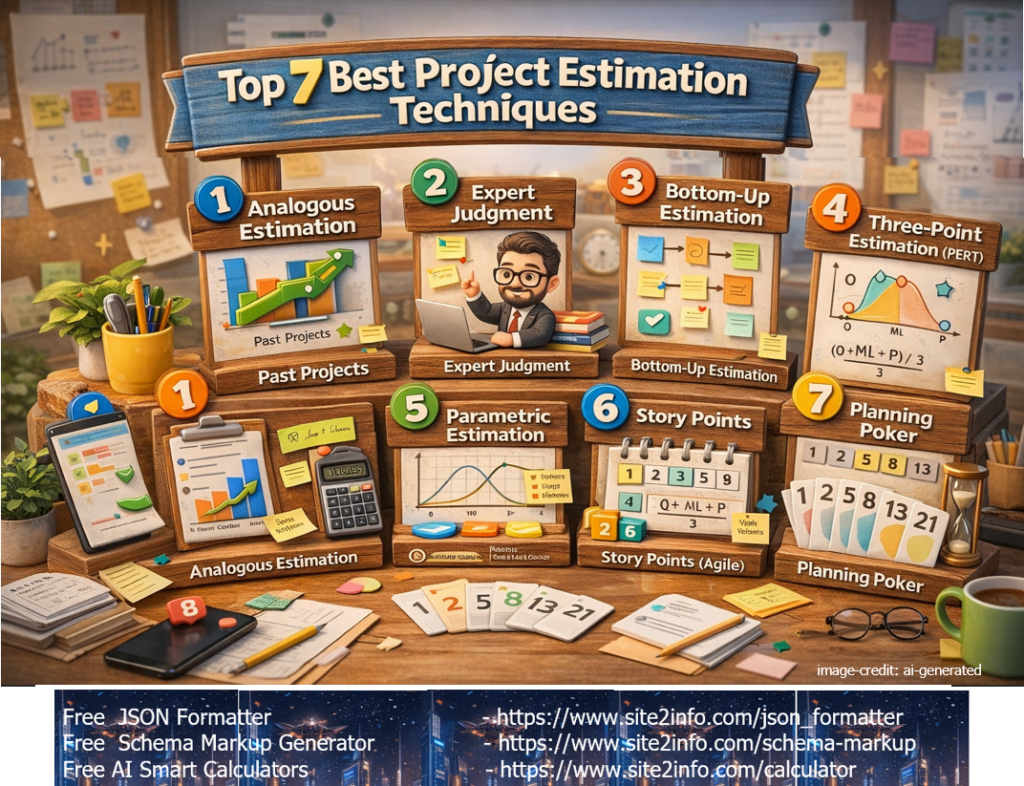
⭐ Top 7 Best Project Estimation Techniques

Detailed list of 7 Best Project Estimation Techniques


1️⃣ Expert Judgment

What it is:
Estimation based on the experience of senior team members or subject-matter experts.

Best for:

  • New or complex projects
  • Early-stage estimation

Pros: Fast, experience-driven
Cons: Can be biased


2️⃣ Analogous Estimation

What it is:
Estimating based on similar past projects.

Best for:

  • Early planning
  • High-level budgeting

Pros: Quick and simple
Cons: Less accurate if projects differ


3️⃣ Parametric Estimation

What it is:
Uses statistical formulas (e.g., cost per feature, hours per module).

Example:
10 pages × 8 hours/page = 80 hours

Best for:

  • Repetitive or standardized work

Pros: Data-driven
Cons: Needs reliable historical data


4️⃣ Bottom-Up Estimation (Most Accurate)

What it is:
Estimate each task individually and sum them.

Best for:

  • Detailed project plans
  • Execution phase

Pros: Highly accurate
Cons: Time-consuming


5️⃣ Three-Point Estimation (PERT)

What it is:
Uses 3 values:

  • Optimistic (O)
  • Most Likely (M)
  • Pessimistic (P)

Formula:
(O + 4M + P) / 6

Best for:

  • Risk-heavy projects

Pros: Accounts for uncertainty
Cons: Slightly complex


6️⃣ Agile Estimation (Story Points / Planning Poker)

What it is:
Estimation using relative sizing instead of hours.

Best for:

  • Agile / Scrum teams

Pros: Team-based, flexible
Cons: Not ideal for fixed-scope contracts


7️⃣ Function Point / Use Case Estimation

What it is:
Estimation based on functional complexity rather than time.

Best for:

  • Large enterprise software
  • Regulated industries

Pros: Technology-independent
Cons: Requires expertise


🏆 Which Estimation Technique Is Best?

There is no single best technique.
Best practice: combine multiple methods.

⭐ Most commonly used combo:

  • Early stage: Analogous + Expert Judgment
  • Planning stage: Bottom-Up + Three-Point
  • Agile projects: Story Points + Velocity

Real-World IT Examples


🔹 1️⃣ Analogous Estimation – Website Development

Scenario:
Client asks: “How long will a 20-page corporate website take?”

Approach:
Last similar website took 6 weeks → estimate 5–7 weeks.

Why it works:

  • Early proposal stage
  • No detailed requirements yet

Used for: Pre-sales, ballpark budgeting
Not used for: Final contracts


🔹 2️⃣ Bottom-Up Estimation – E-Commerce Platform

Scenario:
Building an eCommerce site (Adobe Commerce / Shopify Plus)

Approach:
Break into tasks:

  • UI Design → 40 hrs
  • Backend APIs → 120 hrs
  • Checkout → 60 hrs
  • Payment Gateway → 30 hrs
  • QA → 50 hrs

Total = 300 hrs

Why it works:

  • Highly accurate
  • Clear task ownership

Best for: Fixed-scope projects, delivery planning
Risk: Time-consuming to prepare


🔹 3️⃣ Three-Point Estimation – Payment Gateway Integration

Scenario:
Integration with external payment provider (high uncertainty)

Estimate TypeTime
Optimistic (O)5 days
Most Likely (M)8 days
Pessimistic (P)14 days

PERT Formula:
(5 + 4×8 + 14) ÷ 6 = 8.5 days

Why it works:

  • Accounts for risk & unknowns
  • Better stakeholder confidence

Best for: Integration, migration, legacy systems


🔹 4️⃣ Agile Delivery Estimation – Mobile App Development

Scenario:
Scrum team delivering features in sprints

Approach:

  • User Story A → 5 points
  • User Story B → 8 points
  • User Story C → 3 points

Team Velocity: 20 points / sprint
→ Delivery in 1 sprint

Why it works:

  • Flexible
  • Team-driven
  • Continuous improvement

Best for: Evolving requirements, product development
Not ideal: Fixed-price contracts
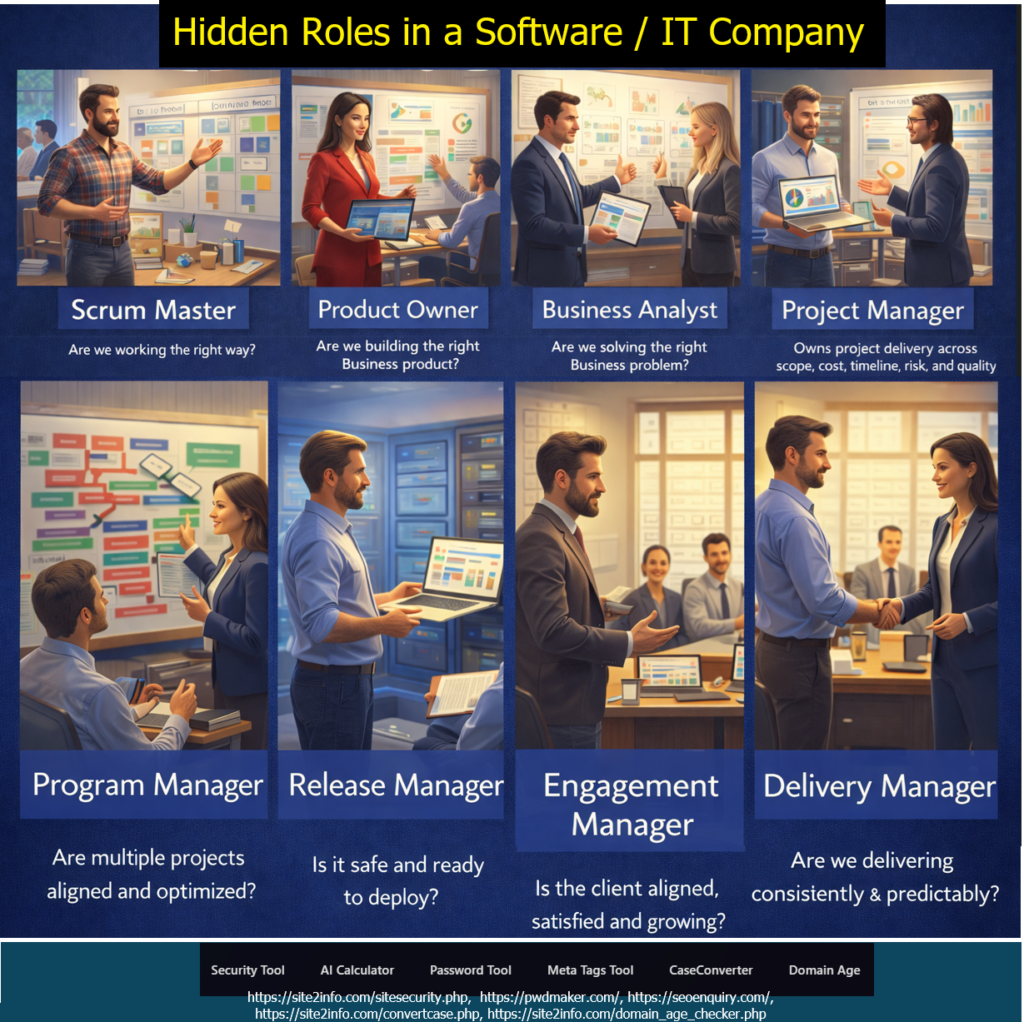
Hidden Roles in a Software / IT Company

The Silent Force Behind Successful Digital Delivery

When people think of a software company, the first roles that come to mind are usually developers, testers, and designers. While these roles are essential, they represent only the visible layer of delivery.

Behind every successful software product is a network of leadership, analysis, governance, and execution roles that ensure clarity, alignment, predictability, and business value.

These are the hidden — yet critical — roles that make modern software delivery work.


Why These Roles Matter More Than Ever

Most software failures don’t happen due to poor coding.
They happen because of:

  • Unclear requirements
  • Misaligned business goals
  • Weak stakeholder communication
  • Poor prioritization
  • Risky or rushed releases
  • Inconsistent delivery

Each of the roles below exists to prevent one or more of these failures.


1️⃣ Business Analyst (BA)

“Are we solving the right business problem?”

The Business Analyst ensures the team builds the right solution, not just a technically correct one.

Key Responsibilities:

  • Understands business goals and pain points
  • Translates business needs into clear requirements
  • Defines functional and non-functional requirements
  • Bridges business stakeholders and technical teams
  • Ensures requirements are testable and measurable

👉 Without a strong BA, teams risk building features that nobody truly needs.


2️⃣ Product Owner (PO)

“Are we building the right product?”

The Product Owner owns product value.

Key Responsibilities:

  • Defines and prioritizes the product backlog
  • Balances business value, user needs, and technical feasibility
  • Accepts or rejects completed work
  • Aligns product roadmap with business strategy
  • Maximizes ROI from the development effort

👉 The Product Owner ensures the team builds what matters most—at the right time.


3️⃣ Scrum Master

“Are we working the right way?”

The Scrum Master protects the process and team effectiveness.

Key Responsibilities:

  • Facilitates Scrum ceremonies
  • Removes impediments blocking the team
  • Coaches the team on Agile and Scrum principles
  • Promotes continuous improvement
  • Shields the team from unnecessary disruptions

👉 A great Scrum Master doesn’t manage people—they enable performance.


4️⃣ Project Manager (PM)

“Are we on track and under control?”

The Project Manager owns execution governance.

Key Responsibilities:

  • Manages scope, timeline, cost, risk, and quality
  • Tracks milestones and dependencies
  • Handles escalation and change management
  • Communicates project status to stakeholders
  • Ensures commitments are met

👉 Project Managers bring discipline, predictability, and control to delivery.


5️⃣ Engagement Manager

“Is the client aligned, satisfied, and growing?”

The Engagement Manager owns the client relationship.

Key Responsibilities:

  • Manages client expectations and trust
  • Acts as the primary escalation point
  • Aligns delivery outcomes with business goals
  • Identifies account growth opportunities
  • Ensures long-term partnership success

👉 Even a successful project can fail without strong engagement management.


6️⃣ Program Manager

“Are multiple projects aligned and optimized?”

Program Managers operate at a strategic level.

Key Responsibilities:

  • Coordinates multiple related projects
  • Manages cross-project dependencies and risks
  • Aligns initiatives with organizational strategy
  • Optimizes resources across teams
  • Provides consolidated executive reporting

👉 Program Managers ensure the big picture doesn’t break while teams focus on details.


7️⃣ Release Manager

“Is it safe and ready to deploy?”

The Release Manager ensures controlled, stable deployments.

Key Responsibilities:

  • Plans release calendars and go-live strategies
  • Coordinates across Dev, QA, Security, and Ops
  • Ensures compliance and rollback readiness
  • Manages release approvals
  • Minimizes production risk

👉 Release Managers protect business continuity and customer trust.


8️⃣ Delivery Manager

“Are we delivering consistently and predictably?”

The Delivery Manager owns delivery excellence.

Key Responsibilities:

  • Owns end-to-end delivery outcomes
  • Tracks delivery metrics and predictability
  • Manages team capacity and performance
  • Removes delivery bottlenecks
  • Ensures repeatable, scalable delivery

👉 Delivery Managers turn plans into results—again and again.


How These Roles Work Together

These roles are not redundant—they are complementary:

  • Business Analyst defines the right problem
  • Product Owner defines the right product
  • Scrum Master ensures the right way of working
  • Project Manager ensures control and predictability
  • Engagement Manager ensures client success
  • Program Manager ensures strategic alignment
  • Release Manager ensures safe deployment
  • Delivery Manager ensures consistent execution

Together, they create a high-maturity delivery organization.

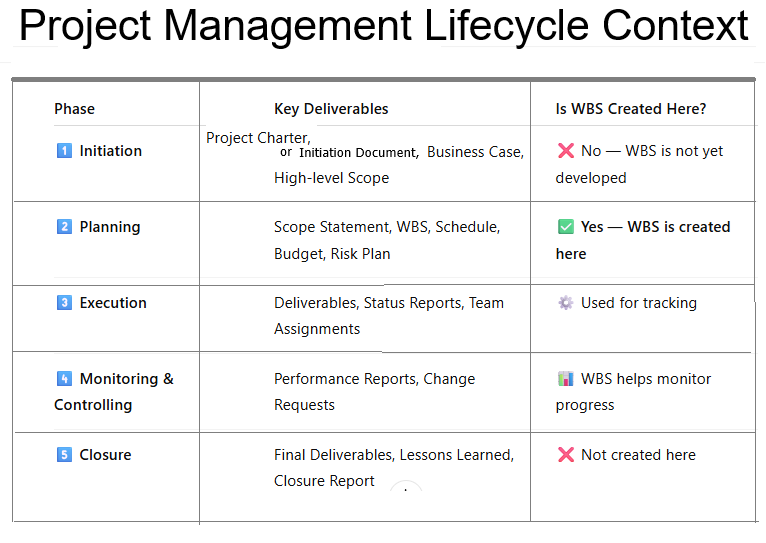
Define Project Management Life Cycle

These are the 5 Project Management Process Groups defined by PMI (Project Management Institute) in the PMBOK (Project Management Body of Knowledge).

These are NOT SDLC phases — they are Project Management Phases used in any type of project, including IT, software, construction, and business operations.


1️⃣ Initiation Phase

Purpose: Start the project formally
Activities include:

  • Define project goals
  • Create Project Charter
  • Identify stakeholders
  • High-level scope & feasibility

2️⃣ Planning Phase

Purpose: Plan how the project will be executed
Activities include:

  • Detailed project plan
  • Scope planning
  • Schedule & timeline
  • Budget planning
  • Risk management plan
  • Resource planning
  • Communication plan

3️⃣ Execution Phase

Purpose: Do the actual work
Activities include:

  • Team execution
  • Development, design, testing
  • Managing stakeholders
  • Quality management
  • Task assignments
  • Delivering project outputs

4️⃣ Monitoring & Controlling Phase

Purpose: Track progress and control deviations
Activities include:

  • Monitor KPIs
  • Control scope changes
  • Track timeline and budget
  • Ensure quality standards
  • Issue/risk management
  • Status reporting

5️⃣ Closure Phase

Purpose: Formally end the project
Activities include:

  • Final deliverables
  • Approvals and sign-off
  • Documentation
  • Lessons learned
  • Release resources
  • Project completion report

Explain all SDLC Methodologies or SDLC Models

SDLC (Software Development Life Cycle) methodologies are structured frameworks used to plan, design, build, test, and maintain software

 It breaks down the complex process into distinct phases, providing a framework that helps manage time, resources, and risks throughout the development of a software product.

Types of SDLC Methodologies or SDLC Models

1️⃣ Waterfall Model

A linear and sequential development model where each phase must be completed before moving to the next.

Key Features:

  • Requirements → Design → Development → Testing → Deployment → Maintenance
  • No going back to previous phases
  • Best for projects with clear, fixed requirements

Used In:

Government, manufacturing, construction, highly controlled environments.


2️⃣ Iterative Model

The product is built step-by-step in small cycles, with feedback after each iteration.

Key Features:

  • Build → Test → Improve → Repeat
  • Each version is better than the previous
  • Reduces risk early
  • Good when complete requirements are not known initially

Used In:

Prototyping, early-stage product development, systems requiring gradual evolution.


3️⃣ Spiral Model

A risk-driven software development model combining Waterfall + Iterative + Risk Management.

Key Features:

  • Each spiral = Planning → Risk Analysis → Engineering → Evaluation
  • Focuses on risk reduction
  • Excellent for large, complex, high-risk projects

Used In:

Defense, aerospace, expensive systems where failure is costly.


4️⃣ V-Model (Verification & Validation Model)

A “V-shaped” model where testing activities happen in parallel with development phases.

Key Features:

  • Each development phase has a corresponding testing phase
  • Very structured and strict
  • Great for systems requiring validation & compliance

Used In:

Healthcare, automotive, safety-critical software, regulated industries.


5️⃣ Big Bang Model

Little to no planning — development starts immediately and evolves as needed.

Key Features:

  • No formal process
  • Suitable only for small, experimental, or short projects
  • Very high risk and unpredictable

Used In:

POCs, experiments, small teams building quick concepts.


6️⃣ Agile Model

An adaptive, flexible, iterative model where development happens in small increments (Sprints).

Key Features:

  • Continuous improvement
  • Responding to change over following a strict plan
  • Customer involvement at every step
  • Works in Sprints (Scrum) or flows (Kanban)

Used In:

Modern software development, ecommerce, SaaS, mobile apps, startups.

📌 Are these the only SDLC models?

No — but they are the most standard and widely used models.

Other recognized SDLC approaches include:

  • Incremental Model
  • Prototype Model
  • RAD (Rapid Application Development) Model
  • DevOps Model
  • Hybrid Model (Agile + Waterfall)
  • Scrum Framework (under Agile)
  • Kanban (under Agile)

But the core SDLC models (commonly taught and used) are exactly the ones you included.

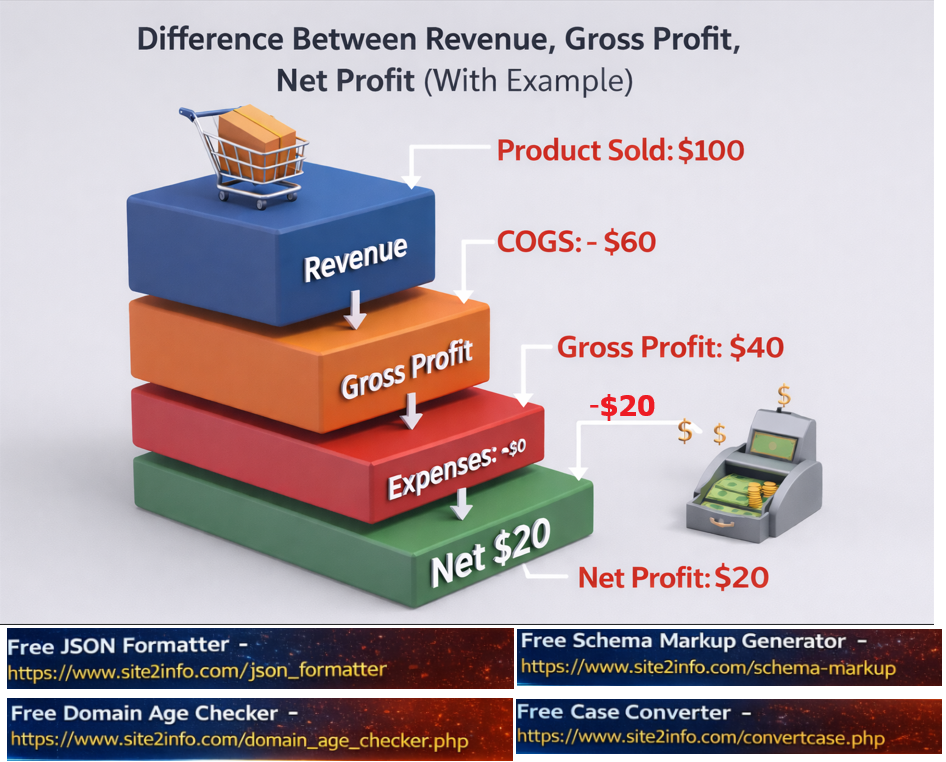
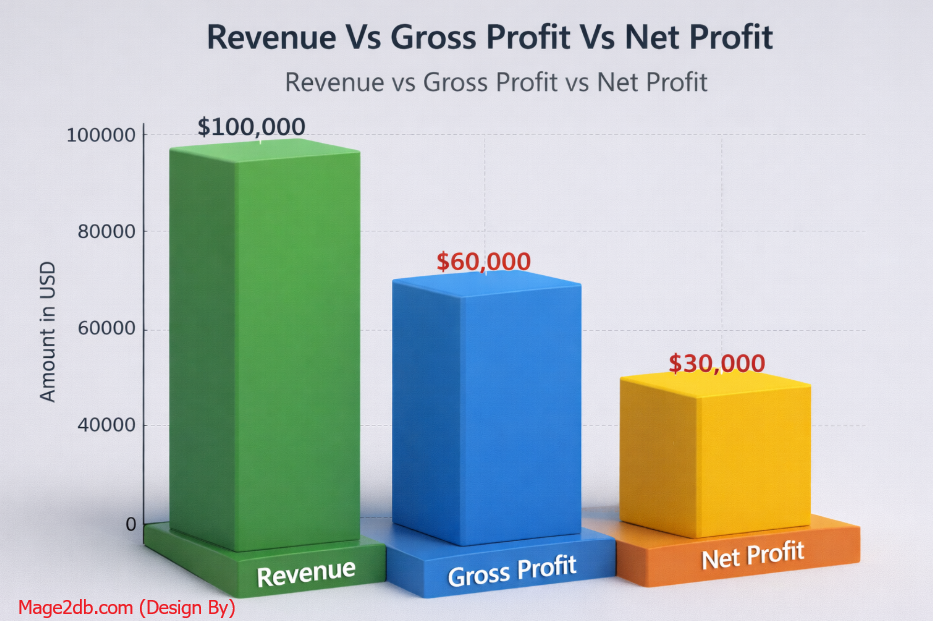
Difference Between Revenue , Gross Profit, Net Profit with Example

Step [1] – Revenue (also called Sales or Top Line):

This is the total amount of money a business earns from selling goods or services before any expenses are deducted.

Revenue – all the money that came in.”

Step [2] – Gross Profit:

This is what’s left from Revenue after subtracting the Cost of Goods Sold (COGS). COGS includes direct costs like materials and labor used to produce the product.

Gross Profit – money left after making the product, but before paying bills.”

Formula:

Gross Profit = Revenue – Cost of Goods Sold

Step [3] –Net Profit: Net Profit (also called Bottom Line or Net Income

Net Profitwhat you actually keep in the end.”)

Formula:

Net Profit = Gross Profit – Operating Expenses – Taxes – Interest

Example: Here Mage2DB Company Data

Revenue=$100000
Cost of Goods Sold=$40000
Operating Expenses (rent, salaries, marketing, etc.) =$20000
Taxes & Interest=$10000

As per above company Mage2db company data

Revenue: $100,000

Gross Profit (Revenue – COGS): = $100000-$40000=$60,000

Net Profit (Gross Profit – Operating Expenses – Taxes & Interest):

$60000-$20000-$10000=$30,000

Top 10 Estimation Techniques in Project Management

In project management, estimation is a critical process for predicting the time, cost, resources, and effort required to complete a project. Different estimation techniques are used depending on the project’s complexity, available data, and the stage of the project lifecycle. Below are the key estimation techniques used in project management:


1. Analogous Estimation (Top-Down Estimation)

  • Description: Uses historical data from similar past projects to estimate the current project.
  • When to Use: Early in the project when detailed information is limited.
  • Advantages:
    • Quick and easy to perform.
    • Requires minimal details.
  • Disadvantages:
    • Less accurate, as it relies on assumptions.
    • Not suitable for unique or complex projects.

2. Parametric Estimation

  • Description: Uses statistical relationships between historical data and project variables (e.g., cost per square foot, time per unit).
  • When to Use: When historical data is available and the project is well-defined.
  • Advantages:
    • More accurate than analogous estimation.
    • Scalable for large projects.
  • Disadvantages:
    • Requires reliable data and a clear understanding of variables.
    • May not account for unique project factors.

3. Bottom-Up Estimation

  • Description: Breaks the project into smaller tasks, estimates each task individually, and then aggregates the estimates.
  • When to Use: When detailed project information is available.
  • Advantages:
    • Highly accurate.
    • Provides a detailed understanding of the project.
  • Disadvantages:
    • Time-consuming.
    • Requires significant effort and expertise.

4. Three-Point Estimation

  • Description: Uses three estimates for each task:
    • Optimistic (O): Best-case scenario.
    • Pessimistic (P): Worst-case scenario.
    • Most Likely (M): Realistic scenario.
  • Formulas:
    • Triangular Distribution: Estimate=O+M+P3Estimate=3O+M+P
    • Beta Distribution (PERT): Estimate=O+4M+P6Estimate=6O+4M+P
  • When to Use: When there is uncertainty in task durations or costs.
  • Advantages:
    • Accounts for risks and uncertainties.
    • Provides a range of possible outcomes.
  • Disadvantages:
    • Requires more effort to calculate.
    • Relies on subjective judgment.

5. Expert Judgment

  • Description: Relies on the experience and intuition of experts to estimate project parameters.
  • When to Use: When historical data is unavailable or the project is unique.
  • Advantages:
    • Quick and flexible.
    • Useful for complex or innovative projects.
  • Disadvantages:
    • Subjective and prone to bias.
    • Accuracy depends on the expert’s experience.

6. Delphi Technique

  • Description: A structured method where experts provide estimates anonymously, and the results are aggregated and refined through multiple rounds of feedback.
  • When to Use: When consensus is needed among experts.
  • Advantages:
    • Reduces bias and groupthink.
    • Provides reliable estimates.
  • Disadvantages:
    • Time-consuming.
    • Requires coordination and facilitation.

7. Reserve Analysis

  • Description: Adds contingency reserves (time or cost) to the project estimate to account for uncertainties and risks.
  • When to Use: When the project has high uncertainty or risk.
  • Advantages:
    • Improves project resilience.
    • Accounts for unforeseen events.
  • Disadvantages:
    • Can lead to overestimation if not managed properly.

8. Comparative Estimation

  • Description: Compares the current project with similar past projects to estimate effort, cost, or duration.
  • When to Use: When historical data from comparable projects is available.
  • Advantages:
    • Simple and quick.
    • Useful for repetitive projects.
  • Disadvantages:
    • Less accurate for unique projects.
    • Relies on the availability of comparable data.

9. Function Point Analysis (FPA)

  • Description: Estimates the size and complexity of software projects based on the number of functions or features.
  • When to Use: For software development projects.
  • Advantages:
    • Standardized and objective.
    • Useful for measuring productivity.
  • Disadvantages:
    • Requires expertise in FPA.
    • Not suitable for non-software projects.

10. Monte Carlo Simulation

  • Description: Uses probability distributions and random sampling to simulate thousands of possible project outcomes.
  • When to Use: For complex projects with high uncertainty.
  • Advantages:
    • Provides a range of possible outcomes and probabilities.
    • Accounts for risks and uncertainties.
  • Disadvantages:
    • Requires specialized software and expertise.
    • Time-consuming to set up and run.

Choosing the Right Estimation Technique

  • Early Project Stages: Use analogous estimation or expert judgment when details are limited.
  • Detailed Planning: Use bottom-up estimation or parametric estimation when more information is available.
  • High Uncertainty: Use three-point estimationMonte Carlo simulation, or reserve analysis.
  • Software Projects: Use function point analysis or story points (in Agile).

By selecting the appropriate estimation technique(s), project managers can improve the accuracy of their estimates and set realistic expectations for stakeholders.

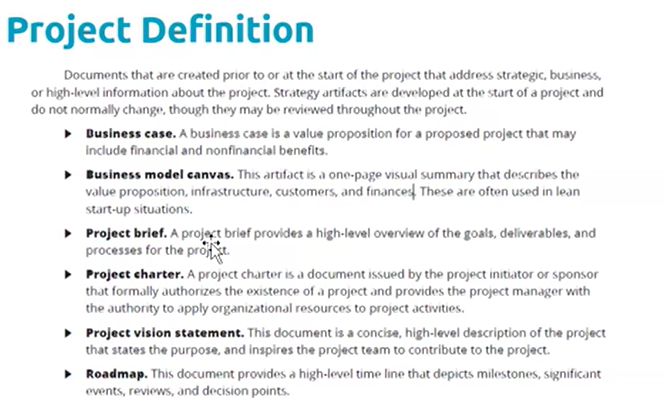
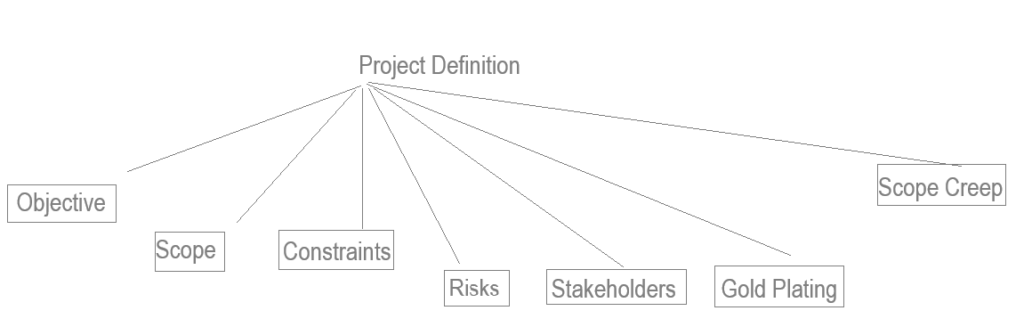
Project Definition Objective, Scope, Constraints, Risks, Stakeholders, Gold Plating, Scope Creep

Project definition refers to the process of clearly outlining the purpose, objectives, deliverables, and boundaries of a project. It serves as the foundation for planning, execution, and monitoring. A well-defined project includes the following elements:

  1. Objectives: Clear, measurable goals that the project aims to achieve.
  2. Scope: The specific tasks, activities, and deliverables that the project will include.
  3. Constraints: Limits on time, budget, and resources.
  4. Stakeholders: Identification of those impacted by or involved in the project.
  5. Risks: Potential challenges or issues that might arise.
  6. Success Criteria: Benchmarks to measure project success.
  7. Requirements: are gathered from all stakeholders ,

• Requirements gathering can take a long time
• While project is completed, only the work in PM plan should be done

Project Management Terms (Gold Plating, Scope Creep) of Project Definition

Gold Plating in Project Definition

Gold plating refers to delivering more than what is required or adding extra features or functionality that were not initially part of the project’s agreed-upon scope. It is done without formal approval and often stems from an overzealous desire to exceed expectations.

Examples of Gold Plating:

  • Adding extra software features to a product beyond what the client requested.
  • Delivering additional marketing materials that were not in the original plan.

Risks of Gold Plating:

  1. Increases project costs and time.
  2. May lead to dissatisfaction if the additional features create complications or deviate from the client’s needs.
  3. Diverts resources from critical tasks.

How to Avoid Gold Plating:

  • Stick to the defined project scope.
  • Obtain formal approval for any scope changes.
  • Regularly communicate with stakeholders about deliverables.

Scope Creep in Project Definition

Scope creep refers to uncontrolled or unauthorized changes and continuous expansion of a project’s scope without adjustments to time, cost, or resources. Unlike gold plating, scope creep often arises from external factors, such as changing client demands or poorly defined project boundaries.

Examples of Scope Creep:

  • Adding additional deliverables because the client requests them midway through the project without formally adjusting the project scope.
  • Extending deadlines to accommodate newly introduced tasks.

Risks of Scope Creep:

  1. Delays project completion.
  2. Leads to budget overruns.
  3. Causes team burnout due to unforeseen workload.
  4. Risks project failure due to loss of focus.

How to Prevent Scope Creep:

  1. Clearly Define the Scope: Develop detailed project requirements in the planning phase.
  2. Establish Change Control Processes: Require formal approvals for scope changes.
  3. Communicate Boundaries: Ensure stakeholders understand the agreed-upon scope.
  4. Regularly Monitor Progress: Use project management tools to identify deviations early.

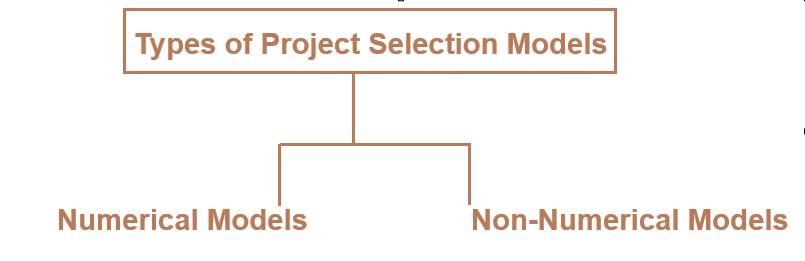
Types of Project Selection Models – Numerical Models & Non-Numerical Models

There are two basic types of project selection models, numeric and non-numeric. Both are widely used. Many organization use both at the same time or they use models that are combinations of the two

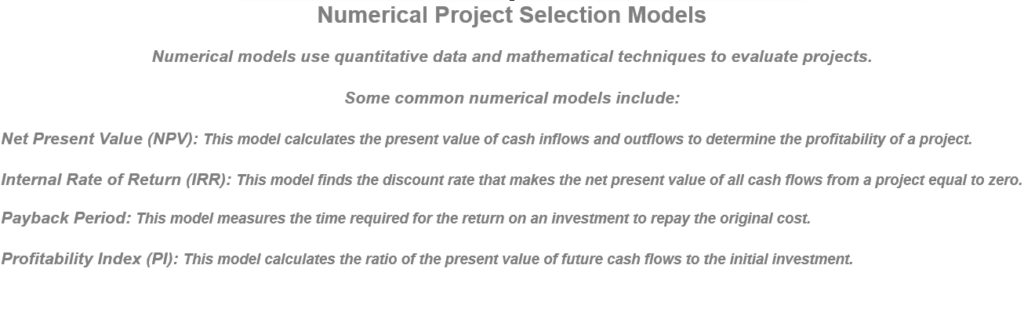
1. Numerical Models

Numerical models are quantitative methods that use numerical data and calculations to evaluate and compare projects.

Characteristics:

  • Relies on measurable data (e.g., costs, revenues, time).
  • Objective and data-driven.
  • Focuses on financial or quantifiable outcomes.

Types of Numerical Models:

  1. Profitability Models:
    • Evaluate financial viability.
    • Examples:
      • Net Present Value (NPV): Measures the present value of cash flows against investment costs.
      • Internal Rate of Return (IRR): Calculates the discount rate where NPV equals zero.
      • Payback Period: Time required to recover the project investment.
      • Benefit-Cost Ratio (BCR): Ratio of benefits to costs; a higher BCR is preferred.
  2. Scoring Models:
    • Assigns weights to criteria based on importance and scores projects accordingly.
    • Example:
      • Weighted Scoring Model: Combines scores across criteria (e.g., risk, ROI, alignment with strategy).

Advantages:

  • Provides clear, comparable metrics.
  • Helps assess financial feasibility and return on investment.

Disadvantages:

  • May overlook non-quantifiable benefits (e.g., reputation, employee satisfaction).

2. Non-Numerical Models

Non-numerical models are qualitative approaches that rely on subjective assessments and strategic considerations.

Characteristics:

  • Focuses on alignment with organizational goals and priorities.
  • Emphasizes qualitative factors like innovation, market trends, or social impact.
  • Less dependent on numerical data.

Types of Non-Numerical Models:

  1. Checklist Model:
    • Projects are evaluated using a checklist of criteria (e.g., “Does it align with organizational goals?”).
    • Simple “yes” or “no” answers determine project viability.
  2. Strategic Alignment Model:
    • Assesses how well a project aligns with the organization’s strategic objectives.
  3. Profile Model:
    • Compares projects based on risk and return profiles.
    • Helps visualize trade-offs between risk and potential benefits.
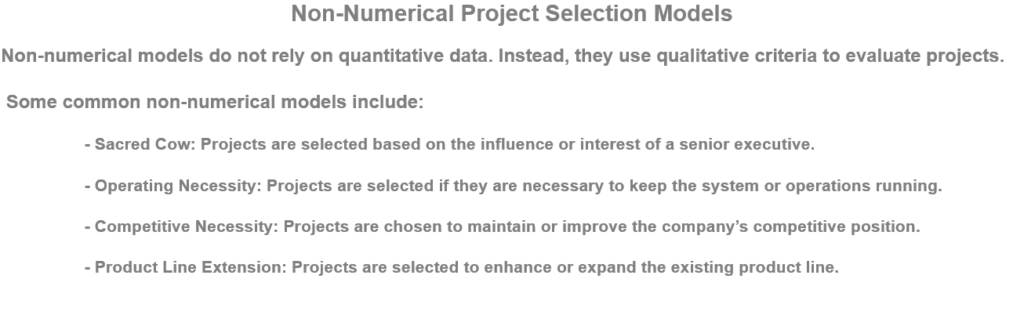
  4. Sacred Cow Model:
    • Projects are selected based on leadership preferences or strategic directives, regardless of other factors.

Advantages:

  • Captures non-financial and strategic benefits.
  • Useful for innovative or exploratory projects.

Disadvantages:

  • Subjective and prone to bias.
  • Lacks consistency across evaluations

Explain Functional, Projectized & Matrix Organization

There are following three type organization in Industry

[1] – Functional Organization It is Power of Functional Manager

Features of Functional Organization

  • Employees are grouped based on their functional areas of expertise, such as marketing, finance, IT, or human resources.
  • Each function operates independently, with a clear hierarchy and reporting structure.
  • Departments work on their specific tasks and are managed by functional managers.
  • The project manager’s role is limited or nonexistent; functional managers have full control.

Functional Organization: Suitable for organizations with routine operations and minimal project demands.

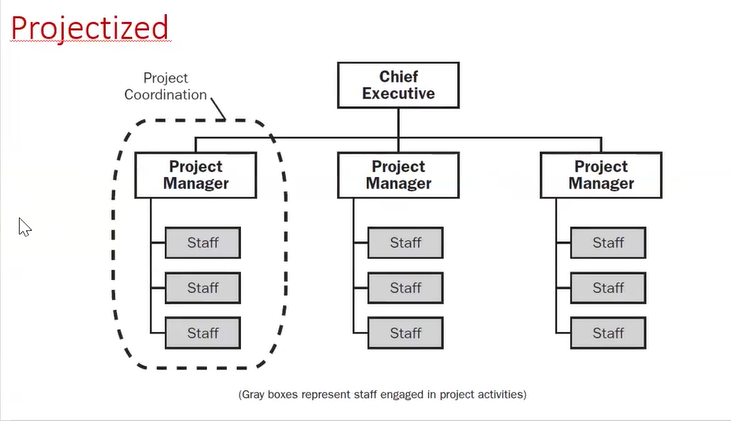
[2] – Projectized Organization:: It is Power of Project Manager

Features of Projectized Organization

  • The organization is structured around projects rather than functional departments.
  • Teams are formed specifically for projects, and team members report directly to the project manager.
  • The project manager has full authority over the team and resources.
  • Teams are disbanded after project completion & The organization focuses on delivering projects.

Projectized Organization: Ideal for project-focused industries like construction or event management.

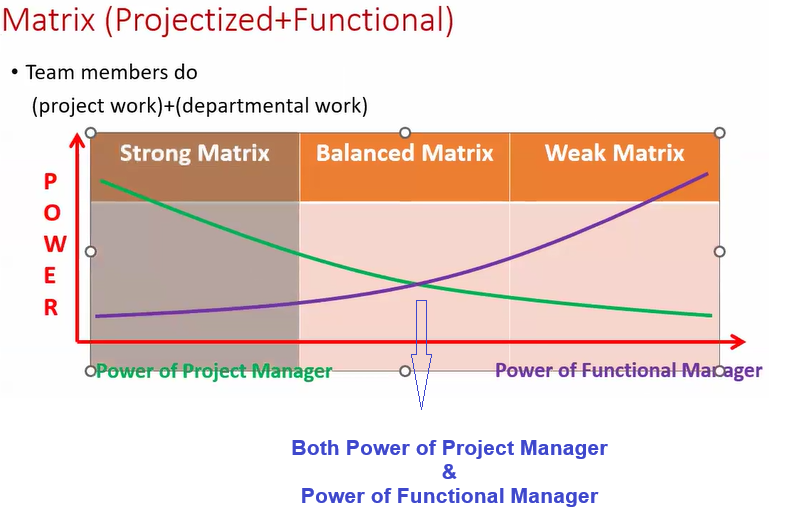
[3] – Matrix Organization:: combination of both Functional & Projectized organization

Features of Matrix Organization

  • Combines elements of both functional and projectized structures.
  • Employees report to both functional and project managers, sharing responsibilities between their department and projects.

Matrix Organization is most popular Organization.

Matrix Organization: Best for organizations balancing both ongoing operations and multiple simultaneous project

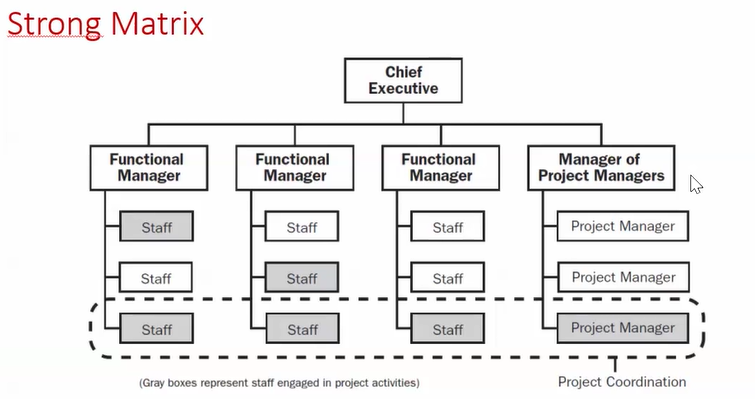
[a] – Strong Matrix

The project manager has more authority, similar to a projectized organization.

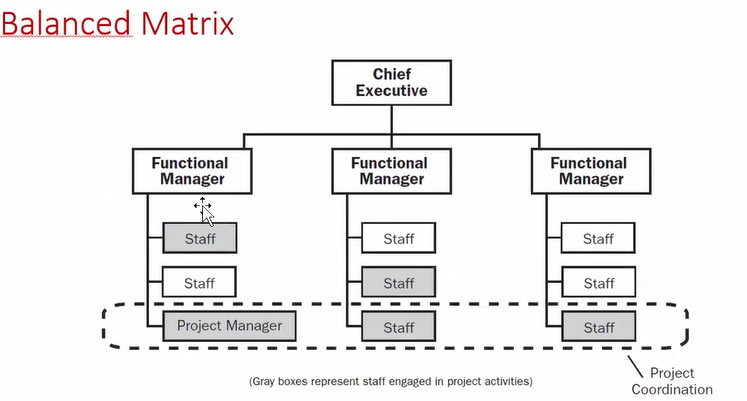
[b] – Balanced Matrix

  • Equal authority between functional and project managers.
  • Both collaborate to make decisions.

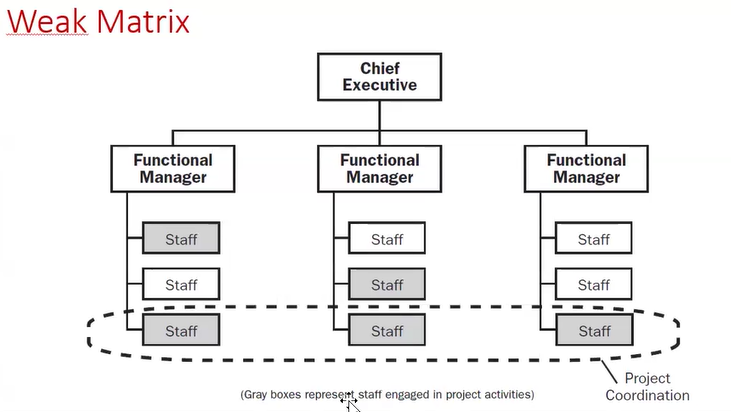
[c] – Weak Matrix

  • Functional managers retain primary control.
  • The project manager has a coordination role with limited authority.

Relationship Between Both Project Manager & Functional Manager & Matrix

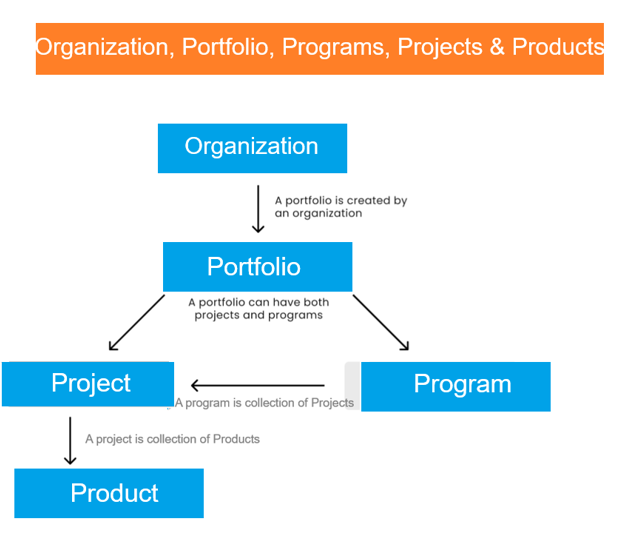
Relationship Among Organization, Portfolio, Programs, Projects & Products

Organization: The highest level of the hierarchy. Defines strategic goals, vision, and mission.

“Allocates resources to portfolios, programs, and projects to achieve business objectives”

Portfolio: Portfolio is collection of Programs & Projects

Portfolio is A collection of programs, projects, and operations grouped together to align with organizational strategy.

Program: Program is collection of Projects.

Program is a group of related projects managed in a coordinated way to achieve benefits not achievable individually.

Project: Project is collection of Products.

A project is a temporary endeavor undertaken to create a unique product, service, or result. It is defined by specific goals, a start and end date, and constraints such as time, cost, and resources.

Products are often managed over their lifecycle to provide ongoing value to the organization.

Product: Product is The final deliverable or result of one or more projects, it’s both services or goods.

Products are often managed over their lifecycle to provide ongoing value to the organization.

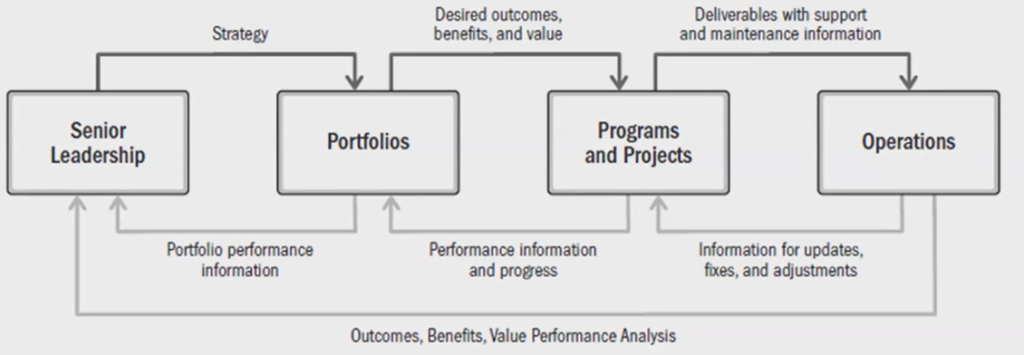
Organization Business Flow