
Explain all SDLC Methodologies or SDLC Models

SDLC (Software Development Life Cycle) methodologies are structured frameworks used to plan, design, build, test, and maintain software

 It breaks down the complex process into distinct phases, providing a framework that helps manage time, resources, and risks throughout the development of a software product.

Types of SDLC Methodologies or SDLC Models

1️⃣ Waterfall Model

A linear and sequential development model where each phase must be completed before moving to the next.

Key Features:

  • Requirements → Design → Development → Testing → Deployment → Maintenance
  • No going back to previous phases
  • Best for projects with clear, fixed requirements

Used In:

Government, manufacturing, construction, highly controlled environments.


2️⃣ Iterative Model

The product is built step-by-step in small cycles, with feedback after each iteration.

Key Features:

  • Build → Test → Improve → Repeat
  • Each version is better than the previous
  • Reduces risk early
  • Good when complete requirements are not known initially

Used In:

Prototyping, early-stage product development, systems requiring gradual evolution.


3️⃣ Spiral Model

A risk-driven software development model combining Waterfall + Iterative + Risk Management.

Key Features:

  • Each spiral = Planning → Risk Analysis → Engineering → Evaluation
  • Focuses on risk reduction
  • Excellent for large, complex, high-risk projects

Used In:

Defense, aerospace, expensive systems where failure is costly.


4️⃣ V-Model (Verification & Validation Model)

A “V-shaped” model where testing activities happen in parallel with development phases.

Key Features:

  • Each development phase has a corresponding testing phase
  • Very structured and strict
  • Great for systems requiring validation & compliance

Used In:

Healthcare, automotive, safety-critical software, regulated industries.


5️⃣ Big Bang Model

Little to no planning — development starts immediately and evolves as needed.

Key Features:

  • No formal process
  • Suitable only for small, experimental, or short projects
  • Very high risk and unpredictable

Used In:

POCs, experiments, small teams building quick concepts.


6️⃣ Agile Model

An adaptive, flexible, iterative model where development happens in small increments (Sprints).

Key Features:

  • Continuous improvement
  • Responding to change over following a strict plan
  • Customer involvement at every step
  • Works in Sprints (Scrum) or flows (Kanban)

Used In:

Modern software development, ecommerce, SaaS, mobile apps, startups.

📌 Are these the only SDLC models?

No — but they are the most standard and widely used models.

Other recognized SDLC approaches include:

  • Incremental Model
  • Prototype Model
  • RAD (Rapid Application Development) Model
  • DevOps Model
  • Hybrid Model (Agile + Waterfall)
  • Scrum Framework (under Agile)
  • Kanban (under Agile)

But the core SDLC models (commonly taught and used) are exactly the ones you included.
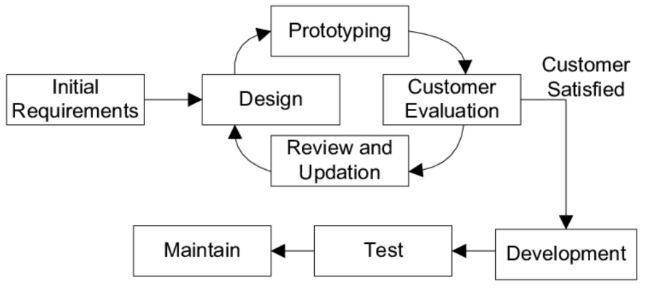
Prototype Model Features, Pros, Cons in Software Engineering, when should use

The Prototype Model is a project management and software development approach that involves creating early working versions of a product—called prototypes—to explore ideas, gather feedback, and refine the final product. It is especially useful in projects where requirements are not fully understood or are likely to evolve.

Key Features of the Prototype Model

  1. Early Visualization: Prototypes provide a tangible representation of the product early in the development process, helping stakeholders visualize the end result.
  2. Iterative Development: The model involves multiple iterations of designing, developing, and refining the prototype based on feedback.
  3. Customer Involvement: Stakeholders and end-users are actively involved in reviewing the prototype and providing feedback.
  4. Flexibility: Changes can be made easily in response to user feedback before the final product is built.

Phases of the Prototype Model

  1. Requirement Gathering and Analysis:
    • Initial requirements are collected from stakeholders.
    • Requirements are not expected to be fully detailed or complete at this stage.
  2. Quick Design:
    • A basic design or mockup is created focusing on the key aspects of the product.
    • This is not a detailed design but rather a framework for the prototype.
  3. Prototype Development:
    • A working version of the product (prototype) is developed.
    • It may include limited functionality and features.
  4. User Evaluation:
    • Stakeholders and end-users review the prototype.
    • Feedback is collected to understand what changes or improvements are needed.
  5. Refinement:
    • The prototype is modified based on the feedback.
    • This cycle of evaluation and refinement continues until stakeholders approve the design.
  6. Final Product Development:
    • Once the prototype meets all expectations, the final product is developed with the full functionality and features.

Pros of the Prototype Model

  1. Improved Communication: Helps stakeholders and developers clarify requirements through visual representation.
  2. Reduced Risk: Early feedback minimizes the risk of developing a product that does not meet user expectations.
  3. Enhanced User Satisfaction: Involvement of end-users ensures that the final product aligns with their needs.
  4. Flexibility in Design: Changes are easier and less costly to implement during the prototyping stage.

Cons of the Prototype Model

  1. Scope Creep: Users may keep requesting changes, leading to an expanding project scope.
  2. Time-Consuming: Iterative refinements can prolong the development timeline.
  3. Incomplete Analysis: Over-reliance on the prototype might lead to neglecting comprehensive requirement analysis.
  4. High Cost for Complex Prototypes: Developing detailed prototypes can be expensive.

When to Use the Prototype Model

  1. Unclear Requirements: Ideal for projects where requirements are not well-defined or are expected to change.
  2. User-Centric Products: Useful for projects requiring significant user interaction, such as user interfaces and mobile apps.
  3. High-Risk Projects: Suitable for projects where early validation of concepts can reduce risks.