Define Project Management Life Cycle

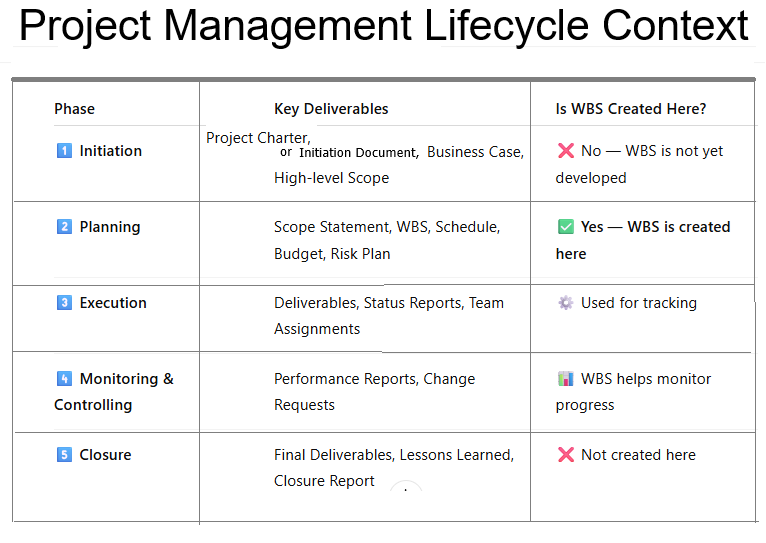
These are the 5 Project Management Process Groups defined by PMI (Project Management Institute) in the PMBOK (Project Management Body of Knowledge).

These are NOT SDLC phases — they are Project Management Phases used in any type of project, including IT, software, construction, and business operations.


1️⃣ Initiation Phase

Purpose: Start the project formally
Activities include:

  • Define project goals
  • Create Project Charter
  • Identify stakeholders
  • High-level scope & feasibility

2️⃣ Planning Phase

Purpose: Plan how the project will be executed
Activities include:

  • Detailed project plan
  • Scope planning
  • Schedule & timeline
  • Budget planning
  • Risk management plan
  • Resource planning
  • Communication plan

3️⃣ Execution Phase

Purpose: Do the actual work
Activities include:

  • Team execution
  • Development, design, testing
  • Managing stakeholders
  • Quality management
  • Task assignments
  • Delivering project outputs

4️⃣ Monitoring & Controlling Phase

Purpose: Track progress and control deviations
Activities include:

  • Monitor KPIs
  • Control scope changes
  • Track timeline and budget
  • Ensure quality standards
  • Issue/risk management
  • Status reporting

5️⃣ Closure Phase

Purpose: Formally end the project
Activities include:

  • Final deliverables
  • Approvals and sign-off
  • Documentation
  • Lessons learned
  • Release resources
  • Project completion report

Explain all SDLC Methodologies or SDLC Models

SDLC (Software Development Life Cycle) methodologies are structured frameworks used to plan, design, build, test, and maintain software

 It breaks down the complex process into distinct phases, providing a framework that helps manage time, resources, and risks throughout the development of a software product.

Types of SDLC Methodologies or SDLC Models

1️⃣ Waterfall Model

A linear and sequential development model where each phase must be completed before moving to the next.

Key Features:

  • Requirements → Design → Development → Testing → Deployment → Maintenance
  • No going back to previous phases
  • Best for projects with clear, fixed requirements

Used In:

Government, manufacturing, construction, highly controlled environments.


2️⃣ Iterative Model

The product is built step-by-step in small cycles, with feedback after each iteration.

Key Features:

  • Build → Test → Improve → Repeat
  • Each version is better than the previous
  • Reduces risk early
  • Good when complete requirements are not known initially

Used In:

Prototyping, early-stage product development, systems requiring gradual evolution.


3️⃣ Spiral Model

A risk-driven software development model combining Waterfall + Iterative + Risk Management.

Key Features:

  • Each spiral = Planning → Risk Analysis → Engineering → Evaluation
  • Focuses on risk reduction
  • Excellent for large, complex, high-risk projects

Used In:

Defense, aerospace, expensive systems where failure is costly.


4️⃣ V-Model (Verification & Validation Model)

A “V-shaped” model where testing activities happen in parallel with development phases.

Key Features:

  • Each development phase has a corresponding testing phase
  • Very structured and strict
  • Great for systems requiring validation & compliance

Used In:

Healthcare, automotive, safety-critical software, regulated industries.


5️⃣ Big Bang Model

Little to no planning — development starts immediately and evolves as needed.

Key Features:

  • No formal process
  • Suitable only for small, experimental, or short projects
  • Very high risk and unpredictable

Used In:

POCs, experiments, small teams building quick concepts.


6️⃣ Agile Model

An adaptive, flexible, iterative model where development happens in small increments (Sprints).

Key Features:

  • Continuous improvement
  • Responding to change over following a strict plan
  • Customer involvement at every step
  • Works in Sprints (Scrum) or flows (Kanban)

Used In:

Modern software development, ecommerce, SaaS, mobile apps, startups.

📌 Are these the only SDLC models?

No — but they are the most standard and widely used models.

Other recognized SDLC approaches include:

  • Incremental Model
  • Prototype Model
  • RAD (Rapid Application Development) Model
  • DevOps Model
  • Hybrid Model (Agile + Waterfall)
  • Scrum Framework (under Agile)
  • Kanban (under Agile)

But the core SDLC models (commonly taught and used) are exactly the ones you included.

What is Project Scheduling & Explain Briefly

Project scheduling is a critical aspect of project management that involves planning, organizing, and managing tasks and resources to ensure the project is completed on time. Below is a step-by-step explanation of how to create and manage a project schedule:


Step 1: Define Project Scope and Objectives

  • Understand the project goals: Clearly define what the project aims to achieve.
  • Identify deliverables: List all the outputs or outcomes the project will produce.
  • Set boundaries: Determine what is included and excluded from the project scope.

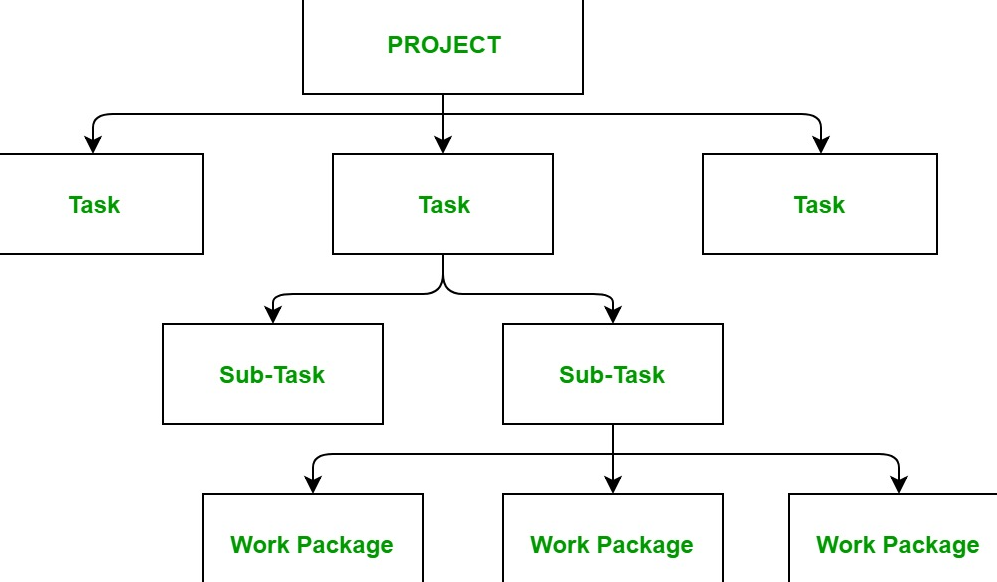
Step 2: Break Down the Work (Work Breakdown Structure – WBS)

  • Decompose the project: Divide the project into smaller, manageable tasks or work packages.
  • Hierarchical structure: Organize tasks into levels (e.g., phases, deliverables, sub-tasks).
  • Ensure completeness: Make sure all tasks are accounted for to avoid missing critical work.

Step 3: Define Task Dependencies

  • Identify relationships: Determine the order in which tasks must be completed.
  • Types of dependencies:
    • Finish-to-Start (FS): Task B cannot start until Task A is finished.
    • Start-to-Start (SS): Task B cannot start until Task A starts.
    • Finish-to-Finish (FF): Task B cannot finish until Task A finishes.
    • Start-to-Finish (SF): Task B cannot finish until Task A starts (rare).
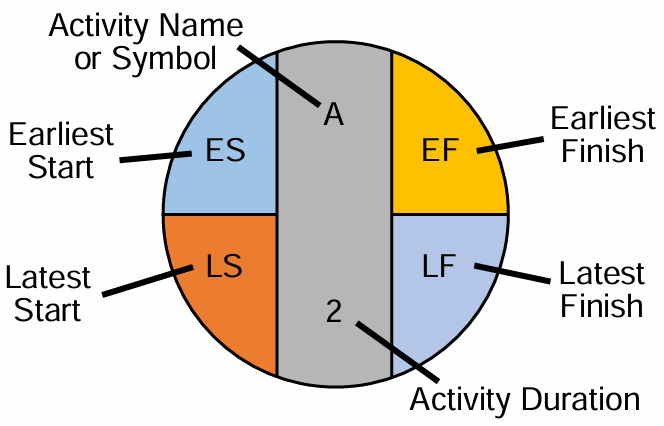
  • Use a network diagram: Visualize task dependencies to understand the flow of work.

Step 4: Estimate Task Durations

  • Gather input: Consult team members or experts to estimate how long each task will take.
  • Consider resources: Account for the availability of resources (e.g., people, equipment).
  • Use estimation techniques:
    • Expert judgment: Rely on experienced team members.
    • Analogous estimating: Use data from similar past projects.
    • Parametric estimating: Use statistical relationships (e.g., cost per unit).
    • Three-point estimating: Calculate optimistic, pessimistic, and most likely durations.

Step 5: Assign Resources

  • Identify resources: Determine the people, equipment, and materials needed for each task.
  • Allocate resources: Assign resources to tasks based on availability and skills.
  • Avoid over-allocation: Ensure resources are not overburdened by too many tasks.

Step 6: Develop the Schedule

  • Choose a scheduling tool: Use tools like Gantt charts, Microsoft Project, or software like Asana, Trello, or Jira.
  • Input tasks, durations, and dependencies: Populate the tool with the information gathered.
  • Set milestones: Identify key points in the project timeline (e.g., project phases, deliverables).
  • Calculate critical path: Identify the longest sequence of dependent tasks that determine the project duration.

Step 7: Review and Optimize the Schedule

  • Check for feasibility: Ensure the schedule is realistic and achievable.
  • Identify bottlenecks: Look for tasks that could delay the project.
  • Optimize resource allocation: Adjust resources to balance workloads.
  • Consider buffers: Add contingency time for high-risk tasks.

Step 8: Baseline the Schedule

  • Finalize the schedule: Once approved, set the schedule as the baseline.
  • Document assumptions: Record any assumptions made during scheduling.
  • Communicate the schedule: Share the baseline schedule with stakeholders and team members.

Step 9: Monitor and Control the Schedule

  • Track progress: Regularly compare actual progress to the baseline schedule.
  • Update the schedule: Adjust the schedule as needed to reflect changes or delays.
  • Manage changes: Use a change control process to handle scope or schedule changes.
  • Communicate updates: Keep stakeholders informed of any changes to the schedule.

Step 10: Close the Project

  • Review the schedule: Analyze how well the schedule was followed and identify lessons learned.
  • Document variances: Record any deviations from the baseline schedule.
  • Archive the schedule: Store the final schedule for future reference.

Key Tools and Techniques for Project Scheduling

  • Gantt Charts: Visual representation of tasks and timelines.
  • Critical Path Method (CPM): Identifies the longest path of dependent tasks.
  • Program Evaluation and Review Technique (PERT): Uses probabilistic time estimates.
  • Kanban Boards: Visual workflow management tool.
  • Resource Leveling: Balances resource allocation to avoid overloading.

Work Breakdown Structure (WBS) in Project Management

Work Breakdown Structure (WBS)

Definition:
A Work Breakdown Structure (WBS) is a hierarchical decomposition of a project into smaller, manageable components. It breaks down the project scope into deliverables and tasks, making it easier to plan, execute, monitor, and control the project. Each level of the WBS provides increasing detail about the work required to achieve the project objectives.


Purpose of the WBS

  1. Scope Clarity: Clearly defines the project scope by outlining all deliverables and tasks.
  2. Manageability: Divides the project into manageable sections, making it easier to assign responsibilities and track progress.
  3. Baseline for Planning: Provides a framework for scheduling, budgeting, resource allocation, and risk management.
  4. Communication Tool: Enhances communication by presenting the project structure visually.

Structure of a WBS

The WBS is typically visualized in a tree-like diagram or outline format with multiple levels:

  1. Level 1: The Project Name or overall deliverable (e.g., “New Office Construction”).
  2. Level 2: Major deliverables or phases of the project (e.g., “Design,” “Construction,” “Move-In”).
  3. Level 3 and Beyond: Breaks down deliverables into smaller, detailed tasks (e.g., “Order Furniture,” “Install Wiring,” etc.).

Key Characteristics of a WBS

  1. Deliverable-Oriented: Focuses on outcomes rather than activities.
  2. 100% Rule: All work required for the project must be included in the WBS, ensuring nothing is missed.
  3. Mutually Exclusive: Each WBS element should be distinct to avoid overlap or redundancy.
  4. Hierarchical: The structure progresses from high-level deliverables to more detailed tasks.

Steps to Create a WBS

  1. Define the Project Scope: Understand the goals, deliverables, and requirements of the project.
  2. Identify Major Deliverables: Break the project into high-level components or phases.
  3. Decompose Deliverables: Divide each deliverable into smaller, more detailed components until manageable tasks are identified.
  4. Assign Unique Codes: Assign identifiers to each WBS element for tracking (e.g., 1.1, 1.2.1).
  5. Validate the WBS: Ensure all project work is accounted for and follows the 100% Rule.

Formats of WBS

  1. Tree Diagram: Visual hierarchical structure.
  2. Outline/Tabular Format: Indented list showing the hierarchy.
  3. Mind Map: Creative and visual representation of deliverables.

Example of a WBS

Project Name: Office Relocation

Level 1: ProjectLevel 2: Major DeliverablesLevel 3: Subtasks
Office Relocation1. Design1.1 Finalize Floor Plan
1.2 Obtain Necessary Approvals
2. Construction2.1 Demolish Existing Partitions
2.2 Install Wiring and Networking
3. Move-In3.1 Pack Existing Office Materials
3.2 Transport and Set Up Equipment

Benefits of WBS

  1. Improved Planning: Provides a clear roadmap for project execution.
  2. Better Resource Allocation: Helps allocate resources effectively by breaking down tasks.
  3. Enhanced Monitoring: Enables tracking of progress and performance against deliverables.
  4. Reduced Risks: Identifies potential risks by detailing all work elements.

WBS vs. Project Schedule

  • WBS focuses on breaking down deliverables into tasks.
  • Project Schedule focuses on the timing and sequencing of tasks.

Conclusion

The Work Breakdown Structure (WBS) is a foundational tool in project management. It ensures clarity, structure, and organization, allowing project teams to manage scope effectively and deliver results on time and within budget.