How To Run Apache, PHP 7.4 & MySQL on CentOS 7 or 8

[1] – Apache Sever :: Apache Start, Restart, Stop & Status check on CentOS 7/8

[1.1] – Apache Start Command on CentOS 7/8::

sudo systemctl start httpd

[1.2] – Apache Restart Command on CentOS 7/8 ::

sudo systemctl restart httpd

[1.3] – Apache Stop Command on CentOS 7/8 ::

sudo systemctl stop httpd

[1.4] – Apache Status Command on CentOS 7/8 ::

sudo systemctl status httpd

[2] – PHP 7.4 :: Start, Restart, Stop & Status Check on CentOS 7/8

[2.1] – PHP 7.4 Start Command on CentOS 7/8::

sudo systemctl start php74-php-fpm.service

[2.2] – PHP 7.4 Restart Command on CentOS 7/8::

sudo systemctl restart php74-php-fpm.service

[2.3] – PHP 7.4 Stop Command on CentOS 7/8::

sudo systemctl stop php74-php-fpm.service

[2.4] – PHP 7.4 Status Command on CentOS 7/8::

sudo systemctl status php74-php-fpm.service

[3] MYSQL 5.7 / 8 :: Start, Restart, Stop & Status Check on CentOS 7/8

[3.1] – MYSQL 5.7 / 8 Start Command on CentOS 7/8::

sudo service mysqld start

[3.2] – MYSQL 5.7 / 8 Restart Command on CentOS 7/8::

sudo service mysqld restart

[3.3] – MYSQL 5.7 / 8 Stop Command on CentOS 7/8::

sudo service mysqld stop

[3.4] – MYSQL 5.7 / 8 Status Command on CentOS 7/8::

sudo service mysqld status

Other important Magento 2.4.x issue as below

Magento 2.3 To Magento 2.4.5 Comptibility For PHP, MYSQL, Composer, Apache etc


Magento 2.4.3-p1 Installation Steps


Magento 2.4.3 Installation Steps


Magento 2.4.3 Features


Magento 2.4.3 – p1 Features


Magento 2.4 Two Factor Authentication


Magento 2.4.1 Features


Magento 2.4 Features


Magento 2.4 Installation


Magento 2.2, Magento 2.3, Magento2.4 Installation Issue on Windows 10, XAMPP


Magento 2 Installation at 51% Error: (Wrong file in Gd2.php:64) Module ‘Magento_Theme’

What is Composer.json Format in Magento 2.3 & After Upgrade in Magento 2.4 Enterprise Edition & Commerce Cloud Edition

Once you upgrade Magento 2.3 Enterprise Edition & Commerce Cloud Edition To Magento 2.4 Enterprise Edition & Commerce Cloud Edition

Format Composer.json [ Magento 2.3 Enterprise Edition & Commerce Cloud Edition ]

{

    "name": "magento/project-enterprise-edition",

    "description": "eCommerce Platform for Growth (Enterprise Edition)",

    "type": "project",

    "version": "2.4.0",

    "license": "OSL-3.0",

    "config": {

        "preferred-install": "dist",

        "sort-packages": true

    },

    "repositories": {

        "repo": {

            "type": "composer",

            "url": "https://repo.magento.com"

        }

    },

    "require": {
        "aheadworks/module-blog": "^2.7",
        "cloudinary/cloudinary-magento2": "1.15.2",
        "cybersource/global-payment-management": "3.3.0",
        "dotmailer/dotmailer-magento2-extension": ">=4.4.0 <4.5.1",
        "laminas/laminas-mime": "^2.7",
        "magento/magento-cloud-metapackage": ">=2.3.5 <2.3.6"
    },

    "suggest": {

        "ext-pcntl": "Need for run processes in parallel mode"

    },

    "conflict": {

        "gene/bluefoot": "*"

    },

    "autoload": {

        "psr-4": {

            "Magento\\Setup\\": "setup/src/Magento/Setup/",

            "Magento\\": "app/code/Magento/",

            "Zend\\Mvc\\Controller\\": "setup/src/Zend/Mvc/Controller/"

        },

        "psr-0": {

            "": [

                "app/code/",

                "generated/code/"

            ]

        },

        "files": [

            "app/etc/NonComposerComponentRegistration.php"

        ],

        "exclude-from-classmap": [

            "**/dev/**",

            "**/update/**",

            "**/Test/**"

        ]

    },

    "autoload-dev": {

        "psr-4": {

            "Magento\\Sniffs\\": "dev/tests/static/framework/Magento/Sniffs/",

            "Magento\\Tools\\": "dev/tools/Magento/Tools/",

            "Magento\\Tools\\Sanity\\": "dev/build/publication/sanity/Magento/Tools/Sanity/",

            "Magento\\TestFramework\\Inspection\\": "dev/tests/static/framework/Magento/TestFramework/Inspection/",

            "Magento\\TestFramework\\Utility\\": "dev/tests/static/framework/Magento/TestFramework/Utility/"

        }

    },

    "minimum-stability": "alpha",

    "prefer-stable": true,

    "extra": {

        "component_paths": {

            "trentrichardson/jquery-timepicker-addon": "lib/web/jquery/jquery-ui-timepicker-addon.js",

            "components/jquery": [

                "lib/web/jquery.js",

                "lib/web/jquery/jquery.min.js",

                "lib/web/jquery/jquery-migrate.js"

            ],

            "blueimp/jquery-file-upload": "lib/web/jquery/fileUploader",

            "components/jqueryui": [

                "lib/web/jquery/jquery-ui.js"

            ],

            "twbs/bootstrap": [

                "lib/web/jquery/jquery.tabs.js"

            ],

            "tinymce/tinymce": "lib/web/tiny_mce_4"

        },

        "magento-force": true,

        "magento-deploystrategy": "copy",
		"composer-exit-on-patch-failure": true,
        "patches": {
            "magento/module-customer": {
               "Unsuscribe email: Customer sent newsletter unsubscribe email when registering for a new account": "m2-hotfixes/newsletter.patch"
            }
        }

    }

}

Format Composer.json [ Magento 2.4 Enterprise Edition & Commerce Cloud Edition ]

Once Upgrade Magento 2.3 Enterprise Edition & Commerce Cloud Edition To Magento 2.4 Enterprise Edition & Commerce Cloud Edition

{

    "name": "magento/project-enterprise-edition",

    "description": "eCommerce Platform for Growth (Enterprise Edition)",

    "type": "project",

    "version": "2.4.0",

    "license": "OSL-3.0",

    "config": {

        "preferred-install": "dist",

        "sort-packages": true

    },

    "repositories": {

        "repo": {

            "type": "composer",

            "url": "https://repo.magento.com"

        }

    },

    "require": {
        "magento/product-enterprise-edition": "2.4.0",
		"aheadworks/module-blog": "^2.7",
        "cybersource/global-payment-management": "3.3.0",
        "dotmailer/dotmailer-magento2-extension": "4.6.0",
        "laminas/laminas-mime": "^2.7",
        "magento/magento-cloud-metapackage": ">=2.4.0 <2.4.3"
    },

    "suggest": {

        "ext-pcntl": "Need for run processes in parallel mode"

    },

    "conflict": {

        "gene/bluefoot": "*"

    },

    "autoload": {

        "psr-4": {

            "Magento\\Setup\\": "setup/src/Magento/Setup/",

            "Magento\\": "app/code/Magento/",

            "Zend\\Mvc\\Controller\\": "setup/src/Zend/Mvc/Controller/"

        },

        "psr-0": {

            "": [

                "app/code/",

                "generated/code/"

            ]

        },

        "files": [

            "app/etc/NonComposerComponentRegistration.php"

        ],

        "exclude-from-classmap": [

            "**/dev/**",

            "**/update/**",

            "**/Test/**"

        ]

    },

    "autoload-dev": {

        "psr-4": {

            "Magento\\Sniffs\\": "dev/tests/static/framework/Magento/Sniffs/",

            "Magento\\Tools\\": "dev/tools/Magento/Tools/",

            "Magento\\Tools\\Sanity\\": "dev/build/publication/sanity/Magento/Tools/Sanity/",

            "Magento\\TestFramework\\Inspection\\": "dev/tests/static/framework/Magento/TestFramework/Inspection/",

            "Magento\\TestFramework\\Utility\\": "dev/tests/static/framework/Magento/TestFramework/Utility/"

        }

    },

    "minimum-stability": "alpha",

    "prefer-stable": true,

    "extra": {

        "component_paths": {

            "trentrichardson/jquery-timepicker-addon": "lib/web/jquery/jquery-ui-timepicker-addon.js",

            "components/jquery": [

                "lib/web/jquery.js",

                "lib/web/jquery/jquery.min.js",

                "lib/web/jquery/jquery-migrate.js"

            ],

            "blueimp/jquery-file-upload": "lib/web/jquery/fileUploader",

            "components/jqueryui": [

                "lib/web/jquery/jquery-ui.js"

            ],

            "twbs/bootstrap": [

                "lib/web/jquery/jquery.tabs.js"

            ],

            "tinymce/tinymce": "lib/web/tiny_mce_4"

        },

        "magento-force": true,

        "magento-deploystrategy": "copy",
		"composer-exit-on-patch-failure": true,
        "patches": {
            "magento/module-customer": {
               "Unsuscribe email: Customer sent newsletter unsubscribe email when registering for a new account": "m2-hotfixes/newsletter.patch"
            }
        }

    }

}

Other important Magento 2.4.x issue as below

Magento 2.3 To Magento 2.4.5 Comptibility For PHP, MYSQL, Composer, Apache etc


Magento 2.4.3-p1 Installation Steps


Magento 2.4.3 Installation Steps


Magento 2.4.3 Features


Magento 2.4.3 – p1 Features


Magento 2.4 Two Factor Authentication


Magento 2.4.1 Features


Magento 2.4 Features


Magento 2.4 Installation


Magento 2.2, Magento 2.3, Magento2.4 Installation Issue on Windows 10, XAMPP


Magento 2 Installation at 51% Error: (Wrong file in Gd2.php:64) Module ‘Magento_Theme’
What is Omnichannel & Using in Magento 2.x

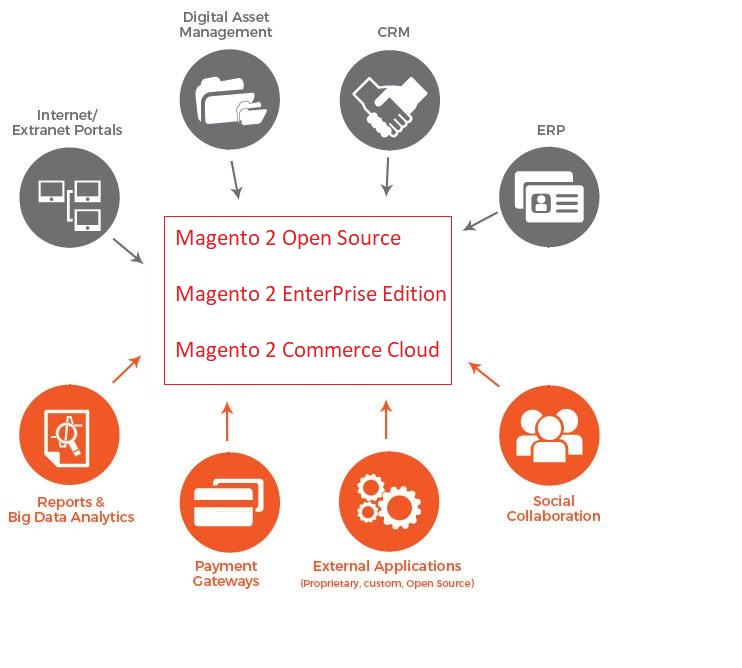
“Omnichannel is the business strategy of using multiple marketing channels and integrating in a way, so that end-user a seamless front-end experience. Customers shop the Products through a wide variety of sales and marketing channels, by using Websites, Mobiles, Native Apps, Physical Retail Shop, Social Media, email, ERP, by Calling

“Omnichannel, Customers cannot dependent any specific marketing channel”

Magento 2 & Omnichannel

What is Composer.json Format in Magento 2.3 & After Upgrade in Magento 2.4 Community Edition

Once you upgrade Magento 2.3 Community Edition To Magento 2.4 Comminity Edition

Format Composer.json [ Magento 2.3 Community Edition ]

{
    "name": "magento/project-community-edition",
    "description": "eCommerce Platform for Growth (Community Edition)",
    "type": "project",
    "license": [
        "OSL-3.0",
        "AFL-3.0"
    ],
    "config": {
        "preferred-install": "dist",
        "sort-packages": true
    },
    "require": {
        "magento/product-community-edition": "2.3.3"
    },
    "require-dev": {
        "allure-framework/allure-phpunit": "~1.2.0",
        "friendsofphp/php-cs-fixer": "~2.14.0",
        "lusitanian/oauth": "~0.8.10",
        "magento/magento-coding-standard": "~3.0.0",
        "magento/magento2-functional-testing-framework": "2.4.5",
        "pdepend/pdepend": "2.5.2",
        "phpmd/phpmd": "@stable",
        "phpunit/phpunit": "~6.5.0",
        "sebastian/phpcpd": "~3.0.0",
        "squizlabs/php_codesniffer": "~3.4.0"
    },
    "conflict": {
        "gene/bluefoot": "*"
    },
    "autoload": {
        "psr-4": {
            "Magento\\Framework\\": "lib/internal/Magento/Framework/",
            "Magento\\Setup\\": "setup/src/Magento/Setup/",
            "Magento\\": "app/code/Magento/",
            "Zend\\Mvc\\Controller\\": "setup/src/Zend/Mvc/Controller/"
        },
        "psr-0": {
            "": [
                "app/code/",
                "generated/code/"
            ]
        },
        "files": [
            "app/etc/NonComposerComponentRegistration.php"
        ],
        "exclude-from-classmap": [
            "**/dev/**",
            "**/update/**",
            "**/Test/**"
        ]
    },
    "autoload-dev": {
        "psr-4": {
            "Magento\\Sniffs\\": "dev/tests/static/framework/Magento/Sniffs/",
            "Magento\\Tools\\": "dev/tools/Magento/Tools/",
            "Magento\\Tools\\Sanity\\": "dev/build/publication/sanity/Magento/Tools/Sanity/",
            "Magento\\TestFramework\\Inspection\\": "dev/tests/static/framework/Magento/TestFramework/Inspection/",
            "Magento\\TestFramework\\Utility\\": "dev/tests/static/framework/Magento/TestFramework/Utility/"
        }
    },
    "version": "2.3.3",
    "minimum-stability": "stable",
    "repositories": [
        {
            "type": "composer",
            "url": "https://repo.magento.com/"
        }
    ],
    "extra": {
        "magento-force": "override"
    }
}

Format Composer.json [ Magento 2.4 Community Edition ], Once Upgrade Magento 2.3 Community Edition To Magento 2.4 Comminity Edition

{
    "name": "magento/project-community-edition",
    "description": "eCommerce Platform for Growth (Community Edition)",
    "type": "project",
    "license": [
        "OSL-3.0",
        "AFL-3.0"
    ],
    "config": {
        "preferred-install": "dist",
        "sort-packages": true
    },
    "require": {
        "magento/composer-root-update-plugin": "~1.0",
        "magento/product-community-edition": "2.4.0"
    },
    "require-dev": {
        "allure-framework/allure-phpunit": "~1.2.0",
        "dealerdirect/phpcodesniffer-composer-installer": "^0.5.0",
        "friendsofphp/php-cs-fixer": "~2.16.0",
        "lusitanian/oauth": "~0.8.10",
        "magento/magento-coding-standard": "*",
        "magento/magento2-functional-testing-framework": "^3.0",
        "pdepend/pdepend": "~2.7.1",
        "phpcompatibility/php-compatibility": "^9.3",
        "phpmd/phpmd": "^2.8.0",
        "phpstan/phpstan": ">=0.12.3 <=0.12.23",
        "phpunit/phpunit": "^9",
        "sebastian/phpcpd": "~5.0.0",
        "squizlabs/php_codesniffer": "~3.5.4"
    },
    "conflict": {
        "gene/bluefoot": "*"
    },
    "autoload": {
        "psr-4": {
            "Magento\\Framework\\": "lib/internal/Magento/Framework/",
            "Magento\\Setup\\": "setup/src/Magento/Setup/",
            "Magento\\": "app/code/Magento/",
            "Zend\\Mvc\\Controller\\": "setup/src/Zend/Mvc/Controller/"
        },
        "psr-0": {
            "": [
                "app/code/",
                "generated/code/"
            ]
        },
        "files": [
            "app/etc/NonComposerComponentRegistration.php"
        ],
        "exclude-from-classmap": [
            "**/dev/**",
            "**/update/**",
            "**/Test/**"
        ]
    },
    "autoload-dev": {
        "psr-4": {
            "Magento\\Sniffs\\": "dev/tests/static/framework/Magento/Sniffs/",
            "Magento\\Tools\\": "dev/tools/Magento/Tools/",
            "Magento\\Tools\\Sanity\\": "dev/build/publication/sanity/Magento/Tools/Sanity/",
            "Magento\\TestFramework\\Inspection\\": "dev/tests/static/framework/Magento/TestFramework/Inspection/",
            "Magento\\TestFramework\\Utility\\": "dev/tests/static/framework/Magento/TestFramework/Utility/",
            "Magento\\PhpStan\\": "dev/tests/static/framework/Magento/PhpStan/"
        }
    },
    "version": "2.4.0",
    "minimum-stability": "stable",
    "repositories": [
        {
            "type": "composer",
            "url": "https://repo.magento.com/"
        }
    ],
    "extra": {
        "magento-force": "override"
    }
}

Other important Magento 2.4.x issue as below

Magento 2.3 To Magento 2.4.5 Comptibility For PHP, MYSQL, Composer, Apache etc


Magento 2.4.3-p1 Installation Steps


Magento 2.4.3 Installation Steps


Magento 2.4.3 Features


Magento 2.4.3 – p1 Features


Magento 2.4 Two Factor Authentication


Magento 2.4.1 Features


Magento 2.4 Features


Magento 2.4 Installation


Magento 2.2, Magento 2.3, Magento2.4 Installation Issue on Windows 10, XAMPP


Magento 2 Installation at 51% Error: (Wrong file in Gd2.php:64) Module ‘Magento_Theme’
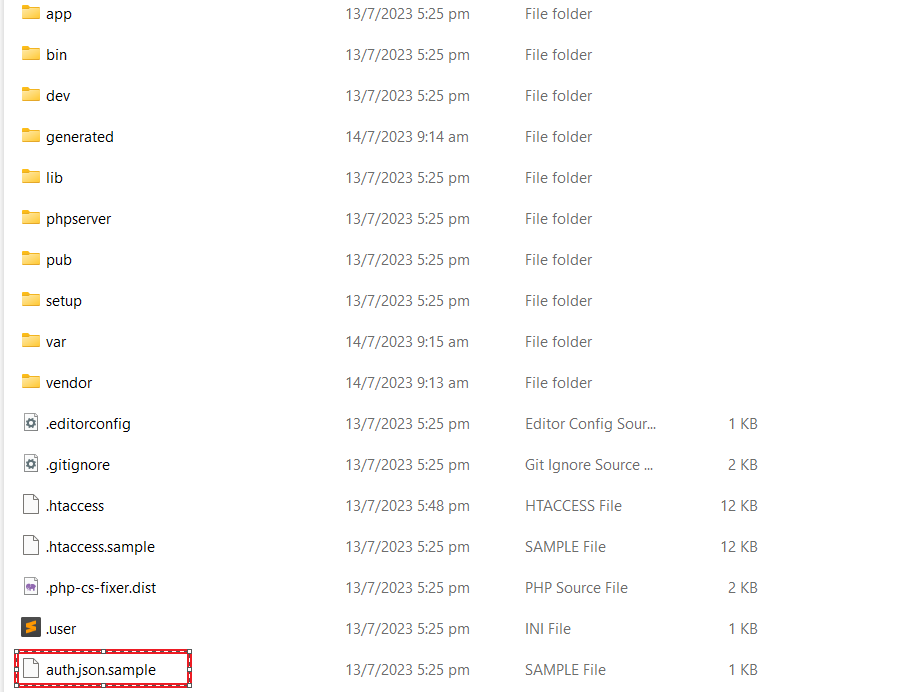
Which Magento 2 File Store Authentication Keys ( Public Key & Private Key) To Access repo.magento.com Repository In Magento 2.x

There are following below file stores Authentication Keys ( Public Key & Private Key) To Access repo.magento.com Repository In Magento 2

File Path as below-

Magento2-Root-Directory/auth.json

{
    "http-basic": {
        "repo.magento.com": {
            "username": "<public-key>",
            "password": "<private-key>"
        }
    }
}

Go To Magento 2 Root folder & rename auth.json.sample into auth

Once added Private & Public Keys, finally auth.json as below

{
"http-basic": {
"repo.magento.com": {
"username": "d42906009cbf0ea28f8278fa26e1eaa0",
"password": "f67302679e36b18610d1a1fe05350d9a"
}
}
}

Facebook Changed Its Name To Meta

Facebook on October 28th, 2021 announced that it has changed its company name to Meta & company rebrand as it moves to the Metaverse

“Metaverse” – an new online digital world where people can communicate, transmission message, playing game, work and in a virtual environment, often using VR(Virtual Reality) headsets.

Facebook and its other products as Instagram, Messenger and WhatsApp will be housed in a separate division from Facebook Reality Labs, which makes the company’s augmented and virtual reality products.

For more info visit https://about.facebook.com/meta

How To Disable Magento 2.4 Two-Factor Authentication

Magento 2.4 provides default Magento 2.4 Admin Login security [Two-Factor Authorization], once you installed Magento 2.4 & other below versions as Magento 2.4.x

Magento 2.4

Magento 2.4.1

Magento 2.4.1-P1

Magento 2.4.2-P1

Magento 2.4.2-P2

Magento 2.4.3

Magento 2.4.3-P1

and try to Admin Login, following below error occurs

Solution : below link redirects on solution page, where you can get info

How To Disable Module Magento_TwoFactorAuth (Two-Factor Authorization )

Other important Magento 2.4.x issue as below

Magento 2.3 To Magento 2.4.5 Comptibility For PHP, MYSQL, Composer, Apache etc


Magento 2.4.3-p1 Installation Steps


Magento 2.4.3 Installation Steps


Magento 2.4.3 Features


Magento 2.4.3 – p1 Features


Magento 2.4 Two Factor Authentication


Magento 2.4.1 Features


Magento 2.4 Features


Magento 2.4 Installation


Magento 2.2, Magento 2.3, Magento2.4 Installation Issue on Windows 10, XAMPP


Magento 2 Installation at 51% Error: (Wrong file in Gd2.php:64) Module ‘Magento_Theme’
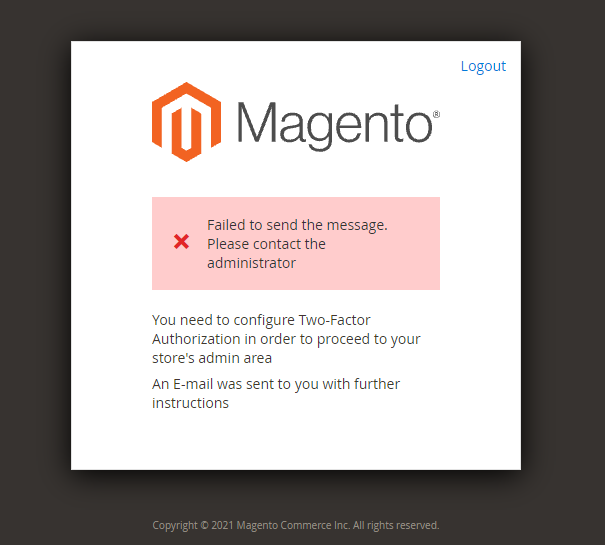
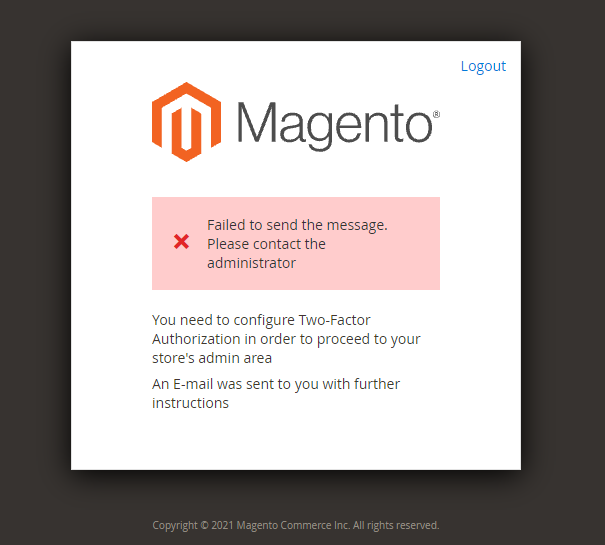
You Need To Configure Two-Factor Authorization in Order To Proceed To Your Store’s Admin Area

Magento 2.4 Admin having following below Admin Login error

This same Magento 2.4 Admin Login issue having with following below Magento 2.4.x versions.

Magento 2.4

Magento 2.4.1

Magento 2.4.1-P1

Magento 2.4.2-P1

Magento 2.4.2-P2

Magento 2.4.3

Magento 2.4.3-P1

“You need to configure Two-Factor Authorization in order to proceed to your store’s admin area”

The following below two Solution

1- Solution : “Module Magento_TwoFactorAuth need to be disable”

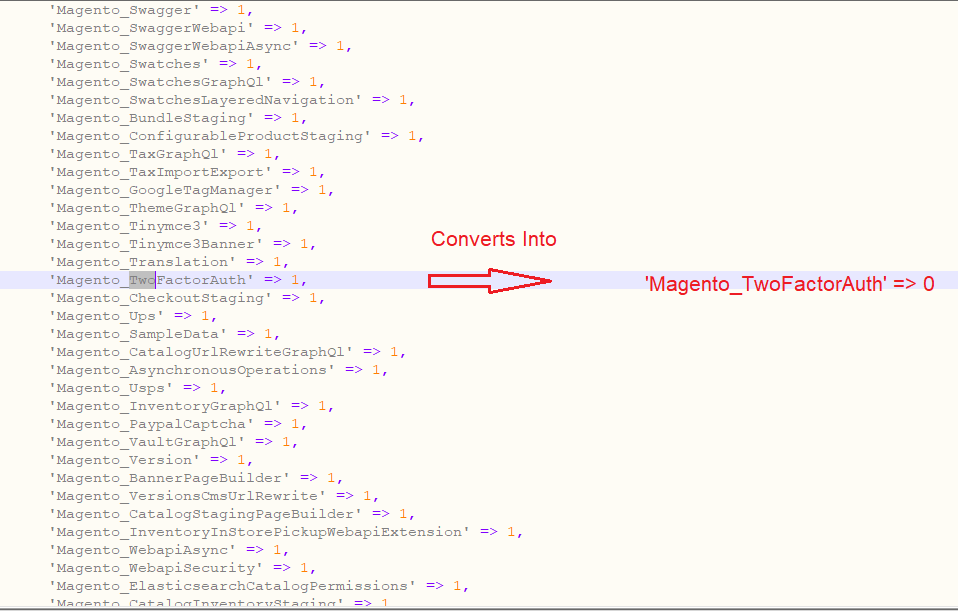
Go to Magento2.4-Root-Directory/app/etc/config.php & converts

'Magento_TwoFactorAuth' => 1

Into

'Magento_TwoFactorAuth' => 0

and Run below command

php bin/magento cache:flush

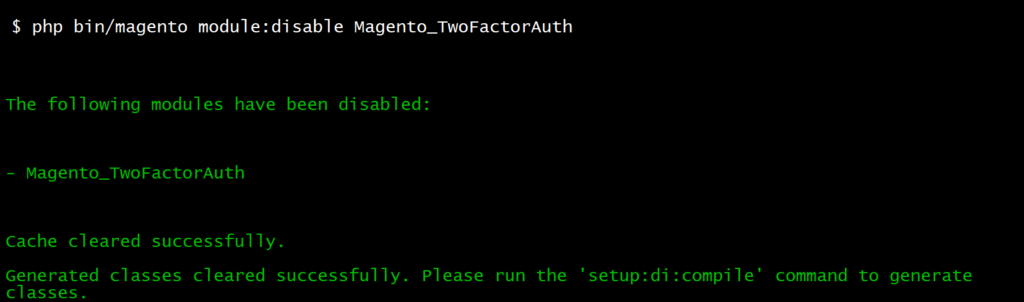
2- Solution : Run following below CLI command

php bin/magento module:disable Magento_TwoFactorAuth

After run Flush Cache CLI Command

Finally Magento 2.4.x Admin Issue will be resolved & Login with your Magento 2.4.x Admin Login credentials

Other important Magento 2.4.x issue as below

Magento 2.3 To Magento 2.4.5 Comptibility For PHP, MYSQL, Composer, Apache etc


Magento 2.4.3-p1 Installation Steps


Magento 2.4.3 Installation Steps


Magento 2.4.3 Features


Magento 2.4.3 – p1 Features


Magento 2.4 Two Factor Authentication


Magento 2.4.1 Features


Magento 2.4 Features


Magento 2.4 Installation


Magento 2.2, Magento 2.3, Magento2.4 Installation Issue on Windows 10, XAMPP


Magento 2 Installation at 51% Error: (Wrong file in Gd2.php:64) Module ‘Magento_Theme’
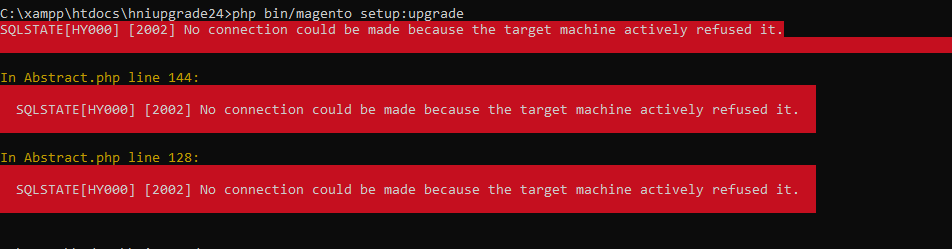
SQLSTATE[HY000] [2002] No Connection Could Be Made Because The Target Machine Actively Refused it

While running Magento 2 Command & getting error as above or defined below

As trying to run below command or any other command

  • php bin/magento deploy:mode:set developer
  • php bin/magento setup:upgrade
  • php bin/magento setup:di:compile
  • php bin/magento setup:static-content:deploy -f
  • php bin/magento indexer:reindex
  • php bin/magento cache:clean
  • php bin/magento cache:flush

and geeting error

SQLSTATE[HY000] [2002] No connection could be made because the target machine actively refused it

Solution:: Need to Start / Restart MYSQL Server.

Magento 2.3 To Magento 2.4.5 Compatibility For PHP, MYSQL, Composer, Apache etc

There are following below define , from Magento 2.3 To Magento 2.4.5 Comptibility For PHP, MYSQL, Composer, Apache, Nginx, Elasticsearch, Redis, Varnish etc.

Magento 2.X 2.3.0 2.3.1 2.3.2 2.3.3 2.3.4 2.3.5 2.3.6 2.3.7 2.4.0 2.4.1 2.4.2 2.4.3 2.4.4 2.4.5
Composer 1.x 1.x 1.x 1.x 1.x 1.x 1.x 2.x 1.x 1.x 2.x 2.x 2.x 2.x
Elasticsearch 2.x, 5.x 5.x, 6.x 5.x, 6.x 5.x, 6.x 5.x, 6.x 7.6 7.7 7.9 7.6 7.7 7.9 7.9 7.10 7.10
MariaDB 10.1, 10.2 10.1, 10.2 10.1, 10.2 10.1, 10.2 10.1, 10.2 10.1, 10.2 10.2 10.3 10.2, 10.3, 10.4 10.4 10.4 10.4 10.4 10.4
MySQL 5.6, 5.7 5.6, 5.7 5.6, 5.7 5.6, 5.7 5.6, 5.7 5.6, 5.7 5.7 5.7 5.7, 8.0 8.0 8.0 8.0 8.0 8.0
PHP 7.1, 7.2 7.1, 7.2 7.1, 7.2 7.1, 7.2, 7.3 7.2, 7.3 7.2, 7.3 7.3 7.4 7.3, 7.4 7.4 7.4 7.4 8.1 8.1
RabbitMQ 2.x, 3.7 2.x, 3.7 2.x, 3.7 2.x, 3.7 3.7, 3.8 3.8 3.8 3.8 3.8 3.8 3.8 3.8 3.8 3.8
Redis 5.x 5.0 5.0 5.0 5.0 5.0 5.0 6.0 5.0 5.0 6.0 6.0 6.0 6.0
Varnish 4.x, 5.x 4.x, 5.x 4.x, 5.x 6.2 4.x, 5.x, 6.2 6.3 6.4 6.5 6.x 6.2 6.4 6.5 6.5 6.5
Apache 2.4 2.4 2.4 2.4 2.4 2.4 2.4 2.4 2.4 2.4 2.4 2.4 2.4 2.4
nginx 1.8 1.8 1.8 1.8 1.8 1.8 1.8 1.8 1.8 1.8 1.8 1.8 1.8 1.8
AWS Aurora (MySQL)                       5.7    
AWS S3                     ✔️ ✔️    
AWS MQ                       3.8.11    
AWS ElastiCache                       Redis 6.x    
AWS ElasticSearch                       7.9    

Other important Magento 2.4.x issue as below

Magento 2.3 To Magento 2.4.5 Comptibility For PHP, MYSQL, Composer, Apache etc


Magento 2.4.3-p1 Installation Steps


Magento 2.4.3 Installation Steps


Magento 2.4.3 Features


Magento 2.4.3 – p1 Features


Magento 2.4 Two Factor Authentication


Magento 2.4.1 Features


Magento 2.4 Features


Magento 2.4 Installation


Magento 2.2, Magento 2.3, Magento2.4 Installation Issue on Windows 10, XAMPP


Magento 2 Installation at 51% Error: (Wrong file in Gd2.php:64) Module ‘Magento_Theme’