
Magento 2 collection of multiple of multiple set of Files & Folders

[1] Magento 2 Folder Structure : Set of Folder Collection as below
app, bin, setup, phpserver, var, generated, lib, pub, dev.

AI, Ecommerce, Technology & Management – Learn. Build. Solve
Magento 2 collection of multiple of multiple set of Files & Folders
[1] Magento 2 Folder Structure : Set of Folder Collection as below
app, bin, setup, phpserver, var, generated, lib, pub, dev.
Magento 2 Magento using its own Technique for password hashing by following below Technique (One of the best Strongest Web Password Encryption algorithms).
[1] Password Hash –
[2] Salt –
[3] SHA256 –
[4] Argon 2ID13 –
Magento 2 Password collection of all above Password algorithms
Magento 2 Password = Password Hash + Salt + SHA256 + Argon 2ID13
6f98f4b6dd20dad5f00f97aa08541fb29c728fc1b8ce32b23bc11c66f792528c:T2izWsU9DcHN1HJ:l:2Magento 2 always stored password as above format
Fist Part=password hash
password hash=6f98f4b6dd20dad5f00f97aa08541fb29c728fc1b8ce32b23bc11c66f792528c
Second Part=Salt=T2izWsU9DcHN1HJ
The last two are the different hash algorithms:
1 is SHA256 and 2 is Argon 2ID13.
This means that the customer’s password was originally hashed with SHA256 and after that, the algorithm was updated with Argon 2ID13 and the hash was re-hashed with Argon.
Click Magento 2 Password Encryption Algorithms PDF Document
To resolve issue, need to run following below Git Command
git add *
git stash
git pullMagento 2 Customer Account Sharing Options allows which level customer account information need to share, either Website Level or Global Level.
Magento 2 Customer Account Sharing Options allows which level customer account information need to share either Website Level or Global Level.
There are following below steps need to follow.
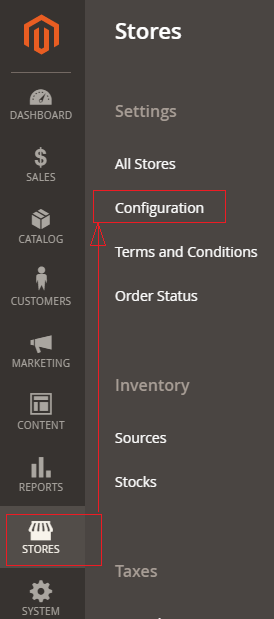
[1]- Go To STORES > Configuration, redirects on configuration.
[2] – Left Panel Clicked Customers > Customer Configuration
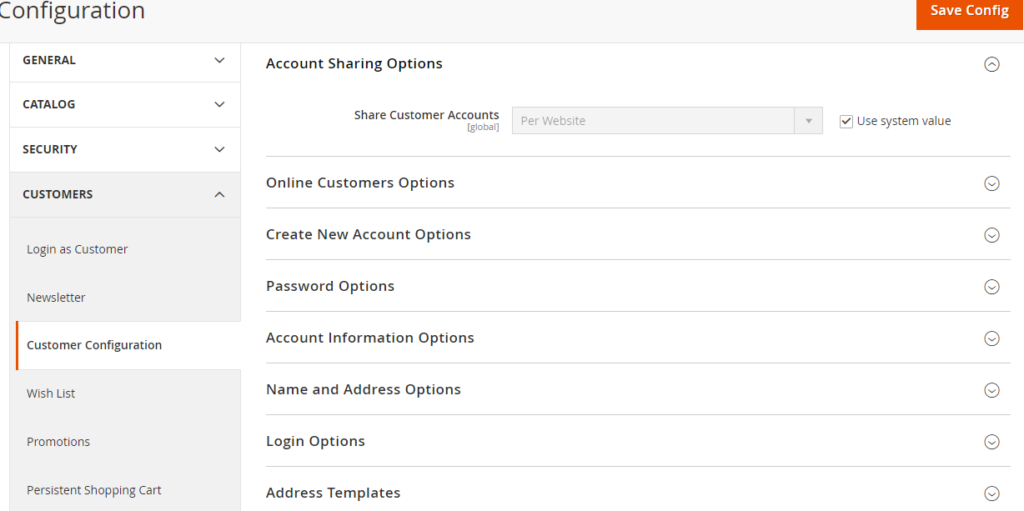
[3] – Once redirection on [Right Panel]

[4] – Once clicked / expanded, URL Options [Right Panel]
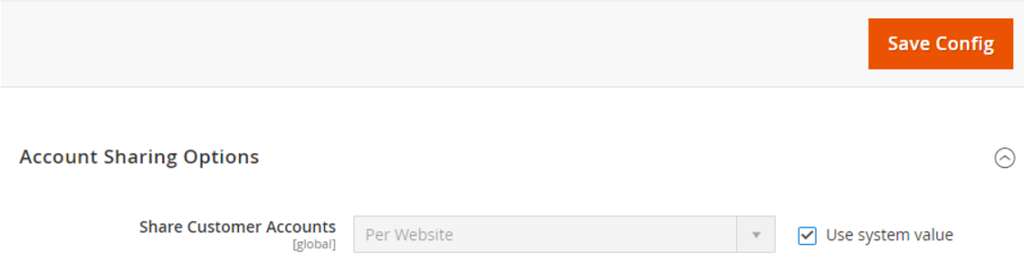
There are following below two options are given in Drop Down Values
By Default Per Website & Another one Global
Per Website : Customer Information like First Name, Last Name Email, Contact Details etc will be shared by within website, Finally customer information accessed by specified website.
Global : Customer Information like First Name, Last Name Email, Contact Details etc will be shared by Globally by website or store, Finally customer information accessed by multiple website or store.
Each of these Customer Account Sharing Options must be select as per Multi Website & Store need
Magento 2 All Database Tables [500 & more Tables]
How To Set Multi Shipping Settings In Magento 2
How To Set Origin Shipping in Magento 2
Difference Between Offline Shipping Method and Online Shipping Method
Magento 2 Online Customers Options
How To Apply Customer Group Price of Products in Magento 2
How To Add Customer Groups Dropdown in Magento 2 Admin Form and Grid By UI Component
How To Get all Customers Data in Magento 2
How To Create Customer Order in Magento 2 Admin Panel
Magento 2 Login As Customer Not Enabled
How To Configure Customer Account Sharing Options in Magento 2
Magento 2 Redirect To Customer Dashboard After Login
Which Magento 2 database table store customer shipping and billing address
How To Remove Sales Order Data & Customer Data in Magento 2
Which Magento 2 database table store customer’s Email Data
Which Magento 2 Database Table Store Customer Newsletter Data
Which Magento 2 database table store customer’s shipping and billing address
How To Remove Sales Order Data & Customer Data in Magento 2
Which Magento 2 Database Tables Store Customer Rating
Which Magento 2 Database Tables Store Customer Wishlist Products
Magento 2 Increase Customer Session Time
The Magento 2 customer password options provides customer’s account security, once customer creating account, required strong password,
Customer’s change password, Customer’s forget password, Customer’s reset password etc.
There are following options , how to storeowner(admin) can make strong password for their customers.
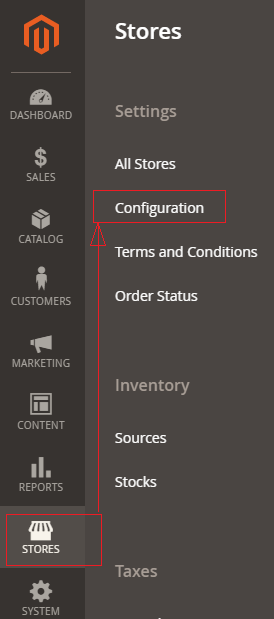
[1] – Go To STORES > Configuration, redirects on configuration.
[2] – Left Panel Clicked Customers > Customer Configuration
[3] – Once redirection on [Right Panel]
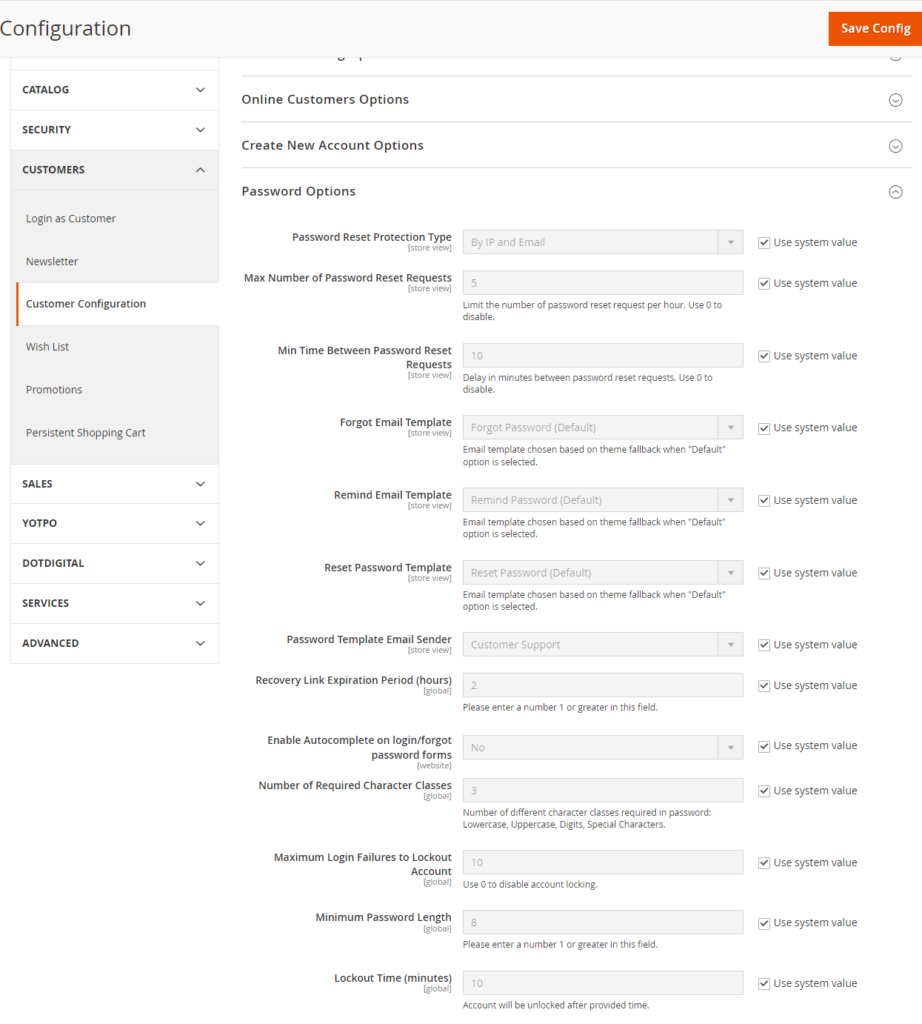
[4] – Once clicked / expanded, Password Options [Right Panel]
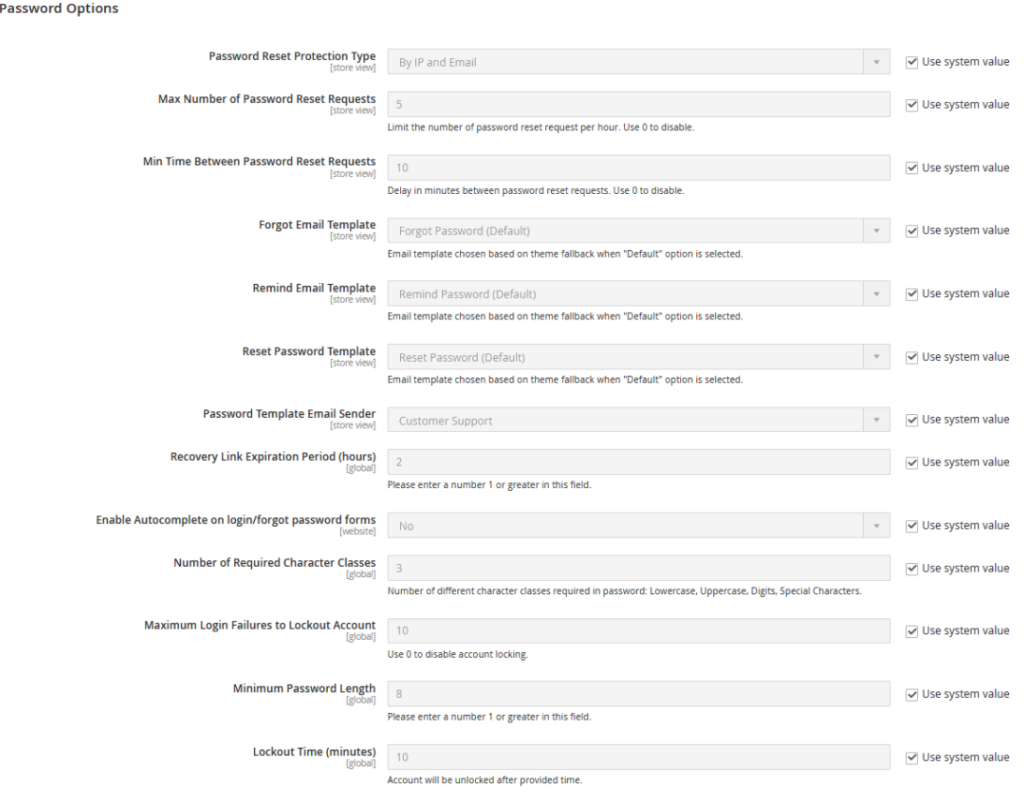
[4.1] Password Reset Protection Type : There are four options given By IP / Email, By IP, By Email, None, as per store requirement select any of them.
[4.2] Max Number of Password Reset Requests : By Default 5 Hour given, as per store requirement enter Hour value, value must be greater than 0, in case disable this feature, enter 0
[4.3] Min Time Between Password Reset Requests :
[5] – Finally click on Save Config Button
There are following below difference
| MongoDB | MariaDB | |
| 1 | MongoDB released on 11 February 2009 & developed by Developed by MongoDB Inc. | MariaDB released on 29 October 2009 & developed by MariaDB Corporation Ab |
| 2 | MongoDB is an open-source relational DBMS solution created to provide SQL features for accessing the data. | MariaDB is open-source, and is a NoSQL Database. |
| 3 | MongoDB is written in Perl, bash, C, and C++ | MongoDB is written in C++, JavaScript, Python |
| 4 | MongoDB supports non relational (NoSQL) database program & open-source document database, that stores the data in the form of key-value pairs | MariaDB supports relational database management system (RDBMS) that is a compatible with widely used MySQL database technology & open-source database |
| 5 | MongoDB does not support XML for storage. | MariaDB supports XML for storage, access, and retrieval in XML data format. |
| 6 | MongoDB supports Referential Integrity & Foreign Keys concept | MariaDB does not support Referential Integrity & Foreign Keys concept |
| 7 | MongoDB supports Multi document based ACID transactions with snapshot isolation. | MariaDB supports only ACID transactions without snapshot isolation. |
| 8 | ||
| 9 | ||
| 10 |
| MongoDB | MySQL | |
| 1 | MongoDB represents data as of JSON documents. | MySQL represents data in tables and rows. |
| 2 | MongoDB does not support JOIN operations. | MySQL supports JOIN operations. |
| 3 | MongoDB uses JavaScript as query language. | MySQL uses the Structured Query Language (SQL). |
| 4 | MongoDB offers faster query processing. | MySQL offers slow query processing. |
| 5 | MongoDB does not support JOIN. | MySQL supports JOIN operations. |
| 6 | MongoDB is an ideal choice for unstructured data. | MySQL is an ideal choice for structured data. |
| 7 | MongoDB do not need to define the schema. | MySQL need to define the schema. |
| 8 | MongoDB supports built-in replication, sharding | MySQL supports master-slave replication and master replication. and auto-elections. |
| 9 | MongoDB Supports languages are C++, C | MySQL supports languages are C++, C and JavaScript |
| 10 | Cloud based application preferred MongoDB, build applications faster, handle highly diverse data types, and manage applications more efficiently at scale. | MySQL, If data security is your priority then MYSQL is the best option for you, is the best suited for you. |
There are following below two ways to get Base URLs
[1] By Using DI (Dependency Injection)
[2] By Using Object Manager
[1] By Using DI (Dependency Injection) : You can get Base URL, with / without Index, Store URL, Link URL, Media URL
[1.1] Write below code inside custom module Helper as

         [VendorName][ModuleName]\Helper\Data.php
<?php

namespace [VendorName]\[ModuleName]\\Helper;
use Magento\Store\Model\StoreManagerInterface;
use Magento\Framework\Controller\ResultFactory;
use Magento\Framework\App\Response\RedirectInterface;
class Data extends \Magento\Framework\App\Helper\AbstractHelper
{
  protected $storeManager;


  public function __construct( \Magento\Framework\App\Helper\Context $context,
                               StoreManagerInterface $storeManager
							 )
     {
      $this->storeManager = $storeManager;
      parent::__construct($context);
     }


  public function getStoreManagerData()
    {
  	    // To get Store Url with index.php
        return $storeUrl = $this->storeManager->getStore()->getBaseUrl();
        // To get Store Url without index.php
        return $storeUrl = $this->storeManager->getStore()->getBaseUrl(\Magento\Framework\UrlInterface::URL_TYPE_WEB);
        // To get Link Url of store
         $storeLinkUrl = $this->storeManager->getStore()->getBaseUrl(\Magento\Framework\UrlInterface::URL_TYPE_DIRECT_LINK);
        // To get media Base Url
         $storeMediaUrl = $this->storeManager->getStore()->getBaseUrl(\Magento\Framework\UrlInterface::URL_TYPE_MEDIA);
        //To get Static content Url
         $storeStaticUrl = $this->storeManager->getStore()->getBaseUrl(\Magento\Framework\UrlInterface::URL_TYPE_STATIC);
    }


}
[1.2] Write below code inside custom module Block as
[VendorName]\[ModuleName]\Block\Index\Index.php
<?php
namespace [VendorName]\[ModuleName]\Block\Index;
class Index extends \Magento\Framework\View\Element\Template
{
	protected $helper;

	public function __construct(
		\Magento\Framework\View\Element\Template\Context $context,
		[VendorName]\[ModuleName]\Helper\Data $helperData,

	)
	{
		$this->helper = $helperData;
		parent::__construct($context);
	}

	public function getbaseurldata()
    {
    return $this->helper->getStoreManagerData();
    }


}
[1.3] Write below code inside Custom Module Template Index phtml file
 [VendorName]\[ModuleName]\view\frontend\templates\index\index.phtml
$baseurl= $block->getbaseurldata();Finally you can Base URL as per store need.
[2] By Using Object Manager :
$objectManager = \Magento\Framework\App\ObjectManager::getInstance();
$storeManager = $objectManager->get('\Magento\Store\Model\StoreManagerInterface');

$storeManager->getStore()->getBaseUrl();  // to get Base Url
$storeManager->getStore()->getBaseUrl(\Magento\Framework\UrlInterface::URL_TYPE_WEB); // to get Base Url without index.php
$storeManager->getStore()->getBaseUrl(\Magento\Framework\UrlInterface::URL_TYPE_LINK); // to get store link url
$storeManager->getStore()->getBaseUrl(\Magento\Framework\UrlInterface::URL_TYPE_MEDIA); // to get Base Media urlThere are two ways to enable / disable module
[1] By Using CLI Command, here disabled Module Magento_TwoFactorAuth
php bin/magento module:status
php bin/magento module:disable Magento_TwoFactorAuth
php bin/magento setup:upgrade
php bin/magento cache:flush
[2] By Using Magento Root /app/etc/config.php
<?php
return [
    'modules' => [
        'Magento_AdminAnalytics' => 1,
        'Magento_Store' => 1,
        'Magento_AdobeIms' => 1,
        'Magento_AdobeImsApi' => 1,
        'Magento_AdobeStockAdminUi' => 1,
        'Magento_MediaGallery' => 1,
        'Magento_AdobeStockAssetApi' => 1,
        'Magento_AdobeStockClient' => 1,
        'Magento_AdobeStockClientApi' => 1,
        'Magento_AdobeStockImage' => 1,
        'Magento_Directory' => 1,
        'Magento_AdobeStockImageApi' => 1,
        'Magento_AdvancedPricingImportExport' => 1,
        'Magento_Theme' => 1,
        'Magento_Amqp' => 1,
        'Magento_AmqpStore' => 1,
        'Magento_Config' => 1,
        'Magento_Backend' => 1,
        'Magento_Authorization' => 1,
        'Magento_Eav' => 1,
    ]
];
To Disable any Module, convert 1 into 0 & run below command
php bin/magento setup:upgrade
php bin/magento cache:flush