Magento 2 Magento using its own Technique for password hashing by following below Technique (One of the best Strongest Web Password Encryption algorithms).
[1] Password Hash –
[2] Salt –
[3] SHA256 –
[4] Argon 2ID13 –
Magento 2 Password collection of all above Password algorithms
This means that the customer’s password was originally hashed with SHA256 and after that, the algorithm was updated with Argon 2ID13 and the hash was re-hashed with Argon.
Click Magento 2 Password Encryption Algorithms PDF Document
Magento 2 Customer Account Sharing Options allows which level customer account information need to share either Website Level or Global Level.
There are following below steps need to follow.
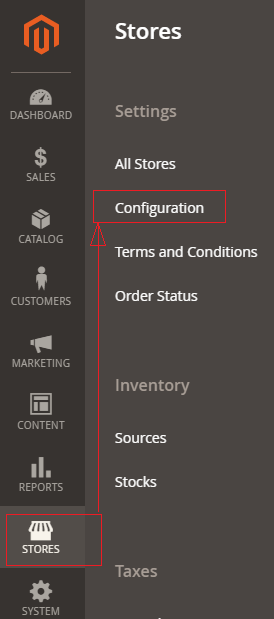
[1]- Go To STORES > Configuration, redirects on configuration.
[2] – Left Panel Clicked Customers > Customer Configuration
[3] – Once redirection on [Right Panel]
[4] – Once clicked / expanded, URL Options [Right Panel]
There are following below two options are given in Drop Down Values
By Default Per Website & Another one Global
Per Website : Customer Information like First Name, Last Name Email, Contact Details etc will be shared by within website, Finally customer information accessed by specified website.
Global : Customer Information like First Name, Last Name Email, Contact Details etc will be shared by Globally by website or store, Finally customer information accessed by multiple website or store.
Each of these Customer Account Sharing Options must be select as per Multi Website & Store need
The Magento 2 customer password options provides customer’s account security, once customer creating account, required strong password, Customer’s change password, Customer’s forget password, Customer’s reset password etc.
There are following options , how to storeowner(admin) can make strong password for their customers.
[1] – Go To STORES > Configuration, redirects on configuration.
[2] – Left Panel Clicked Customers > Customer Configuration
[3] – Once redirection on [Right Panel]
[4] – Once clicked / expanded, Password Options [Right Panel]
[4.1] Password Reset Protection Type : There are four options given By IP / Email, By IP, By Email, None, as per store requirement select any of them.
[4.2] Max Number of Password Reset Requests : By Default 5 Hour given, as per store requirement enter Hour value, value must be greater than 0, in case disable this feature, enter 0
MySQL supports master-slave replication and master replication. and auto-elections.
9
MongoDB Supports languages are C++, C
MySQL supports languages are C++, C and JavaScript
10
Cloud based application preferred MongoDB, build applications faster, handle highly diverse data types, and manage applications more efficiently at scale.
MySQL, If data security is your priority then MYSQL is the best option for you, is the best suited for you.
There are following below two ways to get Base URLs
[1] By Using DI (Dependency Injection)
[2] By Using Object Manager
[1] By Using DI (Dependency Injection) : You can get Base URL, with / without Index, Store URL, Link URL, Media URL
[1.1] Write below code inside custom module Helper as
[VendorName][ModuleName]\Helper\Data.php
<?php
namespace [VendorName]\[ModuleName]\\Helper;
use Magento\Store\Model\StoreManagerInterface;
use Magento\Framework\Controller\ResultFactory;
use Magento\Framework\App\Response\RedirectInterface;
class Data extends \Magento\Framework\App\Helper\AbstractHelper
{
protected $storeManager;
public function __construct( \Magento\Framework\App\Helper\Context $context,
StoreManagerInterface $storeManager
)
{
$this->storeManager = $storeManager;
parent::__construct($context);
}
public function getStoreManagerData()
{
// To get Store Url with index.php
return $storeUrl = $this->storeManager->getStore()->getBaseUrl();
// To get Store Url without index.php
return $storeUrl = $this->storeManager->getStore()->getBaseUrl(\Magento\Framework\UrlInterface::URL_TYPE_WEB);
// To get Link Url of store
$storeLinkUrl = $this->storeManager->getStore()->getBaseUrl(\Magento\Framework\UrlInterface::URL_TYPE_DIRECT_LINK);
// To get media Base Url
$storeMediaUrl = $this->storeManager->getStore()->getBaseUrl(\Magento\Framework\UrlInterface::URL_TYPE_MEDIA);
//To get Static content Url
$storeStaticUrl = $this->storeManager->getStore()->getBaseUrl(\Magento\Framework\UrlInterface::URL_TYPE_STATIC);
}
}
[1.2] Write below code inside custom module Block as
[VendorName]\[ModuleName]\Block\Index\Index.php
<?php
namespace [VendorName]\[ModuleName]\Block\Index;
class Index extends \Magento\Framework\View\Element\Template
{
protected $helper;
public function __construct(
\Magento\Framework\View\Element\Template\Context $context,
[VendorName]\[ModuleName]\Helper\Data $helperData,
)
{
$this->helper = $helperData;
parent::__construct($context);
}
public function getbaseurldata()
{
return $this->helper->getStoreManagerData();
}
}
$objectManager = \Magento\Framework\App\ObjectManager::getInstance();
$storeManager = $objectManager->get('\Magento\Store\Model\StoreManagerInterface');
$storeManager->getStore()->getBaseUrl(); // to get Base Url
$storeManager->getStore()->getBaseUrl(\Magento\Framework\UrlInterface::URL_TYPE_WEB); // to get Base Url without index.php
$storeManager->getStore()->getBaseUrl(\Magento\Framework\UrlInterface::URL_TYPE_LINK); // to get store link url
$storeManager->getStore()->getBaseUrl(\Magento\Framework\UrlInterface::URL_TYPE_MEDIA); // to get Base Media url