
There are following things need to follow

AI, Ecommerce, Technology & Management – Learn. Build. Solve
There are following things need to follow
Admin can enable redirecting customers feature to customer dashboard after they logged in. by default this feature (Redirect Customer to Account Dashboard after Logging in) disabled.
If Admin wants as customers logged & redirects on Customer Dashboard page, this feature (Redirect Customer to Account Dashboard after Logging in) need to enable.
If Admin wants as customers logged & redirects on same page or current page need to disable this feature (Redirect Customer to Account Dashboard after Logging in), this feature By Default Disabled.
There are following steps need to follow.
Magento 2 Admin End
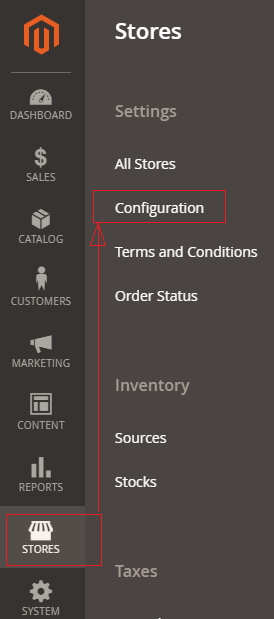
[1] Go STORES > Configuration, redirects Configuration section.
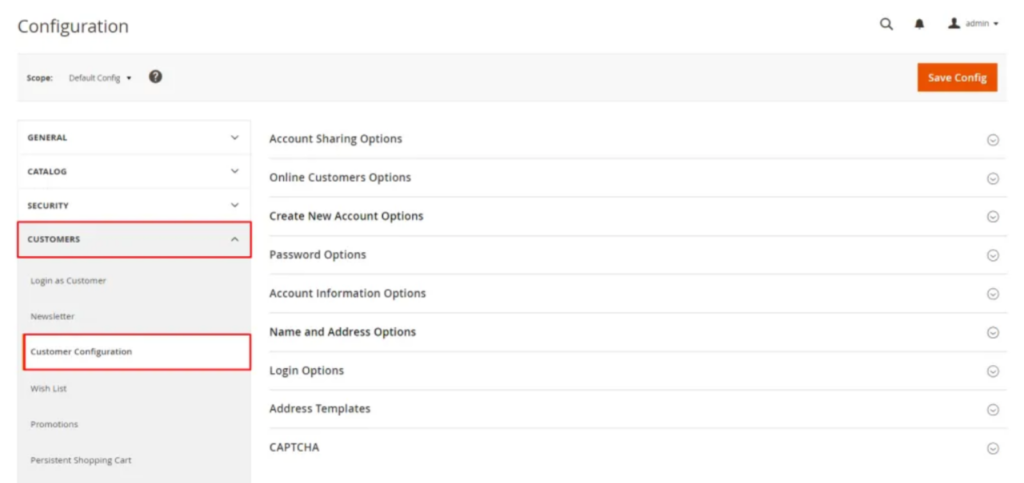
[2] Left panel, choose CUSTOMERS > Customer Configuration.
[3] Once expanded Login Options.
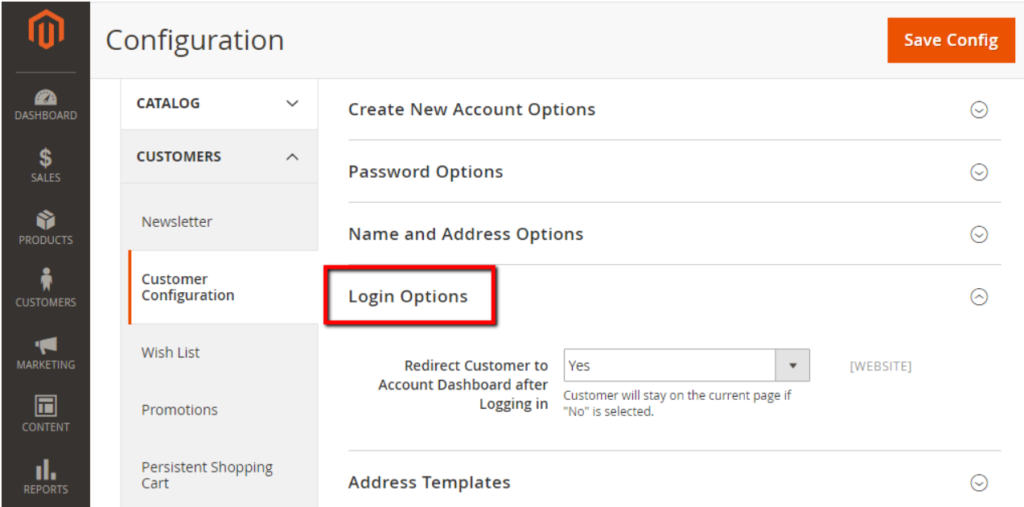
[4] Redirect Customer to Account Dashboard after Logging in By Default Yes, need to set No
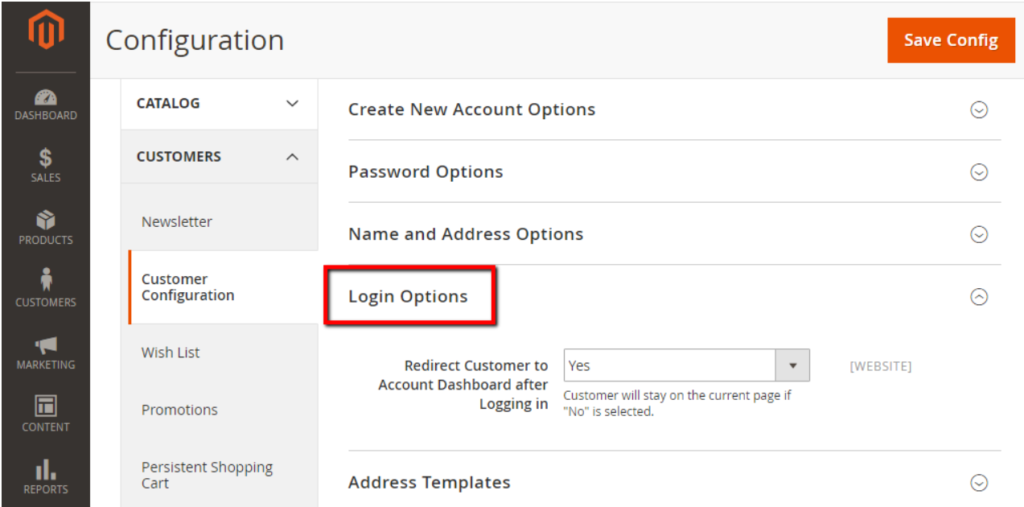
Select Yes: allow showing the customer account dashboard when customers log in to their accounts.
Select No : no redirect to customer account dashboard when customers log in to their accounts, customer stay on same page.
[5] Finally clicked on Save Config Button & run CLI command Flush
Magento 2 All Database Tables [500 & more Tables]
How To Set Multi Shipping Settings In Magento 2
How To Set Origin Shipping in Magento 2
Difference Between Offline Shipping Method and Online Shipping Method
Magento 2 Online Customers Options
How To Apply Customer Group Price of Products in Magento 2
How To Add Customer Groups Dropdown in Magento 2 Admin Form and Grid By UI Component
How To Get all Customers Data in Magento 2
How To Create Customer Order in Magento 2 Admin Panel
Magento 2 Login As Customer Not Enabled
How To Configure Customer Account Sharing Options in Magento 2
Magento 2 Redirect To Customer Dashboard After Login
Which Magento 2 database table store customer shipping and billing address
How To Remove Sales Order Data & Customer Data in Magento 2
Which Magento 2 database table store customer’s Email Data
Which Magento 2 Database Table Store Customer Newsletter Data
Which Magento 2 database table store customer’s shipping and billing address
How To Remove Sales Order Data & Customer Data in Magento 2
Which Magento 2 Database Tables Store Customer Rating
Which Magento 2 Database Tables Store Customer Wishlist Products
Magento 2 Increase Customer Session Time
Newsletter is a essential things for Store to notify their customers about some discount offers, special offers, occasion offers or weekly / monthly special sales running as well as provide them with latest product updates.
There are following steps need to follow.
[1] Go STORES > Configuration, redirects Configuration section.
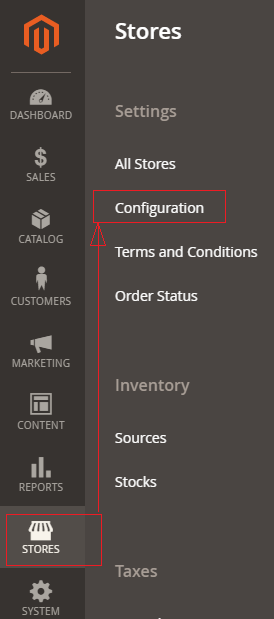
[2] Left panel, choose CUSTOMERS > Newsletter.
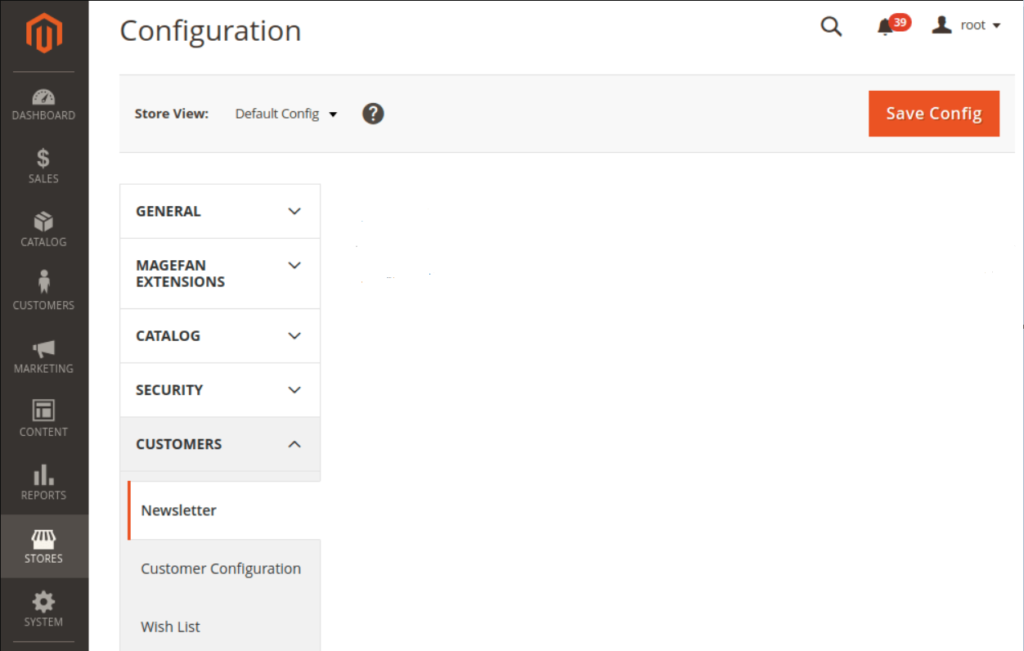
[3] Once Clicked Newsletter, Right Panel opened with
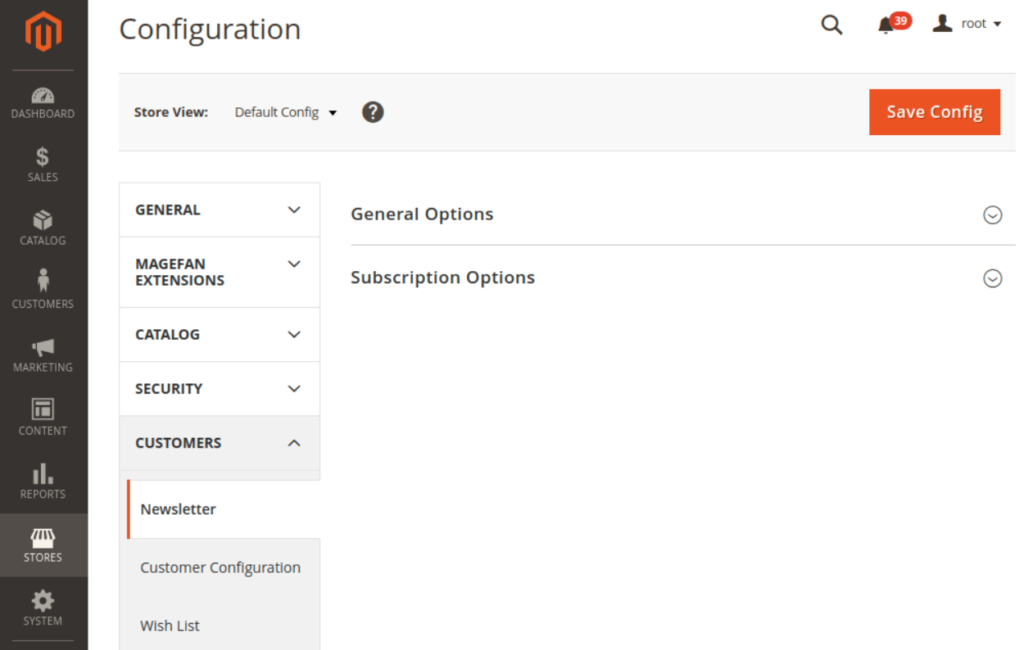
General Options & Subscription option
[4] Once expanded General Options & Subscription option

The following below things enabled / disabled
[5] Finally clicked on Save Config Button & run CLI command Flush
Which Magento 2 Database Table Store Customer Newsletter Data
Magento 2 Customer Groups allows you to divide your customers into groups so that you have an opportunity to set different discounts, share different information and define different custom rules for them to follow.
Magento 2 All Database Tables [500 & more Tables]
How To Set Multi Shipping Settings In Magento 2
How To Set Origin Shipping in Magento 2
Difference Between Offline Shipping Method and Online Shipping Method
Magento 2 Online Customers Options
How To Apply Customer Group Price of Products in Magento 2
How To Add Customer Groups Dropdown in Magento 2 Admin Form and Grid By UI Component
How To Get all Customers Data in Magento 2
How To Create Customer Order in Magento 2 Admin Panel
Magento 2 Login As Customer Not Enabled
How To Configure Customer Account Sharing Options in Magento 2
Magento 2 Redirect To Customer Dashboard After Login
Which Magento 2 database table store customer shipping and billing address
How To Remove Sales Order Data & Customer Data in Magento 2
Which Magento 2 database table store customer’s Email Data
Which Magento 2 Database Table Store Customer Newsletter Data
Which Magento 2 database table store customer’s shipping and billing address
How To Remove Sales Order Data & Customer Data in Magento 2
Which Magento 2 Database Tables Store Customer Rating
Which Magento 2 Database Tables Store Customer Wishlist Products
Magento 2 Increase Customer Session Time
There are following below steps need to follow.
[1] Go STORES > Configuration, redirects Configuration section.
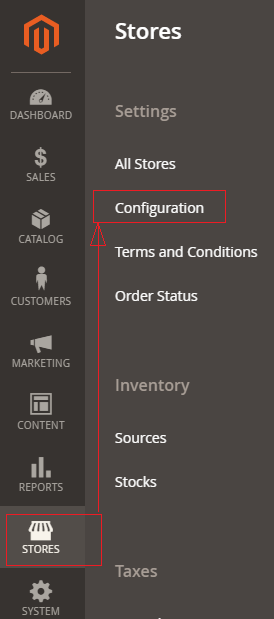
[2] Left panel, choose CUSTOMERS > Customer Configuration.
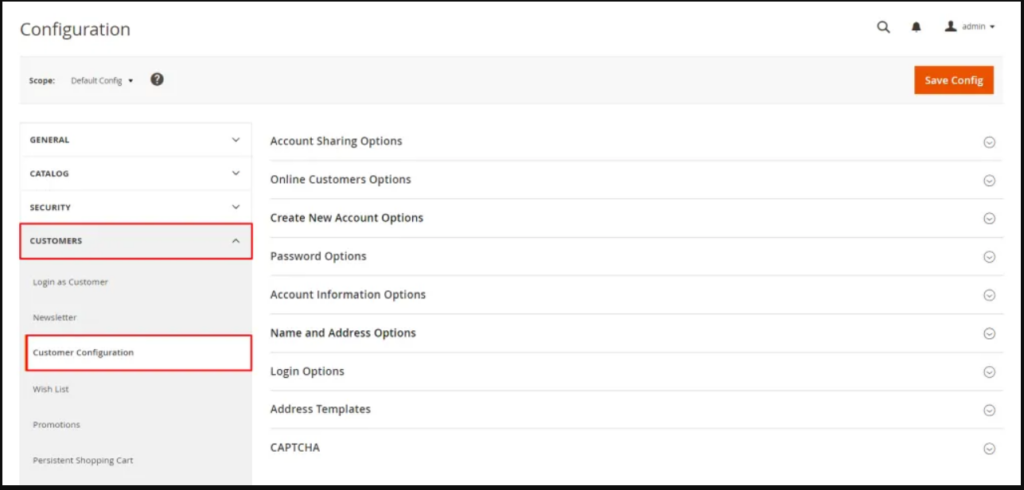
[3] Right panel, Expand the Create New Account Options section.
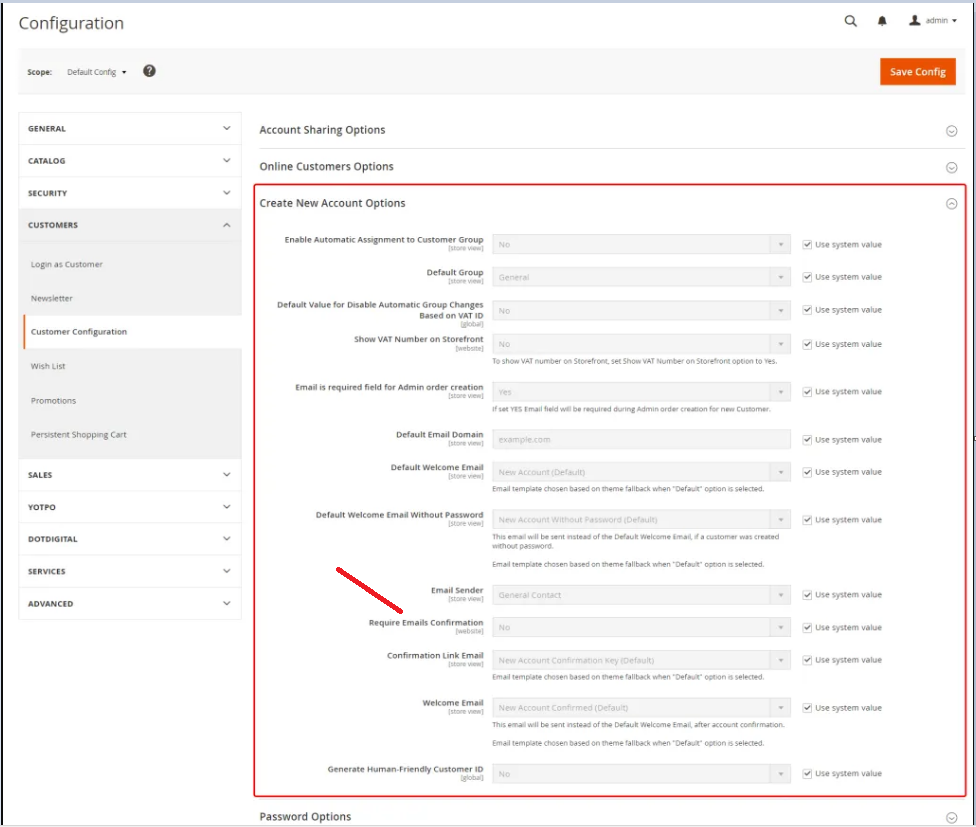
[4] Go To Require Emails Confirmation Section, By Default No selected.
Once clicked on drop down, There are two options as Yes & No
select Yes for email confirmation
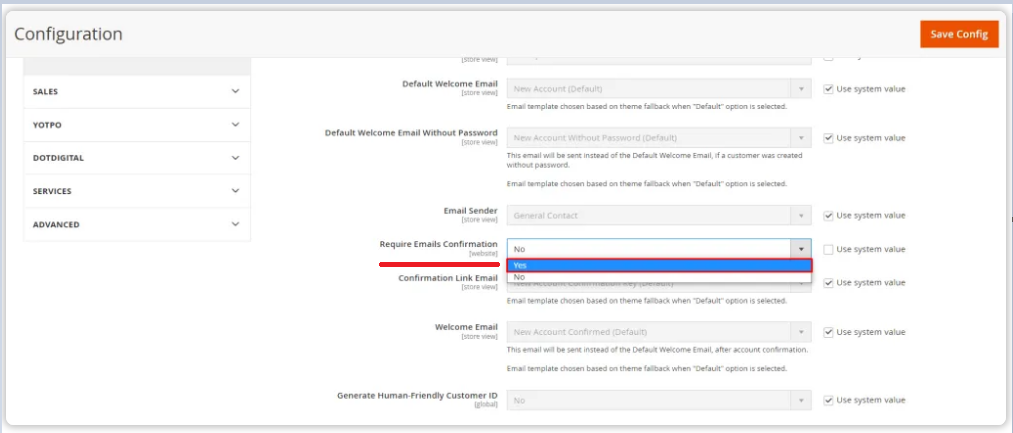
[5] Finally click on Save Config Button & Require Emails Confirmation set as Yes.
Once user fill frontend user registration form, Confirmation Email send to user’s email
There are following steps need to follow.
[1] Go STORES > Configuration, redirects Configuration section.
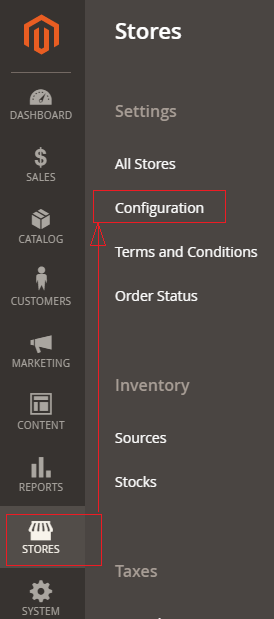
[2] Left panel, choose CUSTOMERS > Customer Configuration.
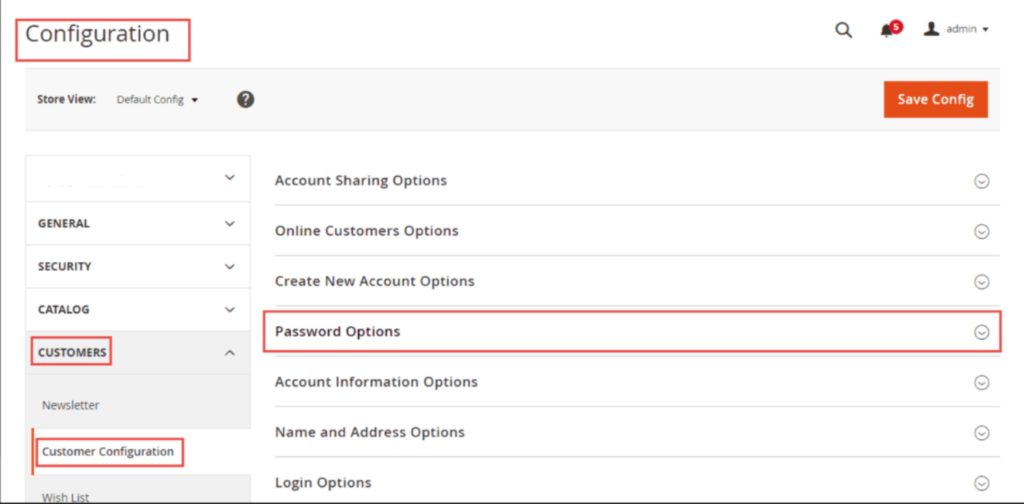
[3] Once expanded Password Options.
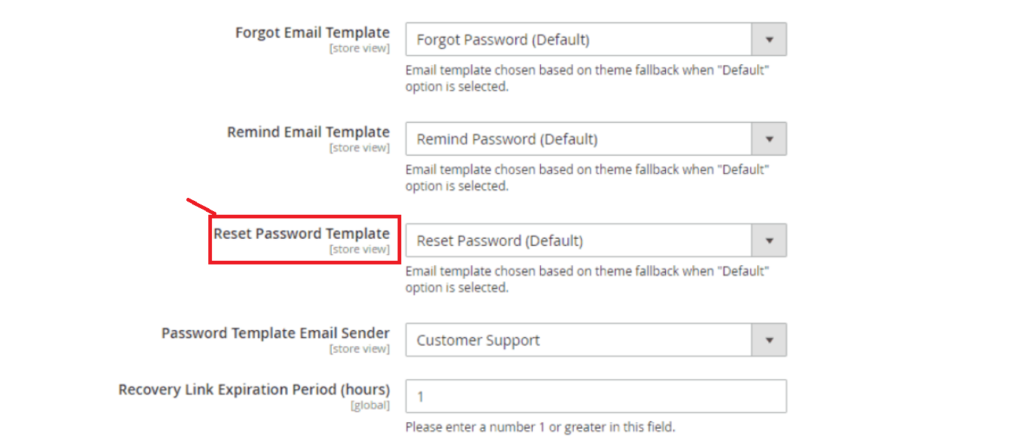
[4] Go To Reset Password Template, clicked on drop down By Default Reset Password Template selected, choose any custom template from drop down.
[5] Finally clicked on Save Config button & run CLI command Flush
There are following steps need to follow.
[1] Go STORES > Configuration, redirects Configuration section.
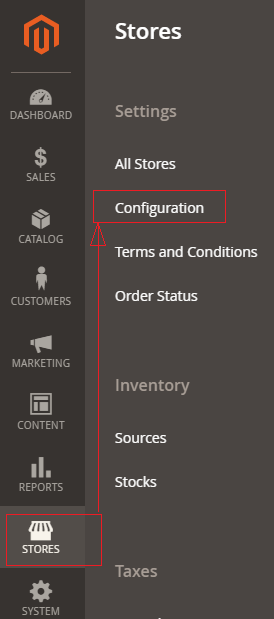
[2] Left panel, choose CUSTOMERS > Customer Configuration.
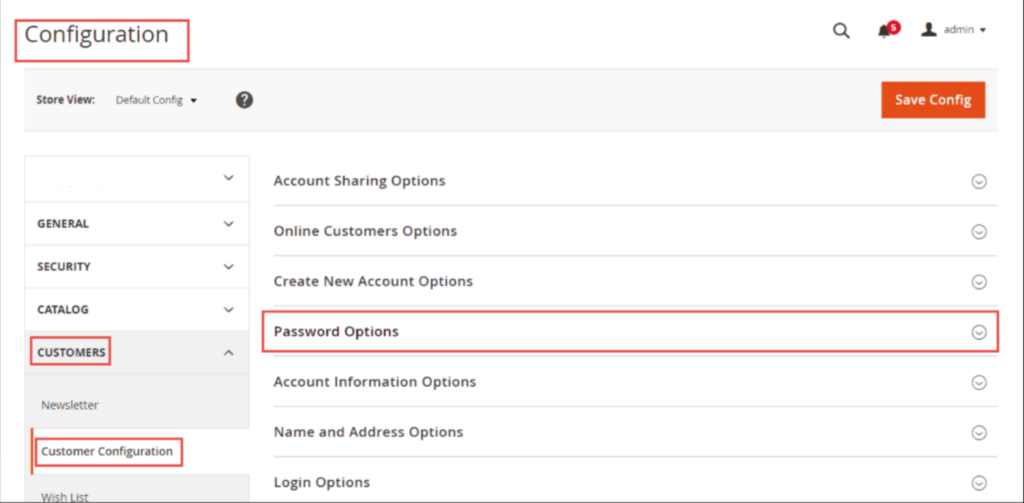
[3] Once expanded Password Options.
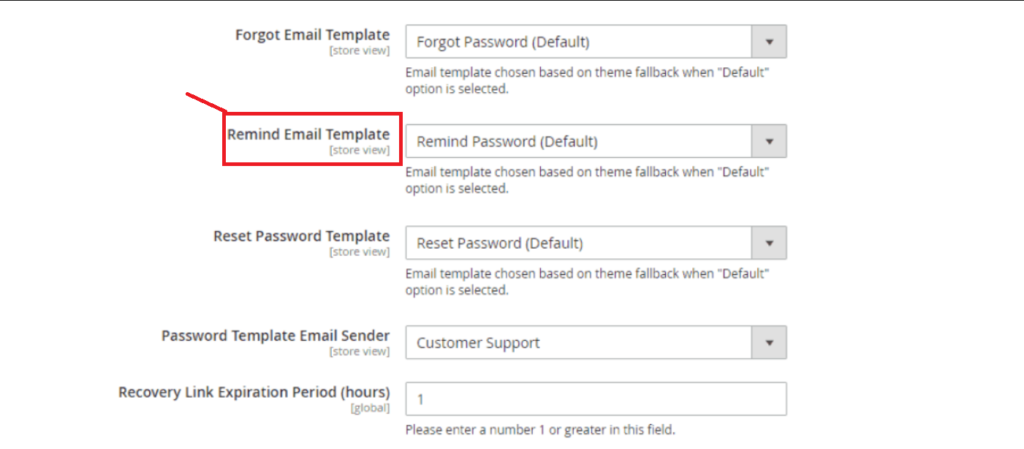
[4] Go To Remind Email Template, clicked on drop down By Default Remind Email Template selected, choose any custom template from down.
[5] Finally clicked on Save Config button.
There are following steps need to follow.
[1] Go STORES > Configuration, redirects Configuration section.
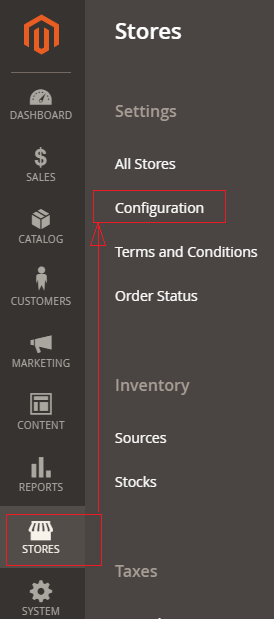
[2] Left panel, choose CUSTOMERS > Customer Configuration.
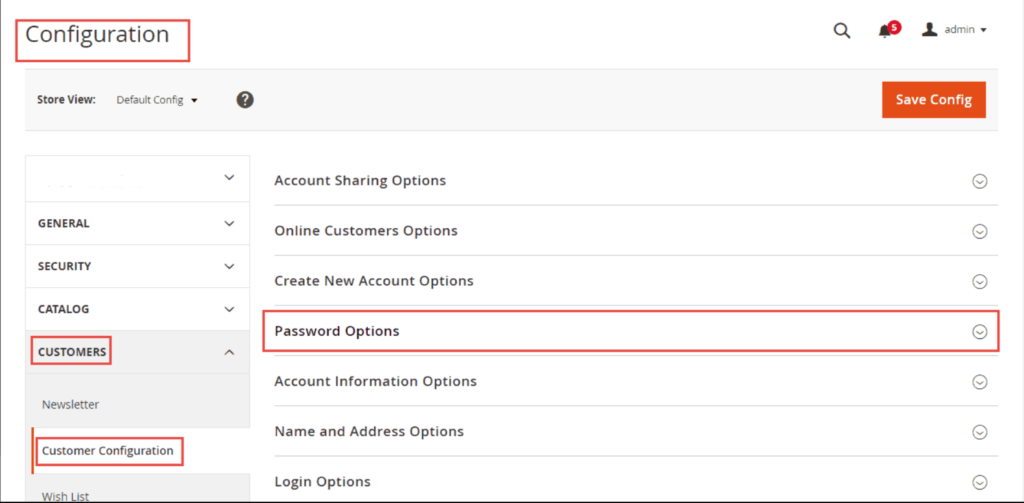
[3] Once expanded Password Options.
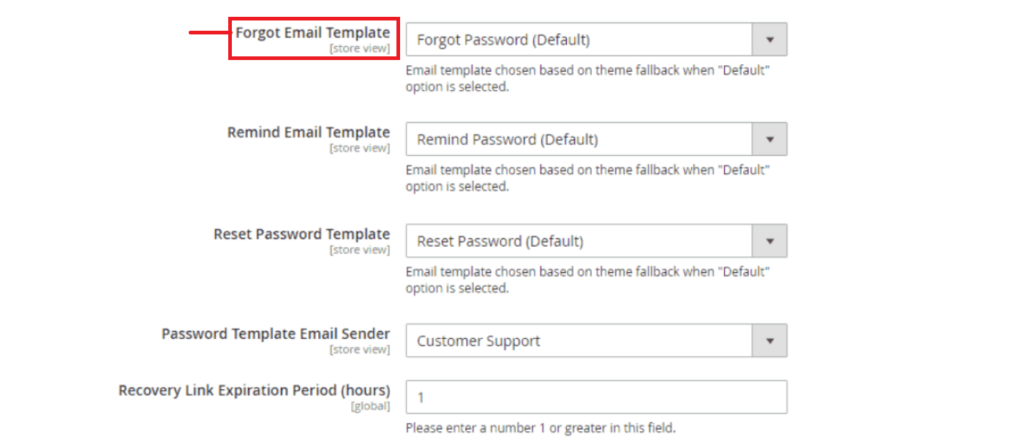
[4] Go To Forgot Email Template, clicked on drop down By Default Forgot Password Template selected, choose any custom template.
[5] Finally clicked on Save Config button.
https://mage2check.com is the best Tool to check whether your ecommerce store or website has been created by using Magento 2 or Not.
Please hit URL [ https://mage2check.com ] & put your ecommerce store or website URL & click on Go Button & Display Result as any of them as below.
[1] Magento 2 Community Edition With Version.
[2] Magento 2 Enterprise Edition With Version.
[3] Magento 2 Enterprise Cloud Edition With Version.
Please follow YouTube Video for further details as
Magento version 2.4.3 has been released on 10th August 2021 (for Commerce and Open Source), which will provide a better on-site shopping experience for customers & improved more security & improved performance with latest features
There are following Magento 2.4.3 latest features
[1]- A new Composer plugin has been introduced that prevents dependency confusion and identifies malicious packages with the same names as internal packages on the public package repository
[2]- Rate limiting is in built to Magento APIs that prevents denial-of-service (DoS) attacks. Web APIs now impose restrictions on the size or number of resources
[3]- ReCAPTCHA has been extended that protects against spam, hacking , attacking etc. ReCAPTCHA will be disabled as default for the Place Order storefront page and payment-related web APIs. This can be enabled from the Admin panel.
[4]- PayPal Pay Later, new paypal modified has been introduced, now customers need to pay for an order byinstallments instead of paying the full amount at time of purchase.
[5]- Admin ACL concept has been modified as those admin users are assigned access to one website only)can no longer edit categories set to Global scope.
[6]- Turns off validation on the Price field as expected when the Dynamic price setting is enabled during bundle product creation
[7]- Page Builder replaces the TinyMCE editor in the following Admin areas:
CMS Page
CMS Block
Category Description
Product Description
Whatever content created by TinyMCE has been migrated into Page Builder as HTML
[8]- The bin/magento setup:db:status command now returns a message indicating that everything is up-to-date after a successful upgrade
[9]- No longer throws an exception when you run bin/magento setup:upgrade to upgrade from a Magento Open Source deployment with Redis to Adobe Commerce
[10]- Once Product added it to an order, removes a product from a wish list.
[11]- Customer now able to add related products to their shopping cart from a wish list. Previously, only added the configurable product, not the configurable product and its related products when a shopper clicked the Select all link of the Related Products section
[12]- Videos are now available in the product gallery.
[13]- It uses the correct email template when sending email to new users, Previously, It uses the default template even when a custom template was selected.
[14]- ACL user role (Admin System > Permissions > User Roles) with the entire Catalog tree selected excluding Edit Product Design ( Catalog > Inventory > Products > Edit Product Design).
[15]- GraphQL is applicable for shared routes as route query and RoutableInterface support routing requests on product, category, and CMS pages. The urlResolver query has been deprecated, and its functionality has been superseded by the route query.
[16]- New composer plugin has been introduced that performs integrity checks during installation to reduce the vulnerability known as dependency confusion.
[17]- Provides Live Search, provides an enhanced search experience by using Artificial Intelligence and Machine Learning concept
[18]- Now Page builder is now available with the Magento 2.4.3 Community Edition [Open Source]
[19]- It fixes over 370 new fixes to core code and 33 security fixes and platform security improvements, protects against remote code execution (RCE) and cross-site scripting (XSS) vulnerabilities.
[20]- Enhancement, the following below functional areas and the quality framework
Other important Magento 2.4.x issue as below
Magento 2.3 To Magento 2.4.5 Comptibility For PHP, MYSQL, Composer, Apache etc
Magento 2.4.4 Installation Steps
Magento 2.4.3-p1 Installation Steps
Magento 2.4.3 Installation Steps
Magento 2.4 Two Factor Authentication
Magento 2.2, Magento 2.3, Magento2.4 Installation Issue on Windows 10, XAMPP
Magento 2 Installation at 51% Error: (Wrong file in Gd2.php:64) Module ‘Magento_Theme’