Difference Between composer.json and composer.lock in Magento 2.x

composer. json file to manage Magento 2 / Extensions installations and upgrades while The composer.lock file stores a set of exact version dependencies that satisfy all of the version constraints of every requirement for every package in the dependency tree of the project.

The composer.lock file is generated after your first composer install. It saves a copy of your dependencies/version that you can commit to your source control

composer.json is the list of required set of libraries and versions for your project.

It contains information such as the name of the project, version constraints for Magento and its dependencies, autoload configurations, scripts to execute during installation and updates, and other project-specific settings.


composer.lock is what set of extensions/modules/components are currently installed for your project. Compoer.lock is a file generated by Composer during dependency resolution and installation, It ensures that all developers working on the same project use the same versions of dependencies

The composer.json is the list of required libraries and versions of your project

What is Declarative Schema in Magento 2.x

Before Release Magento 2.3 we are using in custom module development, Tables created by InstallSchema & upgraded by UpgradeSchema, similarly InstallData to install data in tables & UpgradeData to upgrade data in tables, this process was time-consuming

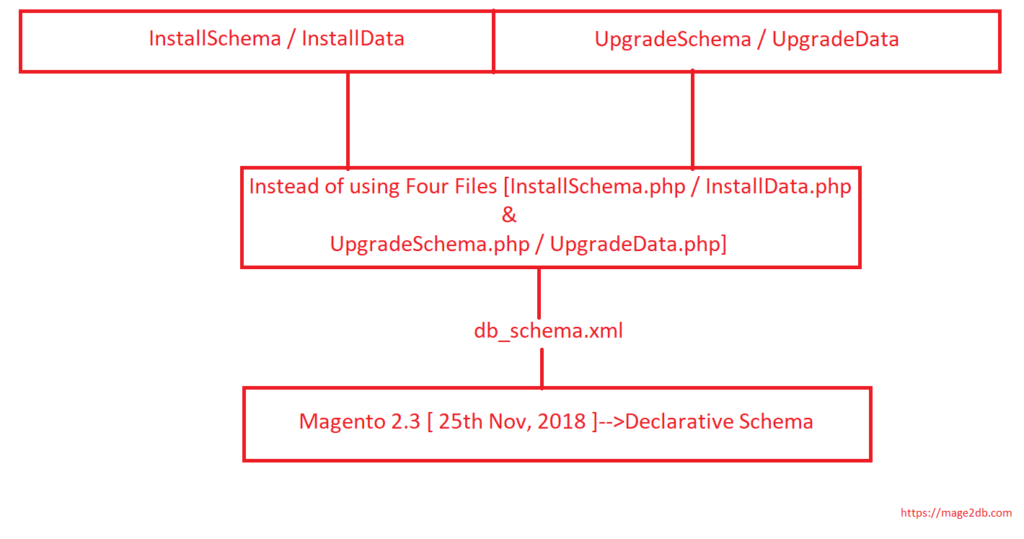
Once Release Magento 2.3 [ 25th Nov, 2018 ], introduced new concept of Database Creation is declarative schema

Replacement of [ InstallSchema / InstallData ,UpgradeSchema / UpgradeData] is declarative schema

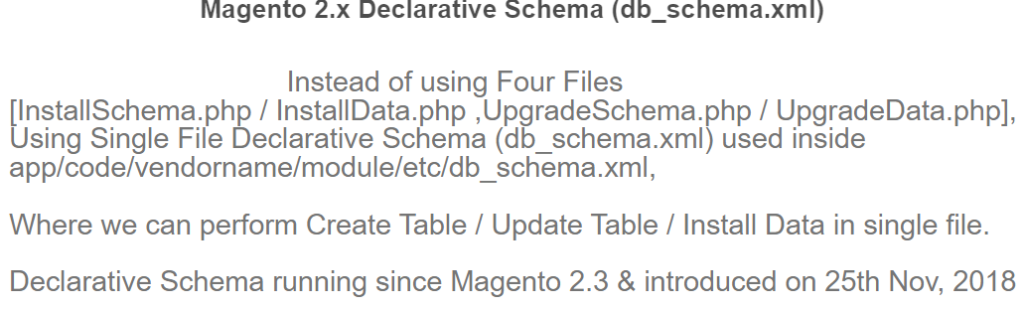
“Instead of using Four Files [InstallSchema.php / InstallData.php ,UpgradeSchema.php / UpgradeData.php], Using Single File (db_schema.xml) used inside app/code/vendorname/module/etc/db_schema.xml”

sample db_schema.xml created as below

<schema xmlns:xsi="http://www.w3.org/2001/XMLSchema-instance" xsi:noNamespaceSchemaLocation="urn:magento:framework:Setup/Declaration/Schema/etc/schema.xsd">
 <table name="Emp_Records" resource="default" engine="innodb" comment="Employee Records">
 <column xsi:type="int" name="id" padding="7" unsigned="false" nullable="false" identity="true" comment="ID" />
	  
<column xsi:type="varchar" name="emp_name"  nullable="false" length="100"  comment="Employee Name" />
		
 <column xsi:type="varchar" name="emp_dept"     nullable="false" length="200"  comment="Employee Department" />
	  
 <column xsi:type="varchar" name="emp_address"       nullable="false" length="200"  comment="Employee Address" />
	 
<column xsi:type="decimal" name="emp_salary" nullable="false" scale="2" precision="10" comment="Employee Salary"/>
	  
<column xsi:type="smallint" name="is_active"   nullable="false"  comment="Employee Records Is Active or not" />

<column xsi:type="datetime" name="created_at"   comment="Employee Records Created Date" />

<column xsi:type="datetime" name="updated_at"   comment="Employee Records Updated Date" />
	  
      <constraint xsi:type="primary" referenceId="PRIMARY">
         <column name="id" />
      </constraint>
	  
    </table>
</schema>

How To Add Customer Groups Dropdown in Magento 2.x Admin Form and Grid By UI Component

There are following below steps need to follow to add Customer Groups drop down in Magento 2 Custom module Admin Entry Form & Grid Listing by using UI Component.

Here we are considering you have already created custom module by using UI Component.

Step [1] – Create Customergroup.php file inside Admin UI Component Listing Column

File Path as below

app/code/ Mage2db/John/Ui/Component/Listing/Column/Customergroup.php
<?php

namespace Hni\Ebsgroupmapping\Ui\Component\Listing\Column;

use Magento\Framework\View\Element\UiComponent\ContextInterface;
use Magento\Framework\View\Element\UiComponentFactory;
use Magento\Ui\Component\Listing\Columns\Column;
use Magento\Framework\UrlInterface;
use Magento\Cms\Block\Adminhtml\Page\Grid\Renderer\Action\UrlBuilder;
use Magento\Framework\Pricing\PriceCurrencyInterface;
use Magento\Store\Model\StoreManagerInterface;
/**
 * Class ProductActions
 */
class Customergroup extends Column
{

    /**
     * @var UrlInterface
     */
    protected $urlBuilder;
    /**
     * @var PriceCurrencyInterface
     */
    protected $priceFormatter;
    /**
     * @var actionUrlBuilder
     */
    protected $actionUrlBuilder;
    /**
     * @var $_storeManager
     */
    protected $_storeManager;


    /**
     * @param ContextInterface $context
     * @param UiComponentFactory $uiComponentFactory
     * @param UrlInterface $urlBuilder
     * @param array $components
     * @param array $data
     */
    public function __construct(
        ContextInterface $context,
        UiComponentFactory $uiComponentFactory,
        UrlInterface $urlBuilder,
        UrlBuilder $actionUrlBuilder,
        PriceCurrencyInterface $priceFormatter,
        StoreManagerInterface $storeManager,
		\Magento\Customer\Ui\Component\Listing\Column\Group\Options $groups,
        array $components = [],
        array $data = []
    ) {
        $this->urlBuilder = $urlBuilder;
        $this->actionUrlBuilder = $actionUrlBuilder;
        $this->priceFormatter = $priceFormatter;
        $this->_storeManager = $storeManager;
		$this->groups = $groups;
        parent::__construct($context, $uiComponentFactory, $components, $data);
    }


    /**
     * Prepare Data Source
     *
     * @param array $dataSource
     * @return array
     */
    public function prepareDataSource(array $dataSource)
    {
        if (isset($dataSource['data']['items'])) {
			
            foreach ($dataSource['data']['items'] as & $item) {
	
   	            $customergroups = $this->groups->toOptionArray();
			    $p=0;
				  foreach ($customergroups as $group) {
					  
				  if($customergroups[$p]['value']==$item['customer_groupid']){
							$groupname = $customergroups[$p]['label'];
						}
				  $p++;		
				  }

                $item[$this->getData('name')] = $groupname;
				
            }
        }
        return $dataSource;
    }
}

Step [2] – Add below code in Admin UI Component Grid Listing.

File Path as below [Instead of UIGridListing.xml use your UI Admin Grid Listing file name]

app/code/ Mage2db/John/view/adminhtml/ui_component/UIGridListing.xml

<column name="customer_groupid" class="Hni\Ebsgroupmapping\Ui\Component\Listing\Column\Customergroup">
<argument name="data" xsi:type="array">
<item name="config" xsi:type="array">
<item name="component" xsi:type="string">Hni_Ebsgroupmapping/js/ui/grid/columns/html</item>
<item name="align" xsi:type="string">left</item>
<item name="sortable" xsi:type="boolean">false</item>
<item name="label" xsi:type="string" translate="true">Customer Group</item>
<item name="sortOrder" xsi:type="number">60</item>
</item>
</argument>
</column>

Step [3] – Add below code in Admin UI Component Grid Entry Form

File Path as below [Instead UIGridEntryForm .xml use your UI Admin UI Form file name]

app/code/ Mage2db/John/view/adminhtml/ui_component/UIGridEntryForm.xml

<field name="customer_groupid" sortOrder="40" formElement="select">
<settings>
<label translate="true">Customer Group</label>
</settings>
  <formElements>
   <select>
   <settings>
   <options  class="Magento\Customer\Model\Customer\Source\GroupSourceInterface"/>
   </settings>
   </select>
  </formElements>
</field>		 

Finally Customers drop down has been added in Magento 2 Admin Grid Entry Form as well as It’s corressponding value displaying in Magento 2 Admin Grid Listing by using UI Component.

How To Create Events & Observer Using Custom Module in Magento / Adobe Commerce 2.x


How To Create Preference Using Custom Module in Magento / Adobe Commerce 2.x


How To Create Plugin Using Custom Module in Magento / Adobe Commerce 2.x


How To Get Base URL in Magento 2.x / Adobe Commerce 2.x


How To Create Custom Module in Magento 2.x / Adobe Commerce 2.x


How To Add Custom Block on Cart Page in Magento 2.x / Adobe Commerce 2.x


How To Create a Custom Log File in Magento 2.x / Adobe Commerce 2.x


How To Create Custom Controller in Magento 2.x / Adobe Commerce 2.x


How To Create a Custom Console Command in Magento 2.x / Adobe Commerce 2.x


How To Add Customer Groups Dropdown in Magento 2.x Admin Form and Grid By UI Component in Magento 2.x / Adobe Commerce 2.


How To Get all Customers Data in Magento 2.x / Adobe Commerce 2.x


How To Set Tier Price With Percentage Value Programmatically in Magento 2.x / Adobe Commerce 2.x


How To Add Tier Price Programmatically in Magento 2.x / Adobe Commerce 2.x


How To Add Websites Dropdown in Admin Form and Grid By UI Component in Magento 2.x / Adobe Commerce 2.x


Magento 2 All Database Tables [500 & more Tables]


How To Set Multi Shipping Settings In Magento 2


How To Set Origin Shipping in Magento 2


Difference Between Offline Shipping Method and Online Shipping Method


Magento 2 Online Customers Options


How To Apply Customer Group Price of Products in Magento 2


How To Add Customer Groups Dropdown in Magento 2 Admin Form and Grid By UI Component


How To Get all Customers Data in Magento 2


How To Create Customer Order in Magento 2 Admin Panel


Magento 2 Login As Customer Not Enabled


How To Configure Customer Account Sharing Options in Magento 2


Magento 2 Redirect To Customer Dashboard After Login


Which Magento 2 database table store customer shipping and billing address


How To Remove Sales Order Data & Customer Data in Magento 2


Which Magento 2 database table store customer’s Email Data


Which Magento 2 Database Table Store Customer Newsletter Data


Which Magento 2 database table store customer’s shipping and billing address


How To Remove Sales Order Data & Customer Data in Magento 2


Which Magento 2 Database Tables Store Customer Rating


Which Magento 2 Database Tables Store Customer Wishlist Products


Magento 2 Increase Customer Session Time


Which Magento 2 Database Table Store Patches

What is Cybersource Payment Gateway

CyberSource is a payment gateway. It is used by online payment and fraud management services for medium and large-sized merchants

Cybersource is an E-commerce credit card payment system management company. Customers process online payments, streamline online fraud management, and simplify payment security, It is introduced in Ecommerce market on December, 2016

How To Add Websites Dropdown in Magento 2.x Admin Form and Grid By UI Component

There are following below steps need to follow to add websites drop down in Magento 2 Custom module Admin Entry Form & Grid Listing by using UI Component.

Here we are considering you have already created custom module by using UI Component.

Step [1] – Create Store.php file inside Admin UI Component Listing Column

File Path as below

app/code/ Mage2db/John/Ui/Component/Listing/Column/Store.php

<?php
namespace Mage2db\John\Ui\Component\Listing\Column;

use Magento\Framework\View\Element\UiComponent\ContextInterface;
use Magento\Framework\View\Element\UiComponentFactory;
use Magento\Ui\Component\Listing\Columns\Column;
use Magento\Framework\UrlInterface;
use Magento\Cms\Block\Adminhtml\Page\Grid\Renderer\Action\UrlBuilder;
use Magento\Framework\Pricing\PriceCurrencyInterface;
use Magento\Store\Model\StoreManagerInterface;
/**
 * Class ProductActions
 */
class Store extends Column
{

    /**
     * @var UrlInterface
     */
    protected $urlBuilder;
    /**
     * @var PriceCurrencyInterface
     */
    protected $priceFormatter;
    /**
     * @var actionUrlBuilder
     */
    protected $actionUrlBuilder;
    /**
     * @var $_storeManager
     */
    protected $_storeManager;


    /**
     * @param ContextInterface $context
     * @param UiComponentFactory $uiComponentFactory
     * @param UrlInterface $urlBuilder
     * @param array $components
     * @param array $data
     */
    public function __construct(
        ContextInterface $context,
        UiComponentFactory $uiComponentFactory,
        UrlInterface $urlBuilder,
        UrlBuilder $actionUrlBuilder,
        PriceCurrencyInterface $priceFormatter,
        StoreManagerInterface $storeManager,
        array $components = [],
        array $data = []
    ) {
        $this->urlBuilder = $urlBuilder;
        $this->actionUrlBuilder = $actionUrlBuilder;
        $this->priceFormatter = $priceFormatter;
        $this->_storeManager = $storeManager;
        parent::__construct($context, $uiComponentFactory, $components, $data);
    }

    /**
     * Prepare Data Source
     *
     * @param array $dataSource
     * @return array
     */
    public function prepareDataSource(array $dataSource)
    {
        if (isset($dataSource['data']['items'])) {
			
            foreach ($dataSource['data']['items'] as & $item) {
	
 	            $Websites = $this->_storeManager->getWebsites();
				
                $WebsiteName="-";
			
                foreach ($Websites as $website) {
                    if($website->getId()==$item['website_id']){
                      /*put your custom column name instead of website_id */
                        $WebsiteName = $website->getName();
                    }
                }
                $item[$this->getData('name')] = $WebsiteName;
            }
        }
        return $dataSource;
    }
}

Step [2] – Add below code in Admin UI Component Grid Listing.

File Path as below

app/code/ Mage2db/John/view/adminhtml/ui_component/UIGridListing.xml

<column name="website_id" class="Mage2db\John\Ui\Component\Listing\Column\Store">
 <argument name="data" xsi:type="array">
 <item name="config" xsi:type="array">
 <item name="component" xsi:type="string">Mage2db_John/js/ui/grid/columns/html</item>
<item name="align" xsi:type="string">left</item>
 <item name="sortable" xsi:type="boolean">false</item>
<item name="label" xsi:type="string" translate="true">Store View</item>
<item name="sortOrder" xsi:type="number">60</item>
 </item>
 </argument>
</column>

Step [3] – Add below code in Admin UI Component Grid Entry Form

File Path as below

app/code/ Mage2db/John/view/adminhtml/ui_component/UIGridEntryForm.xml

<field name="website_id" formElement="select">
   <settings>
   <dataType>text</dataType>
    <label translate="true">Website</label>
    <dataScope>data_title</dataScope>
   </settings>
 <formElements>
  <select>
  <settings>
 <options>
 <option name="1" xsi:type="array">
    <item name="value" xsi:type="string">1</item>
    <item name="label" xsi:type="string">Main Website</item>
 </option>
 <option name="2" xsi:type="array">
 <item name="value" xsi:type="string">2</item>
 item name="label" xsi:type="string">Firstwebsite</item>
 </option>
 <option name="3" xsi:type="array">
 <item name="value" xsi:type="string">3</item>
 <item name="label" xsi:type="string">secondsite</item>
 </option>
 </options>
 <caption translate="true">-- Select Website --</caption>
 </settings>
 </select>
 </formElements>
 </field> 

Finally Website drop down has been added in Magento 2 Admin Grid Entry Form as well as It’s corressponding value displaying in Magento 2 Admin Grid Listing by using UI Component.

How To Call Store ID in Magento 2.x

There are following below code , to call Store ID in Magento 2 by using Depdependency Injection.

<?php
namespace Mage2db\John\Block;
class Index extends \Magento\Framework\View\Element\Template
{
    protected $_storeManager;    
    
    public function __construct(
        \Magento\Backend\Block\Template\Context $context,        
        \Magento\Store\Model\StoreManagerInterface $storeManager,        
        array $data = []
    )
    {        
        $this->_storeManager = $storeManager;        
        parent::__construct($context, $data);
    }
    
    /**
     * Get store identifier
     *
     * @return  int
     */
    public function getStoreId()
    {
        return $this->_storeManager->getStore()->getId();
    }
    
    /**
     * Get website identifier
     *
     * @return string|int|null
     */
    public function getWebsiteId()
    {
        return $this->_storeManager->getStore()->getWebsiteId();
    }
    
    /**
     * Get Store code
     *
     * @return string
     */
    public function getStoreCode()
    {
        return $this->_storeManager->getStore()->getCode();
    }
    
    /**
     * Get Store name
     *
     * @return string
     */
    public function getStoreName()
    {
        return $this->_storeManager->getStore()->getName();
    }
    
    /**
     * Get current url for store
     *
     * @param bool|string $fromStore Include/Exclude from_store parameter from URL
     * @return string     
     */
    public function getStoreUrl($fromStore = true)
    {
        return $this->_storeManager->getStore()->getCurrentUrl($fromStore);
    }
    
    /**
     * Check if store is active
     *
     * @return boolean
     */
    public function isStoreActive()
    {
        return $this->_storeManager->getStore()->isActive();
    }
}
?>

Call above block method inside template phtml file.

echo"<BR> Store ID=".$block->getStoreId();
echo"<BR> Store Code=".$block->getStoreCode();
echo"<BR> Store Website ID=".$block->getWebsiteId();
echo"<BR> Store Name=".$block->getStoreName();
echo"<BR> Store URL=".$block->getStoreUrl();
echo"<BR> Store Active Yes / No=". $block->isStoreActive();

Magento 2.x Rest API

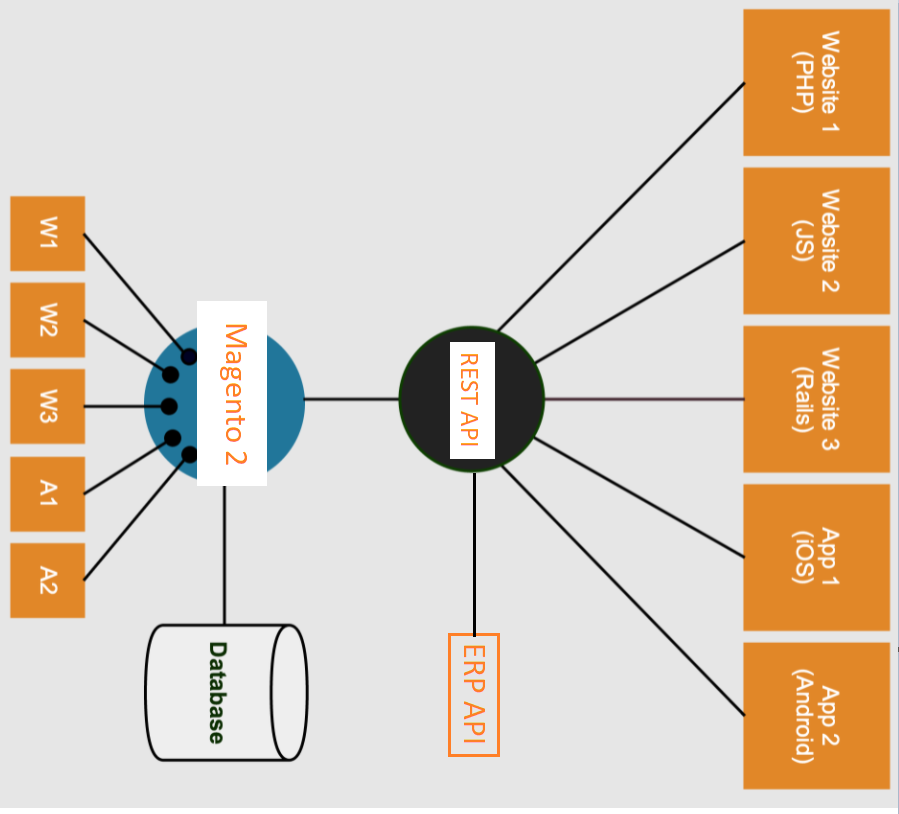
REST API (also known as RESTful API) is an application programming interface (API or web API) that conforms to the constraints of REST architectural style and allows for interaction with RESTful web services.

A Web API (or Web Service) conforming to the REST architectural style is a REST API

Magento 2 REST API identifies multiple functions which can be used to perform requests and receive responses

How To Create db_schema_whitelist.json in Magento 2.3.x & 2.4.x

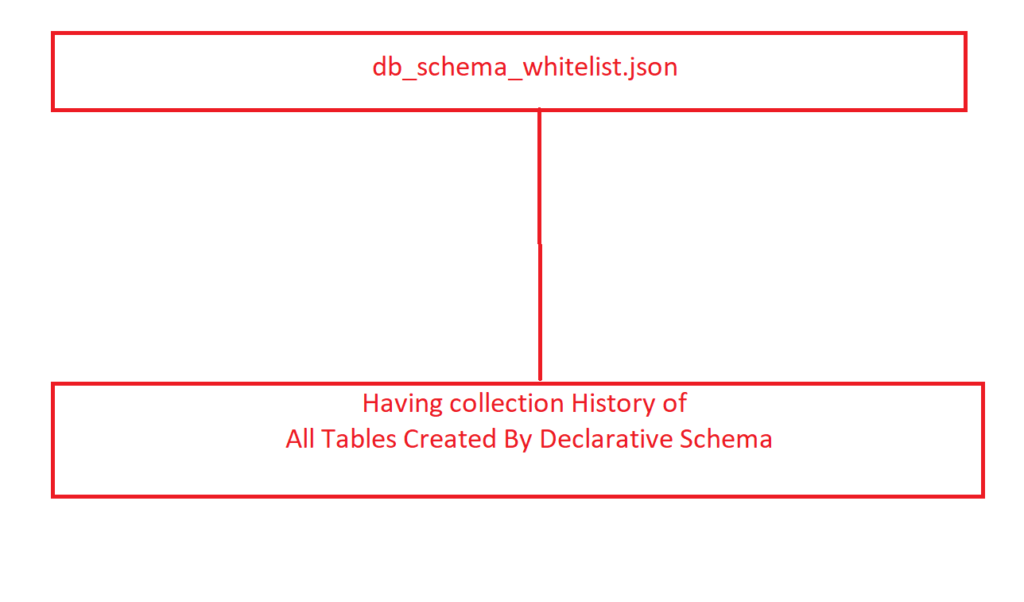
db_schema_whitelist.json file having history of all tables, columns, primary keys, foreign key, constraint keys combination etc, those are created by using the declarative schema.

There are two ways to generate db_schema_whitelist.json by following below methods

Step [1] – Manually To Create db_schema_whitelist.json

Need to create file below path

app/code/VendorName/ModuleName/etc/db_schema_whitelist.json

Step [2] – CLI Command To Create db_schema_whitelist.json

php bin/magento setup:db-declaration:generate-whitelist --module-name=VendorName_ModuleName

It will auto create db_schema_whitelist.json below path

   app/code/VendorName/ModuleName/etc/db_schema_whitelist.json 

Cannot process definition to array for type tinytext in Magento 2.x

This error occurs because any third-party extension’s table’s column data type as tinytext.

This error occurs if any Third Party Extension’s table’s column data type as tinytext

Solution:: There are following below steps need to follow

Step [1] – Open below path file

/vendor/magento/framework/Setup/Declaration/Schema/Db/DefinitionAggregator.php

 fint fromDefinition() method and then add debug code to find column name as below , we have addedd (debugging) code inside

/* Starts Add Code for Debug */ and /* Code End for Debug */

To find column name

public function fromDefinition(array $data)
    {
        $type = $data['type'];
        if (!isset($this->definitionProcessors[$type])) {

            /* Starts Add Code for Debug */

            echo "<pre>";
            print_r($data); exit();

            /* Code End for Debug  */

            throw new \InvalidArgumentException(
                sprintf("Cannot process definition to array for type %s", $type)
            );
        }

        $definitionProcessor = $this->definitionProcessors[$type];
        return $definitionProcessor->fromDefinition($data);
    }

Step [2] – Run setup:upgrade command and you will get an array of column data in the console. so from this array, you will get the name of the column from your third party extension table.

Now from that table please change column’s data type “tinytext” to “text” 

Step [3] – Finally issue has been resolved.

How To Create Custom Module in Magento 2.x

Module is backbone of Magento 2, Module having collection of Controllers, Models, Blocks, Helpers, Layouts, Templates, Plugins, Observer etc. These ineract with each other as well as ineract with
Magento 2 exisiting functionalities in order to add a specific feature to a Magento 2 application.

There are following below steps need to follow to create Magento 2 custom module.

Step [1] – Nominate Module Name :: Syntax as below

Namespace_Modulename or Vendorname_Modulename

Namespace(Vendorname) always must be unique.

Step [2] – Create a new directory for the custom module

Syntax as below

Namespace / ModuleName or Vendorname / ModuleName

Step [3] – Create a module’s registration file :: This file name is registration.php & used to registered module.

Syntax as below

<?php

\Magento\Framework\Component\ComponentRegistrar::register(
    \Magento\Framework\Component\ComponentRegistrar::MODULE,
    'Namespace_Modulename',
    __DIR__
);

Namespace = Mage2db

Modulename = John

<?php
\Magento\Framework\Component\ComponentRegistrar::register(
    \Magento\Framework\Component\ComponentRegistrar::MODULE,
    'Mage2db_John',
    __DIR__
);

Briefly Explain registration.php

Step [4] – Create a module’s naming configuration file :: This file name is module.xml & used to define module name ( Namespace_Modulename ) as well as store module into database table setup_module


Syntax as below

<config xmlns:xsi="http://www.w3.org/2001/XMLSchema-instance" xsi:noNamespaceSchemaLocation="urn:magento:framework:Module/etc/module.xsd">
<module name="Namespace_Modulename" setup_version="3.0.1"/> 
</config>

Namespace = Mage2db

Modulename = John

<config xmlns:xsi="http://www.w3.org/2001/XMLSchema-instance" xsi:noNamespaceSchemaLocation="urn:magento:framework:Module/etc/module.xsd">
<module name="Mage2db_John" setup_version="3.0.1"/> 
</config>

The schema_version is no longer required since releasing Magento 2.3.3

Briefly Explain module.xml


How To Create Events & Observer Using Custom Module in Magento / Adobe Commerce 2.x


How To Create Preference Using Custom Module in Magento / Adobe Commerce 2.x


How To Create Plugin Using Custom Module in Magento / Adobe Commerce 2.x


How To Get Base URL in Magento 2.x / Adobe Commerce 2.x


How To Create Custom Module in Magento 2.x / Adobe Commerce 2.x


How To Add Custom Block on Cart Page in Magento 2.x / Adobe Commerce 2.x


How To Create a Custom Log File in Magento 2.x / Adobe Commerce 2.x


How To Create Custom Controller in Magento 2.x / Adobe Commerce 2.x


How To Create a Custom Console Command in Magento 2.x / Adobe Commerce 2.x


How To Add Customer Groups Dropdown in Magento 2.x Admin Form and Grid By UI Component in Magento 2.x / Adobe Commerce 2.


How To Get all Customers Data in Magento 2.x / Adobe Commerce 2.x


How To Set Tier Price With Percentage Value Programmatically in Magento 2.x / Adobe Commerce 2.x


How To Add Tier Price Programmatically in Magento 2.x / Adobe Commerce 2.x


How To Add Websites Dropdown in Admin Form and Grid By UI Component in Magento 2.x / Adobe Commerce 2.x


Magento 2 All Database Tables [500 & more Tables]


How To Set Multi Shipping Settings In Magento 2


How To Set Origin Shipping in Magento 2


Difference Between Offline Shipping Method and Online Shipping Method


Magento 2 Online Customers Options


How To Apply Customer Group Price of Products in Magento 2


How To Add Customer Groups Dropdown in Magento 2 Admin Form and Grid By UI Component


How To Get all Customers Data in Magento 2


How To Create Customer Order in Magento 2 Admin Panel


Magento 2 Login As Customer Not Enabled


How To Configure Customer Account Sharing Options in Magento 2


Magento 2 Redirect To Customer Dashboard After Login


Which Magento 2 database table store customer shipping and billing address


How To Remove Sales Order Data & Customer Data in Magento 2


Which Magento 2 database table store customer’s Email Data


Which Magento 2 Database Table Store Customer Newsletter Data


Which Magento 2 database table store customer’s shipping and billing address


How To Remove Sales Order Data & Customer Data in Magento 2


Which Magento 2 Database Tables Store Customer Rating


Which Magento 2 Database Tables Store Customer Wishlist Products


Magento 2 Increase Customer Session Time


Which Magento 2 Database Table Store Patches