
There are following below command to enable Query Logs

php bin/magento dev:query-log:enable
php bin/magento cache:flush
After running above CLI Command, you should be able to see the log file at var/debug/db.log

AI, Ecommerce, Technology & Management – Learn. Build. Solve
There are following below command to enable Query Logs
php bin/magento dev:query-log:enable
php bin/magento cache:flushAfter running above CLI Command, you should be able to see the log file at var/debug/db.log
There are following below methods to add Feature-Policy Security Header in Apache or NGINX or .HTACCESS
[1] How to add in Nginx configuration file

There are following code need to add in Nginx configuration file

add_header set Feature-Policy "geolocation 'self'; vibrate 'none'";


[2] How to add in Apache configuration file

There are following code need to add in Apache configuration file

header always set Feature-Policy "geolocation 'self'; vibrate 'none'"


[3] How to add in .htaccess file

There are following code need to add in .htaccess configuration file

<IfModule mod_headers.c>
Header set Feature-Policy "geolocation 'self'; vibrate 'none'"
<IfModule mod_headers.c>
Syntax: Feature-Policy: <directive> <allow-list>

There are following below things, according, website need, can enable/disable Feature-Policy


• Directive: This header accepts 2 directive but on directive can redirect with other directives, as mentioned and described below:

• <directive>: It corresponds to the instructions on how we can use different features and API’s.

• <allow-list>: It is a list indicating that how the browser feature can be used.

• <directive>: This directive can redirect to any of the following directive:
•
• accelerometer: Used to get information about acceleration of device

• ambient-light-sensor: Used to get information whether there is enough light in surroundings

• autoplay: Used to control media autoplay settings. Mostly used with audio and video elements

• battery: Used to get the status of battery using Battery Status API

• camera: Used to control video input via a camera of device

• display-capture: Captures screen contents through a screenshot

• document-domain: Used to control the current document’s document domain by setting it or unsetting it

• encrypted-media: Used to control Encrypted Media Extension API (EME)

• fullscreen : Used to control full screen access

• geolocation: Used to show location of user on a map by using geolocation API

• gyroscope: Used to get information about orientation of device accessing gyroscope of device

• layout-animations: Used to show layout animations and transitions

• legacy-image-formats: Displays image in legacy format

• magnetometer: Used to get information about magnetic orientation of device

• microphone: Used for audio input through device’s microphone

• midi: Used to access Web MIDI API

• oversized-images: Used in displaying and downloading large over-sized images

• payment: Controls all payment related activity by using Payment Request API

• picture-in-picture: Allows a video to play in Picture-in-Picture mode

• public key-credentials-get: Uses Web Authentication API and retrieves public-key credentials

• sync-xhr: Used in making synchronous XMLHTTPRequest

• usb: Controls WebUSB API for USB Media access

• wake-lock: Informs the device to not enter power-saving mode by using Wake Lock API

• xr-spatial-tracking: Used to interact with WebXR session by making use of WebXR Device API
HTTP Security Headers Checker Tool
https://www.site2info.com/sitesecurity.php
Magento 2 All Database Tables [500 & more Tables]
HTTP Security Headers Checker Tool – Security Headers Response
How to add Feature-Policy Security Header
How to add X-Content-Type-Options Security Header
How to add Expect-CT Security Header
How to add X-Frame-Options Security Header
How to add X-XSS-Protection Security Header
How to add Referrer Policy Security Header
Referrer Policy Header Security
How to add HTTP Strict Transport Security (HSTS)
How To Set CSRF Token in Magento 2
There are following below methods to add X-Content-Type-Options Security Header in Apache or NGINX or .HTACCESS
[1] How to add in Nginx configuration file

There are following code need to add in Nginx configuration file

add_header set X-Content-Type-Options "nosniff" always;


[2] How to add in Apache configuration file

There are following code need to add in Apache configuration file

header always set X-Content-Type-Options "nosniff" always


[3] How to add in .htaccess file

There are following code need to add in .htaccess configuration file

<IfModule mod_headers.c>
Header set X-Content-Type-Options "nosniff" always;
<IfModule mod_headers.c>
HTTP Security Headers Checker Tool
https://www.site2info.com/sitesecurity.php
HTTP Security Headers Checker Tool
https://www.site2info.com/sitesecurity.php
Other Important HTTP Security Headers
Magento 2 All Database Tables [500 & more Tables]
HTTP Security Headers Checker Tool – Security Headers Response
How to add Feature-Policy Security Header
How to add X-Content-Type-Options Security Header
How to add Expect-CT Security Header
How to add X-Frame-Options Security Header
How to add X-XSS-Protection Security Header
How to add Referrer Policy Security Header
Referrer Policy Header Security
How to add HTTP Strict Transport Security (HSTS)
How To Set CSRF Token in Magento 2
There are following below methods to add Expect-CT Security Header in Apache or NGINX or .HTACCESS
[1] How to add in Nginx configuration file

There are following code need to add in Nginx configuration file

add_header set Expect-CT: max-age=604800, enforce, report-uri="https://www.example.com/report";


[2] How to add in Apache configuration file

There are following code need to add in Apache configuration file

header always set Expect-CT: max-age=604800, enforce, report-uri="https://www.example.com/report"


[3] How to add in .htaccess file

There are following code need to add in .htaccess configuration file

<IfModule mod_headers.c>
Header set Expect-CT: max-age=604800, enforce, report-uri="https://www.example.com/report"
<IfModule mod_headers.c>

Note:: Instead of https://www.example.com, Please use your own URL
HTTP Security Headers Checker Tool
https://www.site2info.com/sitesecurity.php
Other Important HTTP Security Headers
Magento 2 All Database Tables [500 & more Tables]
HTTP Security Headers Checker Tool – Security Headers Response
How to add Feature-Policy Security Header
How to add X-Content-Type-Options Security Header
How to add Expect-CT Security Header
How to add X-Frame-Options Security Header
How to add X-XSS-Protection Security Header
How to add Referrer Policy Security Header
Referrer Policy Header Security
How to add HTTP Strict Transport Security (HSTS)
How To Set CSRF Token in Magento 2
There are following below methods to add X-Frame-Options Security Header in Apache or NGINX or .HTACCESS
[1] How to add in Nginx configuration file

There are following code need to add in Nginx configuration file

add_header set X-Frame-Options "sameorigin";


[2] How to add in Apache configuration file

There are following code need to add in Apache configuration file

header always set X-Frame-Options "sameorigin"


[3] How to add in .htaccess file

There are following code need to add in .htaccess configuration file

<IfModule mod_headers.c>
Header set X-Frame-Options "sameorigin"
<IfModule mod_headers.c>
HTTP Security Headers Checker Tool
https://www.site2info.com/sitesecurity.php
Other Important HTTP Security Headers
Magento 2 All Database Tables [500 & more Tables]
HTTP Security Headers Checker Tool – Security Headers Response
How to add Feature-Policy Security Header
How to add X-Content-Type-Options Security Header
How to add Expect-CT Security Header
How to add X-Frame-Options Security Header
How to add X-XSS-Protection Security Header
How to add Referrer Policy Security Header
Referrer Policy Header Security
How to add HTTP Strict Transport Security (HSTS)
How To Set CSRF Token in Magento 2
There are following below methods to add X-XSS-Protection Security Header in Apache or NGINX or .HTACCESS
[1] How to add in Nginx configuration file

There are following code need to add in Nginx configuration file

add_header set X-XSS-Protection "1; mode=block";


[2] How to add in Apache configuration file

There are following code need to add in Apache configuration file

header always set X-XSS-Protection "1; mode=block"


[3] How to add in .htaccess file

There are following code need to add in .htaccess configuration file

<IfModule mod_headers.c>
Header set X-XSS-Protection "1; mode=block"
<IfModule mod_headers.c>
HTTP Security Headers Checker Tool
https://www.site2info.com/sitesecurity.php
Other Important HTTP Security Headers
Magento 2 All Database Tables [500 & more Tables]
HTTP Security Headers Checker Tool – Security Headers Response
How to add Feature-Policy Security Header
How to add X-Content-Type-Options Security Header
How to add Expect-CT Security Header
How to add X-Frame-Options Security Header
How to add X-XSS-Protection Security Header
How to add Referrer Policy Security Header
Referrer Policy Header Security
How to add HTTP Strict Transport Security (HSTS)
How To Set CSRF Token in Magento 2
There are following below methods to add HTTP Strict Transport Security Header in Apache or NGINX or .HTACCESS
[1] How to add in Nginx configuration file

There are following code need to add in Nginx configuration file

add_header set Strict-Transport-Security "max-age=31536000; includeSubDomains; preload";


[2] How to add in Apache configuration file

There are following code need to add in Apache configuration file

header always set Strict-Transport-Security "max-age=31536000; includeSubDomains; preload"


[3] How to add in .htaccess file

There are following code need to add in .htaccess configuration file

<IfModule mod_headers.c>
Header set Strict-Transport-Security "max-age=31536000; includeSubDomains; preload"
<IfModule mod_headers.c>
HTTP Security Headers Checker Tool
https://www.site2info.com/sitesecurity.php
Other Important HTTP Security Headers
Magento 2 All Database Tables [500 & more Tables]
HTTP Security Headers Checker Tool – Security Headers Response
How to add Feature-Policy Security Header
How to add X-Content-Type-Options Security Header
How to add Expect-CT Security Header
How to add X-Frame-Options Security Header
How to add X-XSS-Protection Security Header
How to add Referrer Policy Security Header
Referrer Policy Header Security
How to add HTTP Strict Transport Security (HSTS)
How To Set CSRF Token in Magento 2
There are following below methods to add Referrer Policy Security Header in Apache or NGINX or .HTACCESS
[1] How to add in Nginx configuration file

There are following code need to add in Nginx configuration file

add_header set Referrer-Policy "strict-origin-when-cross-origin";


[2] How to add in Apache configuration file

There are following code need to add in Apache configuration file

header always set Referrer-Policy "strict-origin-when-cross-origin"


[3] How to add in .htaccess file

There are following code need to add in .htaccess configuration file

<IfModule mod_headers.c>
Header set Referrer-Policy "strict-origin-when-cross-origin"
<IfModule mod_headers.c>
HTTP Security Headers Checker Tool
https://www.site2info.com/sitesecurity.php
Other Important HTTP Security Headers
Magento 2 All Database Tables [500 & more Tables]
HTTP Security Headers Checker Tool – Security Headers Response
How to add Feature-Policy Security Header
How to add X-Content-Type-Options Security Header
How to add Expect-CT Security Header
How to add X-Frame-Options Security Header
How to add X-XSS-Protection Security Header
How to add Referrer Policy Security Header
Referrer Policy Header Security
How to add HTTP Strict Transport Security (HSTS)
How To Set CSRF Token in Magento 2
Referrer-Policy header security is a request header that indicates the site which the traffic originated from. If there is no adequate prevention in place, the URL itself, and even sensitive information contained in the URL will be leaked to the cross-site.
The Referrer-Policy header is a fairly new header that has been a W3C Candidate Recommendation since January 26, 2017. It makes it possible to control which referrer information is included in requests. When viewing a page, the referrer information indicates the origin of the request. Because this can lead to privacy and security issues when passing on the URL, the Referrer-Policy header was created to control how this information is sent from a referring page to the target page in the course of browsing.
Referrer-Policy is important because it addresses the following issues:
• Unexpected cross-origin information leakage hinders web users’ privacy. A protective referrer policy can help.
• Consider setting a referrer policy of strict-origin-when-cross-origin. It retains much of the referrer’s usefulness, while mitigating the risk of leaking data cross-origins.
• Don’t use referrers for Cross-Site Request Forgery (CSRF) protection. Use CSRF tokens instead, and other headers as an extra layer of security
Referrer-Policy Header Security Working Model
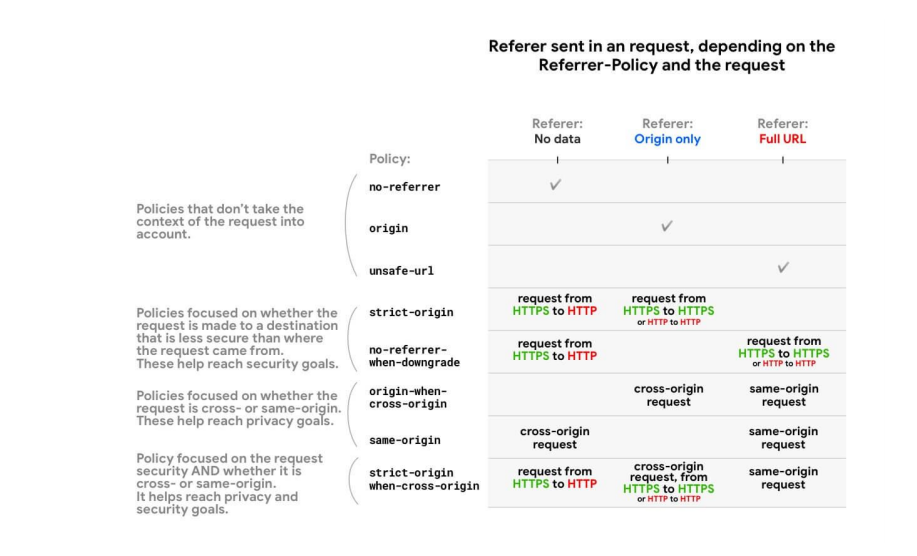
All Referrer policies that take the scheme (HTTPS vs. HTTP) as (strict-origin, no-referrer when-downgrade and strict-origin-when-cross-origin) treat requests from an HTTP origin to another HTTP origin

The same way as requests from an HTTPS origin to another HTTPS origin—even if HTTP is less secure.

That's because for these policies, what matters is whether a security downgrade takes place, as if the request can expose data from an encrypted origin to an unencrypted one.

An HTTP → HTTP request is unencrypted all
along, so there is no downgrade. HTTPS → HTTP requests, on the contrary, present a downgrade.

If a request is same-origin, this means that the scheme (HTTPS or HTTP) is the same; hence there is no security downgrade
How to integrate Referrer-Policy Header Security
The Referrer-Policy HTTP header governs which referrer information, sent in the Referer header should be included with requests made.
How to integrate Referrer-Policy Header Security give as below
Syntax:

• Referrer-Policy: no-referrer
• Referrer-Policy: no-referrer-when-downgrade
• Referrer-Policy: origin
• Referrer-Policy: strict-origin
• Referrer-Policy: origin-when-cross-origin
• Referrer-Policy: strict-origin-when-cross-origin
• Referrer-Policy: same-origin
• Referrer-Policy: unsafe-url
[1] How to add in Nginx configuration file

There are following code need to add in Nginx configuration file

add_header Referrer-Policy "strict-origin-when-cross-origin";


[2] How to add in Apache configuration file

There are following code need to add in Apache configuration file

header Referrer-Policy "strict-origin-when-cross-origin"


[3] How to add in .htaccess file

There are following code need to add in .htaccess configuration file

<IfModule mod_headers.c>
Header  set Referrer-Policy "strict-origin-when-cross-origin"
<IfModule mod_headers.c>
There are following steps, where each Referrer-Policy has been described detailed view

• no-referrer: This sends no referrer information along with the request made.

• no-referrer-when-downgrade: This sends complete URL information to a potentially trustworthy URL from modern HTTPS State or from not modern HTTPS state to any origin . Information is sent for HTTPS -> HTTPS and HTTP -> HTTPS transition . This is the default
Referrer-Policy.

• origin: It only sends the origin value of the request client when making either same origin (same website) or cross-origin (different website) requests.

• strict origin: This only sends origin information to potentially trustworthy URL from modern HTTPS State or from not modern HTTPS state to any origin.

• origin-when-cross-origin: It sends complete URL information when making requests on same origin but only origin information when making cross-origin requests.

• strict-origin-when-cross-origin: It sends complete URL information when working on request from same origin. It sends only origin information to potentially trustworthy URL from modern HTTPS State or from not modern HTTPS state to any origin. No referrer
information is sent to a potentially non-trustworthy URL.

• same-origin: It sends referrer information when origin is on same website but no information is sent for cross origin.

• unsafe-url: It sends complete URL information irrespective of any criteria.
There are following list of Referrer-Policy’s Browser compatibility, that is why Referrer-Policy must be integrate
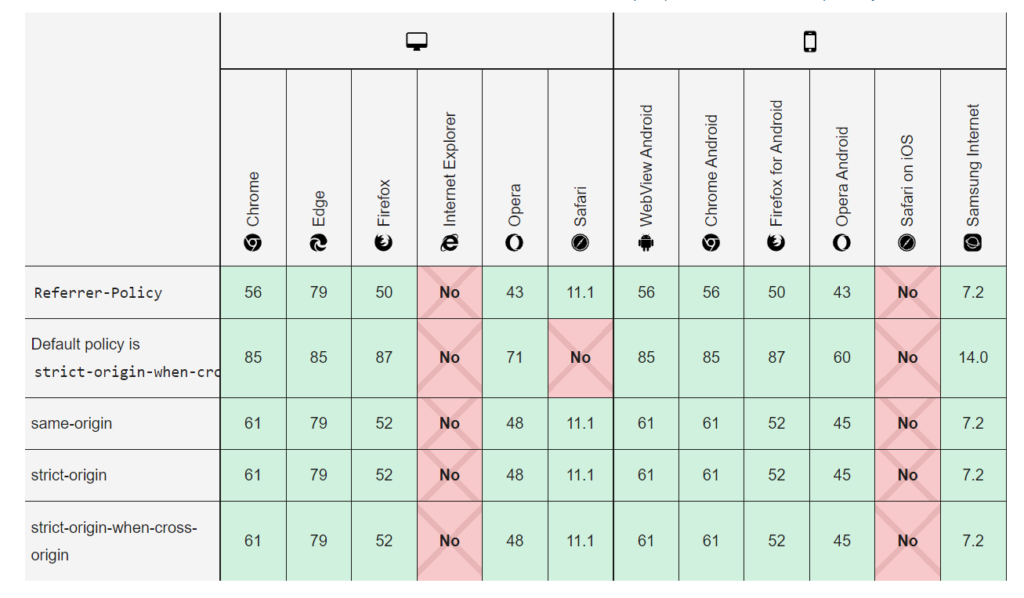
There are following below advantages after integrating Referrer-Policy Header Security
HTTP Security Headers Checker Tool
https://www.site2info.com/sitesecurity.php
Other Important HTTP Security Headers
Magento 2 All Database Tables [500 & more Tables]
HTTP Security Headers Checker Tool – Security Headers Response
How to add Feature-Policy Security Header
How to add X-Content-Type-Options Security Header
How to add Expect-CT Security Header
How to add X-Frame-Options Security Header
How to add X-XSS-Protection Security Header
How to add Referrer Policy Security Header
Referrer Policy Header Security
How to add HTTP Strict Transport Security (HSTS)
How To Set CSRF Token in Magento 2
Chatbot or bot: – It is a human’s language conversation software, Users communicate with a chatbot via the chat interface (text format) or by voice, like how they would talk to a real person. Chatbots process & instantly reply via the chat interface (text format) or by voice.
“Chatbot based on AI-powered Intelligent Virtual Assistant solution”
eCommerce chatbot : – An eCommerce chatbot is an AI-powered Intelligent Virtual Assistant solution that can be implemented by online retailers /shoppers to engage customers at every stage of their shopping steps.
“An eCommerce chatbot is an AI-powered Intelligent Virtual Assistant solution that can be implemented by online retailers /shoppers to engage customers at every stage of their journey.”
“eCommerce chatbots serve as a powerful lead generation tool for online retailers /shoppers. Using this AI-powered Intelligent, they engage visitors on a retailer’s website, app, or other digital shop media and converts them into shopping deals.”