What is an eCommerce Chatbot?

Chatbot or bot: – It is a human’s language conversation software, Users communicate with a chatbot via the chat interface (text format) or by voice, like how they would talk to a real person. Chatbots process & instantly reply via the chat interface (text format) or by voice.

“Chatbot based on AI-powered Intelligent Virtual Assistant solution”

eCommerce chatbot : – An eCommerce chatbot is an AI-powered Intelligent Virtual Assistant solution that can be implemented by online retailers /shoppers to engage customers at every stage of their shopping steps.

“An eCommerce chatbot is an AI-powered Intelligent Virtual Assistant solution that can be implemented by online retailers /shoppers to engage customers at every stage of their journey.”

“eCommerce chatbots serve as a powerful lead generation tool for online retailers /shoppers. Using this AI-powered Intelligent, they engage visitors on a retailer’s website, app, or other digital shop media and converts them into shopping deals.”


SEO Basics: Meta Robots “Noindex,Nofollow” & “index,follow” Explained

What are robot meta tags?

Robots meta directives (sometimes called “meta tags”) are pieces of code that provide crawlers instructions for how to crawl or index web page content. Whereas robots.txt file directives give bots suggestions for how to crawl a website’s pages

There are two types of robots meta directives:
Those that are part of the HTML page (like the meta robotstag) and those that the web server sends as HTTP headers (such as x-robots-tag).

[1] Using the robots meta tag: The robots meta tag lets you utilize a granular, page-specific approach to controlling how an individual page should be indexed and served to users in Google Search results. Place the robots meta tag in the <head> section of a given page, like this:

<!DOCTYPE html>
<html><head>
<meta name="robots" content="noindex" />
(…)
</head>
<body>(…)</body>
</html>

There are following ways for Indexing & No Indexing in Search Engine like Google , Yahoo or Bing

[a] For No Indexing Web Pages: This method used in website developer mode

Syntax as –

[b] For Indexing Web Pages: This method used in website production mode,

Syntax as –

[2] Using the X-Robots-Tag HTTP header:
The X-Robots-Tag can be used as an element of the HTTP header response for a given URL. Any directive that can be used in a robots meta tag can also be specified as an X-Robots-Tag. Here’s an example of an HTTP response with an X-Robots-Tag instructing crawlers not to index a page:

HTTP/1.1 200 OK
Date: Tue, 25 May 2010 21:42:43 GMT
(…)
X-Robots-Tag: noindex
(…)

Multiple X-Robots-Tag headers can be combined within the HTTP response, or you can specify a comma-separated list of directives. Here's an example of an HTTP header response which has a noarchive X-Robots-Tag combined with an unavailable_after X-Robots-Tag.


HTTP/1.1 200 OK
Date: Tue, 25 May 2010 21:42:43 GMT
(…)
X-Robots-Tag: noarchive
X-Robots-Tag: unavailable_after: 25 Jun 2010 15:00:00 PST

The different robots meta tag values

The following values (‘parameters’) can be placed on their own, or together in the content attribute of tag (separated by a comma), to control how search engines interact with your page.

  • index: Allow search engines to add the page to their index, so that it can be discovered by people searching.Note: When there are no directives relating to indexing, this is assumed to be the default.
  • noindex: Disallow search engines from adding this page to their index, and therefore disallow them from showing it in their results.
  • follow: Tells the search engines that it may follow links on the page, to discover other pages.
  • nofollow: Tells the search engines robots not to ‘endorse’ (pass equity through) any links on the page. Note that this includes all links on the page, including, e.g., those in navigation elements, links to images or other resources, and so on.
  • none: A shortcut for noindex, nofollow.
  • all: A shortcut for index, follow.
  • noimageindex: Disallow search engines from indexing images on the page.
  • noarchive: Prevents the search engines from showing a cached copy of this page in their search results listings.
  • nocache: Same as noarchive, but only used by MSN/Live.
  • nosnippet: Prevents the search engines from showing a text or video (as meta description) of this page in the search results, and prevents them from showing a cached copy of this page in their search results listings.
  • nositelinkssearchbox: Prevents the search engine from showing an inline search box for your site.
  • nopagereadaloud: Prevents the search engine from reading your page’s content aloud via voice services/results.
  • notranslate: Prevents search engines from showing translations of the page in their search results.
  • max-snippet:[number]Sets a maximum number of characters for the meta description.
  • max-video-preview:[number]Sets a maximum number of seconds for a video in a preview.
  • max-image-preview:[setting]Sets a maximum image size for use in a preview (nonestandard or large).
  • rating: Indicates that a page contains adult material.
  • unavailable_after: Tells search engines a date/time after which they should not show it in search results; a ‘timed’ version of noindex.
  • noyaca: Prevents the search results snippet from using the page description from the Yandex Directory.
  • noydir: Blocks Yahoo from using the description for this page in the Yahoo directory as the snippet for your page in the search results.

Magento 2 Increase Customer Session Time

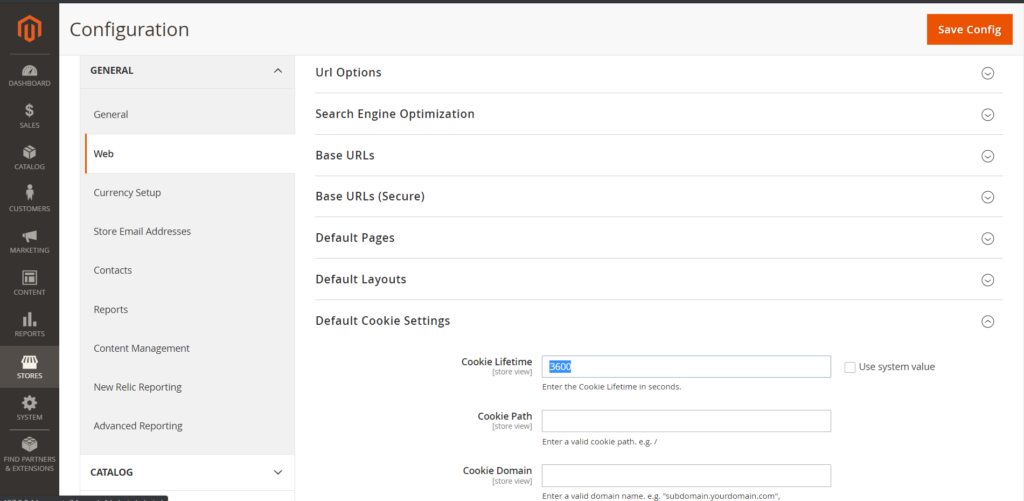
While customer logged, default session timeout 3600 seconds (60 Minute / 1 Hour).

There are following below steps to increase customer session timout

Solution:

1-Step: By Using Magento 2 Admin

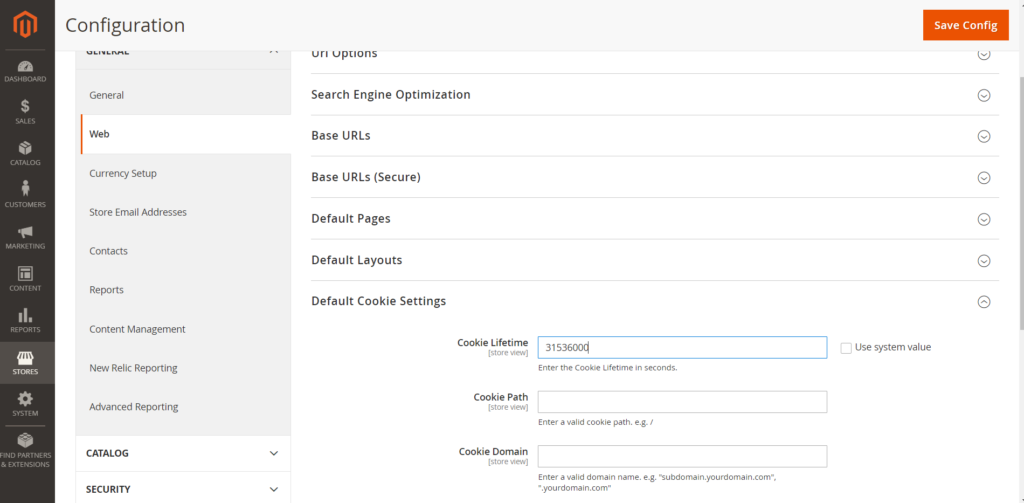
Go to Stores > Settings > Configuration > General > Web > Default Cookie Settings > Cookie Lifetime

By default default session timeout 3600 seconds (60 Minute / 1 Hour), you can change Cookie Lifetime value to any values in seconds

For 1 Hour (3600 Seconds)

For 24 Hour (86400 Seconds)

For 1 Month (2592000 Second)

For 1 Year (31536000 Seconds)

2-Step: By Using SQL Query

INSERT INTO core_config_data (scope, scope_id, path, value) VALUES 
('default', 0, 'web/cookie/cookie_httponly', '1'), 
('default', 0, 'web/cookie/cookie_domain', NULL), 
('default', 0, 'web/cookie/cookie_path', NULL), 
('default', 0, 'web/cookie/cookie_lifetime', '31536000');

Magento 2 All Database Tables [500 & more Tables]


How To Set Multi Shipping Settings In Magento 2


How To Set Origin Shipping in Magento 2


Difference Between Offline Shipping Method and Online Shipping Method


Magento 2 Online Customers Options


How To Apply Customer Group Price of Products in Magento 2


How To Add Customer Groups Dropdown in Magento 2 Admin Form and Grid By UI Component


How To Get all Customers Data in Magento 2


How To Create Customer Order in Magento 2 Admin Panel


Magento 2 Login As Customer Not Enabled


How To Configure Customer Account Sharing Options in Magento 2


Magento 2 Redirect To Customer Dashboard After Login


Which Magento 2 database table store customer shipping and billing address


How To Remove Sales Order Data & Customer Data in Magento 2


Which Magento 2 database table store customer’s Email Data


Which Magento 2 Database Table Store Customer Newsletter Data


Which Magento 2 database table store customer’s shipping and billing address


How To Remove Sales Order Data & Customer Data in Magento 2


Which Magento 2 Database Tables Store Customer Rating


Which Magento 2 Database Tables Store Customer Wishlist Products


Magento 2 Increase Customer Session Time


Which Magento 2 Database Table Store Patches

Magento 2.4 Two Factor Authentication

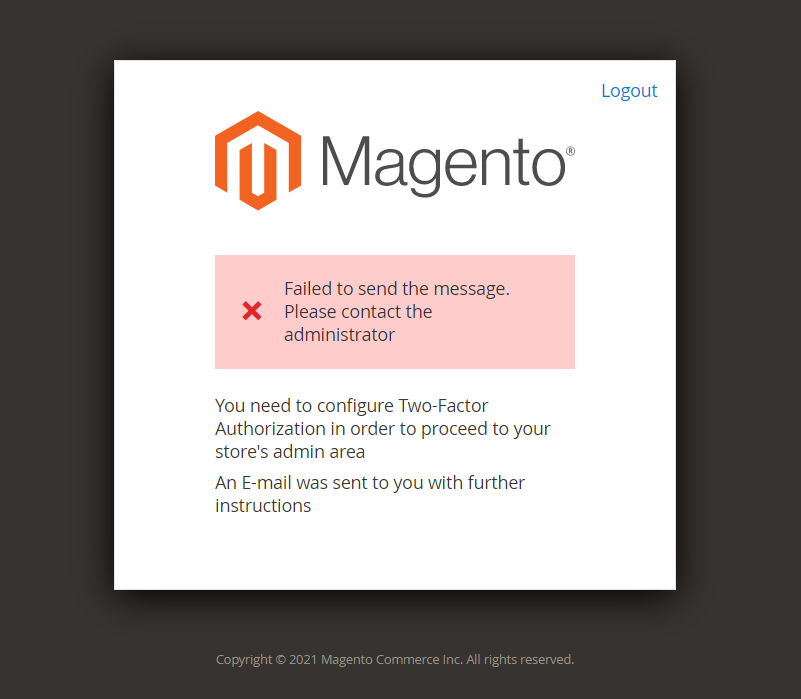
Once Magento 2.4.x Installation done & try to open admin & facing issue 

"Failed to send the message. Please contact the administrator
You need to configure Two-Factor Authorization in order to proceed to your store's admin area
An Email was sent to you with further instructions"

Solution:

To disable Two Factor Authentication on localhost/dev server.

Execute CLI Command as below

php bin/magento module:disable Magento_TwoFactorAuth

or,

Open app/etc/config.php and change value for ‘Magento_TwoFactorAuth’ to 0

Finally, Magento 2.4.x Two Factor Authentication Admin Login issue has been resolved & you can successfully Login in Magento 2.4.x Admin

In PatchApplier.php line 170: Unable to apply data patch Magento\Theme\Setup\Patch\Data\RegisterThemes for module Magento_Theme. Original exception message: Wrong file In Gd2.php line 64:

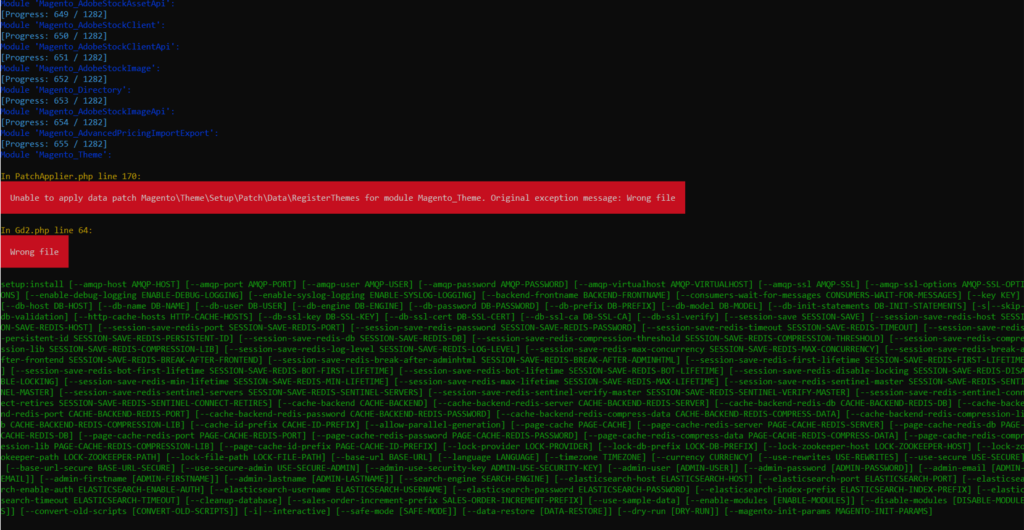
When installing Magento 2.4 & getting below error

In PatchApplier.php line 170:

Unable to apply data patch Magento\Theme\Setup\Patch\Data\RegisterThemes for module Magento_Theme. Original exception message: Wrong file

In Gd2.php line 64:

Wrong file

Error format as below

Solution: Find validateURLScheme function in vendor\magento\framework\Image\Adapter\Gd2.php file. at line 96. Replace function with this: !file_exists($filename)

Replace existing validateURLScheme function with modified validateURLScheme function as per below code

private function validateURLScheme(string $filename) : bool
  {
      $allowed_schemes = ['ftp', 'ftps', 'http', 'https'];
      $url = parse_url($filename);
      if ($url && isset($url['scheme']) && !in_array($url['scheme'], $allowed_schemes) && !file_exists($filename)) {
          return false;
      }

      return true;
  }

Finally, Magento 2.4 or 2.4.x Installation will be completed 100% after above changes

Other Important Magento 2.x Link

MAGENTO 2.4.5 released on 9th August, 2022 & Its Features


Magento 2.3 To Magento 2.4.5 Compatibility For PHP, MYSQL, Composer, Apache etc


Magento 2.4.3-p1 Installation Steps


Magento 2.4.3 Installation Steps


Magento 2.4.3 Features


Magento 2.4.3 – p1 Features


Magento 2.4 Two Factor Authentication


Magento 2.4.1 Features


Magento 2.4 Features


Magento 2.4 Installation


Magento 2.2, Magento 2.3, Magento2.4 Installation Issue on Windows 10, XAMPP


Magento 2 Installation at 51% Error: (Wrong file in Gd2.php:64) Module ‘Magento_Theme’


How To Upgrade Magento 2.4 To Magento 2.4.3 Enterprise-Edition / Commerce Cloud Edition


How To Upgrade Magento 2.4 To Magento 2.4.3 community-edition

Differentiate Between Apache and NGINX

ApacheNGINX
1FounderApache, an open-source Web server created by American software developer Robert McCool. Apache was released in 1995.
NGINX source code is written in the C programming language by Kernighan and Ritchie and maintains a consistent style
,released in 2005
released by Russian developer Igor Sysoev
2Running ByApache is running by ASFNGINX running by NGINX
3Designed ApproachApache based on
Process driven approach
NGINX based on
Event driven approach
4Concurrent OperationApache cannot handle 10k concurrent connections simultaneouslyNginx can handle 10k concurrent connections simultaneously
5Htaccess SupportApache Supports htaccessNginx does not support htaccess
6Static Content OperationApache performs
Slow operation in displaying static content & consumes more memory.
Nginx 2.5 times faster than Apache according to a benchmark test performed by running up to 1,000 simultaneous connections & display content
7MemoryApache consumed more memory to  perform operationNGINX faster and consumed less memory to perform operation
8OS SupportsApache Supports operating systems such as UNIX, Linux or BSD and Microsoft WindowsNGINX Supports operating systems such as UNIX, Linux or BSD but in case  of Microsoft Windows , It is not upto mark.
9Dynamic Content OperationApache performs faster Performance for dynamic contentNGINX does not perform good Performance for dynamic content, these content must be complied by core software.
10SecurityApache provides
excellent security
NGINX provides more excellent security
11Web ServerApache supports web server onlyNGINX supports web server as well as Reverse Proxy
12Availability / Open SourceApache fully Open Source
Apache software is always available for download free of charge from the ASF
NGINX availability as NGINX [open source] & NGINX PLUS a high-performance web server, a powerful front-end load balancer and a highly-scalable accelerating cache to create the ideal end-to-end platform
13Video StreamingNot Best for Video StreamingBest for Video Streaming as Netflix’s online video streaming service has grown to serve over 50 million subscribers in 40 countries
14Open Source / PaidApache software is always available for download free of charge from the ASFNGINX is Open Source , that is availability free while NGINX PLUS Starting at $2500 per year

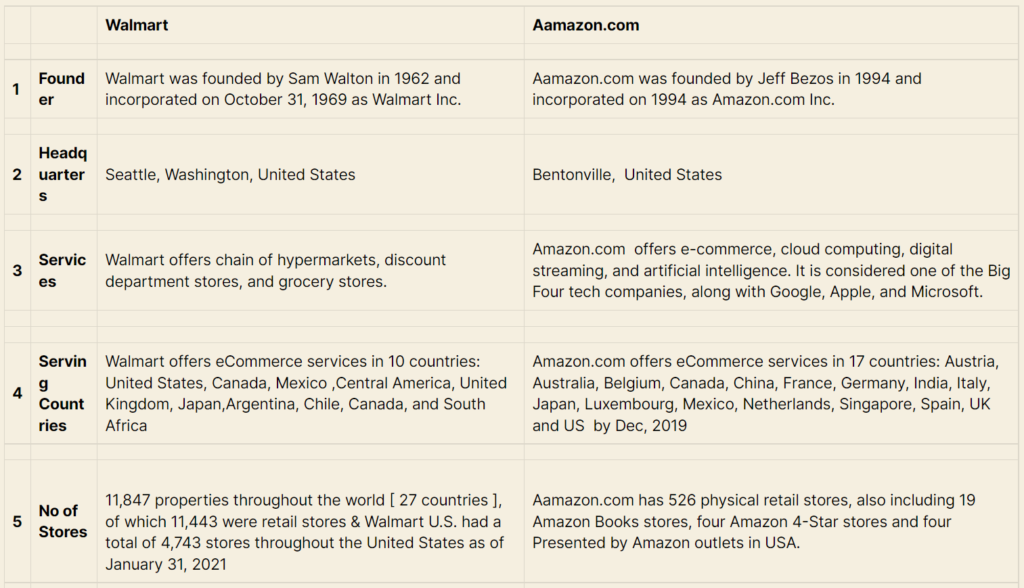
Differentiate Between Aamazon and WalMart

WalmartAamazon.com
1FounderWalmart was founded by Sam Walton in 1962 and incorporated on October 31, 1969 as Walmart Inc.Aamazon.com was founded by Jeff Bezos in 1994 and incorporated on 1994 as Amazon.com Inc.
2HeadquartersSeattle, Washington, United StatesBentonville,  United States
3ServicesWalmart offers chain of hypermarkets, discount department stores, and grocery stores.Amazon.com  offers e-commerce, cloud computing, digital streaming, and artificial intelligence. It is considered one of the Big Four tech companies, along with Google, Apple, and Microsoft.
4Serving CountriesWalmart offers eCommerce services in 10 countries: United States, Canada, Mexico ,Central America, United Kingdom, Japan,Argentina, Chile, Canada, and South AfricaAmazon.com offers eCommerce services in 17 countries: Austria, Australia, Belgium, Canada, China, France, Germany, India, Italy, Japan, Luxembourg, Mexico, Netherlands, Singapore, Spain, UK and US  by Dec, 2019
5No of Stores
11,847 properties throughout the world [ 27 countries ], of which 11,443 were retail stores & Walmart U.S. had a total of 4,743 stores throughout the United States as of January 31, 2021
Aamazon.com has 526 physical retail stores, also including 19 Amazon Books stores, four Amazon 4-Star stores and four Presented by Amazon outlets in USA.
6Retail Stores TypeWalmart offers 6 different types physical retail stores throughout the world
 [1] Walmart Supercenter:: offers  grocery and a GM (general merchandise) Department
 [2] Walmart Express:: Mobile Express Money (Walmart App) that enables Consumers to do money service transactions at Walmart 
 [3] Walmart Neighborhood Market:: offers grocery, fresh  meat, bakery and deli departments and pharmacies
 [4] Walmart Pharmacy:: offers quality Pharmacy Products at affordable prices
 [5] Walmart Fuel Store:: offers gas, diesel fuel at affordable prices 
Aamazon.com offers 4 different types physical retail stores in USA
[1] Amazon Books:: offers Books, Devices, Merchandise
[2] Amazon 4 Star:: offers Books, Devices, Merchandise
[3] Amazon Go:: offers Breakfast, Lunch, Dinner
 [4] Aamzon PoP UP::  offers Merchandise
7Membership FeeWalmart does not charge any membership fee for online purchases.Amazon.com  Prime membership costs $12.99 per month or a once-off annual fee of $9
8No. of ProductsWalmart offers total 46.1 million products across 11766 storesAmazon.com offers  more than 606 million products available online and adds more than 50 000 products per day.
9Owned byWalmart owned by Walton family [51% Share Holding]Amazon.com, owned by MacKenzie Bezos(Ex-wife of Jeff Bezos) having 25% Share Holding and Jeff Bezos having 11% Share Holding

Magento 2 Localhost Admin not opened, Database & Files Taken From Server

If you are taking Magento2 [Files + Database] from server & setup on localhost & while trying to open Admin , It will be not opened, due to cookie domain values specified for a particular domain name.

Solution: There are following below command need to ben run

[1]-: Run select query , to check how many cookie domain values are present in Database

select * from core_config_data 
WHERE path = "web/cookie/cookie_domain"

[2]-: Run update query:

To update all path = “web/cookie/cookie_domain” into 0

update core_config_data
set value="0" 
WHERE path = "web/cookie/cookie_domain"

Once run query all path = “web/cookie/cookie_domain” values will be converted into 0, check again by using select query

select * from core_config_data 
WHERE path = "web/cookie/cookie_domain"
Note: Here only one cookie domain value, if some cases multi store, there
are multiple path = "web/cookie/cookie_domain" & each path value having domain name exists, so you need to converts all 
path = "web/cookie/cookie_domain" values into 0

Finally, localhost Magento 2 admin issue has been resolved.

Magento 2 URL Rewrites Regenerate

There are following below steps to do URL rewrites for Product, Category, CMS Pages

[1]-: The following below command to delete Product, Category & CMS Page URLs from

Table url_rewrite & catalog_url_rewrite_product_category

delete from url_rewrite;
delete from catalog_url_rewrite_product_category;

[2]-: The following below command to install by using Extension

OlegKoval_RegenerateUrlRewrites

that is responsible to regenerate Product, Category & CMS Page URLs

Install
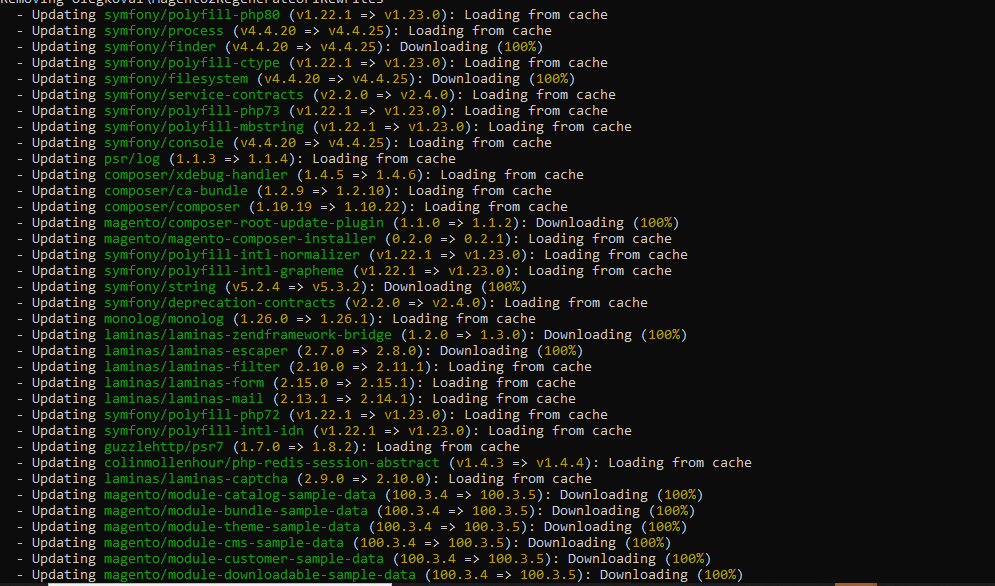
composer require olegkoval/magento2-regenerate-url-rewrites

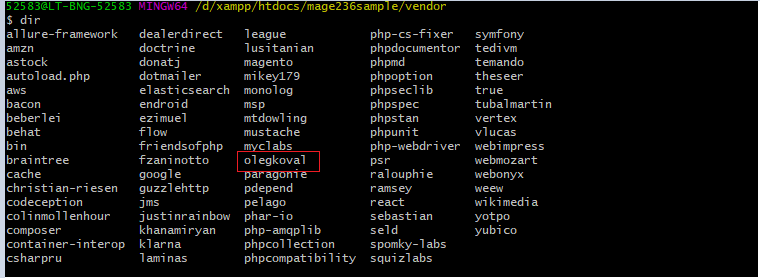
Once command done, It is stored location in side Vendor folder as below

[3]-: The following below command to enable olegkoval Extension , that is responsible to regenerate Product, Category & CMS Page URLs

Enable
php bin/magento module:enable OlegKoval_RegenerateUrlRewrites

[4]-: The following below command to regenerate Product, Category & CMS Page URLs

Regenerate URL
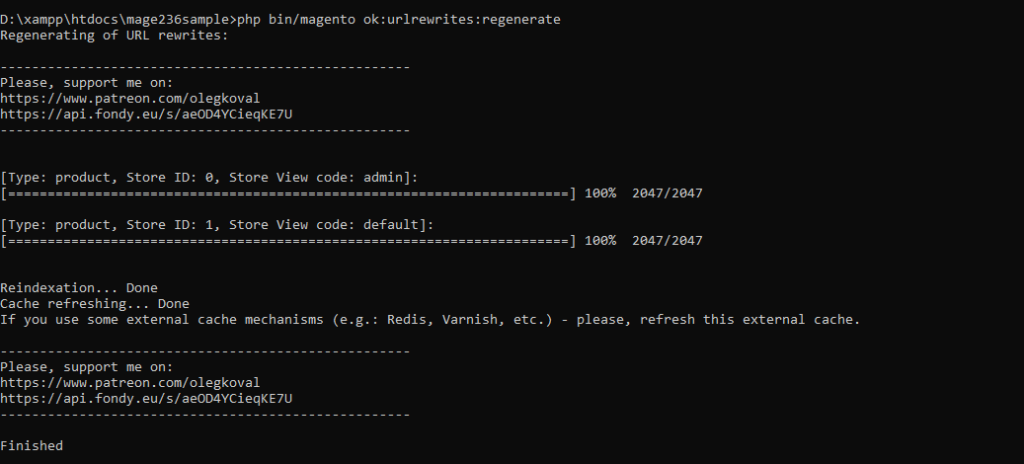
php bin/magento ok:urlrewrites:regenerate

Note: If you use some external cache mechanisms (e.g.: Redis, Varnish, etc.) - please, refresh this external cache.
Finished indicates URLs rewrite generate command successfully all URLs

Finally, Website / Store, Product, Category & CMS Page URLs has been regenerated.