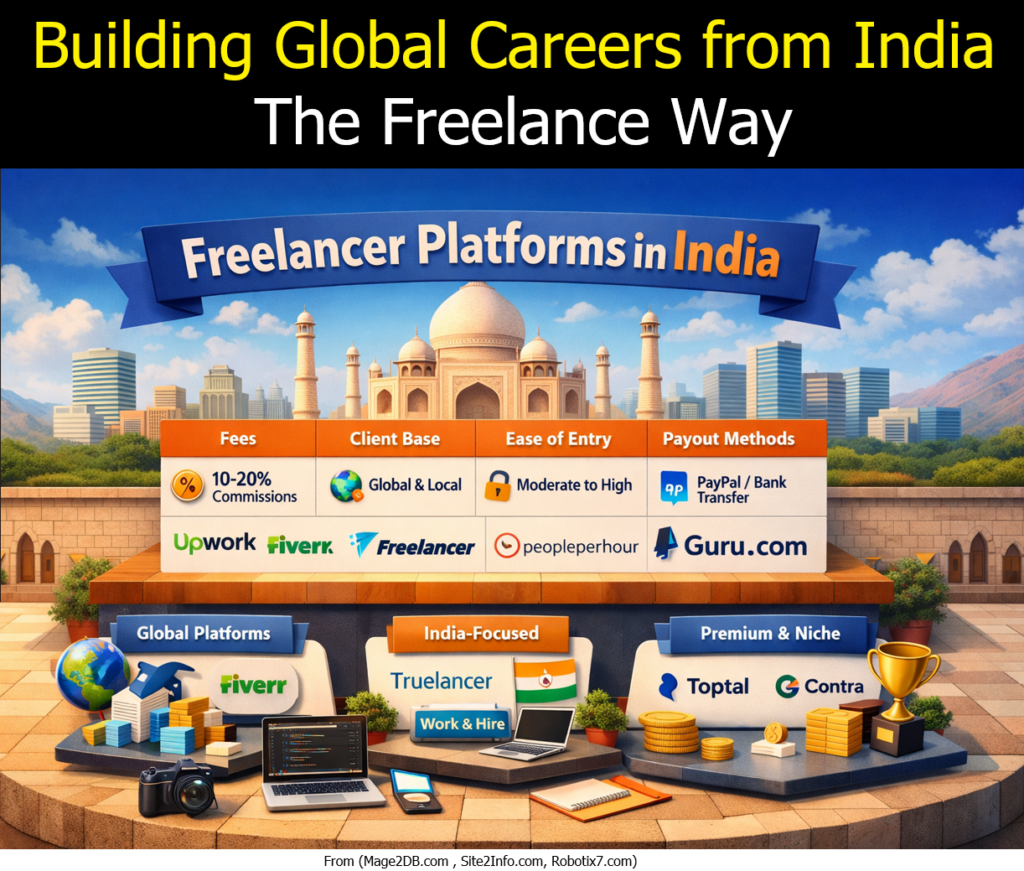
India’s freelance economy is booming. With digital transformation and remote work becoming mainstream, professionals across IT, design, content, and strategy are leveraging online platforms to connect with clients worldwide. Choosing the right platform is crucial for visibility, credibility, and sustainable income.
🌍 Global Platforms
Upwork – Large marketplace with diverse projects; competitive but rewarding for strong profiles.
Fiverr – Gig-based model; ideal for quick, well-defined services like logos, SEO audits, or copywriting.
Freelancer.com – Wide range of projects with a bidding system; suitable for beginners and experienced freelancers alike.
PeoplePerHour – UK-based but accessible in India; emphasizes hourly projects and curated talent.
Guru – Offers milestone-based contracts; good for long-term client relationships.
🇮🇳 India-Focused Platforms
Truelancer – Strong presence in IT, design, and content; popular among Indian freelancers.
WorkandHire – India-specific platform catering to local businesses and independent professionals.
🏆 Premium & Niche Platforms
Toptal – Exclusive network for top 3% talent in software, design, and finance; rigorous screening but high pay.
Contra – Modern, portfolio-driven platform; emphasizes independent professionals over bidding.
Key Considerations for Freelancers
Fees & Commissions: Most platforms charge 10–20% per project.
Client Base: Global platforms provide international exposure; India-focused ones offer quicker entry.
Ease of Entry: Fiverr and Truelancer are beginner-friendly, while Toptal demands advanced expertise.
Payout Methods: PayPal, Payoneer, and direct bank transfers are standard options.
Conclusion
Freelancing in India is no longer just a side hustle — it’s a gateway to global careers. By strategically choosing platforms that align with your skills and goals, you can build sustainable income streams and expand your professional reach.
India’s freelance revolution is here — and it’s connecting talent to the world.
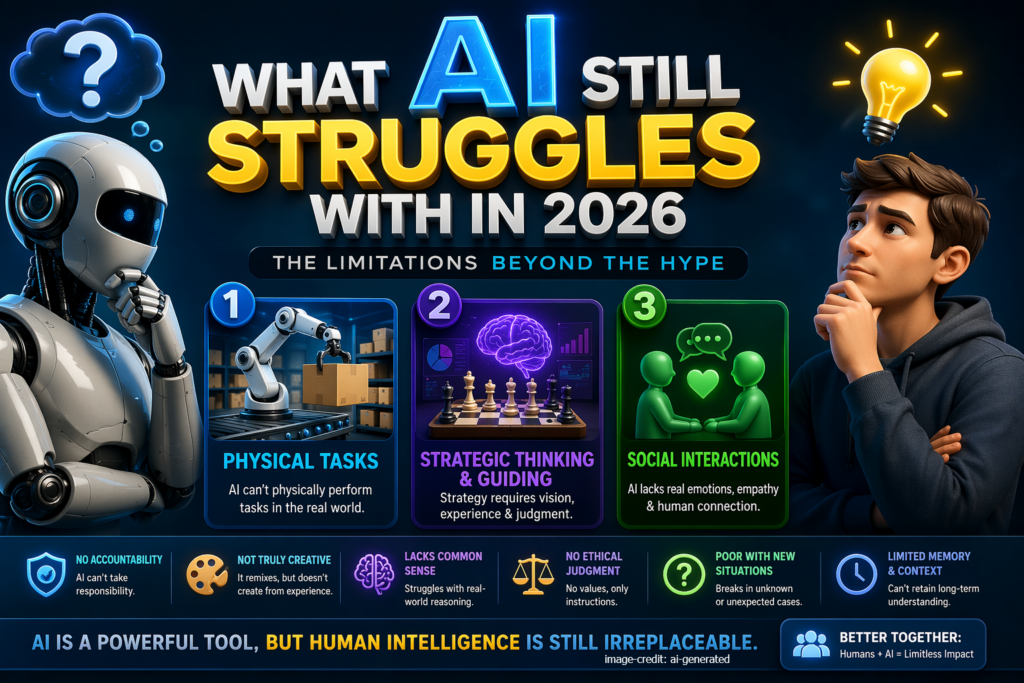
Artificial Intelligence has made massive progress—writing code, generating videos, automating workflows, and even simulating conversations. But despite all the hype, there are still critical areas where AI is limited, unreliable, or simply not capable.
If you’re building products, hiring teams, or planning strategy, understanding these gaps gives you a real competitive advantage.
Let’s break down the three major limitations you mentioned, and expand into more areas where AI still falls short.
🧠 1. Physical Tasks (Real-World Execution)
AI can control machines, but it cannot physically exist or operate in the real world without hardware—and even then, it’s far from perfect.
📝 Agile vs Scrum vs Kanban vs SAFe: When to Use What (Complete Guide with Real Use Cases)
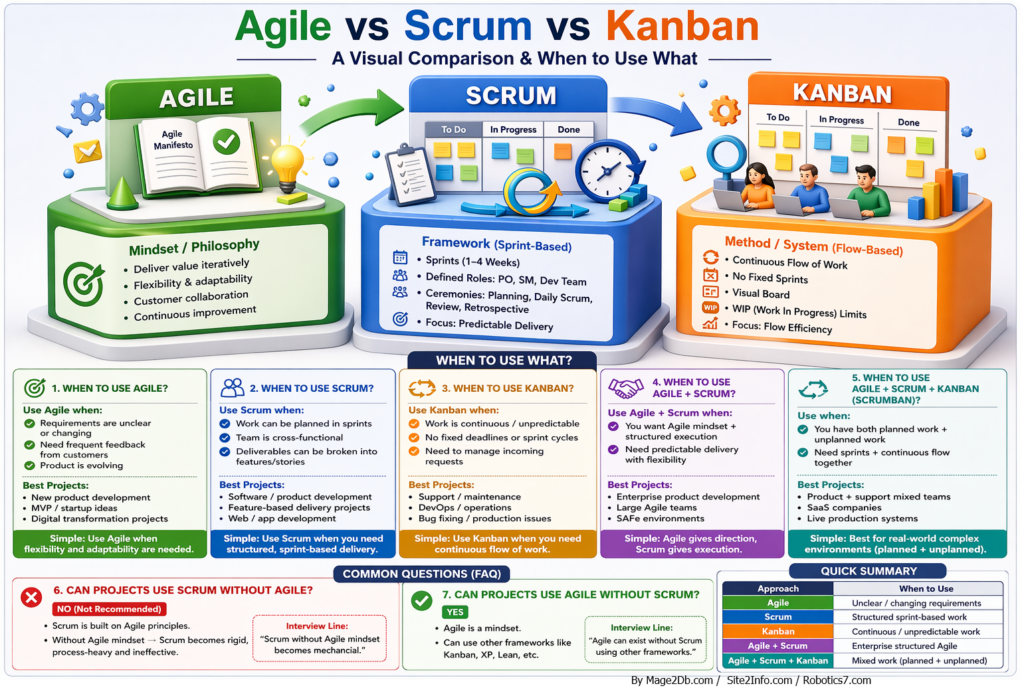
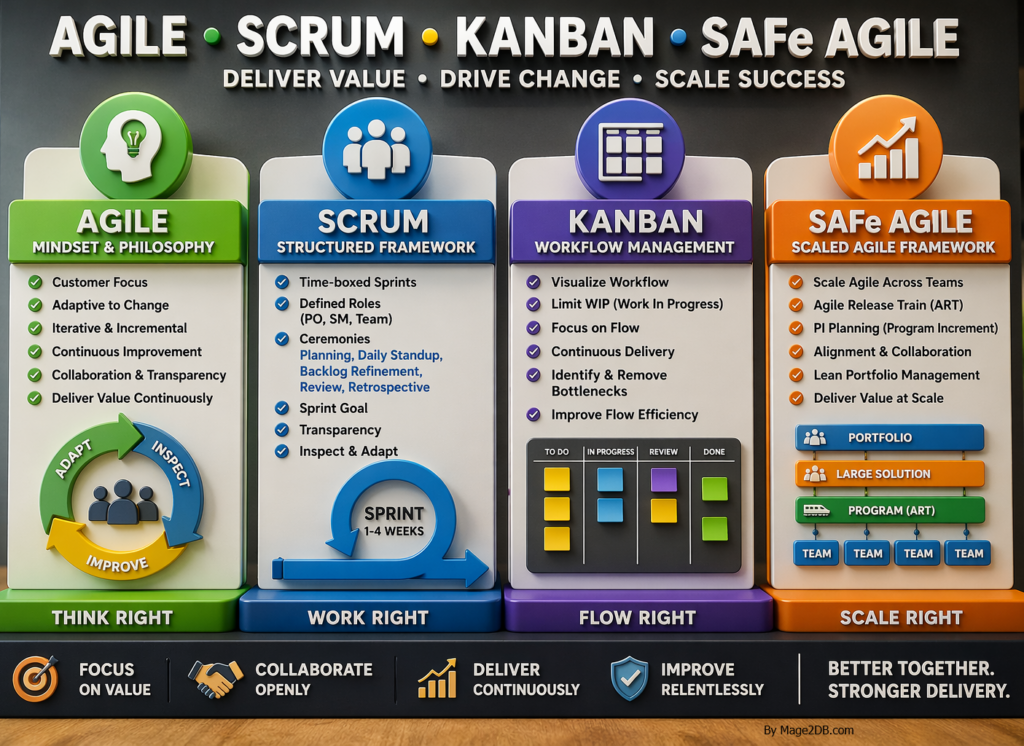
In modern software development, teams often struggle to choose the right approach between Agile, Scrum, and Kanban. While they are closely related, each serves a different purpose.
Agile is a mindset and philosophy focused on delivering value and adapting to change, especially in uncertain environments.
Scrum is a framework based on Agile principles that follows a structured approach using time-boxed sprints, defined roles, and ceremonies such as Sprint Planning, Daily Standup, Backlog Refinement (Grooming), Review, and Retrospective
Kanban is a continuous workflow method with no fixed timeboxes, using visual boards and WIP (Work In Progress) limits to manage and optimize flow.
SAFe Agile is a scaling framework that extends Agile practices across multiple teams and programs, aligning business strategy with execution through structured roles, events like PI Planning, and Agile Release Trains (ARTs)
This guide explains:
What Agile, Scrum, and Kanban are
When to use each
When to combine them
Common misconceptions
🎯 1. Agile – The Mindset / Foundation
Agile is a philosophy based on the Agile Manifesto, focusing on flexibility, collaboration, and continuous improvement.
🔑 Key Principles:
Deliver value iteratively
Embrace changing requirements
Focus on customer collaboration
Promote continuous improvement
✅ When to Use Agile
Use Agile when:
Requirements are unclear or frequently changing
You need continuous feedback from customers
Product is evolving (startup, MVP)
📌 Best Projects
New product development
Startup/MVP projects
Digital transformation initiatives
👉 Simple: Agile = Flexibility & adaptability
⚙️ 2. Scrum – The Structured Framework
Scrum is a framework under Agile that provides structure through sprints, roles, and ceremonies.
🔑 Key Features:
Sprints (1–4 weeks)
Defined roles:
Product Owner
Scrum Master
Development Team
Ceremonies:
Sprint Planning
Daily Scrum
Sprint Review
Retrospective
✅ When to Use Scrum
Use Scrum when:
Work can be planned in iterations
Team is cross-functional
Deliverables can be broken into features/stories
📌 Best Projects
Software/product development
Feature-based delivery
Web & app development
👉 Simple: Scrum = Structured execution
🔄 3. Kanban – Continuous Flow System
Kanban focuses on continuous delivery and workflow efficiency.
🔑 Key Features:
No fixed sprints
Visual board (To Do → In Progress → Done)
WIP (Work In Progress) limits
Focus on flow efficiency
✅ When to Use Kanban
Use Kanban when:
Work is continuous or unpredictable
No fixed deadlines or sprint cycles
Managing incoming requests or support tickets
📌 Best Projects
Support/maintenance
DevOps/operations
Bug fixing / production issues
👉 Simple: Kanban = Continuous flow
🔗 4. Agile + Scrum – Best of Both
Combining Agile mindset with Scrum structure gives flexibility + predictability.
✅ When to Use
Need Agile mindset + structured delivery
Require predictable outcomes with flexibility
📌 Best Projects
Enterprise product development
Large Agile teams
SAFe environments
👉 Simple: Agile = direction, Scrum = execution
🔀 5. Agile + Scrum + Kanban (Scrumban)
This hybrid approach combines:
Scrum → planned work
Kanban → unplanned/continuous work
✅ When to Use
Work includes both planned + unplanned tasks
Need sprints + continuous flow together
📌 Best Projects
SaaS products
Product + support teams
Live production systems
👉 Simple: Best for real-world complex environments
🚫 6. Can You Use Scrum Without Agile?
❌ Answer: No (Not Recommended)
Scrum is built on Agile principles
Without Agile mindset:
Becomes rigid
Process-heavy
Ineffective
👉 Key Insight: “Scrum without Agile mindset becomes mechanical.”
✅ 7. Can You Use Agile Without Scrum?
✔️ Answer: Yes
Agile is a mindset
Can use other frameworks:
Kanban
XP (Extreme Programming)
Lean
👉 Key Insight: “Agile can exist without Scrum using other frameworks.”
📊 Quick Summary Table
Approach
When to Use
Agile
Unclear / changing requirements
Scrum
Structured sprint-based work
Kanban
Continuous / unpredictable work
Agile + Scrum
Enterprise structured Agile
Agile + Scrum + Kanban
Mixed work (planned + unplanned)
🚀 Important Points
Choosing the right approach depends on your project type, team structure, and business goals.
Use Agile for flexibility
Use Scrum for structured delivery
Use Kanban for continuous flow
Combine them for real-world scenarios
❓ Agile vs Scrum vs Kanban – Detailed Q&A Guide
🔷 Interview Questions & Answers
❓ What is the main difference between Agile, Scrum, and Kanban?
Answer: Agile is a mindset, Scrum is a structured framework, and Kanban is a workflow management method. Agile defines principles, Scrum provides a sprint-based structure, and Kanban focuses on continuous delivery and flow.
❓ Why do companies prefer Agile?
Answer: Because it allows:
Faster delivery
Flexibility to adapt changes
Continuous customer feedback
Better risk management
🔷 Agile-Specific Questions
❓ Is Agile only for software development?
Answer: No. Agile is used in:
Marketing
HR
Finance
Product management
👉 Any domain requiring flexibility and iterative improvement
❓ What are the core values of Agile?
Answer: Based on the Agile Manifesto:
Individuals over processes
Working software over documentation
Customer collaboration over contracts
Responding to change over following a plan
❓ What are common Agile challenges?
Answer:
Lack of stakeholder involvement
Poor backlog management
Resistance to change
Misunderstanding Agile as “no planning”
🔷 Scrum-Specific Questions
❓ What are Scrum ceremonies and why are they important?
Answer:
Sprint Planning → Define work
Daily Standup → Track progress
Sprint Review → Demo work
Retrospective → Improve process
👉 They ensure transparency, inspection, and adaptation
❓ What is the role of Scrum Master?
Answer:
Removes impediments
Facilitates ceremonies
Ensures Scrum is followed
Supports team productivity
❓ When Scrum is NOT suitable?
Answer:
Continuous support work
Highly unpredictable tasks
Very small or non-collaborative teams
🔷 Kanban-Specific Questions
❓ What is WIP (Work In Progress) limit?
Answer: It restricts the number of tasks in progress to:
Avoid overload
Improve focus
Increase efficiency
❓ What are key Kanban metrics?
Answer:
Cycle Time
Lead Time
Throughput
👉 Used to improve workflow efficiency
❓ When Kanban is NOT suitable?
Answer:
Projects requiring strict deadlines
Work needing structured planning
Large feature-based development
🔷 Comparison-Based Questions
❓ Scrum vs Kanban – Which is better?
Answer: Neither is better. It depends on use case:
Scrum → Predictable, planned work
Kanban → Continuous, unplanned work
❓ Can Scrum and Kanban be combined?
Answer: Yes, called Scrumban:
Scrum for planning
Kanban for execution flow
❓ Agile vs Waterfall – Key difference?
Answer:
Agile → Iterative, flexible
Waterfall → Sequential, fixed
🔷 Scenario-Based Questions
❓ Which approach for a startup product?
Answer: Agile + Scrum 👉 Helps in quick iterations and feedback
❓ Which approach for mixed work (features + bugs)?
Answer: Agile + Scrum + Kanban 👉 Handles both planned and unplanned work
🔷 Advanced / Interview-Level Questions
❓ What is Scrumban?
Answer: A hybrid model combining:
Scrum → Sprint planning
Kanban → Continuous workflow
❓ What is the biggest mistake teams make?
Answer:
Following Scrum rituals without Agile mindset
Overloading Kanban without WIP limits
Treating Agile as no planning
❓ How do you choose between Scrum and Kanban?
Answer:
If work is predictable → Scrum
If work is continuous → Kanban
❓ Can Agile fail? Why?
Answer: Yes, if:
No stakeholder involvement
Poor team collaboration
Lack of Agile understanding
Over-emphasis on tools over mindset
❓ Frequently Asked Questions (Quick Answers)
Agile = Mindset
Scrum = Framework
Kanban = Flow system
Scrum uses sprints
Kanban uses continuous flow
Agile can exist without Scrum ✔️
Scrum without Agile ❌
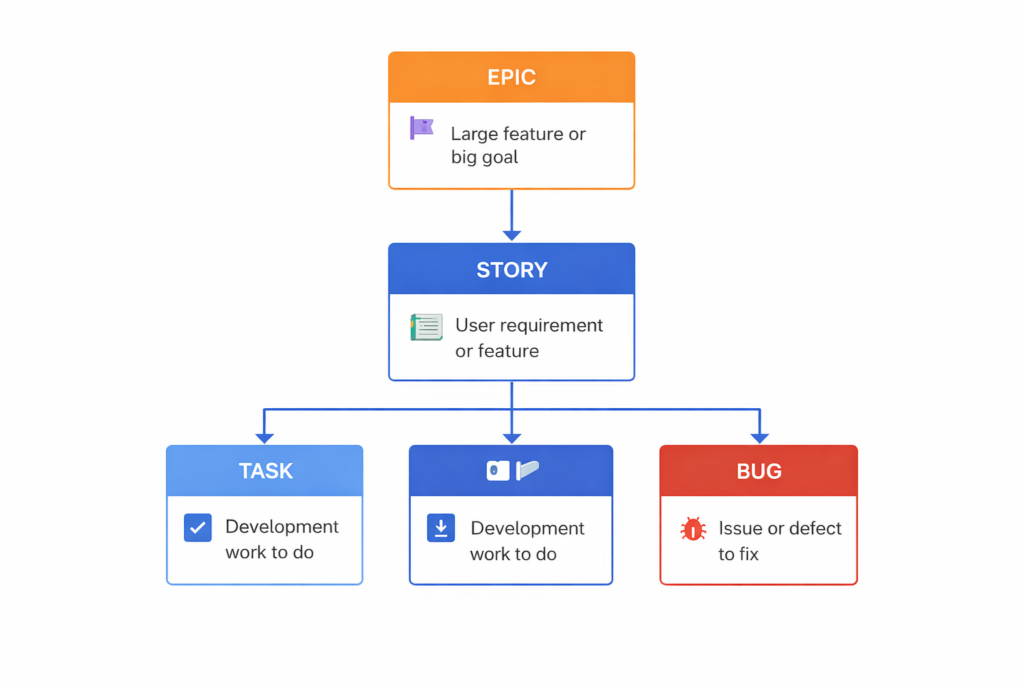
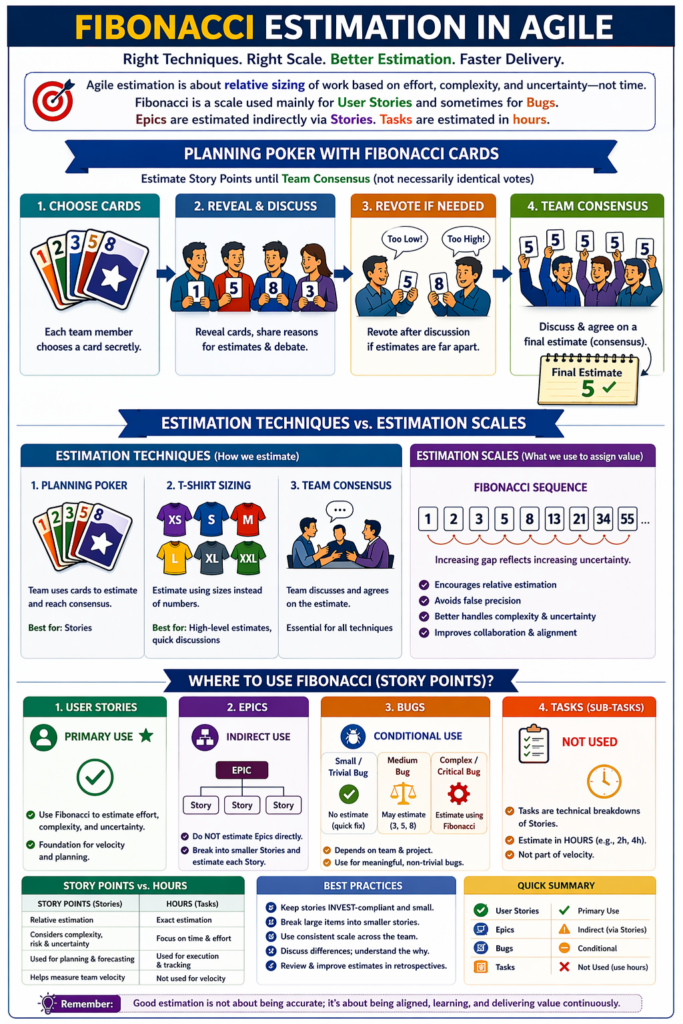
Que: What are Epic, Story, task and Bug?
Epic (Top Level): Big feature (e.g., Buyer and Seller Congifuration)
Story (Next Level): User requirement or feature (e.g., As A User, I want User Login Form, Create it by Username (email) & password, so that I can successfully login).
Task (Execution): Technical work to implement the Story or support for sory (e.g., Configure email server).
Bug (Correction): Defect found during testing (e.g., Receipt email not sent on mobile).
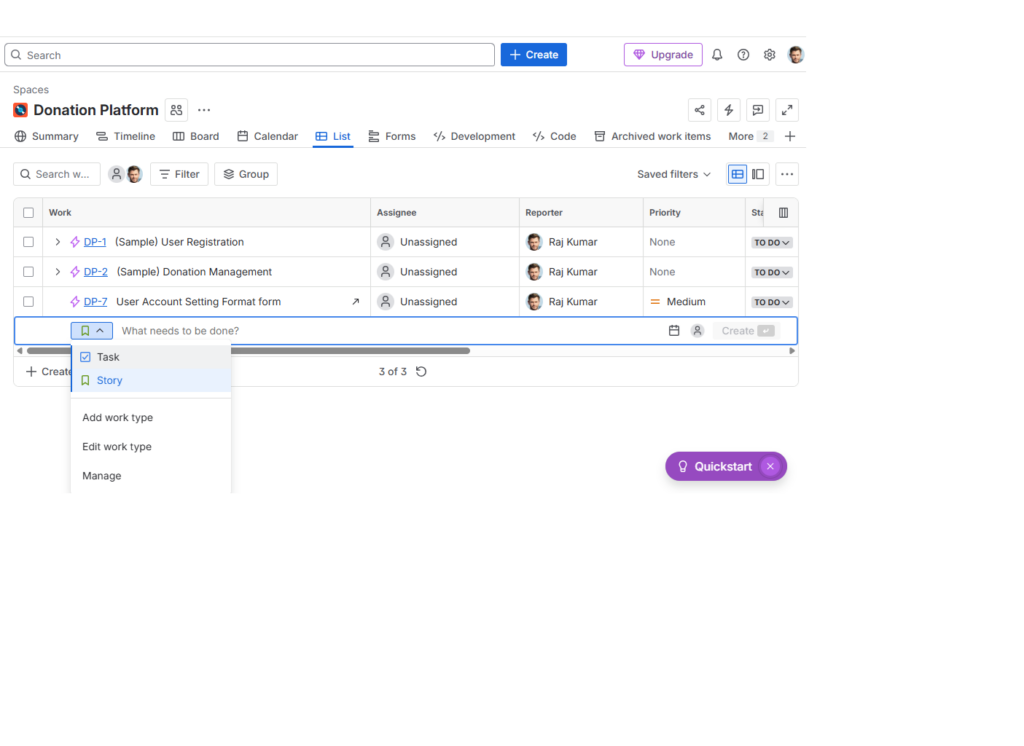
Que:: In Jira by default what is going to be create once click on Create Button for (Story, Epic, Task, or Bug )?
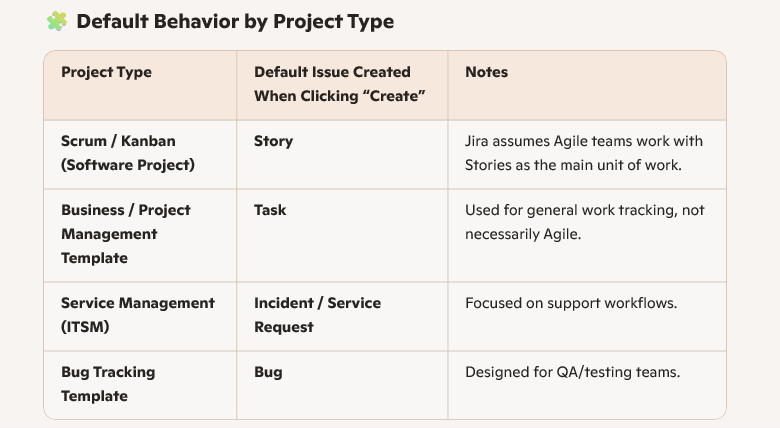
By default, when you click the Create button in Jira, the system creates a Task (or sometimes a Story) depending on the project template you’re using. Here’s how it works:
⚙️ How to Check or Change It
Click Create → look at the Issue Type dropdown.
The first option shown is your default issue type.
You can change it manually before saving (Story, Epic, Task, Bug).
Admins can set the default issue type under: Project Settings → Issue Types → Default Issue Type.
“By default, Jira creates a Task or Story depending on the project template. In Agile software projects, it’s usually a Story; in business projects, it’s a Task. The issue type can be changed manually or configured by the admin under Project Settings.
Que:: Are story points used for all issue types in Jira?
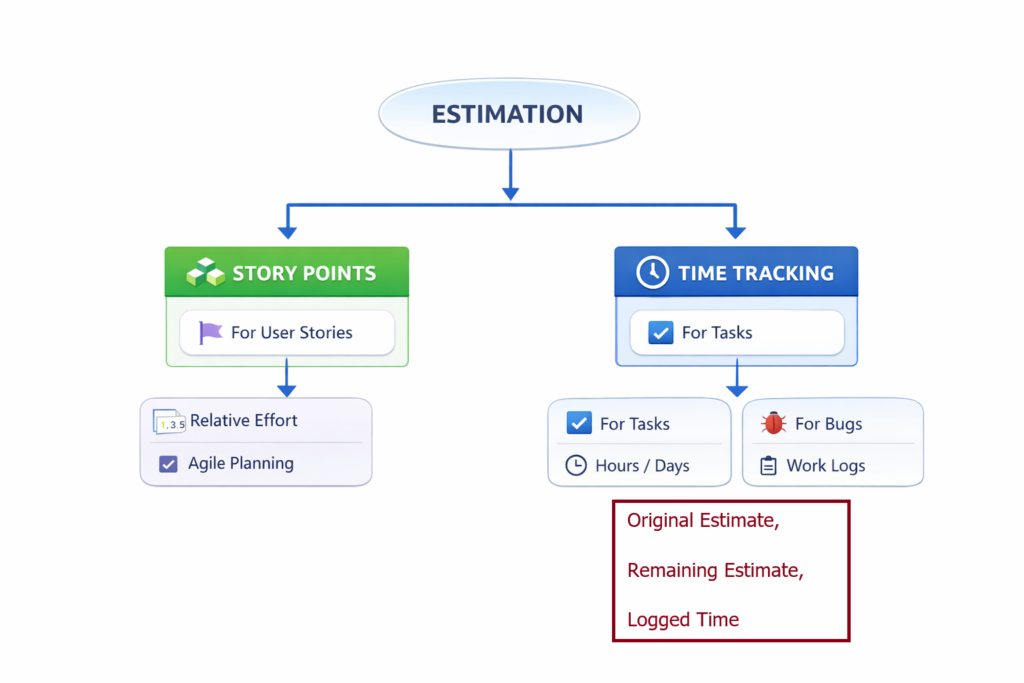
By default in Jira, the Story Points field is intended for estimating Stories in Agile projects
“In Jira, Story Points are applied only to Stories by default. Tasks and Bugs use time tracking (Original Estimate, Remaining Estimate, Logged Time), while Epics track effort through their Stories.
1. Default Behavior
Story Points field is available only for Stories in most Jira Software templates.
This aligns with Scrum/Agile practice: story points measure relative effort for user-facing requirements.
Epics usually don’t have story points (they’re containers), though some teams add them for high-level tracking.
2. Tasks and Bugs
By default, Tasks and Bugs do not display the Story Points field.
Instead, they use Time Tracking fields (Original Estimate, Remaining Estimate, Logged Time).
However, Jira admins can add the Story Points field to these issue types via Field Configuration or Screens.
3. Custom Issue Types
If you create custom issue types (e.g., “Improvement”), the Story Points field won’t appear automatically.
You must configure it manually in Project Settings → Screens → Add Field → Story Points.
🎯 🔷 Agile / Scrum – Advanced Q&A
❓ How do you handle a team that is not following Agile properly?
Answer: “I start by identifying gaps through retrospectives and team feedback. Then I coach the team on Agile principles, simplify processes, and ensure leadership alignment. I focus on gradual improvement rather than enforcing strict rules.”
❓ How do you ensure predictable delivery?
Answer:
Stable velocity tracking
Proper backlog refinement
Clear Definition of Done
Managing dependencies early
Using historical data for forecasting
👉 “Predictability comes from consistency, not pressure.”
⚙️ 🔷 Estimation & Fibonacci – Advanced
❓ Why do you prefer Fibonacci over linear scale?
Answer: “Fibonacci reflects increasing uncertainty as work grows. It prevents false precision and encourages relative estimation instead of exact guessing.”
❓ How do you handle disagreement in Planning Poker?
Answer: “I encourage discussion between highest and lowest estimators, clarify assumptions, and re-vote. The goal is alignment, not forcing agreement.”
❓ Do you estimate bugs?
Answer: “Yes, for medium and complex bugs. Small bugs are handled without estimation. It depends on team practice and impact.”
❓ Why not estimate tasks using story points?
Answer: “Tasks are execution-level work and are better estimated in hours. Story points are for relative estimation at story level.”
🔄 🔷 Kanban – Advanced
❓ When do you prefer Kanban over Scrum?
Answer: “When work is continuous, unpredictable, and requires quick turnaround—like support or maintenance projects.”
❓ How do you improve flow in Kanban?
Answer:
Apply WIP limits
Identify bottlenecks
Optimize cycle time
Monitor throughput
🚀 🔷 SAFe Agile – Advanced
❓ How do you manage multiple teams in SAFe?
Answer:
PI Planning for alignment
Program board for dependencies
Regular ART sync
Clear communication across teams
❓ How do you handle cross-team dependencies?
Answer: “I identify dependencies during PI Planning, track them on program boards, and ensure continuous follow-up through sync meetings.”
📊 🔷 Velocity & Metrics
❓ What if velocity fluctuates heavily?
Answer: “I analyze root causes such as team changes, unclear stories, or external dependencies. Then stabilize backlog refinement and team composition.”
❓ Can velocity be improved?
Answer: “Yes, indirectly by improving:
Story clarity
Team collaboration
Removing impediments
Reducing dependencies”
📝 🔷 Jira – Advanced Q&A
❓ How do you use Jira for project tracking?
Answer: “I use boards for execution, backlog for planning, and dashboards for monitoring KPIs like velocity, burndown, and cycle time.”
❓ Which Jira reports do you use most?
Answer:
Burndown chart → sprint tracking
Velocity chart → forecasting
Cumulative flow → bottleneck analysis
❓ How do you design an effective Jira dashboard?
Answer: “I include only meaningful metrics—like sprint progress, issue status, and delivery trends—to avoid information overload.”
🔥 🔷 Scenario-Based (Most Important)
❓ What if team overcommits in sprint?
Answer: “I reduce scope, prioritize critical work, and improve estimation for future sprints.”
❓ What if stakeholders keep changing requirements?
Answer: “I manage expectations, prioritize changes via backlog, and ensure minimal disruption during sprint.”
❓ How do you handle a delayed project?
Answer:
Identify bottlenecks
Re-prioritize backlog
Improve communication
Adjust timelines realistically
🎯 🔷 Leadership-Level Questions
❓ How do you handle team conflicts?
Answer: “I facilitate open discussions, focus on facts, and align everyone towards common goals.”
❓ How do you ensure team motivation?
Answer:
Recognize achievements
Encourage ownership
Maintain transparency
Provide growth opportunities
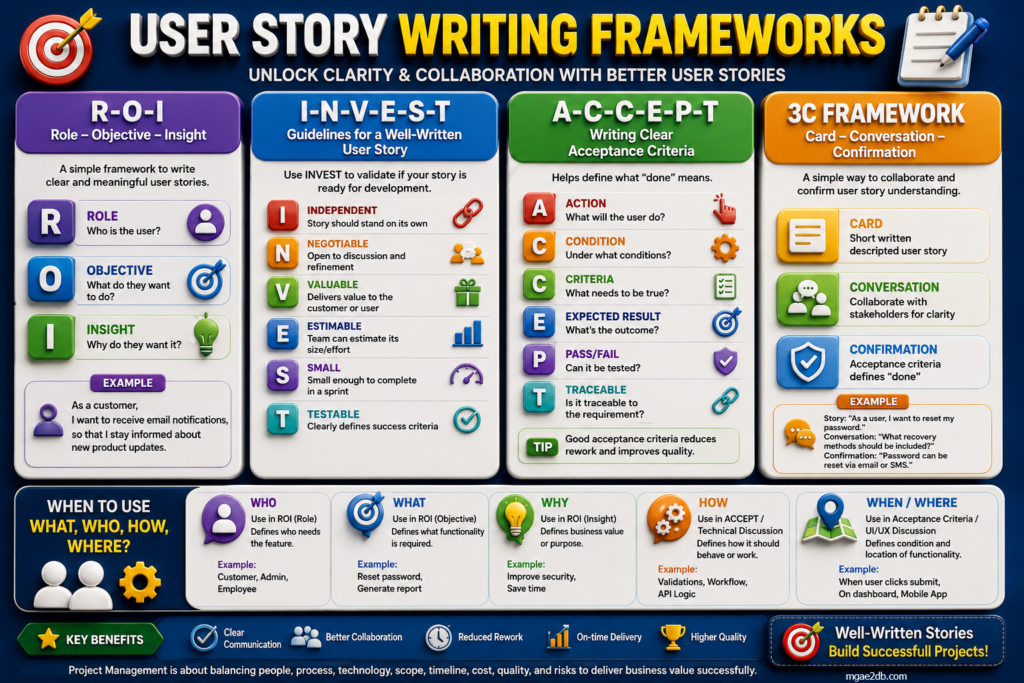
User Story 4 Frameworks That Drive Collaboration and Sprint Success
In agile product development, user stories are the foundation of collaboration between business, design, and engineering teams. Yet, many stories fail to communicate who, what, and why clearly enough to drive meaningful outcomes. To bridge that gap, here are four proven frameworks that transform vague requirements into actionable insights.
🎭 R‑O‑I: Role – Objective – Insight
This framework helps teams focus on the user’s perspective rather than technical tasks.
Role: Who is the user?
Objective: What do they want to achieve?
Insight: Why do they need it?
💡 Example: “As a customer, I want to receive email notifications so that I stay informed about new product updates.” Impact: Encourages empathy and clarity in defining user needs.
📊 I‑N‑V‑E‑S‑T: Story Quality Check
Before moving a story into development, validate it using INVEST:
Independent – Can stand alone
Negotiable – Open to refinement
Valuable – Delivers user benefit
Estimable – Effort can be measured
Small – Fits within a sprint
Testable – Defines success criteria
✅ Impact: Ensures stories are actionable, measurable, and ready for execution.
✅ A‑C‑C‑E‑P‑T: Define “Done” Criteria
Acceptance criteria define what success looks like.
Action: What will the user do?
Condition: Under what circumstances?
Criteria: Expected result
Expected Result: Outcome
Pass/Fail: How it’s tested
Traceable: Linked to requirement
📈 Impact: Builds transparency and accountability across teams.
A collaborative approach that keeps communication at the heart of agile delivery.
Card: Write the story
Conversation: Discuss with stakeholders
Confirmation: Define acceptance criteria
💬 Example: “As a user, I want to reset my password.” → “Password can be reset via email or SMS.” Impact: Strengthens stakeholder alignment and shared understanding.
Health Insurance Portability and Accountability Act
Purpose: Protects patient health information (PHI) in the U.S.
Covers:
Privacy of patient data
Security of electronic health data
Data sharing rules
Administrative / technical / physical safeguards
Key focus:
PHI / ePHI protection
Access control
Encryption / security
Audit trails
Patient privacy rights
👉 Most important U.S. healthcare compliance law
2) HITECH
Health Information Technology for Economic and Clinical Health Act
Purpose: Strengthens HIPAA and promotes electronic health records (EHR) adoption.
Covers:
Breach notification
Stronger HIPAA enforcement
Business associate liability
Electronic medical records security
👉 Think of it as HIPAA + stronger digital health / breach enforcement
3) CMS Rules
Centers for Medicare & Medicaid Services
Purpose: Governs healthcare reimbursement, Medicare/Medicaid standards, interoperability, patient access, etc.
Medicare is a federal insurance program for people 65+ or with disabilities
Medicaid is a joint federal/state program for low-income individuals, with covering long-term care
Important for:
Healthcare providers
Payers / insurers
Patient data access
Healthcare interoperability
👉 Important if your platform deals with insurance, billing, patient portals, or provider systems
4) FDA (for Health Software / Medical Devices)
U.S. Food & Drug Administration
Purpose: Regulates medical devices, SaMD (Software as a Medical Device), digital therapeutics, and health apps in some cases.
Important if product includes:
Diagnostics
Clinical decision tools
Medical device integrations
AI in diagnosis / treatment support
👉 Important for health-tech product / AI healthcare platforms
5) 21st Century Cures Act
Purpose: Promotes:
interoperability
patient data access
prevention of information blocking
Important for:
EHR systems
APIs
patient access apps
provider / payer integrations
👉 Very relevant for modern healthcare platforms and patient data APIs
UK Healthcare Regulations
1) UK GDPR
UK General Data Protection Regulation
Purpose: Governs personal data privacy in the UK, including health data.
Covers:
lawful processing
consent
privacy rights
data minimization
security
breach reporting
👉 Health data is treated as special category / sensitive personal data
2) Data Protection Act 2018
Purpose: UK law that works alongside UK GDPR
Covers:
personal data rights
lawful use of data
penalties / compliance
healthcare data handling
👉 Important legal foundation for UK healthcare data privacy
3) NHS DSPT
Data Security and Protection Toolkit
Purpose: UK NHS security and data protection compliance framework.
Important for:
NHS suppliers
healthcare vendors
digital health platforms
NHS-connected systems
Focus:
data security
cyber controls
staff awareness
governance
patient data handling
👉 Very important if working with NHS or UK healthcare systems
4) NHS England Information Governance Rules
Purpose: Covers how healthcare organizations handle patient information, access, sharing, confidentiality, and governance.
Important for:
NHS projects
patient systems
digital health vendors
healthcare app integrations
5) Medical Device Regulations (UK MHRA)
MHRA = Medicines and Healthcare products Regulatory Agency
Purpose: UK regulator for:
medical devices
software as medical device
healthcare products
clinical safety
👉 Important if your software is used for diagnosis, treatment, or medical decisions
🔐 Other Important Healthcare Compliance Areas (Both USA / UK)
✅ PHI / Patient Data Security
Protect patient health records, diagnoses, treatment, and insurance data.
✅ Consent Management
Make sure patient data is used only with valid legal basis / consent where needed.
✅ Access Control
Only authorized people should access sensitive health information.
✅ Encryption
Healthcare systems should protect data:
in transit
at rest
✅ Audit Logging
Track who accessed or changed patient records.
✅ Breach Notification
Healthcare data breaches usually require reporting within regulated timeframes.
✅ Data Retention & Deletion
Patient records and healthcare data must be handled under retention rules.
🎯 Best Interview Summary
Simple Answer
“In the USA, the key healthcare regulations are HIPAA, HITECH, CMS-related requirements, FDA rules for health software, and the 21st Century Cures Act. In the UK, the major regulations include UK GDPR, the Data Protection Act 2018, NHS DSPT, NHS information governance standards, and MHRA rules for medical devices and digital health solutions.”