There are following below things need to follow to Enable & Disable Compare Products
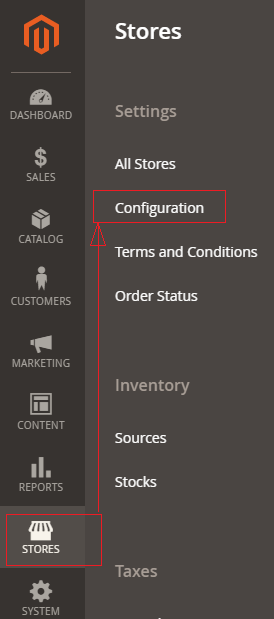
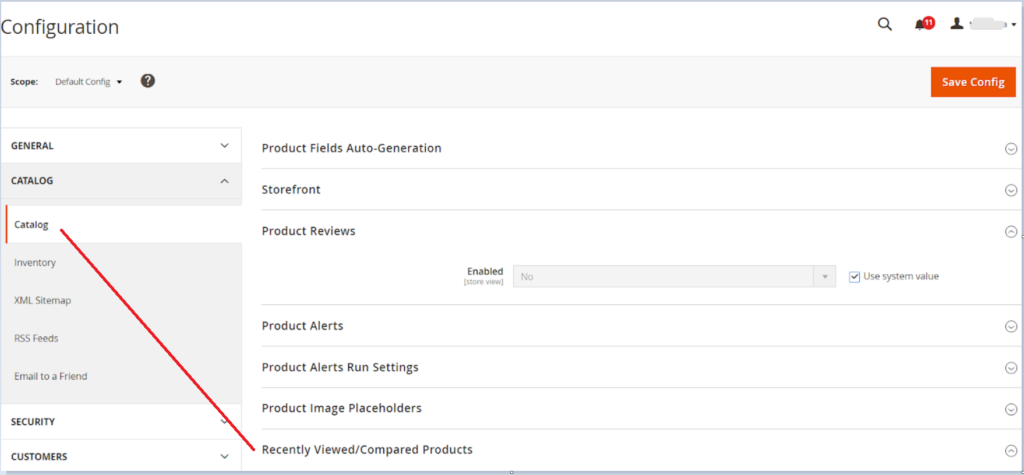
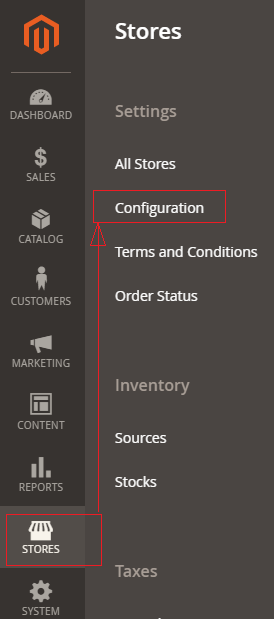
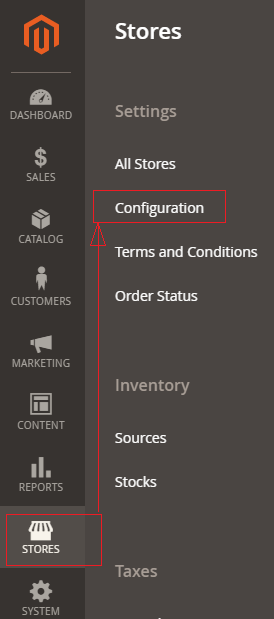
[1] Go STORES > Configuration, redirects Configuration section.
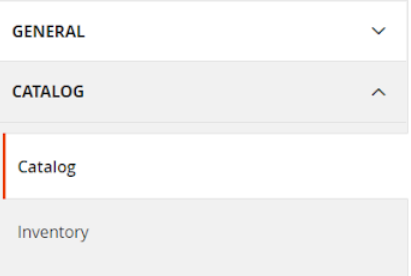
[2] Left panel under Catalog, choose Catalog
[3] Go to Catalog & Expand the Recently Viewed/Compared Products section & follow below things
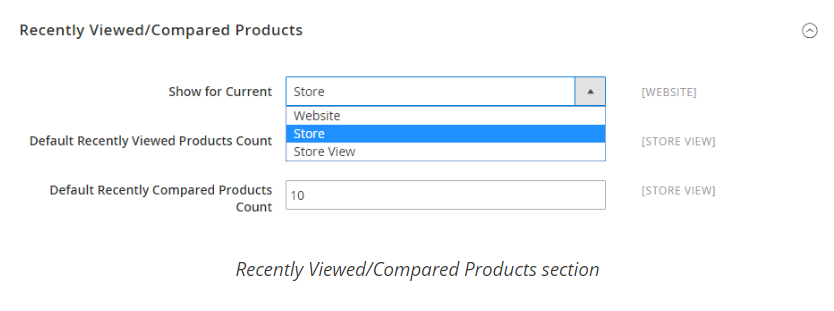
Once Recently Viewed/Compared Products section expanded, It is view as below
Set Show for Current to the website, store, or store view where the configuration applies.
In the Default Recently Viewed Products Count field, enter the number of recently viewed products to appear on the list. In the Default Recently Compared Products Count, enter the number of recently compared products to appear in the list.
There are following below things need to follow to enable Magento 2 One Page Checkout.
Step-[1] Go STORES > Configuration, redirects Configuration section.
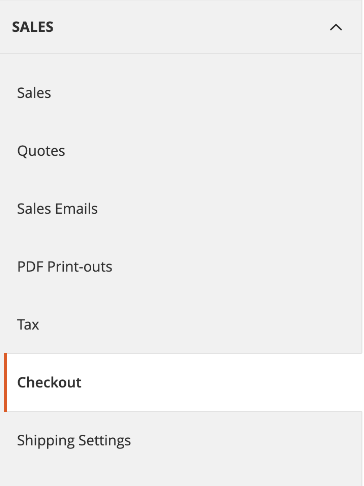
Step- [2] Go To Sales > Checkout
Once clicked on Sales, display multiple values , need to click on Checkout.
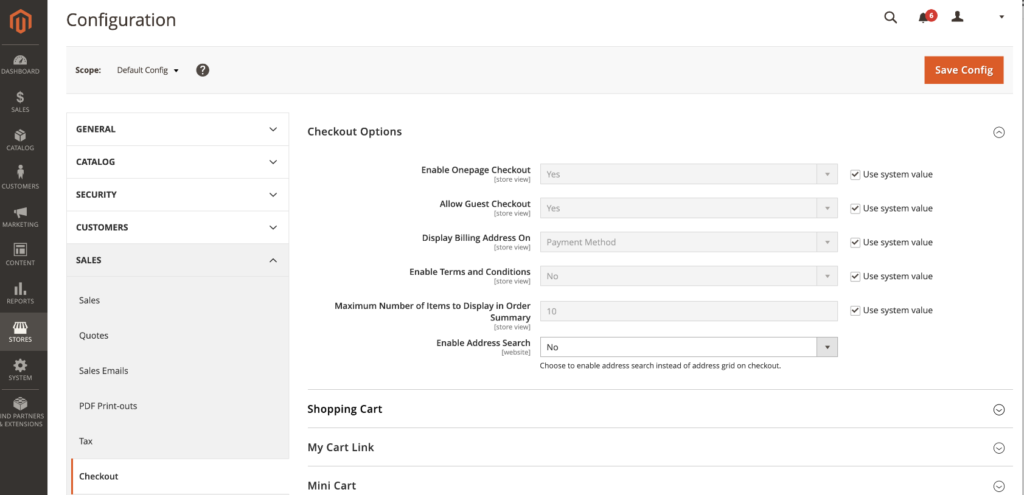
Step- [3] Once Clicked on Checkout, displayed checkout options as below image, There are following below Checkout Things are given
Enable One Page Checkout: By Default enable , if Admin User wants to disable, need to select No from Drop Down, Finally One Page Checkout will be disabled.
Allow Guest Checkout: By Default enable , if Admin User wants to disable, need to select No from Drop Down. Finally Guest Checkout will be disabled.
Display Billing Address On: By Default Payment Method selected, There are two Values given , Once Clicked on Drop Down
Payment Method: If selected Billing Address will be displayed on Payment Method
Payment Page: If selected Billing Address will be displayed on Payment Page
Enabled Terms & Conditions: By Default Payment No selected, If Yes selected Enabled Terms & Conditions checkbox will be displayed.
Maximum Number of Items to display in Order Summary: By Default 10 Products are being displayed, if filled more than 10, Total no of products will be more than 10 in Checkout Order Summary
Enable Address Search: By Default No
Step- [4] Click on Save Config button & run CLI command Flush
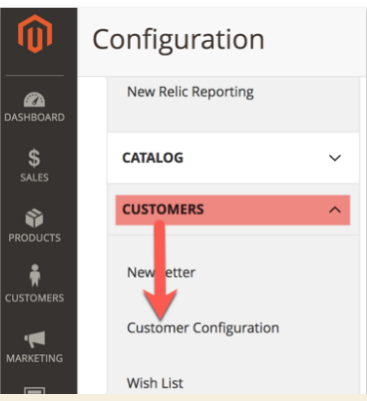
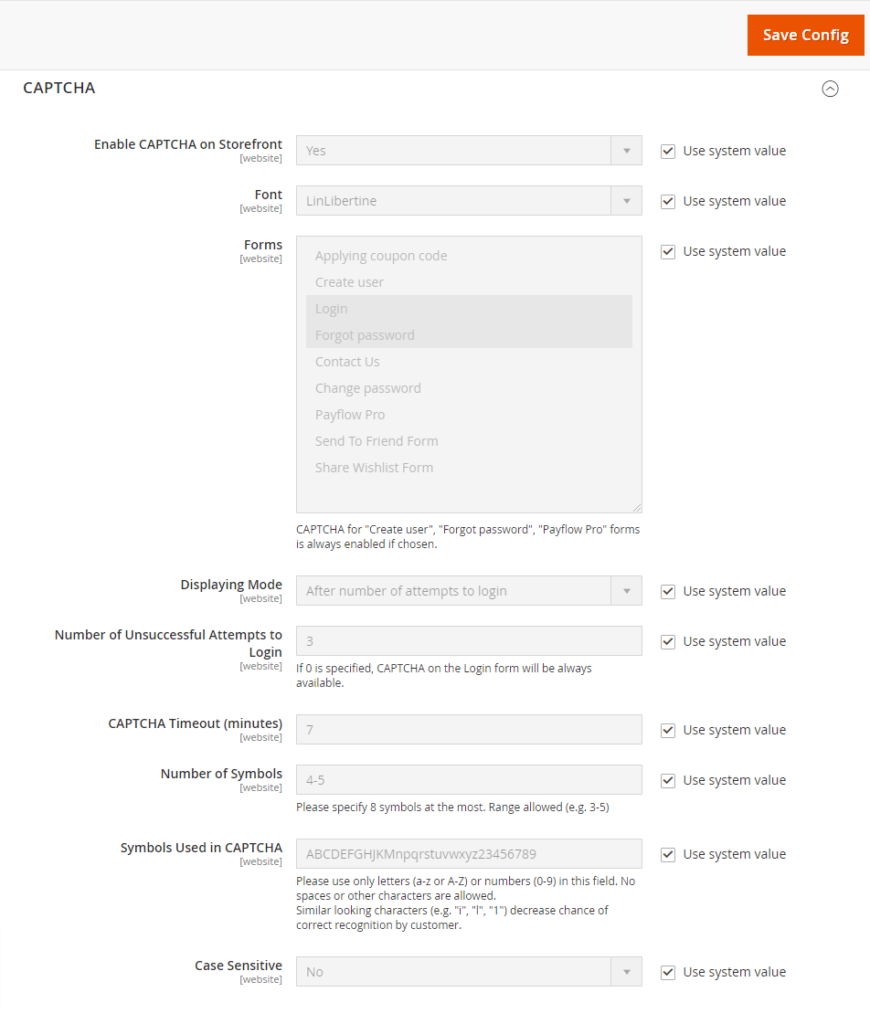
[3]- Go To Forms section. There are following below each CAPTCHAForm field details described.
Note : Each form field use system value checked, if you want to modify need to uncheck.
[3.1] – Enable CAPTCHA on Storefront : Select Yes from drop down, by default Yes selected.
[3.2] – Font : Select font, by default font LinLibertine selected
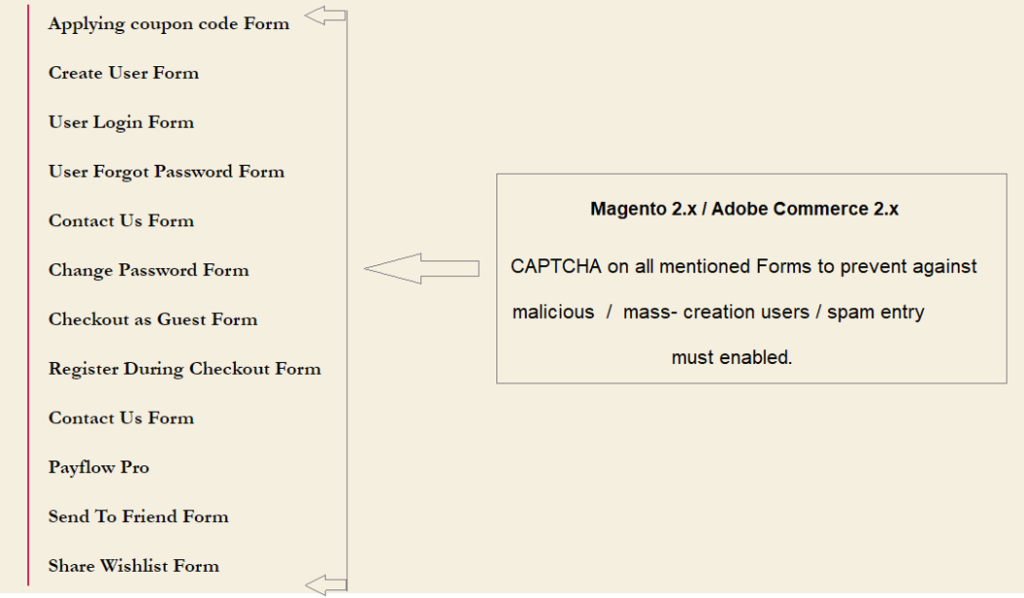
[3.3] – Forms : select any form or set of form as
Applying coupon codeForm
Create UserForm
User Login Form
User Forgot Password Form
Contact Us Form
Change Password Form
Checkout as Guest Form
Register During Checkout Form
Contact Us Form
Payflow Pro
Send To Friend Form
Share Wishlist Form
once selected any form or set of form, Captcha will be enabled.
By Default User Login Form & User Forget Password Form Captcha enabled
[3.4] – Displaying Mode : Two option are here as After number of attempts to login or Always
By default After number of attempts to login selected, It means number of login attempts , CAPTCHA will be displayed, number of login attempts defined next step.
[3.5] – Number of Unsuccessful Attempts To Login : By default 3 attempts, if 0 selected CAPTCHA will be always displayed on forms.
[3.6] – CAPTCHA Timeout (minutes) : By default 7 minute specified, as per store requirement, need to modify.
[3.7] – Number of Symbols : By default 4-5 , as per store requirement, need to modify.
[3.8] – Symbols Used in CAPTCHA : By default combination of Capital Alphabet, Small Alphabet & Number (0-9).
It only allows combination of Capital Alphabet, Small Alphabet & Number (0-9), Never allowed Spaces, Character, Special Character
[3.9] – Case Sensitive : By Default, No selected, as per store requirement, need to modify.
[4]- Finally click on save button & now Magento 2 website / store User Login Form & User Forgot Password form now ready with CAPTCHA
Website / Store protects against prevent against malicious/mass-creation users / spam entry after enabled CAPTCHA
There are following steps need to follow in Magento 2 admin to be secure Magento 2 Admin, only authorized user can access system
Go To Magento 2 Admin
Stores–Configuration–Advanced–System–Admin
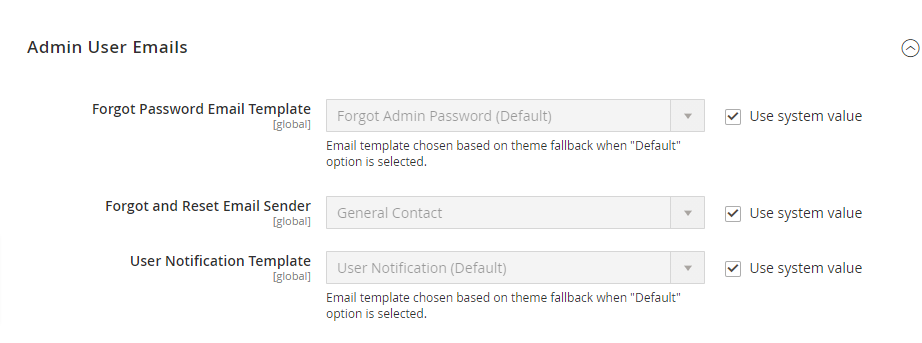
Admin User Emails
There are following three parts are given under Admin User Email

Forgot Password Email Template: Select Forgot Password Email Template from drop down email template--by default Forgot Admin Password (Default).

Forgot & Reset Email Sender: Select Contact List to send forget & reset password to specified email-- By Default General Contact, whatever email written in General Contact, forget & reset password
email sent to that email. There is another option Sales Representative  or any custom contact list from drop down list

User Notification Template:  Select User Notification Email Template
which is responsible for all users activity email notification template to Admin
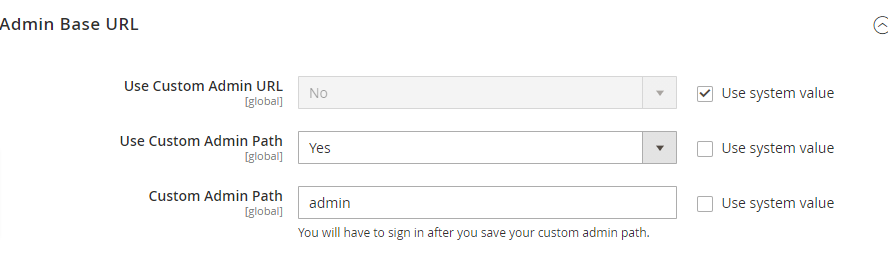
Admin Base URL
There are following three parts are given under Admin User Email

Use Custom Admin URL: Select Yes if Admin User want Custom Admin URL

Use Custom Admin Path: Select Yes if Admin User want Custom Admin Path

Custom Admin Path: Provide Custom Admin Path Name if Admin user want
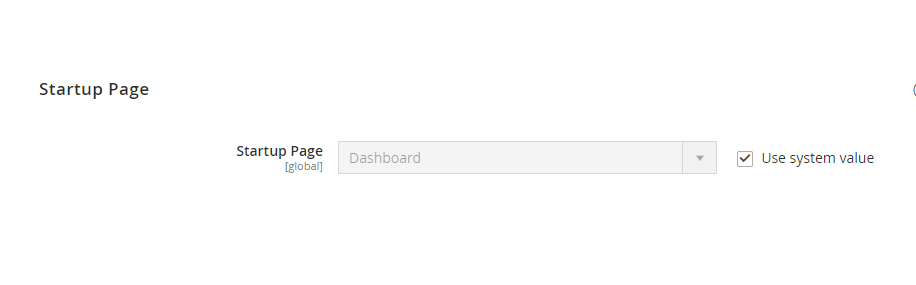
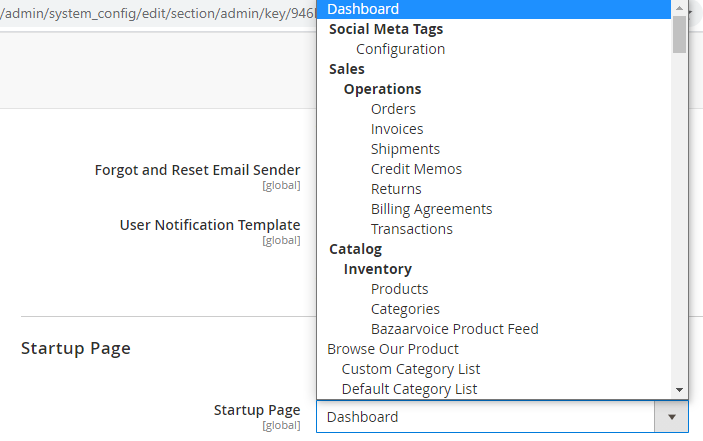
Startup Page
Once Admin Uses logged in Magento 2 admin by default redirects on Dashboard Page , if Admin User want, select another admin redirection page from drop down list, where all admin pages are given as per below Dashboard drop down list
Security
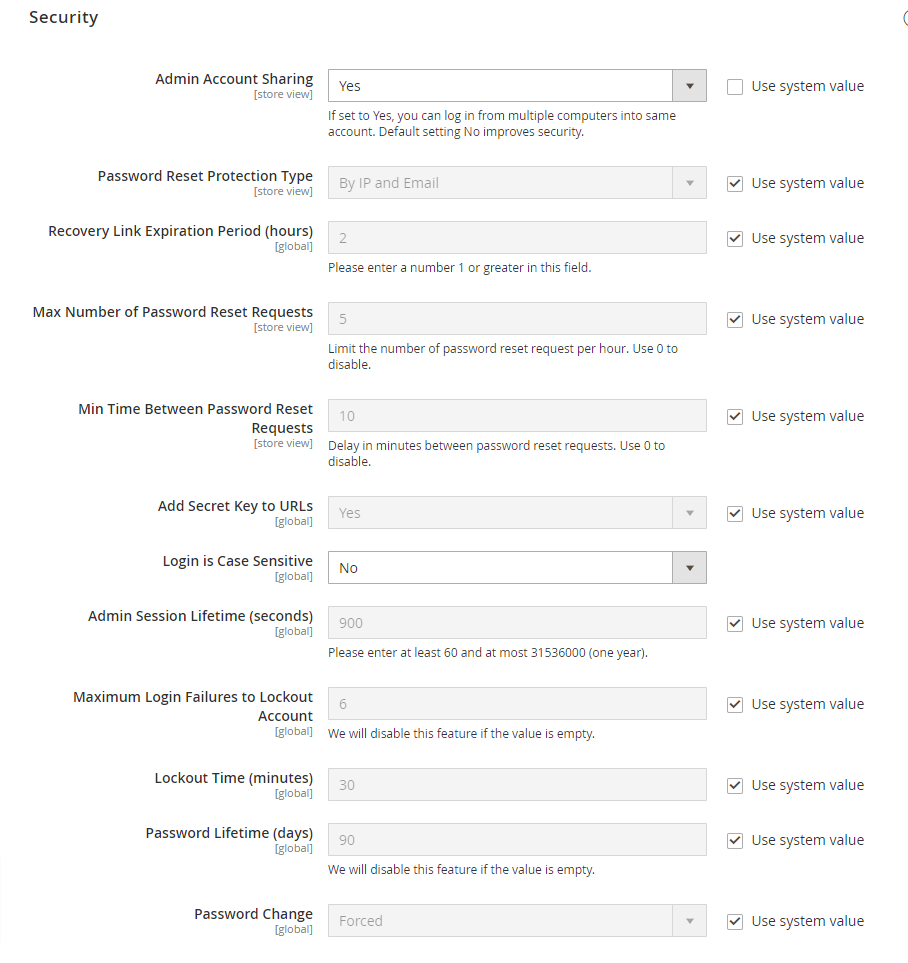
There are following three parts are given under SecurityAdmin Account Sharing: By Default, it is Yes, because Admin User can login in multiple system, by using same Admin User Credentials
If It is No, Admin User can not login in multiple system, by using same Admin User Credentials.
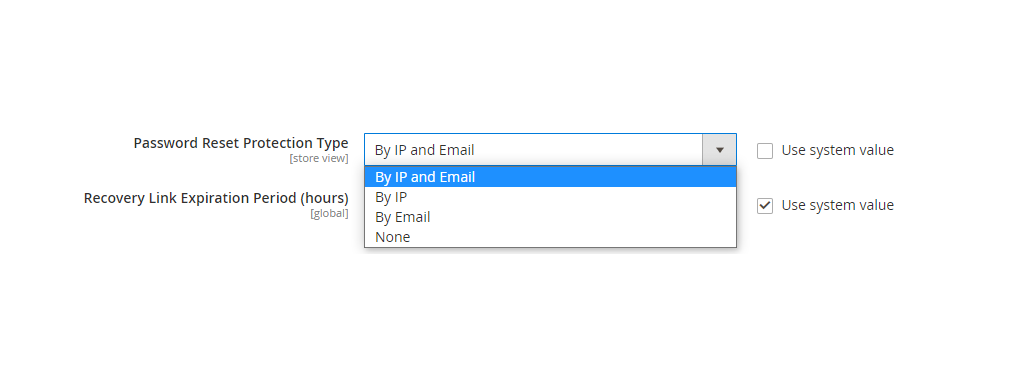
Password Reset Protection Type: By Default IP and Email, if Admin User can select by IP or Email or None from drop down list.
Recovery Link Expiration Period (hours): Password Recovery Link expiation period , By Default 2 Hours, If Admin User wants to put more Hours, can modify value more than 2.
Max Number of Password Reset Requests: Limit the number of password reset request per hour. Use 0 to disable. .
Min Time Between Password Reset Requests: Delay in minutes between password reset requests. Use 0 to disable
Add Secret Key to URLs: By default Yes, If Admin User do not want to put Secret Key to URLs, can select No from drop down.
Login is Case Sensitive: By default No , If Admin User want to
Login User Name as Case Sensitive, can select Yes from drop down.
Admin Session Lifetime (seconds): By default 900 Seconds [15 Minute], If Admin User want to modify , can modify values,
but enter at least 60 seconds and at most 31536000 seconds (one year).Maximum Login Failures to Lockout Account: By default 6, maximum Login failures attempt, if not putting correct Admin Credentials,
If Admin User want to modify , can put different value,
this feature will be disabled if the value is empty.Lockout Time (minutes): By default Lockout Time 30 minutes, increase as per requirement.
Password Lifetime (days): By default 90 days, increase as per requirement. this feature will be disabled if the value is empty.Password Change: By default forced, If Admin User want to change
can select Recommendation from drop down list.
In case forced whatever strong password while creating / updating password it will accept.
In case Recommendation , there are some strong password steps will be displayed, while creating / updating password
When user browsing a website, the website’s contents will cache in your browser. This cache can be controlled by using to configure Cache-Control HTTP headers for your website, This is done by adding mod_expires in the .htaccess file of your server.
If you don’t use Cache-Control HTTP headers, then, you will have a longer wait times when browsing your website. Each time your website is accessed without Cache-Control, your website has to make a request to the server for each content as image, html file, jquery file, javascript file, CSS file, and so forth to load.
HTACCESS mod_expires Module instructs Apache to generate Expires and Cache-Control HTTP response headers for the specified content types. Web browsers parse these HTTP response headers to determine how long to cache content on the client’s machine browser.
There are following below methods to add Feature-Policy Security Header in Apache or NGINX or .HTACCESS
[1] How to add in Nginx configuration file

There are following code need to add in Nginx configuration file

add_header set Feature-Policy "geolocation 'self'; vibrate 'none'";


[2] How to add in Apache configuration file

There are following code need to add in Apache configuration file

header always set Feature-Policy "geolocation 'self'; vibrate 'none'"


[3] How to add in .htaccess file

There are following code need to add in .htaccess configuration file

<IfModule mod_headers.c>
Header set Feature-Policy "geolocation 'self'; vibrate 'none'"
<IfModule mod_headers.c>
Syntax: Feature-Policy: <directive> <allow-list>

There are following below things, according, website need, can enable/disable Feature-Policy


• Directive: This header accepts 2 directive but on directive can redirect with other directives, as mentioned and described below:

• <directive>: It corresponds to the instructions on how we can use different features and API’s.

• <allow-list>: It is a list indicating that how the browser feature can be used.

• <directive>: This directive can redirect to any of the following directive:
•
• accelerometer: Used to get information about acceleration of device

• ambient-light-sensor: Used to get information whether there is enough light in surroundings

• autoplay: Used to control media autoplay settings. Mostly used with audio and video elements

• battery: Used to get the status of battery using Battery Status API

• camera: Used to control video input via a camera of device

• display-capture: Captures screen contents through a screenshot

• document-domain: Used to control the current document’s document domain by setting it or unsetting it

• encrypted-media: Used to control Encrypted Media Extension API (EME)

• fullscreen : Used to control full screen access

• geolocation: Used to show location of user on a map by using geolocation API

• gyroscope: Used to get information about orientation of device accessing gyroscope of device

• layout-animations: Used to show layout animations and transitions

• legacy-image-formats: Displays image in legacy format

• magnetometer: Used to get information about magnetic orientation of device

• microphone: Used for audio input through device’s microphone

• midi: Used to access Web MIDI API

• oversized-images: Used in displaying and downloading large over-sized images

• payment: Controls all payment related activity by using Payment Request API

• picture-in-picture: Allows a video to play in Picture-in-Picture mode

• public key-credentials-get: Uses Web Authentication API and retrieves public-key credentials

• sync-xhr: Used in making synchronous XMLHTTPRequest

• usb: Controls WebUSB API for USB Media access

• wake-lock: Informs the device to not enter power-saving mode by using Wake Lock API

• xr-spatial-tracking: Used to interact with WebXR session by making use of WebXR Device API
There are following below methods to add X-Content-Type-Options Security Header in Apache or NGINX or .HTACCESS
[1] How to add in Nginx configuration file

There are following code need to add in Nginx configuration file

add_header set X-Content-Type-Options "nosniff" always;


[2] How to add in Apache configuration file

There are following code need to add in Apache configuration file

header always set X-Content-Type-Options "nosniff" always


[3] How to add in .htaccess file

There are following code need to add in .htaccess configuration file

<IfModule mod_headers.c>
Header set X-Content-Type-Options "nosniff" always;
<IfModule mod_headers.c>
There are following below methods to add Expect-CT Security Header in Apache or NGINX or .HTACCESS
[1] How to add in Nginx configuration file

There are following code need to add in Nginx configuration file

add_header set Expect-CT: max-age=604800, enforce, report-uri="https://www.example.com/report";


[2] How to add in Apache configuration file

There are following code need to add in Apache configuration file

header always set Expect-CT: max-age=604800, enforce, report-uri="https://www.example.com/report"


[3] How to add in .htaccess file

There are following code need to add in .htaccess configuration file

<IfModule mod_headers.c>
Header set Expect-CT: max-age=604800, enforce, report-uri="https://www.example.com/report"
<IfModule mod_headers.c>

Note:: Instead of https://www.example.com, Please use your own URL


 Recovery Link Expiration Period (hours): Password Recovery Link expiation period , By Default 2 Hours, If Admin User wants to put more Hours, can modify value more than 2.
Max Number of Password Reset Requests: Limit the number of password reset request per hour. Use 0 to disable. .
Min Time Between Password Reset Requests: Delay in minutes between password reset requests. Use 0 to disable
Add Secret Key to URLs: By default Yes, If Admin User do not want to put Secret Key to URLs, can select No from drop down.
Login is Case Sensitive: By default No , If Admin User want to
Login User Name as Case Sensitive, can select Yes from drop down.
Admin Session Lifetime (seconds): By default 900 Seconds [15 Minute], If Admin User want to modify , can modify values,
but enter at least 60 seconds and at most 31536000 seconds (one year).
Maximum Login Failures to Lockout Account: By default 6, maximum Login failures attempt, if not putting correct Admin Credentials,
If Admin User want to modify , can put different value,
this feature will be disabled if the value is empty.
Lockout Time (minutes): By default Lockout Time 30 minutes, increase as per requirement.
Password Lifetime (days): By default 90 days, increase as per requirement. this feature will be disabled if the value is empty.
Password Change: By default forced, If Admin User want to change
can select Recommendation from drop down list.
In case forced whatever strong password while creating / updating password it will accept.
In case Recommendation , there are some strong password steps will be displayed, while creating / updating password
Recovery Link Expiration Period (hours): Password Recovery Link expiation period , By Default 2 Hours, If Admin User wants to put more Hours, can modify value more than 2.
Max Number of Password Reset Requests: Limit the number of password reset request per hour. Use 0 to disable. .
Min Time Between Password Reset Requests: Delay in minutes between password reset requests. Use 0 to disable
Add Secret Key to URLs: By default Yes, If Admin User do not want to put Secret Key to URLs, can select No from drop down.
Login is Case Sensitive: By default No , If Admin User want to
Login User Name as Case Sensitive, can select Yes from drop down.
Admin Session Lifetime (seconds): By default 900 Seconds [15 Minute], If Admin User want to modify , can modify values,
but enter at least 60 seconds and at most 31536000 seconds (one year).
Maximum Login Failures to Lockout Account: By default 6, maximum Login failures attempt, if not putting correct Admin Credentials,
If Admin User want to modify , can put different value,
this feature will be disabled if the value is empty.
Lockout Time (minutes): By default Lockout Time 30 minutes, increase as per requirement.
Password Lifetime (days): By default 90 days, increase as per requirement. this feature will be disabled if the value is empty.
Password Change: By default forced, If Admin User want to change
can select Recommendation from drop down list.
In case forced whatever strong password while creating / updating password it will accept.
In case Recommendation , there are some strong password steps will be displayed, while creating / updating password