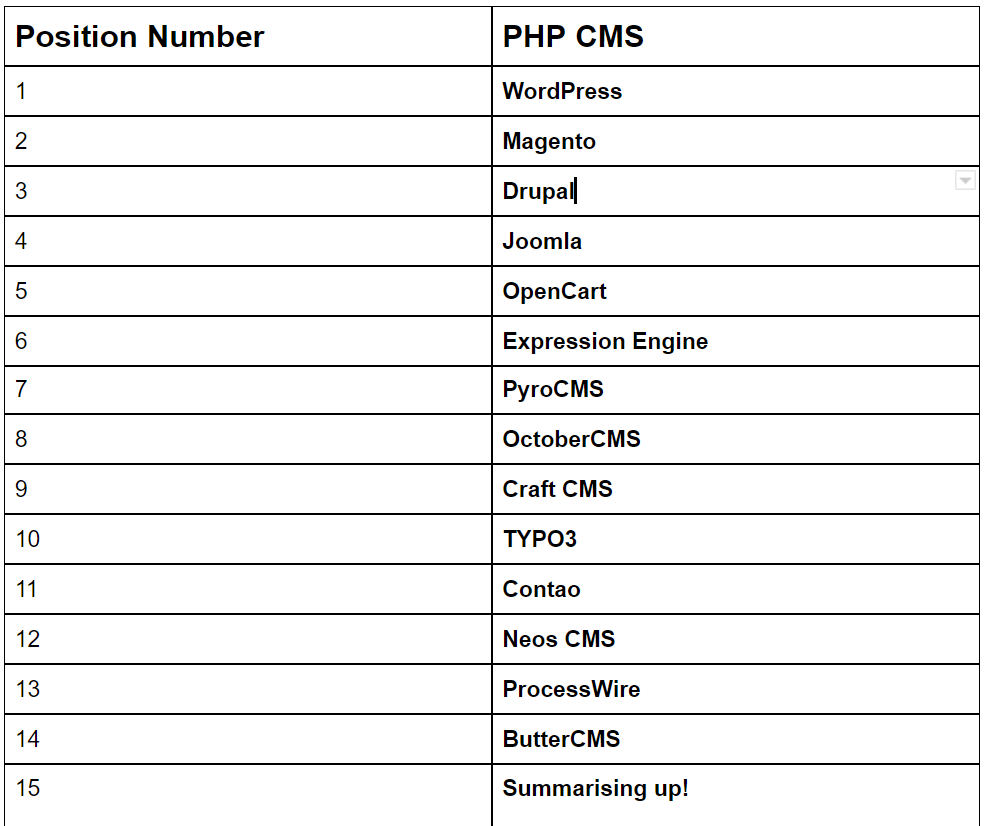
There are following below PHP based framework in 2021


AI, Ecommerce, Technology & Management – Learn. Build. Solve

There are following below three modes in Magento 2
Once you download Magento 2.x, It is mode as Default Mode
[1] Default Mode :: It is not recommended used for the development and production environment.
It perform following below operation
[2] Developer mode :: It is recommended used for the development environment
How to convert in Developer Mode by using CLI Command
php bin/magento deploy:mode:show

It is output as below
Current application mode: default
php bin/magento deploy:mode:set developer
It is output as below
Current application mode: developer
It perform following below operation.
[3] Production mode :: It is recommended used for the Production environment.
How to convert in Production Mode by using CLI Command
php bin/magento deploy:mode:show

It is output as below
Current application mode: default
php bin/magento deploy:mode:set production

It is output as below
Current application mode: production
It perform following below operation
system.log and exception.log. system.log Magento 2 runs in the production mode (not developer mode) then it does not show the actual error message on the screen, but shows a generic message: There has been an error processing your request and creates a detailed error report in the var/reports folder. You can find the error report file there by its report ID which is shown on the screen.
Yotpo is a user-generated content marketing platform enabling merchants to gather, curate, manage, and respond to all kinds of user content from just a single platform. Yotpo integrates with Adobe Commerce and Magento Open Source for customers to maximize the power of user-generated content.
Yotpo A.I. engine, Adobe Commerce brands and merchants can easily collect and intelligently display customer content like
Customer’s reviews
Photos
Videos
It is key point throughout the buyer journey to improve trust, social proof, and sales. Adobe Commerce users will also gain access to feedback data and unprecedented insight into consumer behavior and sentiment.
There are following below Magento 2 Database Table having All Catalog (Categories & Products) URLs Storage Data
catalog_url_rewrite_product_category
Which Magento 2 database tables store Product details
Which Magento 2 database tables store Category details
How To Delete Magento 2 Categories & Products in Magento 2
How To Delete Magento 2 Products
How To Delete Magento 2 Categories
How To Delete Magento 2 Categories & Products in Magento 2
Which Magento 2 Database Table Store Customer Group Price of products
Which Magento 2 Database Table Store Products Special Discount Price
There are following below methods need to follow to disable Password Expiration Limit in Magento 2.
Method-1:: By usng Magento 2 Admin
[1] – Go To STORES > Configuration, redirects on configuration.
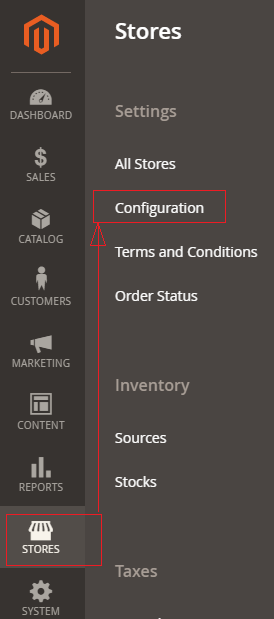
[2] – Left Panel Advanced -> Admin, redirects on [Right Panel]
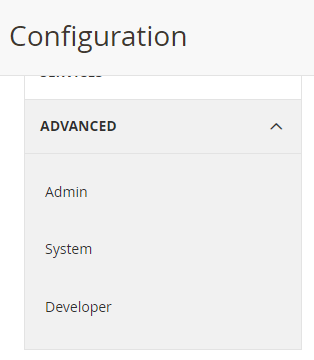
[3] – Once redirection on [Right Panel]
[4] – Once clicked / expanded, Security Fieldset.
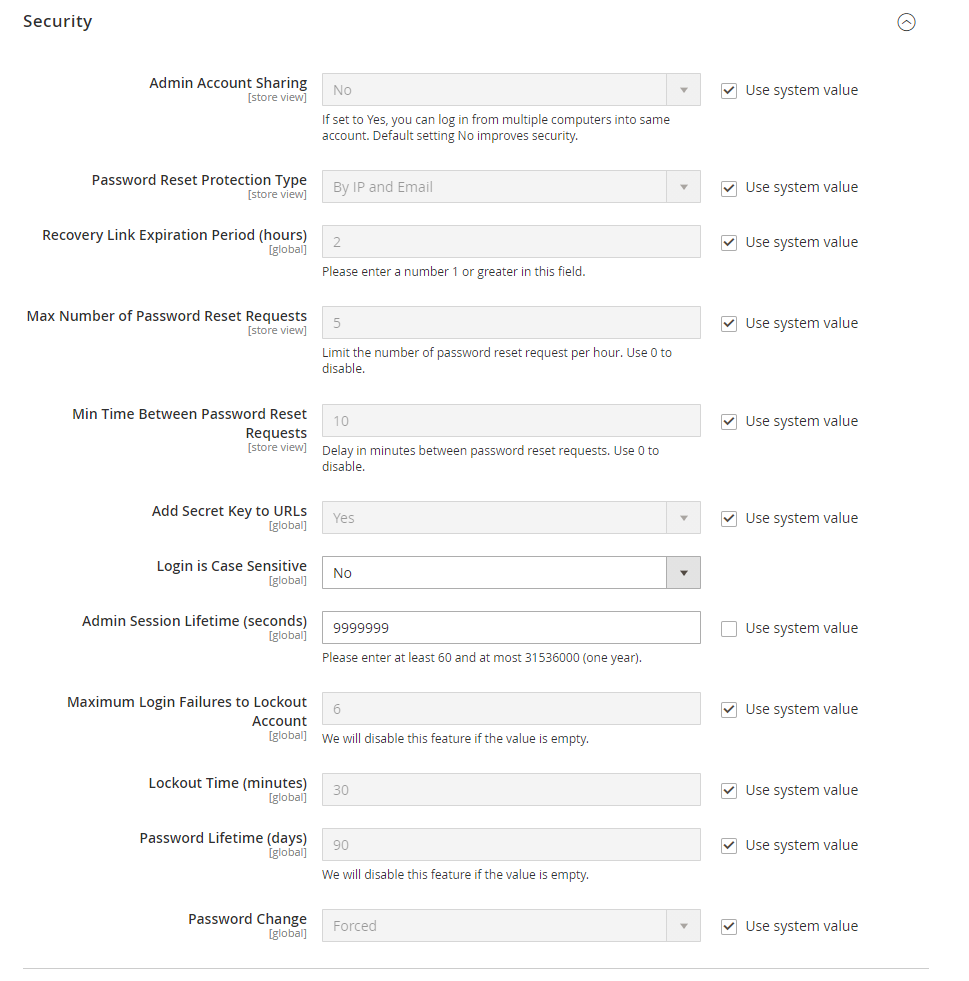
By Default Password Lifetime (days) – 90
Need to modify as per below spets
By Default Password Change – Forced
[5] – Go to Password Change section and select option “Recommended“.

[6] – Go to Password Lifetime (days) section and set empty textbox.

[7] -Finally click on Save Config Button & clear cache
Method-2:: By usng CLI command, need to run below two CLI command
php bin/magento config:set admin/security/password_lifetime ''
php bin/magento config:set admin/security/password_is_forced 0There are following below cases where you are getting this error “Invalid Form Key. Please refresh the page”
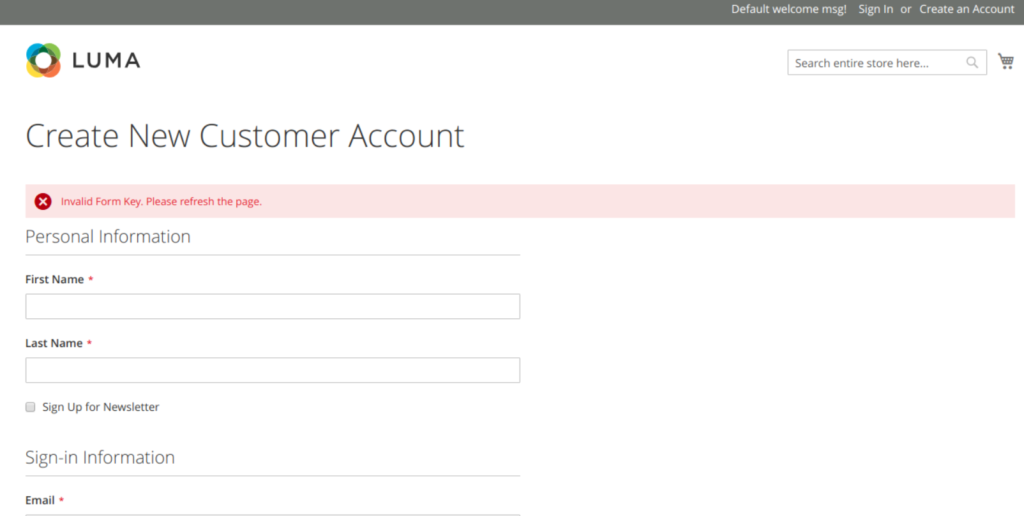
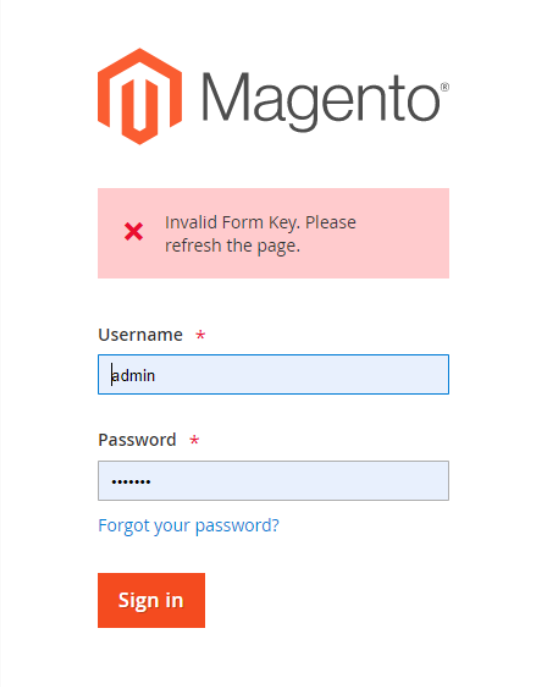
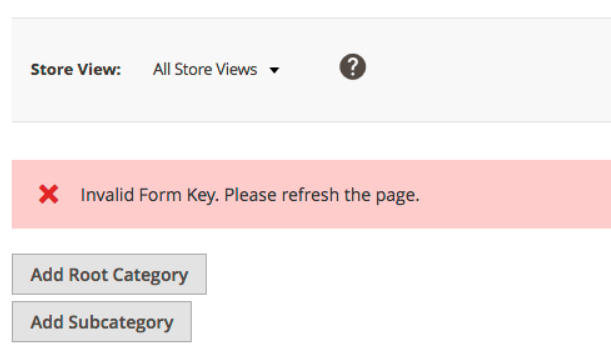
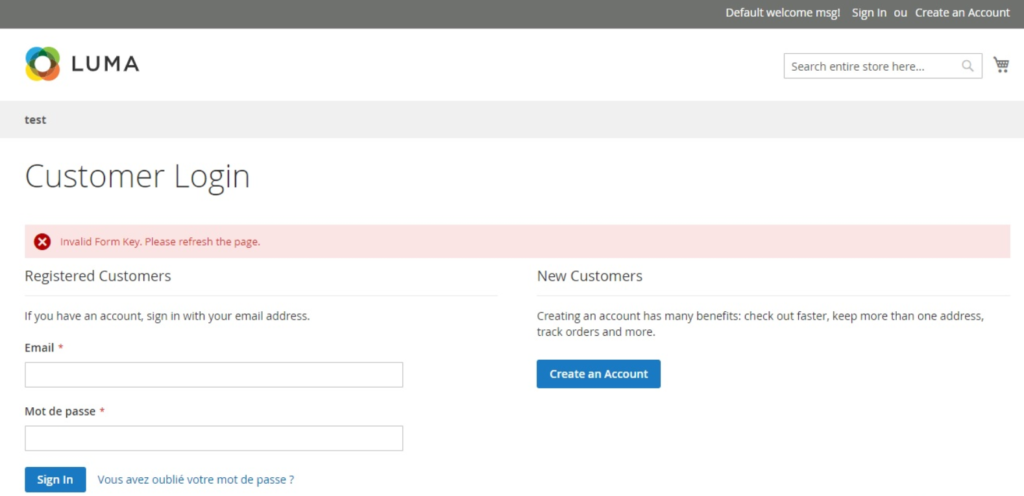
Solution:: Need to increase the value of PHP Max_input_vars to the value in php.ini (PHP Configuration File)
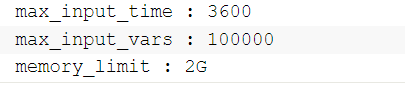
The recommended value for Max_input_vars for Magento 2 should be 100000
After that restart Web Server (Apache / Nginx) to apply changes.
Finally issue will be resolved.
There are following below Magento 2 Database SQL query need to run.
SET FOREIGN_KEY_CHECKS = 0;
TRUNCATE TABLE catalog_category_entity;
TRUNCATE TABLE catalog_category_entity_int;
TRUNCATE TABLE catalog_category_entity_varchar;
TRUNCATE TABLE cataloginventory_stock_item;
TRUNCATE TABLE cataloginventory_stock_status;
TRUNCATE TABLE cataloginventory_stock_status_idx;
TRUNCATE TABLE cataloginventory_stock_status_tmp;
TRUNCATE TABLE catalog_category_product;
TRUNCATE TABLE catalog_category_product_index;
TRUNCATE TABLE catalog_category_product_index_tmp;
TRUNCATE TABLE catalog_compare_item;
TRUNCATE TABLE catalog_product_bundle_option;
TRUNCATE TABLE catalog_product_bundle_option_value;
TRUNCATE TABLE catalog_product_bundle_price_index;
TRUNCATE TABLE catalog_product_bundle_selection;
TRUNCATE TABLE catalog_product_bundle_selection_price;
TRUNCATE TABLE catalog_product_bundle_stock_index;
TRUNCATE TABLE catalog_product_entity;
TRUNCATE TABLE catalog_product_entity_datetime;
TRUNCATE TABLE catalog_product_entity_decimal;
TRUNCATE TABLE catalog_product_entity_gallery;
TRUNCATE TABLE catalog_product_entity_int;
TRUNCATE TABLE catalog_product_entity_media_gallery;
TRUNCATE TABLE catalog_product_entity_media_gallery_value;
TRUNCATE TABLE catalog_product_entity_media_gallery_value_to_entity;
TRUNCATE TABLE catalog_product_entity_media_gallery_value_video;
TRUNCATE TABLE catalog_product_entity_text;
TRUNCATE TABLE catalog_product_entity_tier_price;
TRUNCATE TABLE catalog_product_entity_varchar;
TRUNCATE TABLE catalog_product_index_eav;
TRUNCATE TABLE catalog_product_index_eav_decimal;
TRUNCATE TABLE catalog_product_index_eav_decimal_idx;
TRUNCATE TABLE catalog_product_index_eav_decimal_tmp;
TRUNCATE TABLE catalog_product_index_eav_idx;
TRUNCATE TABLE catalog_product_index_eav_tmp;
TRUNCATE TABLE catalog_product_index_price;
TRUNCATE TABLE catalog_product_index_price_bundle_idx;
TRUNCATE TABLE catalog_product_index_price_bundle_opt_idx;
TRUNCATE TABLE catalog_product_index_price_bundle_opt_tmp;
TRUNCATE TABLE catalog_product_index_price_bundle_sel_idx;
TRUNCATE TABLE catalog_product_index_price_bundle_sel_tmp;
TRUNCATE TABLE catalog_product_index_price_bundle_tmp;
TRUNCATE TABLE catalog_product_index_price_cfg_opt_agr_idx;
TRUNCATE TABLE catalog_product_index_price_cfg_opt_agr_tmp;
TRUNCATE TABLE catalog_product_index_price_cfg_opt_idx;
TRUNCATE TABLE catalog_product_index_price_cfg_opt_tmp;
TRUNCATE TABLE catalog_product_index_price_downlod_idx;
TRUNCATE TABLE catalog_product_index_price_downlod_tmp;
TRUNCATE TABLE catalog_product_index_price_final_idx;
TRUNCATE TABLE catalog_product_index_price_final_tmp;
TRUNCATE TABLE catalog_product_index_price_idx;
TRUNCATE TABLE catalog_product_index_price_opt_agr_idx;
TRUNCATE TABLE catalog_product_index_price_opt_agr_tmp;
TRUNCATE TABLE catalog_product_index_price_opt_idx;
TRUNCATE TABLE catalog_product_index_price_opt_tmp;
TRUNCATE TABLE catalog_product_index_price_tmp;
TRUNCATE TABLE catalog_product_index_tier_price;
TRUNCATE TABLE catalog_product_index_website;
TRUNCATE TABLE catalog_product_link;
TRUNCATE TABLE catalog_product_link_attribute_decimal;
TRUNCATE TABLE catalog_product_link_attribute_int;
TRUNCATE TABLE catalog_product_link_attribute_varchar;
TRUNCATE TABLE catalog_product_option;
TRUNCATE TABLE catalog_product_option_price;
TRUNCATE TABLE catalog_product_option_title;
TRUNCATE TABLE catalog_product_option_type_price;
TRUNCATE TABLE catalog_product_option_type_title;
TRUNCATE TABLE catalog_product_option_type_value;
TRUNCATE TABLE catalog_product_relation;
TRUNCATE TABLE catalog_product_super_attribute;
TRUNCATE TABLE catalog_product_super_attribute_label;
TRUNCATE TABLE catalog_product_super_link;
TRUNCATE TABLE catalog_product_website;
TRUNCATE TABLE catalog_url_rewrite_product_category;
TRUNCATE TABLE downloadable_link;
TRUNCATE TABLE downloadable_link_price;
TRUNCATE TABLE downloadable_link_purchased;
TRUNCATE TABLE downloadable_link_purchased_item;
TRUNCATE TABLE downloadable_link_title;
TRUNCATE TABLE downloadable_sample;
TRUNCATE TABLE downloadable_sample_title;
TRUNCATE TABLE product_alert_price;
TRUNCATE TABLE product_alert_stock;
TRUNCATE TABLE report_compared_product_index;
TRUNCATE TABLE report_viewed_product_aggregated_daily;
TRUNCATE TABLE report_viewed_product_aggregated_monthly;
TRUNCATE TABLE report_viewed_product_aggregated_yearly;
TRUNCATE TABLE report_viewed_product_index;

INSERT INTO catalog_category_entity
  (entity_id,attribute_set_id,parent_id,created_at,updated_at,path,POSITION,level,children_count)
VALUES
  (1,0,0,'0000-00-00 00:00:00','2009-02-20 00:25:34','1',1,0,1),
  (2,3,0,'2009-02-20 00:25:34','2009-02-20 00:25:34','1/2',1,1,0);

INSERT INTO catalog_category_entity_int
  (value_id,attribute_id,store_id,entity_id,value)
VALUES
  (1,32,0,2,1),
  (2,32,1,2,1);

INSERT INTO catalog_category_entity_varchar
  (value_id,attribute_id,store_id,entity_id,value)
VALUES
  (1,31,0,1,'Root Catalog'),
  (2,33,0,1,'root-catalog'),
  (3,31,0,2,'Default Category'),
  (4,39,0,2,'PRODUCTS'),
  (5,33,0,2,'default-category');

SET FOREIGN_KEY_CHECKS = 1;
Magento 2 All Database Tables [500 & more Tables]
Which Magento 2 database tables store Product details
Which Magento 2 database tables store Category details
How To Delete Magento 2 Categories & Products in Magento 2
Which Magento 2 Database Table Store Bundles Product
Which Magento 2 Database Table Having All Catalog (Categories & Products) URLs Rewrite Storage Data
Which Magento 2 Database Tables Store Product Attributes
How To Delete Magento 2 Products
How To Delete Magento 2 Categories
Which Magento 2 Database Table Store Customer Group Price of products
Which Magento 2 Database Table Store Products Special Discount Price
There are following below Magento 2 Database SQL query need to run.
SET FOREIGN_KEY_CHECKS = 0;
TRUNCATE TABLE catalog_category_entity;
TRUNCATE TABLE catalog_category_entity_int;
TRUNCATE TABLE catalog_category_entity_varchar;
TRUNCATE TABLE cataloginventory_stock_item;
TRUNCATE TABLE cataloginventory_stock_status;
TRUNCATE TABLE cataloginventory_stock_status_idx;
TRUNCATE TABLE cataloginventory_stock_status_tmp;
TRUNCATE TABLE catalog_category_product;
TRUNCATE TABLE catalog_category_product_index;
TRUNCATE TABLE catalog_category_product_index_tmp;
TRUNCATE TABLE catalog_compare_item;
TRUNCATE TABLE catalog_product_bundle_option;
TRUNCATE TABLE catalog_product_bundle_option_value;
TRUNCATE TABLE catalog_product_bundle_price_index;
TRUNCATE TABLE catalog_product_bundle_selection;
TRUNCATE TABLE catalog_product_bundle_selection_price;
TRUNCATE TABLE catalog_product_bundle_stock_index;
TRUNCATE TABLE catalog_product_entity;
TRUNCATE TABLE catalog_product_entity_datetime;
TRUNCATE TABLE catalog_product_entity_decimal;
TRUNCATE TABLE catalog_product_entity_gallery;
TRUNCATE TABLE catalog_product_entity_int;
TRUNCATE TABLE catalog_product_entity_media_gallery;
TRUNCATE TABLE catalog_product_entity_media_gallery_value;
TRUNCATE TABLE catalog_product_entity_media_gallery_value_to_entity;
TRUNCATE TABLE catalog_product_entity_media_gallery_value_video;
TRUNCATE TABLE catalog_product_entity_text;
TRUNCATE TABLE catalog_product_entity_tier_price;
TRUNCATE TABLE catalog_product_entity_varchar;
TRUNCATE TABLE catalog_product_index_eav;
TRUNCATE TABLE catalog_product_index_eav_decimal;
TRUNCATE TABLE catalog_product_index_eav_decimal_idx;
TRUNCATE TABLE catalog_product_index_eav_decimal_tmp;
TRUNCATE TABLE catalog_product_index_eav_idx;
TRUNCATE TABLE catalog_product_index_eav_tmp;
TRUNCATE TABLE catalog_product_index_price;
TRUNCATE TABLE catalog_product_index_price_bundle_idx;
TRUNCATE TABLE catalog_product_index_price_bundle_opt_idx;
TRUNCATE TABLE catalog_product_index_price_bundle_opt_tmp;
TRUNCATE TABLE catalog_product_index_price_bundle_sel_idx;
TRUNCATE TABLE catalog_product_index_price_bundle_sel_tmp;
TRUNCATE TABLE catalog_product_index_price_bundle_tmp;
TRUNCATE TABLE catalog_product_index_price_cfg_opt_agr_idx;
TRUNCATE TABLE catalog_product_index_price_cfg_opt_agr_tmp;
TRUNCATE TABLE catalog_product_index_price_cfg_opt_idx;
TRUNCATE TABLE catalog_product_index_price_cfg_opt_tmp;
TRUNCATE TABLE catalog_product_index_price_downlod_idx;
TRUNCATE TABLE catalog_product_index_price_downlod_tmp;
TRUNCATE TABLE catalog_product_index_price_final_idx;
TRUNCATE TABLE catalog_product_index_price_final_tmp;
TRUNCATE TABLE catalog_product_index_price_idx;
TRUNCATE TABLE catalog_product_index_price_opt_agr_idx;
TRUNCATE TABLE catalog_product_index_price_opt_agr_tmp;
TRUNCATE TABLE catalog_product_index_price_opt_idx;
TRUNCATE TABLE catalog_product_index_price_opt_tmp;
TRUNCATE TABLE catalog_product_index_price_tmp;
TRUNCATE TABLE catalog_product_index_tier_price;
TRUNCATE TABLE catalog_product_index_website;
TRUNCATE TABLE catalog_product_link;
TRUNCATE TABLE catalog_product_link_attribute_decimal;
TRUNCATE TABLE catalog_product_link_attribute_int;
TRUNCATE TABLE catalog_product_link_attribute_varchar;
TRUNCATE TABLE catalog_product_option;
TRUNCATE TABLE catalog_product_option_price;
TRUNCATE TABLE catalog_product_option_title;
TRUNCATE TABLE catalog_product_option_type_price;
TRUNCATE TABLE catalog_product_option_type_title;
TRUNCATE TABLE catalog_product_option_type_value;
TRUNCATE TABLE catalog_product_relation;
TRUNCATE TABLE catalog_product_super_attribute;
TRUNCATE TABLE catalog_product_super_attribute_label;
TRUNCATE TABLE catalog_product_super_link;
TRUNCATE TABLE catalog_product_website;
TRUNCATE TABLE catalog_url_rewrite_product_category;
TRUNCATE TABLE downloadable_link;
TRUNCATE TABLE downloadable_link_price;
TRUNCATE TABLE downloadable_link_purchased;
TRUNCATE TABLE downloadable_link_purchased_item;
TRUNCATE TABLE downloadable_link_title;
TRUNCATE TABLE downloadable_sample;
TRUNCATE TABLE downloadable_sample_title;
TRUNCATE TABLE product_alert_price;
TRUNCATE TABLE product_alert_stock;
TRUNCATE TABLE report_compared_product_index;
TRUNCATE TABLE report_viewed_product_aggregated_daily;
TRUNCATE TABLE report_viewed_product_aggregated_monthly;
TRUNCATE TABLE report_viewed_product_aggregated_yearly;
TRUNCATE TABLE report_viewed_product_index;

INSERT INTO catalog_category_entity
  (entity_id,attribute_set_id,parent_id,created_at,updated_at,path,POSITION,level,children_count)
VALUES
  (1,0,0,'0000-00-00 00:00:00','2009-02-20 00:25:34','1',1,0,1),
  (2,3,0,'2009-02-20 00:25:34','2009-02-20 00:25:34','1/2',1,1,0);

INSERT INTO catalog_category_entity_int
  (value_id,attribute_id,store_id,entity_id,value)
VALUES
  (1,32,0,2,1),
  (2,32,1,2,1);

INSERT INTO catalog_category_entity_varchar
  (value_id,attribute_id,store_id,entity_id,value)
VALUES
  (1,31,0,1,'Root Catalog'),
  (2,33,0,1,'root-catalog'),
  (3,31,0,2,'Default Category'),
  (4,39,0,2,'PRODUCTS'),
  (5,33,0,2,'default-category');

SET FOREIGN_KEY_CHECKS = 1;
Magento 2 All Database Tables [500 & more Tables]
Which Magento 2 database tables store Product details
Which Magento 2 database tables store Category details
How To Delete Magento 2 Categories & Products in Magento 2
Which Magento 2 Database Table Store Bundles Product
Which Magento 2 Database Table Having All Catalog (Categories & Products) URLs Rewrite Storage Data
Which Magento 2 Database Tables Store Product Attributes
How To Delete Magento 2 Categories
How To Delete Magento 2 Categories & Products in Magento 2
Which Magento 2 Database Table Store Customer Group Price of products
Which Magento 2 Database Table Store Products Special Discount Price
There are following below Magento 2 Database SQL query need to run.
SET FOREIGN_KEY_CHECKS = 0;
TRUNCATE TABLE catalog_category_entity;
TRUNCATE TABLE catalog_category_entity_int;
TRUNCATE TABLE catalog_category_entity_varchar;
TRUNCATE TABLE cataloginventory_stock_item;
TRUNCATE TABLE cataloginventory_stock_status;
TRUNCATE TABLE cataloginventory_stock_status_idx;
TRUNCATE TABLE cataloginventory_stock_status_tmp;
TRUNCATE TABLE catalog_category_product;
TRUNCATE TABLE catalog_category_product_index;
TRUNCATE TABLE catalog_category_product_index_tmp;
TRUNCATE TABLE catalog_compare_item;
TRUNCATE TABLE catalog_product_bundle_option;
TRUNCATE TABLE catalog_product_bundle_option_value;
TRUNCATE TABLE catalog_product_bundle_price_index;
TRUNCATE TABLE catalog_product_bundle_selection;
TRUNCATE TABLE catalog_product_bundle_selection_price;
TRUNCATE TABLE catalog_product_bundle_stock_index;
TRUNCATE TABLE catalog_product_entity;
TRUNCATE TABLE catalog_product_entity_datetime;
TRUNCATE TABLE catalog_product_entity_decimal;
TRUNCATE TABLE catalog_product_entity_gallery;
TRUNCATE TABLE catalog_product_entity_int;
TRUNCATE TABLE catalog_product_entity_media_gallery;
TRUNCATE TABLE catalog_product_entity_media_gallery_value;
TRUNCATE TABLE catalog_product_entity_media_gallery_value_to_entity;
TRUNCATE TABLE catalog_product_entity_media_gallery_value_video;
TRUNCATE TABLE catalog_product_entity_text;
TRUNCATE TABLE catalog_product_entity_tier_price;
TRUNCATE TABLE catalog_product_entity_varchar;
TRUNCATE TABLE catalog_product_index_eav;
TRUNCATE TABLE catalog_product_index_eav_decimal;
TRUNCATE TABLE catalog_product_index_eav_decimal_idx;
TRUNCATE TABLE catalog_product_index_eav_decimal_tmp;
TRUNCATE TABLE catalog_product_index_eav_idx;
TRUNCATE TABLE catalog_product_index_eav_tmp;
TRUNCATE TABLE catalog_product_index_price;
TRUNCATE TABLE catalog_product_index_price_bundle_idx;
TRUNCATE TABLE catalog_product_index_price_bundle_opt_idx;
TRUNCATE TABLE catalog_product_index_price_bundle_opt_tmp;
TRUNCATE TABLE catalog_product_index_price_bundle_sel_idx;
TRUNCATE TABLE catalog_product_index_price_bundle_sel_tmp;
TRUNCATE TABLE catalog_product_index_price_bundle_tmp;
TRUNCATE TABLE catalog_product_index_price_cfg_opt_agr_idx;
TRUNCATE TABLE catalog_product_index_price_cfg_opt_agr_tmp;
TRUNCATE TABLE catalog_product_index_price_cfg_opt_idx;
TRUNCATE TABLE catalog_product_index_price_cfg_opt_tmp;
TRUNCATE TABLE catalog_product_index_price_downlod_idx;
TRUNCATE TABLE catalog_product_index_price_downlod_tmp;
TRUNCATE TABLE catalog_product_index_price_final_idx;
TRUNCATE TABLE catalog_product_index_price_final_tmp;
TRUNCATE TABLE catalog_product_index_price_idx;
TRUNCATE TABLE catalog_product_index_price_opt_agr_idx;
TRUNCATE TABLE catalog_product_index_price_opt_agr_tmp;
TRUNCATE TABLE catalog_product_index_price_opt_idx;
TRUNCATE TABLE catalog_product_index_price_opt_tmp;
TRUNCATE TABLE catalog_product_index_price_tmp;
TRUNCATE TABLE catalog_product_index_tier_price;
TRUNCATE TABLE catalog_product_index_website;
TRUNCATE TABLE catalog_product_link;
TRUNCATE TABLE catalog_product_link_attribute_decimal;
TRUNCATE TABLE catalog_product_link_attribute_int;
TRUNCATE TABLE catalog_product_link_attribute_varchar;
TRUNCATE TABLE catalog_product_option;
TRUNCATE TABLE catalog_product_option_price;
TRUNCATE TABLE catalog_product_option_title;
TRUNCATE TABLE catalog_product_option_type_price;
TRUNCATE TABLE catalog_product_option_type_title;
TRUNCATE TABLE catalog_product_option_type_value;
TRUNCATE TABLE catalog_product_relation;
TRUNCATE TABLE catalog_product_super_attribute;
TRUNCATE TABLE catalog_product_super_attribute_label;
TRUNCATE TABLE catalog_product_super_link;
TRUNCATE TABLE catalog_product_website;
TRUNCATE TABLE catalog_url_rewrite_product_category;
TRUNCATE TABLE downloadable_link;
TRUNCATE TABLE downloadable_link_price;
TRUNCATE TABLE downloadable_link_purchased;
TRUNCATE TABLE downloadable_link_purchased_item;
TRUNCATE TABLE downloadable_link_title;
TRUNCATE TABLE downloadable_sample;
TRUNCATE TABLE downloadable_sample_title;
TRUNCATE TABLE product_alert_price;
TRUNCATE TABLE product_alert_stock;
TRUNCATE TABLE report_compared_product_index;
TRUNCATE TABLE report_viewed_product_aggregated_daily;
TRUNCATE TABLE report_viewed_product_aggregated_monthly;
TRUNCATE TABLE report_viewed_product_aggregated_yearly;
TRUNCATE TABLE report_viewed_product_index;

INSERT INTO catalog_category_entity
  (entity_id,attribute_set_id,parent_id,created_at,updated_at,path,POSITION,level,children_count)
VALUES
  (1,0,0,'0000-00-00 00:00:00','2009-02-20 00:25:34','1',1,0,1),
  (2,3,0,'2009-02-20 00:25:34','2009-02-20 00:25:34','1/2',1,1,0);

INSERT INTO catalog_category_entity_int
  (value_id,attribute_id,store_id,entity_id,value)
VALUES
  (1,32,0,2,1),
  (2,32,1,2,1);

INSERT INTO catalog_category_entity_varchar
  (value_id,attribute_id,store_id,entity_id,value)
VALUES
  (1,31,0,1,'Root Catalog'),
  (2,33,0,1,'root-catalog'),
  (3,31,0,2,'Default Category'),
  (4,39,0,2,'PRODUCTS'),
  (5,33,0,2,'default-category');

SET FOREIGN_KEY_CHECKS = 1;
Magento 2 All Database Tables [500 & more Tables]
Which Magento 2 database tables store Product details
Which Magento 2 database tables store Category details
How To Delete Magento 2 Categories & Products in Magento 2
Which Magento 2 Database Table Store Bundles Product
Which Magento 2 Database Table Having All Catalog (Categories & Products) URLs Rewrite Storage Data
Which Magento 2 Database Tables Store Product Attributes
How To Delete Magento 2 Products
How To Delete Magento 2 Categories & Products in Magento 2
Which Magento 2 Database Table Store Customer Group Price of products
Which Magento 2 Database Table Store Products Special Discount Price