
Category: magento 2.x
Magento 2.x / Adobe Commerce 2.x Outh Based Authentication
Magento 2.x / Adobe Commerce 2.x Token Based Authentication
How Do 3D Design Integration in Magento 2.x / Adobe Commerce 2.x
Why require 3D Design Technology
Ecommerce store should be integrate with 3D Design based technology to increase sales revenue & boost ecommerce sales, once Ecommerce store integrate with 3D Design based technology, it delivers awesome product’s images experience, customer able to watch images 3D Dimension base.
By using 3D Design product Image representation that display interactive way. With a 3D model, customer have option what part of the object they’d like to watch as Zoom in / out.
Once 3D Integrate with Ecommerce Store, following below features applicable.
- Ecommerce Store allow for Customization / configuration of products images in a Browser / Mobile App based, once select from virtual mode.
- Ecommerce Store allow to show interactive, 360-degree views of products on an e-commerce shopping website / store / app
- Ecommerce Store allow to show product’s images like real physical environment
- Ecommerce Store support AR for customers to preview products or experience services in their own environment and on their own time, before electing to make a purchase.
- Ecommerce Store support for Immersive multimedia and video gaming experiences
- Ecommerce Store support Digital product showrooms which present 3D models of products
- Ecommerce Store support for Metaverse shopping in 3D based technology
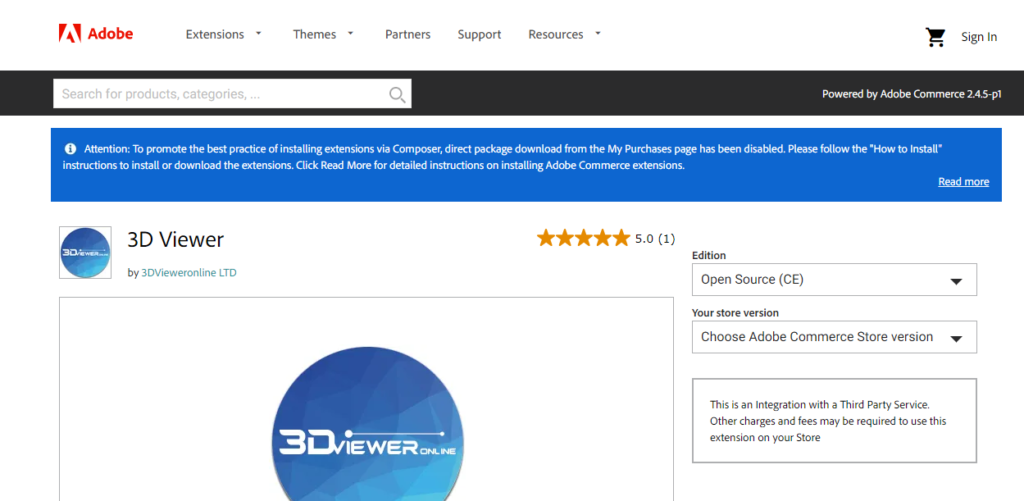
To Integrate Magento 2.x / Adobe Commerce 2.x with 3D Based Design:: the following below extension need to install.
https://marketplace.magento.com/vieweronline3d-product3dviewer.html
Magento 2.x / Adobe Commerce 2.x Page Builder & Its Layout, Elements, Media & Content
What is General Data Protection Regulation [ GDPR ]
What is the GDPR?
GDPR full form e General Data Protection Regulation. GDPR introduce on 25th May 2018 as the new European Union Regulation, replacing the Data Protection Directive (DPD) and The UK Data Protection Act 1998.
To Provide privacy of data for EU citizens, in relation to the storage, processing and handling of personal data. Personal data includes data that can identify an individual directly by using following below user’s data
- User’s Name
- User’s Address
- User’s Contact Information
- User’s Date of Birth
- User’s Health Records
- User’s Photographs
- User’s Resumes
- User’s Driver’s License
What is the use of GDPR?
General Data Protection Regulation (GDPR) is to protect individuals’ fundamental rights and freedoms, particularly their right to protection of their personal data.
GDPR Example
By using website Using tracking/advertising cookies.
To Send marketing emails or newsletters.
To Share personal data with other companies for commercial purposes.
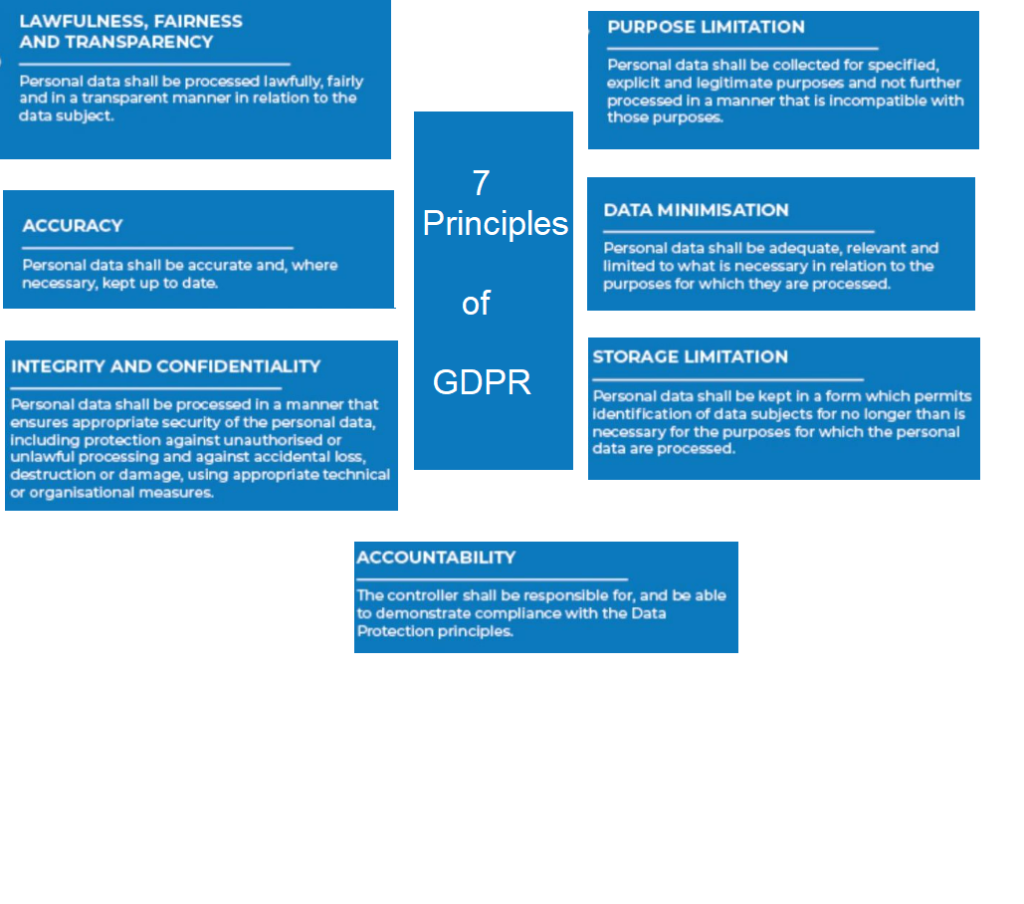
7 Principles of GDPR
How To Coupon in Cart By Using GraphQL in Magento 2.x / Adobe Commerce 2.x
What is PCI DSS, PCI DSC & its Rules , Levels
PCI DSS (Payment Card Industry Data Security Standard) is set of rules & regulations to prevent card payment against fraud & card security breaches, PCI data security standards are requirements determined by a council (PCI SSC) consisting of representatives of companies with global card networks such as American Express, MasterCard, Visa, Discover, and JCB to ensure the security of card and cardholder data.
PCI DSS is a set of security rules established by the PCI SSC (Security Standard Council) to ensure that all companies that process, store, or transmit credit card or cardholder data, need to maintain a secure environment.
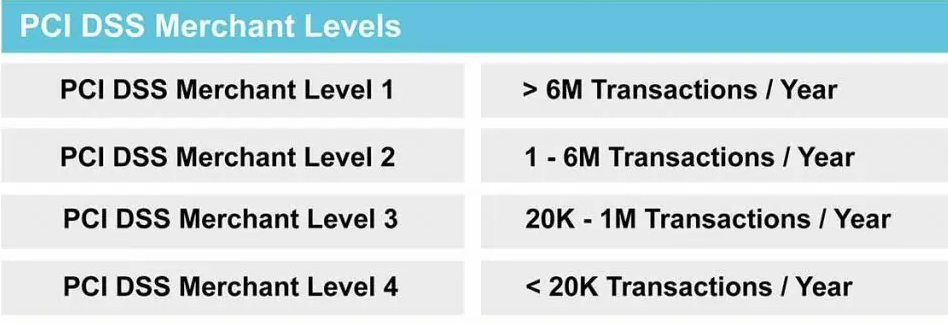
There are four type PCI DSS Level or PCI Compliance Levels
PCI Merchant Level 1: Merchants with over 6 million transactions a year, across all channels, or any merchant that has had a data breach
PCI Merchant Level 2: Merchants with between 1 million and 6 million transactions annually, across all channels
PCI Merchant Level 3: Merchants with between 20,000 and 1 million online transactions annually
PCI Merchant Level 4: Merchants with fewer than 20,000 online transactions a year or any merchant processing up to 1 million regular transactions per year
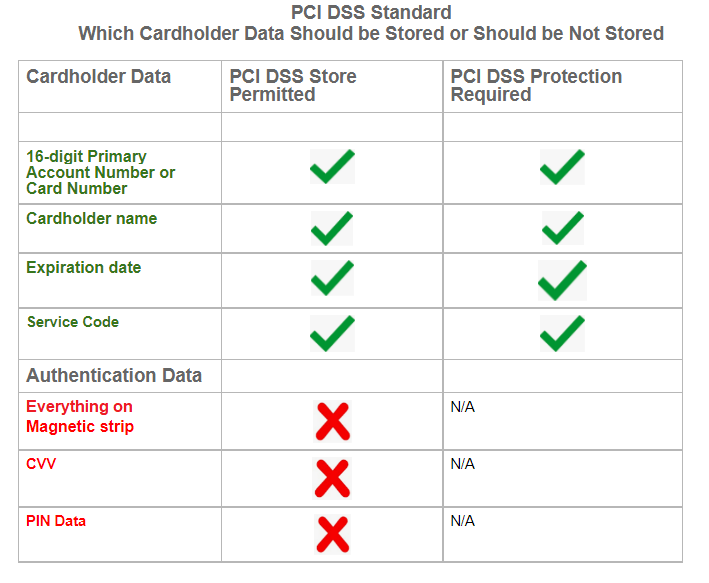
Cardholder Data Which Data should be Stored or should be not stored
12 requirements of PCI DSS Compliance
- Install and maintain a firewall configuration to protect cardholder data
- Do not use vendor-supplied defaults for system passwords and other security parameters
- Protect stored cardholder data
- Encrypt transmission of cardholder data across open, public networks
- Use and regularly update anti-virus software or programs
- Develop and maintain secure systems and applications
- Restrict access to cardholder data by business need to know
- Assign a unique ID to each person with computer access
- Restrict physical access to cardholder data
- Track and monitor all access to network resources and cardholder data
- Regularly test security systems and processes
- Maintain a policy that addresses information security for all personnel
How To Billing Address in Cart By Using GraphQL in Magento 2.x / Adobe Commerce 2.x
The following below steps need to follow to add Billing address in Cart by using GraphQL in Magento 2.x / Adobe Commerce 2.x
Here, we are using the setBillingAddressesOnCart mutation to add a shipping address to the cart.
Below use for guest checkout & logged customer checkout, in case of logged checkout need to use customer authorization
Step [1] – Recommendation to use below syntax to Use Billing address in Cart
Here Using Postman
Syntax
mutation {
  setBillingAddressOnCart(
    input: {
      cart_id: "{ CART_ID }"
      billing_address: {
        address: {
          firstname: "John"
          lastname: "Doe"
          company: "Company Name"
          street: ["64 Strawberry Dr", "Beverly Hills"]
          city: "Los Angeles"
          region: "CA"
          region_id: 12
          postcode: "90210"
          country_code: "US"
          telephone: "123-456-0000"
          save_in_address_book: true
        }
      }
    }
  ) {
    cart {
      billing_address {
        firstname
        lastname
        company
        street
        city
        region{
          code
          label
        }
        postcode
        telephone
        country {
          code
          label
        }
      }
    }
  }
}
Step [2] – Put below Request
mutation {
  setBillingAddressOnCart(
    input: {
      cart_id: "{ CART_ID }"
      billing_address: {
        address: {
          firstname: "John"
          lastname: "Doe"
          company: "Company Name"
          street: ["64 Strawberry Dr", "Beverly Hills"]
          city: "Los Angeles"
          region: "CA"
          region_id: 12
          postcode: "90210"
          country_code: "US"
          telephone: "123-456-0000"
          save_in_address_book: true
        }
      }
    }
  ) {
    cart {
      billing_address {
        firstname
        lastname
        company
        street
        city
        region{
          code
          label
        }
        postcode
        telephone
        country {
          code
          label
        }
      }
    }
  }
}
Step [3] – Put below Output Response
{
    "data": {
        "setBillingAddressOnCart": {
            "cart": {
                "billing_address": {
                    "firstname": "John",
                    "lastname": "Doe",
                    "company": "Company Name",
                    "street": [
                        "64 Strawberry Dr",
                        "Beverly Hills"
                    ],
                    "city": "Los Angeles",
                    "region": {
                        "code": "CA",
                        "label": "California"
                    },
                    "postcode": "90210",
                    "telephone": "123-456-0000",
                    "country": {
                        "code": "US",
                        "label": "US"
                    }
                }
            }
        }
    }
}How To Shipping Address in Cart By Using GraphQL in Magento 2.x / Adobe Commerce 2.x
The following below steps need to follow to add shipping address in Cart by using GraphQL in Magento 2.x / Adobe Commerce 2.x
Here, we are using the setShippingAddressesOnCart mutation to add a shipping address to the cart.
Below use for guest checkout & logged customer checkout, in case of logged checkout need to use customer authorization
Step [1] – Recommendation to use below syntax to to Use Shipping address in Cart
Here Using Postman
Syntax
mutation {
  setShippingAddressesOnCart(
    input: {
      cart_id: "{ CART_ID }"
      shipping_addresses: [
        {
          address: {
            firstname: "Customer First Name"
            lastname: "Customer Lastt Name"
            company: "Company Name"
            street: ["Street Address"]
            city: "Customer City"
            region: "Customer Region"
            region_id: Customer Region ID
            postcode: "Customer Post Code"
            country_code: "Customer Country Code"
            telephone: "Customer Telephone"
            save_in_address_book: false or true
          }
        }
      ]
    }
  ) {
    cart {
      shipping_addresses {
        firstname
        lastname
        company
        street
        city
        region {
          code
          label
        }
        postcode
        telephone
        country {
          code
          label
        }
        available_shipping_methods{
          carrier_code
          carrier_title
          method_code
          method_title
        }
      }
    }
  }
}
Step [2] – Put below Request
mutation {
  setShippingAddressesOnCart(
    input: {
      cart_id: "s6Wgi4j0H2ULX0YHfD3mhOMHuAL10qLL"
      shipping_addresses: [
        {
          address: {
            firstname: "John"
            lastname: "Doe"
            company: "Company Name"
            street: ["3320 N Crescent Dr", "Beverly Hills"]
            city: "Los Angeles"
            region: "CA"
            region_id: 12
            postcode: "90210"
            country_code: "US"
            telephone: "123-456-0000"
            save_in_address_book: false
          }
        }
      ]
    }
  ) {
    cart {
      shipping_addresses {
        firstname
        lastname
        company
        street
        city
        region {
          code
          label
        }
        postcode
        telephone
        country {
          code
          label
        }
        available_shipping_methods{
          carrier_code
          carrier_title
          method_code
          method_title
        }
      }
    }
  }
}
Step [3] – Put below Output Response
{
    "data": {
        "setShippingAddressesOnCart": {
            "cart": {
                "shipping_addresses": [
                    {
                        "firstname": "John",
                        "lastname": "Doe",
                        "company": "Company Name",
                        "street": [
                            "3320 N Crescent Dr",
                            "Beverly Hills"
                        ],
                        "city": "Los Angeles",
                        "region": {
                            "code": "CA",
                            "label": "California"
                        },
                        "postcode": "90210",
                        "telephone": "123-456-0000",
                        "country": {
                            "code": "US",
                            "label": "US"
                        },
                        "available_shipping_methods": [
                            {
                                "carrier_code": "flatrate",
                                "carrier_title": "Flat Rate",
                                "method_code": "flatrate",
                                "method_title": "Fixed"
                            }
                        ]
                    }
                ]
            }
        }
    }
}