
There are following below Magento 2 Database Table store All Magento 2 URLs
url_rewriteBelow Magento 2 Database SQL query used to delete all Products URLs
DELETE FROM url_rewrite WHERE entity_type='product';

AI, Ecommerce, Technology & Management – Learn. Build. Solve
There are following below Magento 2 Database Table store All Magento 2 URLs
url_rewriteBelow Magento 2 Database SQL query used to delete all Products URLs
DELETE FROM url_rewrite WHERE entity_type='product';While running Magento 2.x & displaying Invalid template file error as below
exception(s):
Exception #0 (Magento\Framework\Exception\ValidatorException): Invalid template file: 'C:/xampp/htdocs/magento2/vendor/magento/module-theme/view/frontend/templates/page/js/require_js.phtml' in module: '' block's n
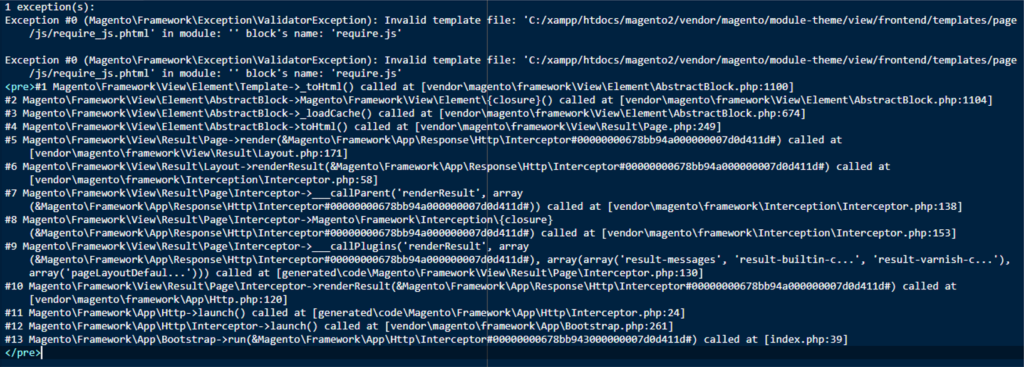
Solution: There are following below steps need to follow
[1] – Find validateURLScheme function in below Path vendor\magento\framework\Image\Adapter\Gd2.php file. at line 96
[2] – Replace function with this: !file_exists($filename)
private function validateURLScheme(string $filename) : bool
{
	if(!file_exists($filename)) { // if file not exist
		$allowed_schemes = ['ftp', 'ftps', 'http', 'https'];
		$url = parse_url($filename);
		if ($url && isset($url['scheme']) && !in_array($url['scheme'], $allowed_schemes)) {
			return false;
		}
	}

	return true;
}
[3] – Finally Magento 2.x Invalid template issue will be resolved & site will be run properly.
There are following below Magento 2 Database Table having all URLs storage
url_rewrite
This table having all Magento 2 URLs for front pages as well as admin pages
Magento 2 All Database Tables [500 & more Tables]
Which Magento 2 database table store customer’s Email Data
Which Magento 2 Database Table Store Customer Newsletter Data
Which Magento 2 database table store customer’s shipping and billing address
How To Remove Sales Order Data & Customer Data in Magento 2
Which Magento 2 Database Tables Store Customer Rating
Which Magento 2 Database Tables Store Customer Review
Which Magento 2 Database Tables Store Customer Wishlist Products
Which Magento 2 Database Table Store Patches
Which Magento 2 Database Table Store Static Blocks & Its Details
Which Magento 2 Database Table Store CMS Pages & Its Details
Which Magento 2 Database Tables Having All URLs Storage
There are following below set of Magento 2 Database Tables store Customer’s Wishlist Products
wishlist -> Store the wishlists created by customers
wishlist_item -> Store the items added to the wishlists, including the product id and other item details
wishlist_item_option -> Store the options selected for the wishlist items
email_wishlist -> Store wishlist customer’s email
Magento 2 All Database Tables [500 & more Tables]
Which Magento 2 database table store customer’s Email Data
Which Magento 2 Database Table Store Customer Newsletter Data
Which Magento 2 database table store customer’s shipping and billing address
How To Remove Sales Order Data & Customer Data in Magento 2
Which Magento 2 Database Tables Store Customer Rating
Which Magento 2 Database Tables Store Customer Review
Which Magento 2 Database Tables Store Customer Wishlist Products
Which Magento 2 Database Table Store Patches
Which Magento 2 Database Table Store Static Blocks & Its Details
Which Magento 2 Database Table Store CMS Pages & Its Details
Which Magento 2 Database Tables Having All URLs Storage
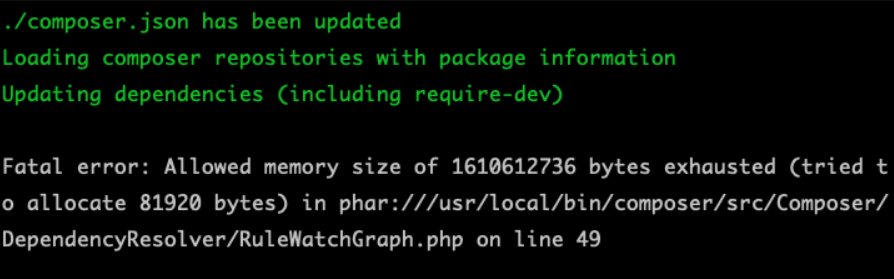
While Installing Magento 2 by using Composer & trying to run composer update command as below image.
or
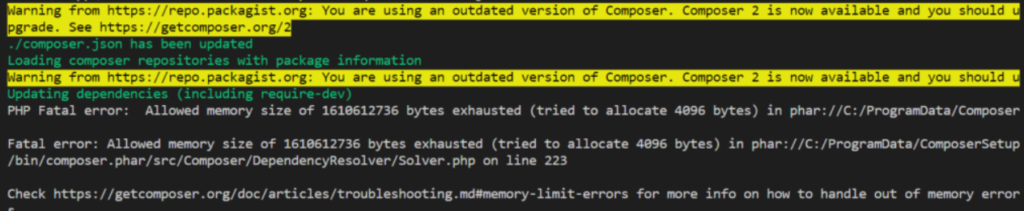
Solution:: To resolve this issue, there are following below setting need to do in php.ini file.
Go to [PHP configuration file PHP.INI File]] & do following
below changes & restart server
max_execution_time = 5000
max_input_time = 5000
memory_limit = 2G
post_max_size = 900M
upload_max_filesize = 900
Once required PHP Settings has been done, need to run composer update again & it will be run successfully.
For my.ini changes
Path= xampp\mysql\bin\my.ini [Default format below]
key_buffer=16M
max_allowed_packet=1M
sort_buffer_size=512K
net_buffer_length=8K
read_buffer_size=256K
read_rnd_buffer_size=512K
myisam_sort_buffer_size=8M
After changes
key_buffer=80M
max_allowed_packet=10M
sort_buffer_size=4M
net_buffer_length=64K
read_buffer_size=1M
read_rnd_buffer_size=2M
myisam_sort_buffer_size=32MWhile Installation Magento 2.3.x or Magento 2.4.x in Windows 10 Machine & getting below error.
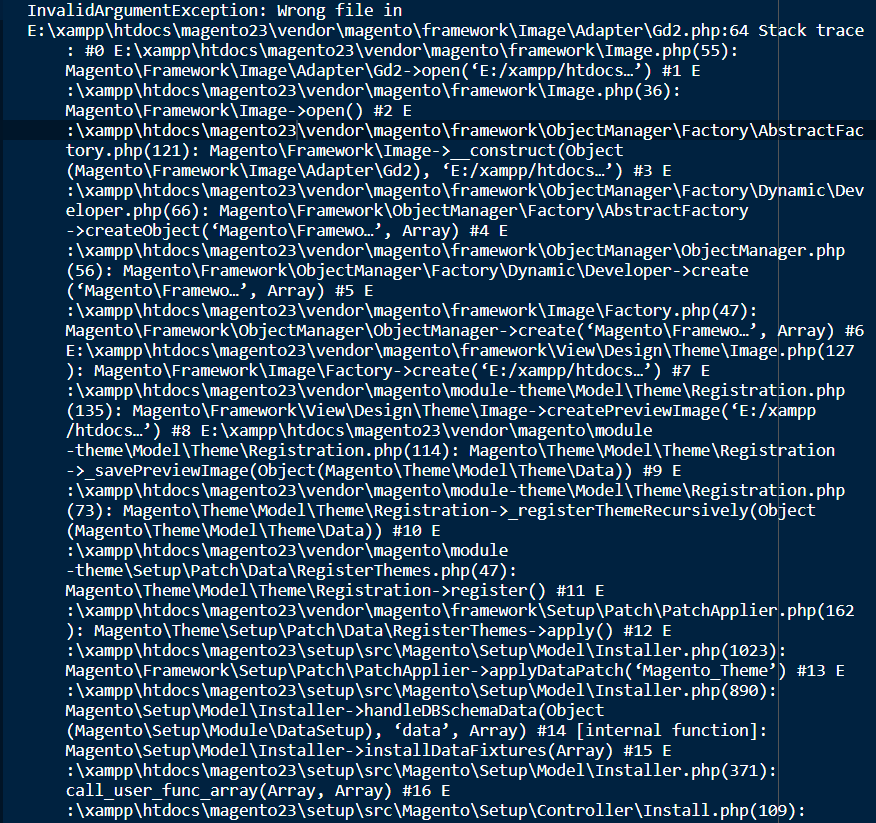
Solution:: There are following below steps need to follow
[1] – Find validateURLScheme function in Path vendor\magento\framework\Image\Adapter\Gd2.php file. at line 96.
[2] – Replace function with this: !file_exists($filename)
private function validateURLScheme(string $filename) : bool
{
	if(!file_exists($filename)) { // if file not exist
		$allowed_schemes = ['ftp', 'ftps', 'http', 'https'];
		$url = parse_url($filename);
		if ($url && isset($url['scheme']) && !in_array($url['scheme'], $allowed_schemes)) {
			return false;
		}
	}

	return true;
}
[3] – Finally Magento 2.3.x or Magento 2.4.x Installation will be successfully completed 100%
Other Important Magento 2.X Link
Magento 2.3 To Magento 2.4.5 Comptibility For PHP, MYSQL, Composer, Apache etc
Magento 2.4.4 Installation Steps
Magento 2.4.3-p1 Installation Steps
Magento 2.4.3 Installation Steps
Magento 2.4 Two Factor Authentication
Magento 2.2, Magento 2.3, Magento2.4 Installation Issue on Windows 10, XAMPP
Magento 2 Installation at 51% Error: (Wrong file in Gd2.php:64) Module ‘Magento_Theme’
There are following below set of Magento 2 Database tables store Customer Review Data for products.
review
review_detail
review_entity
review_entity_summary
review_status
review_store
Magento 2 All Database Tables [500 and more Tables]
Which Magento 2 database table store customer’s Email Data
Which Magento 2 Database Table Store Customer Newsletter Data
Which Magento 2 database table store customer’s shipping and billing address
How To Remove Sales Order Data & Customer Data in Magento 2
Which Magento 2 Database Tables Store Customer Rating
Which Magento 2 Database Tables Store Customer Review
Which Magento 2 Database Tables Store Customer Wishlist Products
Which Magento 2 Database Table Store Patches
Which Magento 2 Database Table Store Static Blocks & Its Details
Which Magento 2 Database Table Store CMS Pages & Its Details
Which Magento 2 Database Tables Having All URLs Storage
There are following below set of Magento 2 Database Tables having Custom Rating Data for Products.
rating_entity
rating_option
rating_option_vote
rating_option_vote_aggregated
rating_store
rating_title
Magento 2 All Database Tables [500 and more Tables]
Which Magento 2 database table store customer’s Email Data
Which Magento 2 Database Table Store Customer Newsletter Data
Which Magento 2 database table store customer’s shipping and billing address
How To Remove Sales Order Data & Customer Data in Magento 2
Which Magento 2 Database Tables Store Customer Rating
Which Magento 2 Database Tables Store Customer Review
Which Magento 2 Database Tables Store Customer Wishlist Products
Which Magento 2 Database Table Store Patches
Which Magento 2 Database Table Store Static Blocks & Its Details
Which Magento 2 Database Table Store CMS Pages & Its Details
Which Magento 2 Database Tables Having All URLs Storage
There are following below SQL Query need to run in Magento 2 Database.
--SET FOREIGN_KEY_CHECKS = 0 Compulsory otherwise Foreign Key Based Table will be not deleted --

  SET FOREIGN_KEY_CHECKS = 0;

-- Starts Truncate Quote & Sales Order & Other Tables --

TRUNCATE TABLE `gift_message`;
TRUNCATE TABLE `quote`;
TRUNCATE TABLE `quote_address`;
TRUNCATE TABLE `quote_address_item`;
TRUNCATE TABLE `quote_id_mask`;
TRUNCATE TABLE `quote_item`;
TRUNCATE TABLE `quote_item_option`;
TRUNCATE TABLE `quote_payment`;
TRUNCATE TABLE `quote_shipping_rate`;
TRUNCATE TABLE `reporting_orders`;
TRUNCATE TABLE `sales_bestsellers_aggregated_daily`;
TRUNCATE TABLE `sales_bestsellers_aggregated_monthly`;
TRUNCATE TABLE `sales_bestsellers_aggregated_yearly`;
TRUNCATE TABLE `sales_creditmemo`;
TRUNCATE TABLE `sales_creditmemo_comment`;
TRUNCATE TABLE `sales_creditmemo_grid`;
TRUNCATE TABLE `sales_creditmemo_item`;
TRUNCATE TABLE `sales_invoice`;
TRUNCATE TABLE `sales_invoiced_aggregated`;
TRUNCATE TABLE `sales_invoiced_aggregated_order`;
TRUNCATE TABLE `sales_invoice_comment`;
TRUNCATE TABLE `sales_invoice_grid`;
TRUNCATE TABLE `sales_invoice_item`;
TRUNCATE TABLE `sales_order`;
TRUNCATE TABLE `sales_order_address`;
TRUNCATE TABLE `sales_order_aggregated_created`;
TRUNCATE TABLE `sales_order_aggregated_updated`;
TRUNCATE TABLE `sales_order_grid`;
TRUNCATE TABLE `sales_order_item`;
TRUNCATE TABLE `sales_order_payment`;
TRUNCATE TABLE `sales_order_status_history`;
TRUNCATE TABLE `sales_order_tax`;
TRUNCATE TABLE `sales_order_tax_item`;
TRUNCATE TABLE `sales_payment_transaction`;
TRUNCATE TABLE `sales_refunded_aggregated`;
TRUNCATE TABLE `sales_refunded_aggregated_order`;
TRUNCATE TABLE `sales_shipment`;
TRUNCATE TABLE `sales_shipment_comment`;
TRUNCATE TABLE `sales_shipment_grid`;
TRUNCATE TABLE `sales_shipment_item`;
TRUNCATE TABLE `sales_shipment_track`;
TRUNCATE TABLE `sales_shipping_aggregated`;
TRUNCATE TABLE `sales_shipping_aggregated_order`;
TRUNCATE TABLE `tax_order_aggregated_created`;
TRUNCATE TABLE `tax_order_aggregated_updated`;

-- Finish Truncate Quote & Sales Order Tables --

-- Truncate Customer tables

-- Starts Truncate Customer Data & Customer Address Tables --

TRUNCATE TABLE `customer_address_entity`;
TRUNCATE TABLE `customer_address_entity_datetime`;
TRUNCATE TABLE `customer_address_entity_decimal`;
TRUNCATE TABLE `customer_address_entity_int`;
TRUNCATE TABLE `customer_address_entity_text`;
TRUNCATE TABLE `customer_address_entity_varchar`;
TRUNCATE TABLE `customer_entity`;
TRUNCATE TABLE `customer_entity_datetime`;
TRUNCATE TABLE `customer_entity_decimal`;
TRUNCATE TABLE `customer_entity_int`;
TRUNCATE TABLE `customer_entity_text`;
TRUNCATE TABLE `customer_entity_varchar`;
TRUNCATE TABLE `customer_grid_flat`;
TRUNCATE TABLE `customer_log`;
TRUNCATE TABLE `customer_log`;
TRUNCATE TABLE `customer_visitor`;
TRUNCATE TABLE `persistent_session`;
TRUNCATE TABLE `wishlist`;
TRUNCATE TABLE `wishlist_item`;
TRUNCATE TABLE `wishlist_item_option`;

-- Finish Truncate Customer Data & Customer Address Tables --


-- Starts Truncate Review tables --

TRUNCATE TABLE `review`;
TRUNCATE TABLE `review_detail`;
TRUNCATE TABLE `review_entity_summary`;
TRUNCATE TABLE `review_store`;

-- Finish Truncate Review tables --
Magento 2 All Database Tables [500 & more Tables]
Which Magento 2 database table store customer’s Email Data
Which Magento 2 Database Table Store Customer Newsletter Data
Which Magento 2 database table store customer’s shipping and billing address
How To Remove Sales Order Data & Customer Data in Magento 2
Which Magento 2 Database Tables Store Customer Rating
Which Magento 2 Database Tables Store Customer Review
Which Magento 2 Database Tables Store Customer Wishlist Products
Which Magento 2 Database Table Store Patches
Which Magento 2 Database Table Store Static Blocks & Its Details
Which Magento 2 Database Table Store CMS Pages & Its Details
Which Magento 2 Database Tables Having All URLs Storage
Which Magento 2 Database Tables Store Sales Order Data
Which Magento 2 Database Tables Store Sales Invoice Order Data
Which Magento 2 Database Tables Store Sales Tax and Its related Data
Which Magento 2 Database Tables Store Catalog Price Rules
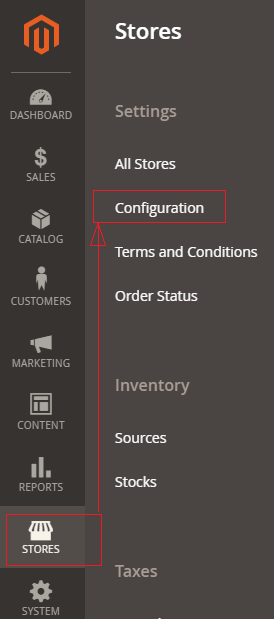
There are following below things need to follow to configure Name and Address Options in Magento 2
[1] – Go To STORES > Configuration, redirects on configuration.
[2] – Go To CUSTOMERS > Customer Configuration
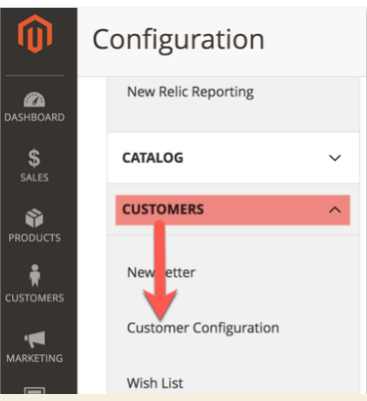
redirects on Right Panel form as Step 3
[3] Once redirection on [Right Panel]
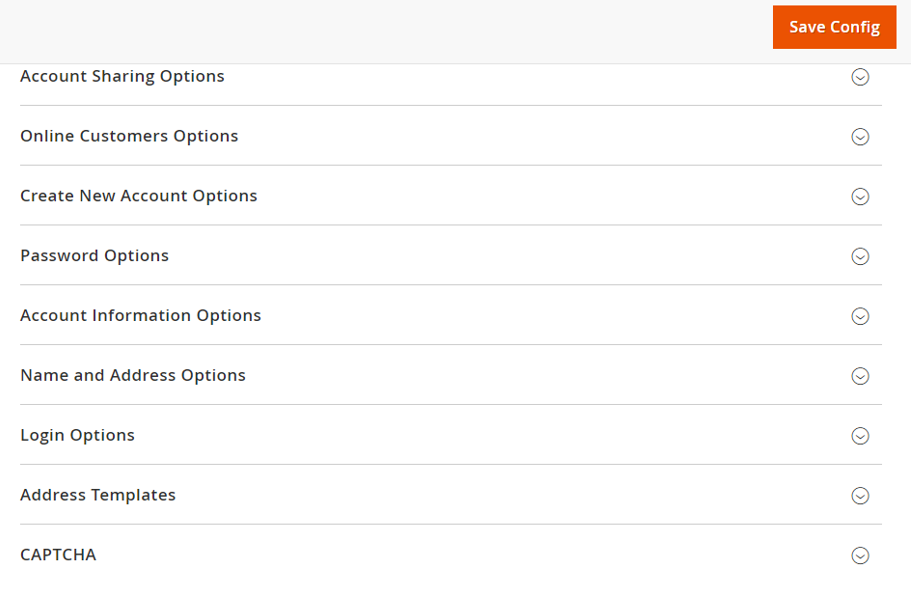
[4] – Once clicked / expanded, Name and Address Options [Right Panel]
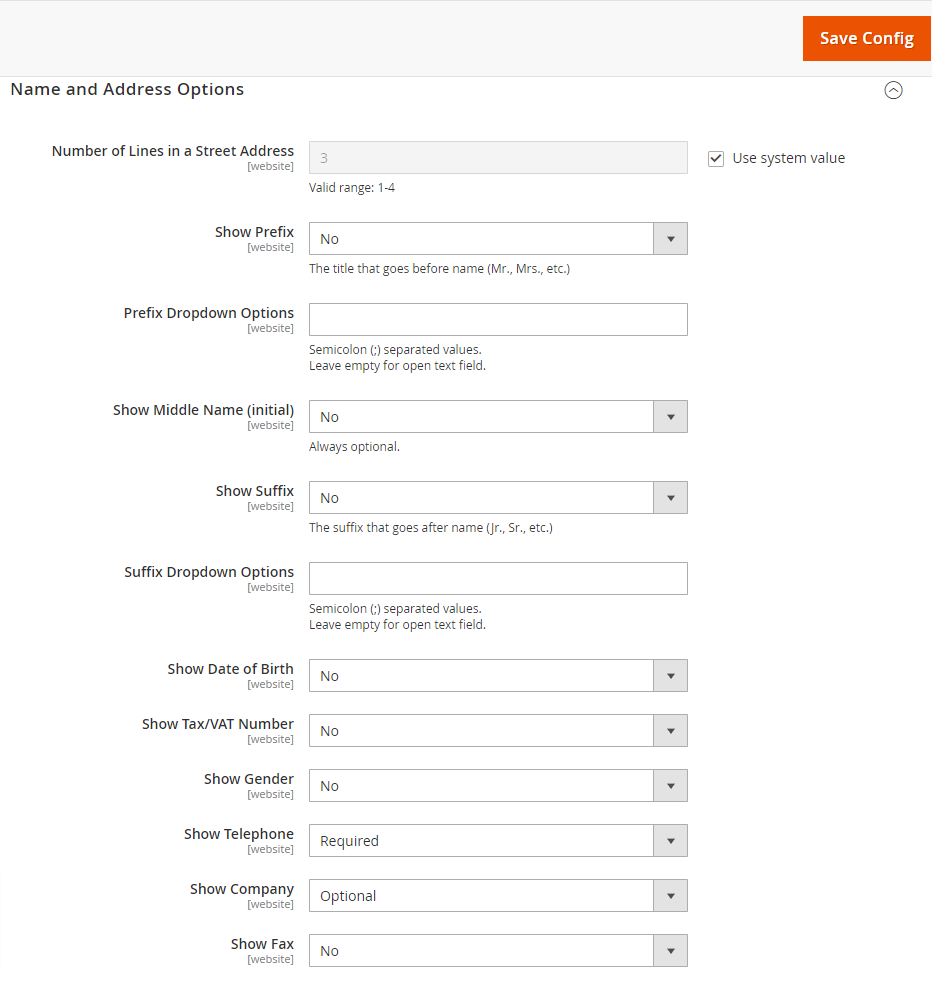
Each filed of Name and Address Options form described as below
[4.1] – Number of Lines in a Street Address : By default 3 Lines given
It can be change up to 4 Lines.
[4.2] – Show Prefix : There are three options given as follows:
No – By default selected
Optional
Required
as per store requirement select any of them
[4.3] – Prefix Dropdown Option : put prefix that Store Admin want to be include in the list, each prefix is separated by a semicolon. & put semicolon in the beginning for empty first option.
Leave empty for open text field.
[4.4] – Show Middle Name (initial) : By default No selected, as per store requirement select Yes
It is Optional
[4.5] – Show Suffix : There are three options given as follows
No – By default selected
Optional
Required
as per store requirement select any of them
[4.6] – Prefix Dropdown Option : put prefix that Store Admin want to be include in the list, each prefix is separated by a semicolon. & put semicolon in the beginning for empty first option.
Leave empty for open text field.
[4.7] – Show Date of Birth : There are three options given as follows
No – By default selected
Optional
Required
as per store requirement select any of them
[4.8] – Show Tax/VAT Number : There are three options given as follows
No – By default selected
Required
Optional
as per store requirement select any of them
[4.9] – Show Gender : There are three options given as follows
No – By default selected
Optional
Required
as per store requirement select any of them
[4.10 ] – Show Telephone : There are three options given as follows
No
Required -By default selected
Optional
as per store requirement select any of them
[4.11] – Show Company : There are three options given as follows
No
Optional -By default selected
Required
as per store requirement select any of them
[4.12] – Show Fax : There are three options given as follows
No – By default selected
selected
Required
as per store requirement select any of them
[5] – Finally click on Save Config Button