HIPAA, FHIR & Their Healthcare Data Security Concern

HIPAA (Health Insurance Portability and Accountability Act) and FHIR (Fast Healthcare Interoperability Resources) are interconnected in the healthcare sector.

HIPAA sets the standards for protecting sensitive patient information, while FHIR facilitates the secure exchange of healthcare data through APIs. Together, they ensure that healthcare institutions can create and manage compliant systems that protect patient data while enabling interoperability. FHIR also includes security standards that help maintain HIPAA compliance during data sharing and integration

🛡️ What is HIPAA?

HIPAA (Health Insurance Portability and Accountability Act) is a U.S. federal law enacted in 1996 to protect sensitive patient health information.

  • Key Goals:
    • Ensure confidentiality, integrity, and availability of Protected Health Information (PHI)
    • Set standards for electronic health transactions
    • Mandate safeguards for data privacy and security
  • Covered Entities:
    • Healthcare providers
    • Health plans
    • Healthcare clearinghouses
    • Business associates handling PHI
  • Security Rules:
  • Administrative safeguards (e.g., training, policies)
  • Physical safeguards (e.g., facility access controls)
  • Technical safeguards (e.g., encryption, access control)

🔗 What is FHIR?

FHIR (Fast Healthcare Interoperability Resources) is a data standard developed by HL7 for exchanging healthcare information electronically.

  • Purpose: Facilitate seamless, secure data sharing across systems like EHRs, mobile apps, and cloud platforms
  • Structure: Uses RESTful APIs and standardized data formats (JSON, XML)
  • Resources: Includes patient, observation, medication, appointment, etc.

Business Analyst vs Scrum Master vs Product Owner vs Product Manager 

In today’s Agile-driven organizations, clarity of roles is not just important — it’s essential for delivery, collaboration, and stakeholder alignment.
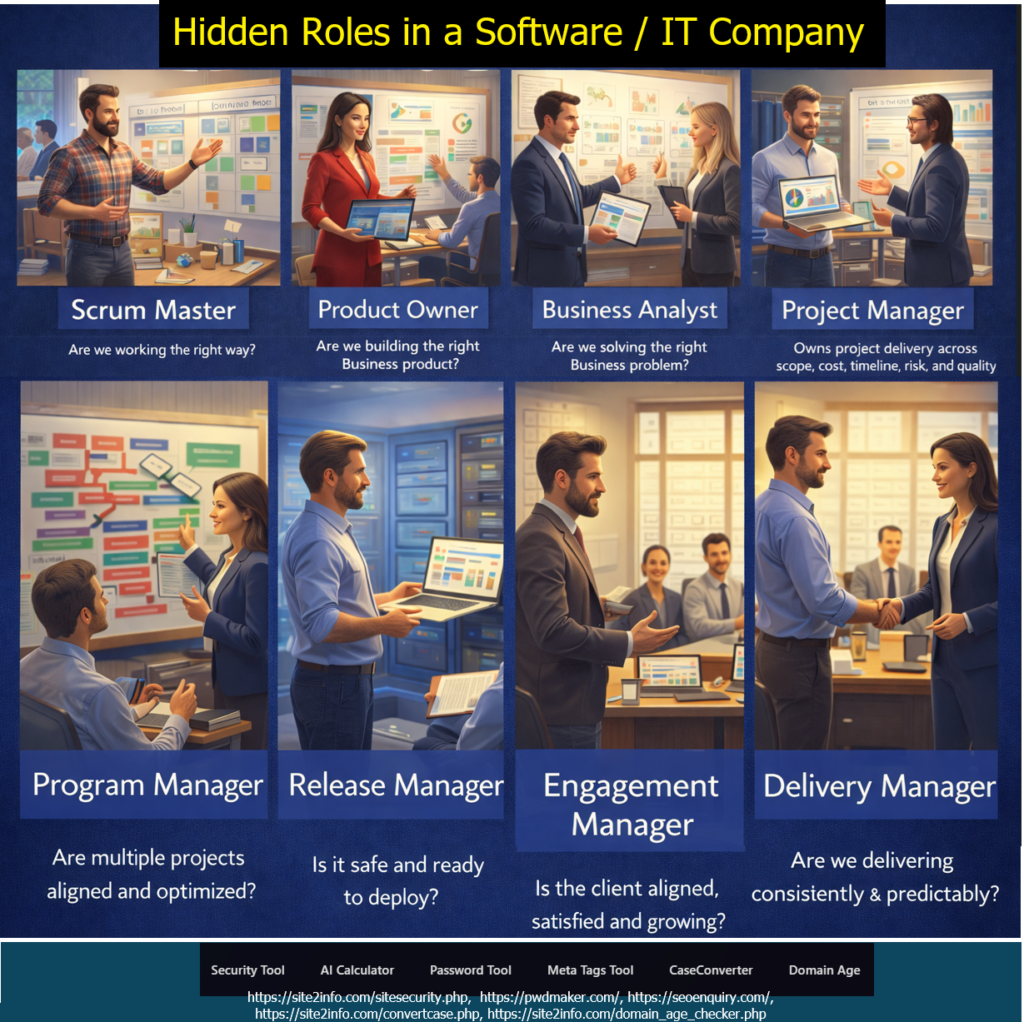
To make things simpler, I created a Ghibli-style professional banner highlighting the key roles & responsibilities of:
👤 Business Analyst: (Roles & Responsibilities )

  • Requirements gathering, analysis & documentation
  • Creating user stories, acceptance criteria & process flows
  • Stakeholder communication & expectation alignment
  • Conducting GAP analysis & defining business solutions
  • Supporting UAT & ensuring solution meets business needs


👤 Scrum Master: (Roles & Responsibilities )

  • Facilitating Scrum ceremonies (Daily, Sprint Planning, Review, Retro)
  • Removing blockers & enabling team productivity
  • Coaching the team on Agile/Scrum practices
  • Ensuring sprint goals, velocity & continuous improvement
  • Protecting the team from scope creep & distractions


👤 Product Owner: (Roles & Responsibilities )

  • Defining & prioritizing the product backlog
  • Aligning product vision with stakeholder expectations
  • Writing clear user stories & acceptance criteria
  • Making decisions on scope, priority & release readiness
  • Ensuring maximum value delivery each sprint


👤 Product Manager: (Roles & Responsibilities )

  • Owning product strategy, roadmap & long-term vision
  • Conducting market research & competitive analysis
  • Identifying customer needs & driving product direction
  • Coordinating with cross-functional teams (engineering, design, marketing)
  • Measuring product performance & driving improvements


Each role plays a unique part in ensuring successful product delivery:
🔹 BA → Translates business needs into clear requirements
🔹 SM → Empowers the Agile team and removes blockers
🔹 PO → Owns the product backlog + sprint value
🔹 PM → Defines long-term product vision & strategy
When these roles work together smoothly, teams deliver faster, better, and with more value.

Explain 3Cs Model, Invest Model, Smart Model in Scrum / Agile

The 3Cs Model in Agile (Card, Conversation, Confirmation)

The 3Cs Model, introduced by Ron Jeffries (one of the Agile pioneers), defines how User Stories should be created and understood in Agile frameworks like Scrum. It ensures clarity, collaboration, and validation in requirement gathering.

Card → A short written story that captures the idea → By Product Owner
Conversation → Dialogue between Product Owner and Team to elaborate details → By Product Owner & Development Team & (facilitated by Scrum Master)
Confirmation → Acceptance Criteria that confirm the story is complete → By Product Owner & QA Team

The Scrum Master facilitates the Conversation, usually during Backlog Refinement or Sprint Planning, ensuring effective communication, mutual understanding, and that the timebox is respected.

INVEST Model: ( (Define the “How and What”))

To evaluate the quality of a User Story and ensure it’s well-defined and ready for development.

Independent: Self-contained, can be implemented separately.
Negotiable: Flexible for discussion and change.
Valuable: Provides user/business value.
Estimable: Team can estimate the effort.
Small: Fits in a sprint.
Testable: Has clear acceptance criteria.

The SMART Model: (Define the “Why and What”)

To make sure goals and deliverables are clear, measurable, and realistic within the sprint timeline.

Specific: Clear and focused.
Measurable: Quantifiable results.
Achievable: Possible within sprint capacity.
Relevant: Aligns with business or product goals.
Time-bound: Achievable within the sprint.

https://www.linkedin.com/pulse/using-smart-goals-project-planning-projectmanagementinformation-wtdkf

Windows 10 Support Is Ending on October 14, 2025 – What You Need to Know

Microsoft has officially announced that it will end support for Windows 10 on October 14, 2025. After this date, Windows 10 users will no longer receive free security patches, technical support, or feature updates, follow below steps.

Donate
Other Amount
Your Email Address:

Windows 10 won’t stop working after October 14, 2025 — but staying on it is like driving a car with no airbags, no insurance, and no road support.

Step [1]: What Does “End of Support” Mean?

Microsoft will stop delivering:

  • Security updates (no protection against new threats)
  • Technical assistance (no support via Microsoft help channels)
  • Feature or bug fixes (no future improvements)

Windows 10 will still work, but it won’t be safe or supported.

Step [2]: Why Is Microsoft Ending Support?

Every Windows version has a lifecycle.
Windows 10 was released in July 2015 — and like its predecessors, it gets around 10 years of official support. Now, Microsoft is shifting focus to Windows 11 and future OS versions.

Step [3]: What Are the Risks After October 2025?

  • Higher vulnerability to viruses, ransomware, and malware
  • Incompatibility with new apps or hardware
  • No official support in case of crashes or technical issues

Using an outdated OS can pose serious cybersecurity risks, especially for businesses.

Step [4]: What Should You Do Next?

Option A: Upgrade to Windows 11
If your device meets the requirements (TPM 2.0, Secure Boot, etc.), you can upgrade to Windows 11 for free.

Option B: Replace Older Devices
If your current PC doesn’t support Windows 11, consider upgrading your hardware before the deadline.

Option C: Explore Paid Support (for Enterprises)
Microsoft may offer extended support at a cost, but this is usually for large organizations — not individual users.

Step [5]: Start Preparing Now

  • Back up your files
  • Check device compatibility
  • Plan your upgrade path
  • Train teams on the new OS if you’re a business

The earlier you prepare, the smoother your transition will be.

Top 10 Salary Negotiation Tips to Use in (Online & Offline Interviews)

Top 10 Salary Negotiation Tips (Online & Offline Interviews)

Salary negotiation isn’t about being difficult — it’s about aligning your value with the right opportunity. Preparation, professionalism, and confidence are your greatest tools.

Salary negotiation isn’t awkward — it’s essential.
Whether you’re interviewing virtually or in person, here are 10 powerful tips to help you secure the pay you deserve:


Step [1] – Know Your Market Value
Before entering any negotiation, research industry benchmarks for your role, experience level, and location. Tools like Glassdoor, Payscale, or LinkedIn Salary can give you realistic expectations — empowering you to negotiate from a position of knowledge.

Step [2] – Let the Employer Go First
Avoid being the first to mention numbers. Let the employer share their offer first — it sets the starting point and gives you leverage to respond thoughtfully based on their expectations.

Step [3] – Don’t Undersell Yourself
Phrases like “I’m open to anything” or “Whatever works for you” weaken your perceived value. Be prepared with a confident salary range based on your market research and experience.

Step [4] – Be Confident, Not Pushy
Confidence shows that you know your worth. However, balance it with professionalism — being aggressive or entitled can create discomfort and harm your chances.

Step [5] – Quantify Your Achievements
Support your salary request with data and real outcomes — like “I increased revenue by 20%” or “Led a project that saved the company $30,000.” Numbers speak louder than opinions.

Step [6] – Consider Total Compensation
Salary is just one part of the package. Take into account benefits like health insurance, paid time off, bonuses, remote work, and equity — all of which contribute to the true value of an offer.

Step [7] – Prepare Your Talking Points
Rehearse how you’ll communicate your expectations and value. Have clear reasoning ready so you can respond with confidence when the salary question comes up.

Step [8] – Listen Actively
Good negotiators don’t just talk — they listen. Pay attention to what the employer is offering and why. This helps you respond strategically, rather than react emotionally.

Step [9] – Stay Professional if Rejected
If the employer declines your counteroffer, don’t burn bridges. Stay gracious and open — you might receive a revised offer or be considered for future opportunities.

Step [10] – Ask for Time to Decide
Don’t rush your decision. Request 24–48 hours to review the offer in full. This shows maturity and ensures you’re making a well-informed choice.

How Perplexity on WhatsApp can now turn News Summaries into Audio Podcasts

Use the following steps to convert news summaries into audio podcasts through Perplexity on WhatsApp

Step [1]Start a Chat
Visit 👉 perplexity.ai/whatsapp
Or message on WhatsApp: +1 (833) 436-3285

Step [2]Step 2: Ask Any News Topic
Just type something like:
Send & Summarize me daily software technology news summary as latest innovation, latest startup, latest layoff in big tech industry like Google, Meta, Microsoft etc, latest job openings at 7:00 PM as an audio podcast”
“Today’s top tech news?”

Step [4]Get a Text Summary Instantly
Perplexity replies with a crisp, sourced summary in seconds.

1. AI and machine learning are everywhere—over 80% of software teams now use tools like GitHub Copilot.
2. ‘Vibe coding’ lets anyone create apps just by describing what they want in plain language.
3. Quantum computing is booming, with Microsoft, IBM, and Google making big breakthroughs.

Step [5] – Tap 🎧 Listen
Right under the reply, tap the 🎧 icon.
Boom — you get a voice note-style podcast, summarizing the news.

🧠 Learn while walking.
📱 Listen on the go.
⌛ Save time daily.

🔄 Bonus: You can even ask it to “explain more,” “translate,” or “simplify” — and get that version in audio too!

💡 This is where AI meets real-world convenience.

Why Office Politics Matter, It is Inevitable or Avoidable?

Why Office Politics Matter

Office politics are often unavoidable, and in many cases, necessary to succeed in complex team environments. Knowing how to manage relationships, build alliances, and position yourself professionally can have as much impact as your job performance.

Office Politics: Inevitable or Avoidable?

Office politics often gets a bad reputation — but the truth is, it’s not always toxic. Sometimes, it’s simply the natural result of human relationships, influence, and informal dynamics within the workplace.

Understanding it doesn’t mean playing dirty — it means navigating with awareness, strategy, and emotional intelligence.

Interesting Facts About Office Politics

70% of employees say they’ve experienced office politics at work
1 in 4 workers believe office politics has more impact on promotions than performance
✅ Promotions often hinge on visibility and relationships, not just merit
✅ Employees with strong internal networks get more recognition, support, and growth opportunities
✅ Avoiding politics entirely can actually limit career advancement

You don’t have to play dirty — but you do have to play smart.
Office politics isn’t about manipulation — it’s about connection, visibility, and strategic awareness.

Top 10 Habits to Be More Confident at Workplace or Office

Confidence isn’t a gift. It’s a habit.

Confidence isn’t a trait — it’s your daily training.

Want to appear more self-assured, respected, and impactful at your workplace?

Here are 10 habits to level up your confidence at work

Step [1] . Stand Tall, Sit Straight

🧍‍♂️ Good posture changes how you feel and how others see you.

A straight back, relaxed shoulders, and a firm stance subconsciously signal strength and readiness. Posture is the body’s confidence amplifier.

Step – [2]. Make Eye Contact

👀 Don’t stare — just connect. It builds trust instantly.

Looking people in the eye while speaking shows you’re grounded, present, and open. It’s a silent way to project inner certainty.

Step – [3]. Speak Slowly, With Intent

🗣️ Fast = nervous. Calm and steady = confident and in control.

Slow, deliberate speech commands attention. It tells others (and yourself) that what you’re saying matters.

Step – [4]. Dress Sharp, Feel Sharp

👔 Style impacts psychology. Dress for the role you aspire to.

When you dress well, you carry yourself differently. You send a silent message: “I belong here.”

Step – [5]. Talk Kindly to Yourself

🧠 Replace “I’m not ready” with “I’m learning and growing.”

Inner dialogue drives outward behavior. Positive self-talk strengthens self-worth and resilience over time.

Step – [6]. Prepare, Don’t Wing It

📑 Confidence is earned behind the scenes through preparation.

Rehearsing, researching, and knowing your material quiets the inner critic and builds natural self-assurance.

Step – [7]. Receive Compliments Without Shrinking

🙏 A simple “thank you” is powerful. Don’t deflect — own your wins.

Brushing off praise may feel humble, but accepting it with grace reinforces your value — for you and others.

Step – [8]. Say Yes to Stretch Goals

🚀 Step out of comfort. Each challenge conquered = confidence built.

Growth lies just beyond “I’m not sure I can.” Say yes, show up, figure it out — that’s how self-belief is built.

Step – [9]. Focus on Progress, Not Comparison

🔍 Comparison kills joy. Track your growth — not others’.

Everyone’s journey is different. Confidence grows when you celebrate your own milestones, not someone else’s finish line.

Step – [10]. Stack Small Wins Daily

Micro-success fuels macro-confidence. Do one thing well every day.

Consistency is the quiet engine of confidence. Small daily actions build momentum — and belief.

Top 10 Reasons Why AI Must Be Known for Career Growth in 2025

The following below are the Top 10 Reasons Why AI Must Be Known for Career Growth in 2025 — tailored for a tech-forward, future-ready professional

Step [1] – AI Is the New Literacy

– In 2025, understanding AI is as essential as knowing Excel was in 2005.

Step [2] – AI Is Embedded in Every Industry

– From healthcare to finance to marketing, AI is everywhere—and growing.

Step [3] – Boosts Productivity with Automation

– Mastering AI tools means doing more in less time with fewer errors.

Step [4] – Creates Smarter Decision-Makers

– AI turns raw data into insights, helping you lead with facts, not guesswork.

Step [5] – Future-Proofs Your Career

– AI can analyze patterns, predict outcomes, and help you solve complex issues faster.

Step [6] – Enhances Your Problem-Solving Edge

– As jobs evolve, those who adapt to AI stay relevant and in demand.

Step [7] – Amplifies Creativity and Innovation

– AI helps generate content, design, and code—making you a creative powerhouse.

Step [8] – Improves Collaboration with Tech Teams

– Understanding AI helps you communicate better with data scientists and developers.

Step [9] – Opens New Job Roles & Freelance Gigs

– AI-related roles like Prompt Engineer, AI Trainer, and Automation Consultant are booming.

Step [10] – Separates You from the Average

– In a sea of resumes, AI proficiency makes yours stand out.

How Can Open Google Search in AI Mode – Google AI Mode

The following steps to open Google Search in AI Mode

Step [1] – Go to labs.google.com

Step [2] – Look for “AI Mode” and switch it ON

Go To https://labs.google.com/search/experiment/22

Step [3] – Click “Try AI Mode” to start using it

Once Done –

Step [4] – Or just search something on Google and tap the AI Mode tab at the top

Google’s AI Mode makes searching easier, smarter, and faster — whether you’re planning meals, learning something new, or exploring hobbies. It’s now available to all users in India who use English on their device.

Step [5] – Ask Using Voice or Photos

You don’t always have to type. Just:

Upload a photo for visual searches (like spices, clothes, books, etc.)

Tap the microphone to ask your question

Step [6] – How Does Google AI Mode Work?

Google uses a “query fan-out technique” — this means the AI breaks your big question into smaller ones, searches them all together, and gives you one useful, combined answer. It also uses tools like:

  • Knowledge Graph (for facts)
  • Shopping search (for product suggestions)
  • Lens support (for image-based questions)

So if you take a photo of a spice and ask,

“What is this spice and how can I use it in cooking?”

— it will give you a detailed response.