
| Apache | NGINX | ||
| 1 | Founder | Apache, an open-source Web server created by American software developer Robert McCool. Apache was released in 1995. | NGINX source code is written in the C programming language by Kernighan and Ritchie and maintains a consistent style ,released in 2005 released by Russian developer Igor Sysoev |
| 2 | Running By | Apache is running by ASF | NGINX running by NGINX |
| 3 | Designed Approach | Apache based on Process driven approach | NGINX based on Event driven approach |
| 4 | Concurrent Operation | Apache cannot handle 10k concurrent connections simultaneously | Nginx can handle 10k concurrent connections simultaneously |
| 5 | Htaccess Support | Apache Supports htaccess | Nginx does not support htaccess |
| 6 | Static Content Operation | Apache performs Slow operation in displaying static content & consumes more memory. | Nginx 2.5 times faster than Apache according to a benchmark test performed by running up to 1,000 simultaneous connections & display content |
| 7 | Memory | Apache consumed more memory to perform operation | NGINX faster and consumed less memory to perform operation |
| 8 | OS Supports | Apache Supports operating systems such as UNIX, Linux or BSD and Microsoft Windows | NGINX Supports operating systems such as UNIX, Linux or BSD but in case of Microsoft Windows , It is not upto mark. |
| 9 | Dynamic Content Operation | Apache performs faster Performance for dynamic content | NGINX does not perform good Performance for dynamic content, these content must be complied by core software. |
| 10 | Security | Apache provides excellent security | NGINX provides more excellent security |
| 11 | Web Server | Apache supports web server only | NGINX supports web server as well as Reverse Proxy |
| 12 | Availability / Open Source | Apache fully Open Source Apache software is always available for download free of charge from the ASF | NGINX availability as NGINX [open source] & NGINX PLUS a high-performance web server, a powerful front-end load balancer and a highly-scalable accelerating cache to create the ideal end-to-end platform |
| 13 | Video Streaming | Not Best for Video Streaming | Best for Video Streaming as Netflix’s online video streaming service has grown to serve over 50 million subscribers in 40 countries |
| 14 | Open Source / Paid | Apache software is always available for download free of charge from the ASF | NGINX is Open Source , that is availability free while NGINX PLUS Starting at $2500 per year |
Category: magento 2.x
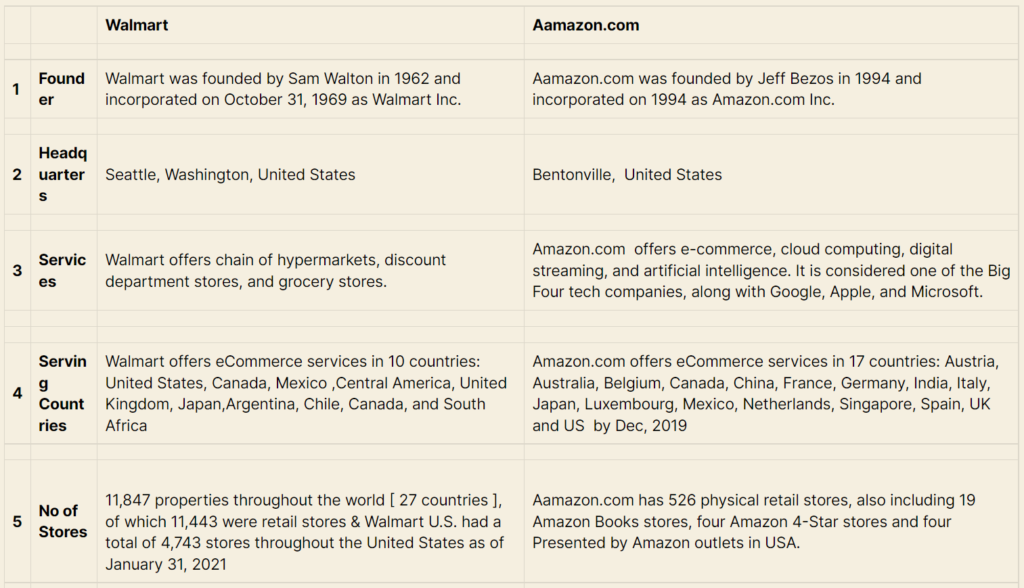
Differentiate Between Aamazon and WalMart
| Walmart | Aamazon.com | ||
| 1 | Founder | Walmart was founded by Sam Walton in 1962 and incorporated on October 31, 1969 as Walmart Inc. | Aamazon.com was founded by Jeff Bezos in 1994 and incorporated on 1994 as Amazon.com Inc. |
| 2 | Headquarters | Seattle, Washington, United States | Bentonville, United States |
| 3 | Services | Walmart offers chain of hypermarkets, discount department stores, and grocery stores. | Amazon.com offers e-commerce, cloud computing, digital streaming, and artificial intelligence. It is considered one of the Big Four tech companies, along with Google, Apple, and Microsoft. |
| 4 | Serving Countries | Walmart offers eCommerce services in 10 countries: United States, Canada, Mexico ,Central America, United Kingdom, Japan,Argentina, Chile, Canada, and South Africa | Amazon.com offers eCommerce services in 17 countries: Austria, Australia, Belgium, Canada, China, France, Germany, India, Italy, Japan, Luxembourg, Mexico, Netherlands, Singapore, Spain, UK and US by Dec, 2019 |
| 5 | No of Stores | 11,847 properties throughout the world [ 27 countries ], of which 11,443 were retail stores & Walmart U.S. had a total of 4,743 stores throughout the United States as of January 31, 2021 | Aamazon.com has 526 physical retail stores, also including 19 Amazon Books stores, four Amazon 4-Star stores and four Presented by Amazon outlets in USA. |
| 6 | Retail Stores Type | Walmart offers 6 different types physical retail stores throughout the world [1] Walmart Supercenter:: offers grocery and a GM (general merchandise) Department [2] Walmart Express:: Mobile Express Money (Walmart App) that enables Consumers to do money service transactions at Walmart [3] Walmart Neighborhood Market:: offers grocery, fresh meat, bakery and deli departments and pharmacies [4] Walmart Pharmacy:: offers quality Pharmacy Products at affordable prices [5] Walmart Fuel Store:: offers gas, diesel fuel at affordable prices | Aamazon.com offers 4 different types physical retail stores in USA [1] Amazon Books:: offers Books, Devices, Merchandise [2] Amazon 4 Star:: offers Books, Devices, Merchandise [3] Amazon Go:: offers Breakfast, Lunch, Dinner [4] Aamzon PoP UP:: offers Merchandise |
| 7 | Membership Fee | Walmart does not charge any membership fee for online purchases. | Amazon.com Prime membership costs $12.99 per month or a once-off annual fee of $9 |
| 8 | No. of Products | Walmart offers total 46.1 million products across 11766 stores | Amazon.com offers more than 606 million products available online and adds more than 50 000 products per day. |
| 9 | Owned by | Walmart owned by Walton family [51% Share Holding] | Amazon.com, owned by MacKenzie Bezos(Ex-wife of Jeff Bezos) having 25% Share Holding and Jeff Bezos having 11% Share Holding |
Magento 2 Localhost Admin not opened, Database & Files Taken From Server
If you are taking Magento2 [Files + Database] from server & setup on localhost & while trying to open Admin , It will be not opened, due to cookie domain values specified for a particular domain name.
Solution: There are following below command need to ben run
[1]-: Run select query , to check how many cookie domain values are present in Database
select * from core_config_data
WHERE path = "web/cookie/cookie_domain"
[2]-: Run update query:
To update all path = “web/cookie/cookie_domain” into 0
update core_config_data
set value="0"
WHERE path = "web/cookie/cookie_domain"
Once run query all path = “web/cookie/cookie_domain” values will be converted into 0, check again by using select query
select * from core_config_data
WHERE path = "web/cookie/cookie_domain"
Note: Here only one cookie domain value, if some cases multi store, there
are multiple path = "web/cookie/cookie_domain" & each path value having domain name exists, so you need to converts all
path = "web/cookie/cookie_domain" values into 0
Finally, localhost Magento 2 admin issue has been resolved.
installation failed reverting ./composer.json to its original content
If you getting error like
installation failed reverting ./composer.json to its original content

Solution: There is following below command need to be run
Composer updateRunning format this command
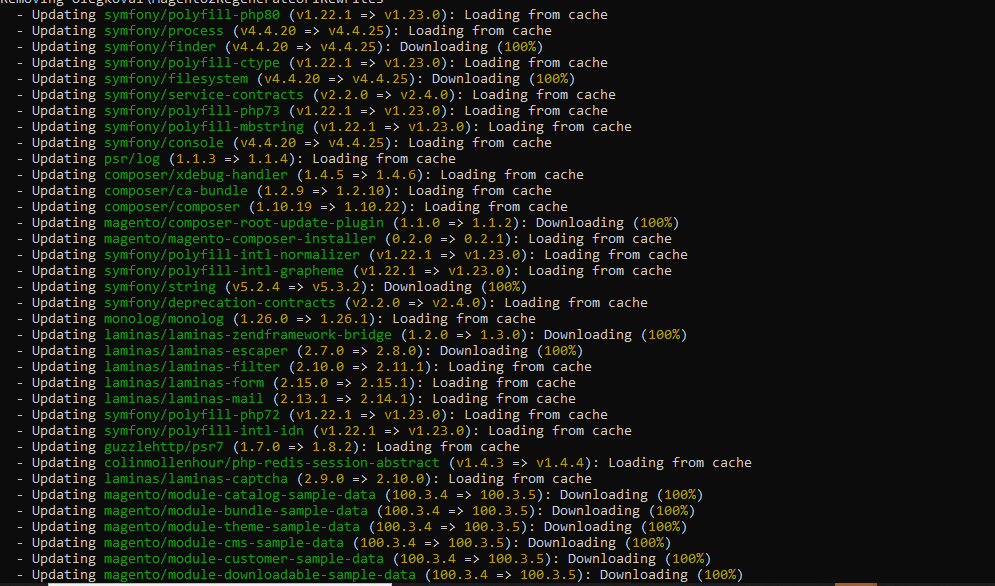
Once command done, Finally, issue will be resolved.
Magento 2 URL Rewrites Regenerate
There are following below steps to do URL rewrites for Product, Category, CMS Pages
[1]-: The following below command to delete Product, Category & CMS Page URLs from
Table url_rewrite & catalog_url_rewrite_product_category
delete from url_rewrite;
delete from catalog_url_rewrite_product_category;[2]-: The following below command to install by using Extension
OlegKoval_RegenerateUrlRewrites
that is responsible to regenerate Product, Category & CMS Page URLs
Install
composer require olegkoval/magento2-regenerate-url-rewrites

Once command done, It is stored location in side Vendor folder as below
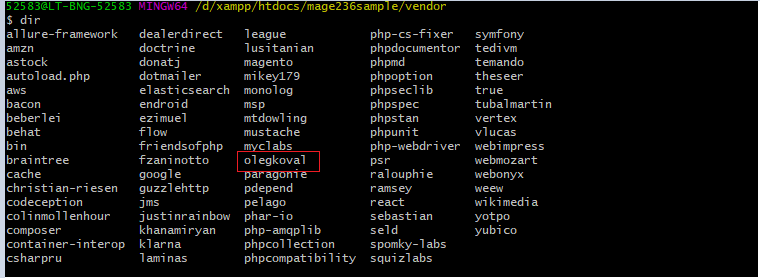
[3]-: The following below command to enable olegkoval Extension , that is responsible to regenerate Product, Category & CMS Page URLs
Enable
php bin/magento module:enable OlegKoval_RegenerateUrlRewrites

[4]-: The following below command to regenerate Product, Category & CMS Page URLs
Regenerate URL
php bin/magento ok:urlrewrites:regenerate

Note: If you use some external cache mechanisms (e.g.: Redis, Varnish, etc.) - please, refresh this external cache.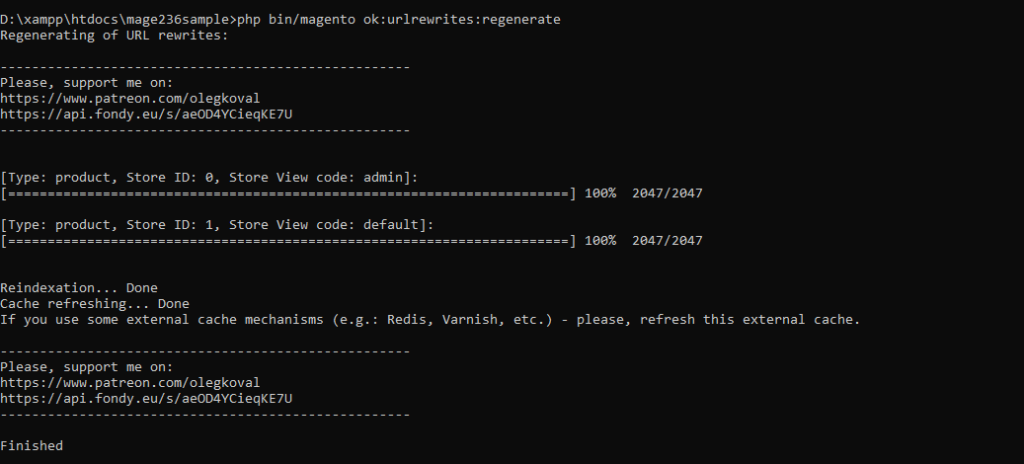
Finally, Website / Store, Product, Category & CMS Page URLs has been regenerated.
Magento 2 Converts Simple Product To Virtual Product
Step-1: By Using Magento 2 Admin
- Go To Magento 2 Admin
- Catalog–Products: select Simple Products, which you want to converts into Virtual products.
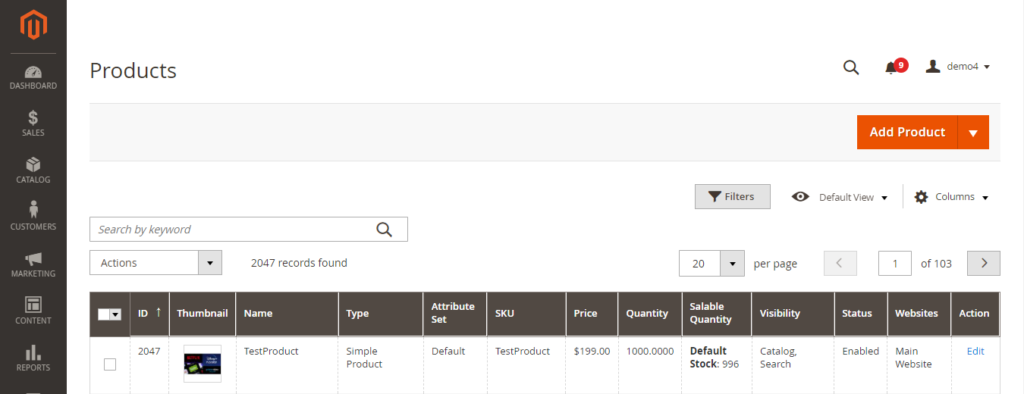
- Click on Edit
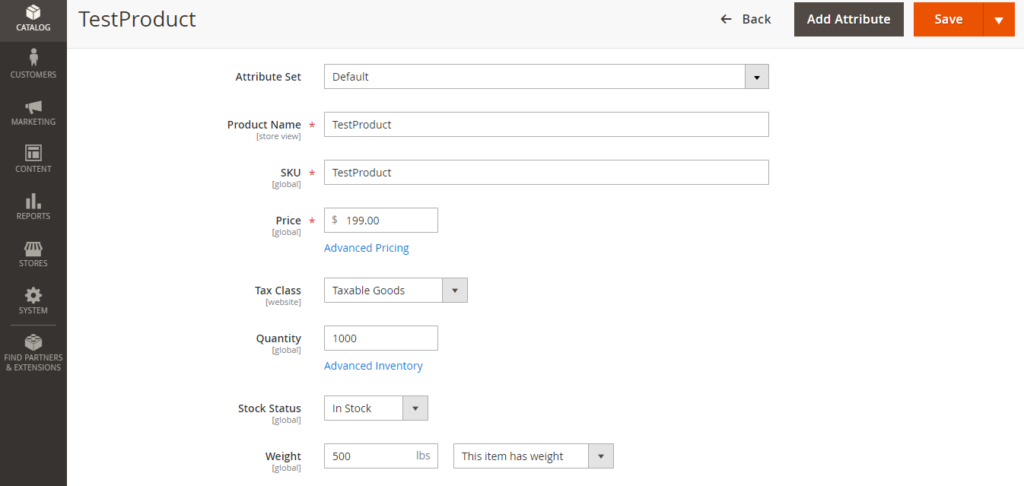
- Go To Weight: “The item has weight” for Simple Product already mentioned.
- To Converts into Virtual Product, “select Item has no weight”
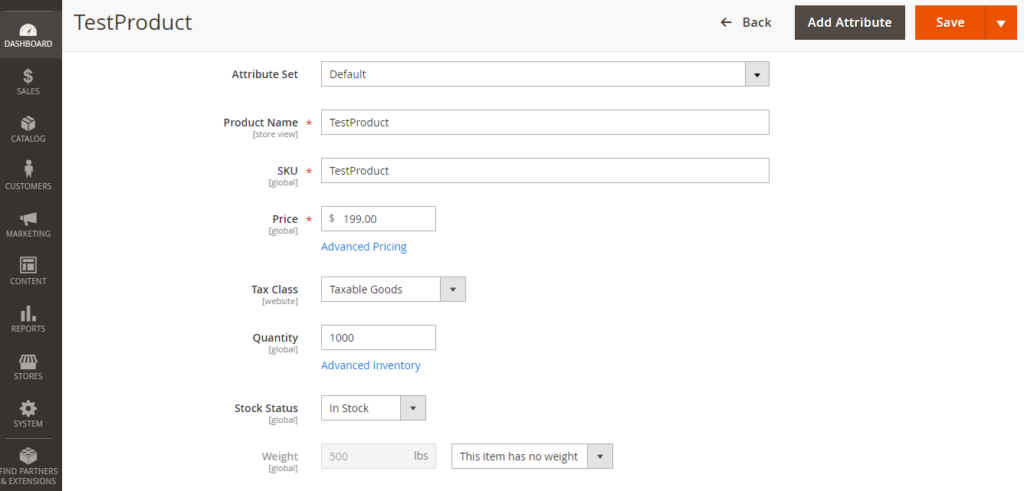
- Step-2: By Using Database SQL Query
update catalog_product_entity
set type_id = 'virtual'
where type_id = 'simple'

Note: Be careful, this query will be converted all Simple Products To Virtual Products
Note: If user wants to convert specific Simple Products To Virtual Products, below query need to run
update catalog_product_entity
set type_id = 'virtual'
where type_id = 'simple' and sku in ('BSX55MOLCG','BSX55MOLCLW','BSX55MOLCMW','BSX55MOLWWH')Magento 2 Converts Virtual Products To Simple Products
Step-1: By Using Magento 2 Admin,
- Go To Magento 2 Admin
- Catalog–Products: select Virtual Products, which you want to converts into simple products.
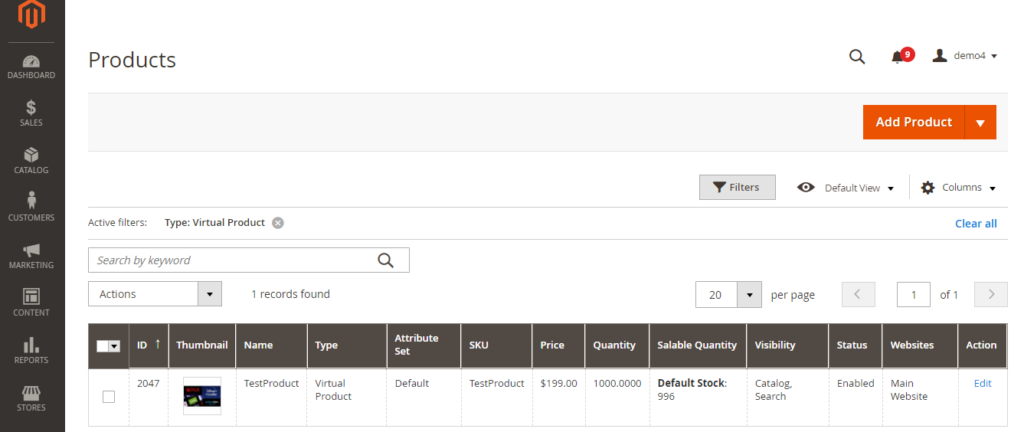
- Click on Edit
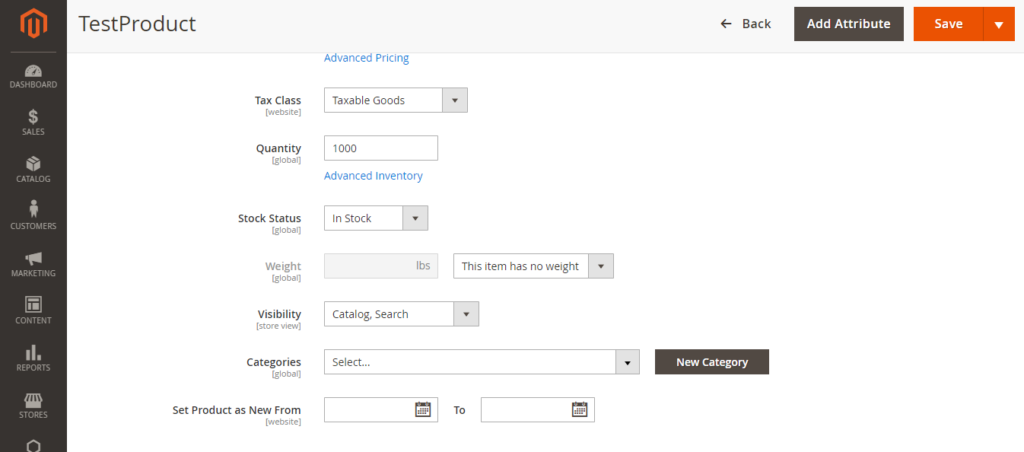
- Go To Weight: “The item has no weight” for Virtual Product already mentioned.
- To Converts into Simple Product, select Item has weight & put
weight value.
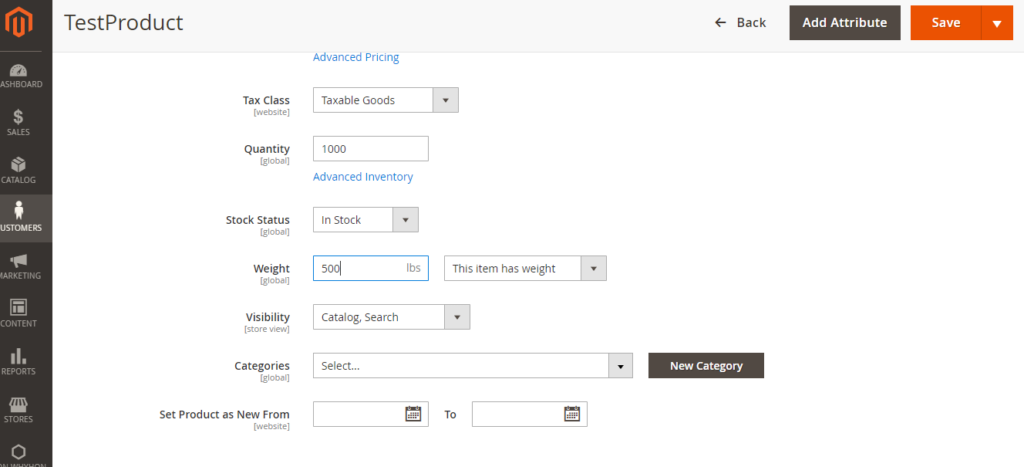
- Finally Click on Save button & Virtual Product will be converted into Simple
Product.
Step-2: By Using Database SQL Query
update catalog_product_entity
set type_id = 'simple'
where type_id = 'virtual'

Note: Be careful, this query will be converted all Simple Products To Virtual Products
Note: If user wants to convert specific Simple Products To Virtual Products, below query need to run
update catalog_product_entity
set type_id = 'simple'
where type_id = 'virtual' and sku in ('BSX55MOLCG','BSX55MOLCLW','BSX55MOLCMW','BSX55MOLWWH')
Magento 2 Popular Websites
- https://www.paulsmith.com
- https://www.omegawatches.com
- https://www.paperchase.com
- https://www.paulsmith.com
- https://www.paperchase.com
- https://www.cyclerepublic.com
- https://www.bulkpowders.co.uk
- https://solgirl.com
- https://www.coxandcox.co.uk
- https://www.sigmabeauty.com
- https://www.bulkpowders.co.uk
- https://www.boodles.com
- https://royalmen.com
- https://rattanfurnitureuk.co.uk
- https://girav.com
- https://addapearl.com
- https://onlinespyshop.co.uk
Magento 2.x Truncate Essential Tables Before Going Production or Live

There are following below Magento 2 tables need to be deleted, before going to Production or Live
--SET FOREIGN_KEY_CHECKS = 0 Compulsory otherwise Foreign Key Based Table will be not deleted --

  SET FOREIGN_KEY_CHECKS = 0;

-- Starts Truncate Quote & Sales Order & Other Tables --

TRUNCATE TABLE `gift_message`;
TRUNCATE TABLE `quote`;
TRUNCATE TABLE `quote_address`;
TRUNCATE TABLE `quote_address_item`;
TRUNCATE TABLE `quote_id_mask`;
TRUNCATE TABLE `quote_item`;
TRUNCATE TABLE `quote_item_option`;
TRUNCATE TABLE `quote_payment`;
TRUNCATE TABLE `quote_shipping_rate`;
TRUNCATE TABLE `reporting_orders`;
TRUNCATE TABLE `sales_bestsellers_aggregated_daily`;
TRUNCATE TABLE `sales_bestsellers_aggregated_monthly`;
TRUNCATE TABLE `sales_bestsellers_aggregated_yearly`;
TRUNCATE TABLE `sales_creditmemo`;
TRUNCATE TABLE `sales_creditmemo_comment`;
TRUNCATE TABLE `sales_creditmemo_grid`;
TRUNCATE TABLE `sales_creditmemo_item`;
TRUNCATE TABLE `sales_invoice`;
TRUNCATE TABLE `sales_invoiced_aggregated`;
TRUNCATE TABLE `sales_invoiced_aggregated_order`;
TRUNCATE TABLE `sales_invoice_comment`;
TRUNCATE TABLE `sales_invoice_grid`;
TRUNCATE TABLE `sales_invoice_item`;
TRUNCATE TABLE `sales_order`;
TRUNCATE TABLE `sales_order_address`;
TRUNCATE TABLE `sales_order_aggregated_created`;
TRUNCATE TABLE `sales_order_aggregated_updated`;
TRUNCATE TABLE `sales_order_grid`;
TRUNCATE TABLE `sales_order_item`;
TRUNCATE TABLE `sales_order_payment`;
TRUNCATE TABLE `sales_order_status_history`;
TRUNCATE TABLE `sales_order_tax`;
TRUNCATE TABLE `sales_order_tax_item`;
TRUNCATE TABLE `sales_payment_transaction`;
TRUNCATE TABLE `sales_refunded_aggregated`;
TRUNCATE TABLE `sales_refunded_aggregated_order`;
TRUNCATE TABLE `sales_shipment`;
TRUNCATE TABLE `sales_shipment_comment`;
TRUNCATE TABLE `sales_shipment_grid`;
TRUNCATE TABLE `sales_shipment_item`;
TRUNCATE TABLE `sales_shipment_track`;
TRUNCATE TABLE `sales_shipping_aggregated`;
TRUNCATE TABLE `sales_shipping_aggregated_order`;
TRUNCATE TABLE `tax_order_aggregated_created`;
TRUNCATE TABLE `tax_order_aggregated_updated`;

-- Finish Truncate Quote & Sales Order Tables --

-- Truncate Customer tables

-- Starts Truncate Customer Data & Customer Address Tables --

TRUNCATE TABLE `customer_address_entity`;
TRUNCATE TABLE `customer_address_entity_datetime`;
TRUNCATE TABLE `customer_address_entity_decimal`;
TRUNCATE TABLE `customer_address_entity_int`;
TRUNCATE TABLE `customer_address_entity_text`;
TRUNCATE TABLE `customer_address_entity_varchar`;
TRUNCATE TABLE `customer_entity`;
TRUNCATE TABLE `customer_entity_datetime`;
TRUNCATE TABLE `customer_entity_decimal`;
TRUNCATE TABLE `customer_entity_int`;
TRUNCATE TABLE `customer_entity_text`;
TRUNCATE TABLE `customer_entity_varchar`;
TRUNCATE TABLE `customer_grid_flat`;
TRUNCATE TABLE `customer_log`;
TRUNCATE TABLE `customer_log`;
TRUNCATE TABLE `customer_visitor`;
TRUNCATE TABLE `persistent_session`;
TRUNCATE TABLE `wishlist`;
TRUNCATE TABLE `wishlist_item`;
TRUNCATE TABLE `wishlist_item_option`;

-- Finish Truncate Customer Data & Customer Address Tables --


-- Starts Truncate Review tables --

TRUNCATE TABLE `review`;
TRUNCATE TABLE `review_detail`;
TRUNCATE TABLE `review_entity_summary`;
TRUNCATE TABLE `review_store`;

-- Finish Truncate Review tables --
Magento 2 All Database Tables [500 & more Tables]
Which Magento 2 database table store customer’s Email Data
Which Magento 2 Database Table Store Customer Newsletter Data
Which Magento 2 database table store customer’s shipping and billing address
How To Remove Sales Order Data & Customer Data in Magento 2
Which Magento 2 Database Tables Store Customer Rating
Which Magento 2 Database Tables Store Customer Review
Which Magento 2 Database Tables Store Customer Wishlist Products
Which Magento 2 Database Table Store Patches
Which Magento 2 Database Table Store Static Blocks & Its Details
Which Magento 2 Database Table Store CMS Pages & Its Details
Which Magento 2 Database Tables Having All URLs Storage
Which Magento 2 Database Tables Store Sales Order Data
Which Magento 2 Database Tables Store Sales Invoice Order Data
Which Magento 2 Database Tables Store Sales Tax and Its related Data
Which Magento 2 Database Tables Store Catalog Price Rules
Which Magento 2 Database Tables Store Cart Price Rules
Single Sign-on (SSO)
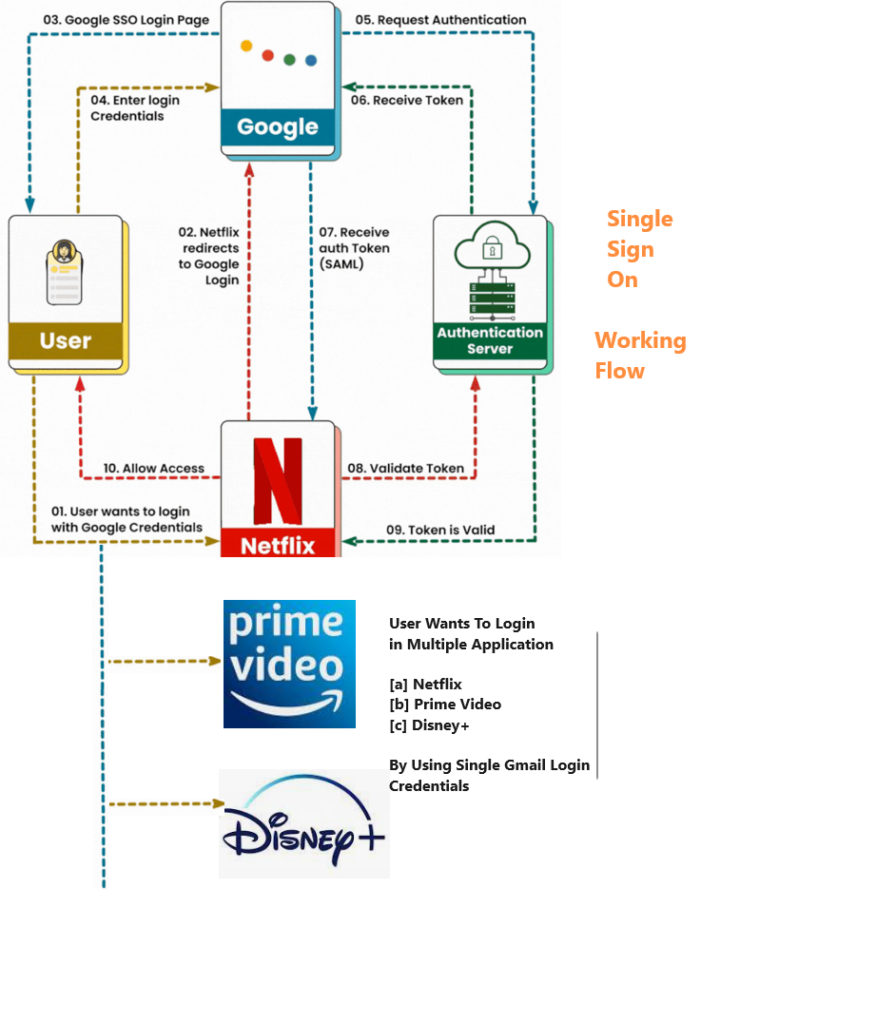
Single Sign-on (SSO):: It is an authentication process that allow users to access multiple applications with same login credentials of Magento 2. Using this user can enter the login credentials in the third-party application and be logged in to Magento 2 store simultaneously.
“Single sign-on is an authentication method that allows a user to log in with a single ID and password to multiples applications simultaneously”
“Single Credential that enables users to log in to multiple applications and websites”
This allows faster access to applications. The customers can use their existing credentials for logging into various third-party applications such as UVdesk, The user can use one set of credentials for various platforms and won’t have to remember multiple passwords for each login.
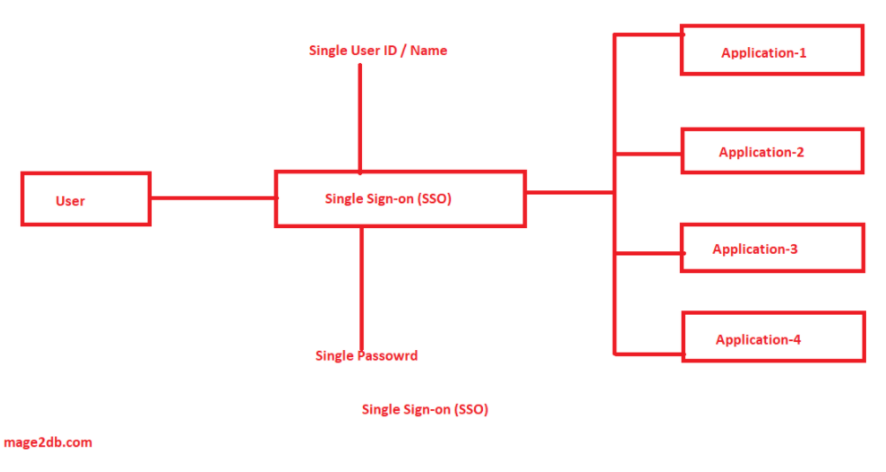
Magento 2 using multiple stores, blog etc., by using single User ID / Password, user can enable to login multiple Magento 2 stores & blog